1. Introduction
This manual provides essential information for the safe and effective operation, maintenance, and troubleshooting of your Garvee 800W Electric Drywall Sander. Please read these instructions thoroughly before using the tool to ensure proper function and to prevent injury or damage.
2. Safety Instructions
Always follow basic safety precautions when using electric power tools to reduce the risk of fire, electric shock, and personal injury.
- Work Area Safety: Keep the work area clean and well-lit. Cluttered or dark areas invite accidents. Do not operate power tools in explosive atmospheres, such as in the presence of flammable liquids, gases, or dust. Power tools create sparks which may ignite the dust or fumes. Keep children and bystanders away while operating a power tool. Distractions can cause you to lose control.
- Electrical Safety: Power tool plugs must match the outlet. Never modify the plug in any way. Do not use any adapter plugs with earthed (grounded) power tools. Unmodified plugs and matching outlets will reduce risk of electric shock. Avoid body contact with earthed or grounded surfaces such as pipes, radiators, ranges, and refrigerators. There is an increased risk of electric shock if your body is earthed or grounded. Do not expose power tools to rain or wet conditions. Water entering a power tool will increase the risk of electric shock. Do not abuse the cord. Never use the cord for carrying, pulling, or unplugging the power tool. Keep cord away from heat, oil, sharp edges, or moving parts. Damaged or entangled cords increase the risk of electric shock.
- Personal Safety: Stay alert, watch what you are doing, and use common sense when operating a power tool. Do not use a power tool while you are tired or under the influence of drugs, alcohol, or medication. A moment of inattention while operating power tools may result in serious personal injury. Use personal protective equipment. Always wear eye protection. Protective equipment such as dust mask, non-skid safety shoes, hard hat, or hearing protection used for appropriate conditions will reduce personal injuries. Prevent unintentional starting. Ensure the switch is in the off-position before connecting to power source, picking up, or carrying the tool.
- Tool Use and Care: Do not force the power tool. Use the correct power tool for your application. The correct power tool will do the job better and safer at the rate for which it was designed. Do not use the power tool if the switch does not turn it on and off. Any power tool that cannot be controlled with the switch is dangerous and must be repaired. Disconnect the plug from the power source before making any adjustments, changing accessories, or storing power tools. Such preventive safety measures reduce the risk of starting the power tool accidentally. Store idle power tools out of the reach of children and do not allow persons unfamiliar with the power tool or these instructions to operate the power tool. Power tools are dangerous in the hands of untrained users. Maintain power tools and accessories. Check for misalignment or binding of moving parts, breakage of parts, and any other condition that may affect the power tool’s operation. If damaged, have the power tool repaired before use. Many accidents are caused by poorly maintained power tools. Keep cutting tools sharp and clean. Properly maintained cutting tools with sharp cutting edges are less likely to bind and are easier to control. Use the power tool, accessories, and tool bits, etc. in accordance with these instructions, taking into account the working conditions and the work to be performed. Use of the power tool for operations different from those intended could result in a hazardous situation.
3. Package Contents
Verify that all items listed below are included in your package. If any items are missing or damaged, please contact customer support.
- Garvee 800W Electric Drywall Sander
- 12 Sandpapers (2 each of 80, 100, 120, 150, 180, 240 grit)
- User Manual (this document)
- Dust Bag
- Dust Hose
- Carrying Bag
- Dual Hook Tension Spring
- Carbon Brushes (spare set)
- Gaskets
4. Product Features
- 800W Motor: Provides consistent power for efficient sanding.
- Variable Speed Control: Adjust speed from 800 to 1800 RPM for different applications and materials.
- Automatic Dust Removal System: Integrated self-suction function with an 800W suction power for efficient dust and debris collection.
- LED Lights: Double-deck LED strip lights illuminate the work surface for improved visibility in darker environments.
- Extendable and Foldable Handle: Handle length adjusts from 4.6 ft to 6 ft for reaching various heights. The foldable design allows for compact storage and transport.
- 90° Pivoting Head: The sanding head swivels 90 degrees in all directions, automatically adjusting to maintain flush contact with surfaces.
- Detachable Sander Base: Allows for easy sanding of ceiling corners and wall right-angles.
- 360-Degree Surround Brush: Helps contain dust during operation.
- Overload Protection: Equipped with a constant power board and overload protection for enhanced motor lifespan and stability.
5. Setup
5.1 Attaching the Handle
Assemble the handle sections by aligning the connectors and twisting until secure. Ensure all connections are firm before use.
5.2 Connecting the Dust Collection System
- Connect one end of the dust hose to the dust port on the sander head.
- Connect the other end of the dust hose to the dust bag. Ensure a tight fit, using gaskets if necessary, to prevent dust leakage.
- Alternatively, the dust hose can be connected to an external vacuum cleaner for enhanced dust extraction.
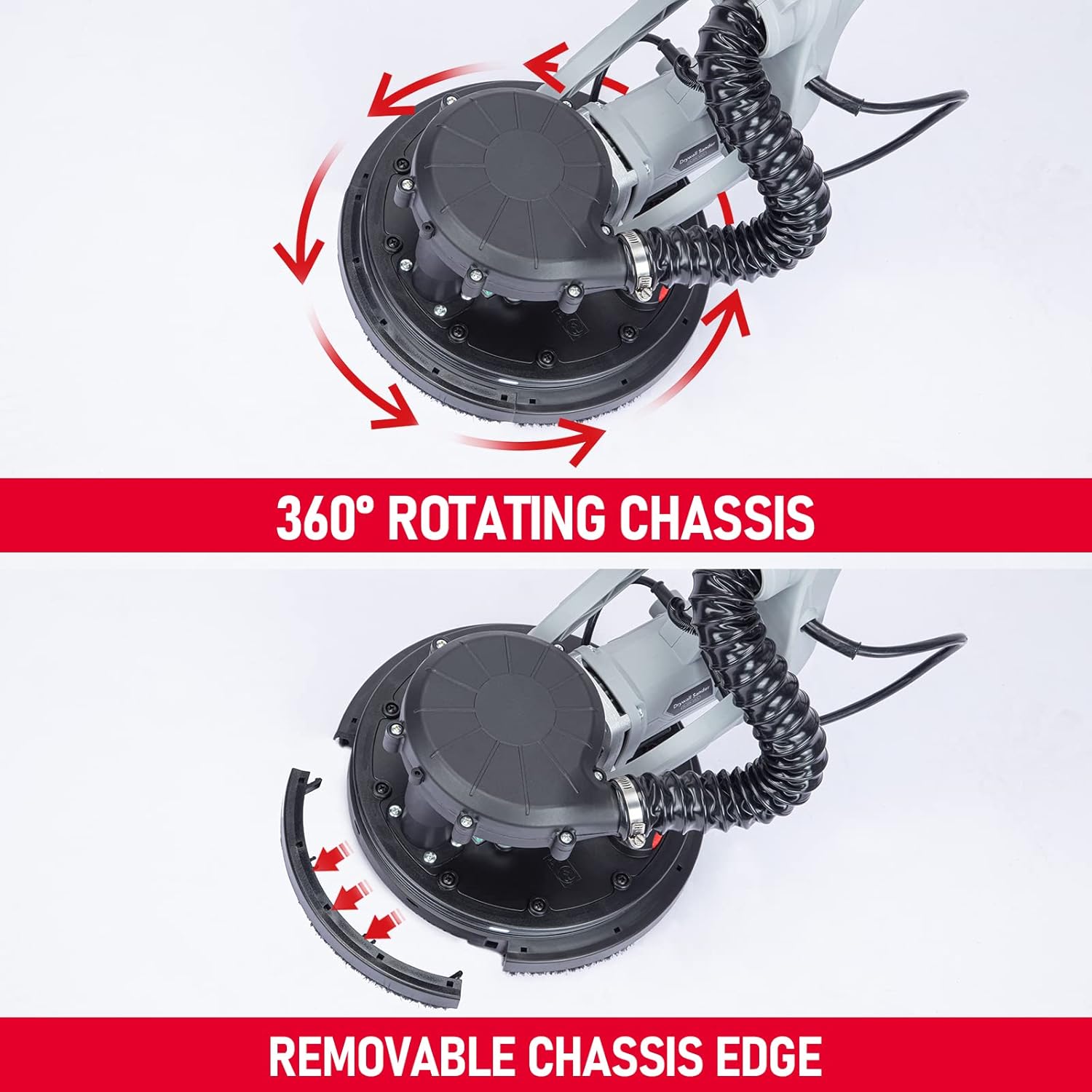
Figure 5.2: Illustration of connecting the dust collection hose to the sander and the dust bag. The image shows two connection points: one for the dust collection hose to the sander and another for the dust bag to the vacuum cleaner or hose.
5.3 Attaching Sandpaper
The sander uses hook-and-loop sandpaper discs. Align the holes on the sandpaper with the holes on the sanding pad and press firmly to secure.
5.4 Adjusting Handle Length
To extend or retract the handle, unlock the adjustment mechanism, slide the handle to the desired length (between 4.6 ft and 6 ft), and lock it securely in place.

Figure 5.4: The retractable handle of the Garvee drywall sander, demonstrating its adjustable length from 4.6 feet to 6 feet for labor-saving operation, especially when sanding ceilings.
5.5 Using the Dual Hook Tension Spring
For overhead work, such as sanding ceilings, attach the dual hook tension spring to the designated points on the sander and your harness (if applicable) to reduce arm fatigue.
6. Operating Instructions
6.1 Powering On/Off
Connect the sander to a 120V power outlet. Use the on/off switch located on the handle to power the tool. Ensure the switch is in the 'off' position before plugging in.
6.2 Adjusting Speed
The sander features a variable speed trigger and a slide speed adjustment knob. Rotate the knob to select a speed between 800 and 1800 RPM. Start with a lower speed and increase as needed for the material and desired finish.
6.3 Using LED Lights
Activate the LED strip lights using the dedicated switch on the sander head or handle. This feature is useful for illuminating dark work areas and highlighting imperfections on the surface.

Figure 6.3: The LED light feature of the Garvee drywall sander provides enhanced visibility, making it more convenient to work in dark environments compared to sanders without this feature.
6.4 Sanding Technique
Apply light, even pressure to the sander. Move the sander in smooth, overlapping passes across the surface. Avoid pressing too hard, as this can damage the surface or the sander motor. The 90° pivoting head will automatically adjust to the surface angle.

Figure 6.4: The 90-degree pivoting head allows the sander to adapt to various angles and surfaces, ensuring consistent contact and efficient sanding.
6.5 Corner Sanding with Detachable Base
For sanding tight corners and right-angles, the edge of the sanding chassis can be detached. Carefully remove the designated section of the chassis to expose more of the sanding disc, allowing for closer access to edges.

Figure 6.5: The sander features a 360° rotating chassis and a removable chassis edge, which facilitates sanding in tight corners and along edges by allowing the sanding disc to reach closer to the wall.
6.6 Dust Collection Adjustment
The dust collection system has a control wheel to adjust suction. If the sander is difficult to slide across the surface, the suction may be too high. Adjust the wheel to reduce suction for smoother movement.
6.7 Versatile Application
The Garvee Drywall Sander is suitable for various surfaces, including latex walls, painted walls, silicate walls, atomic ash, and putty wall lamps. Select the appropriate sandpaper grit for your specific application.
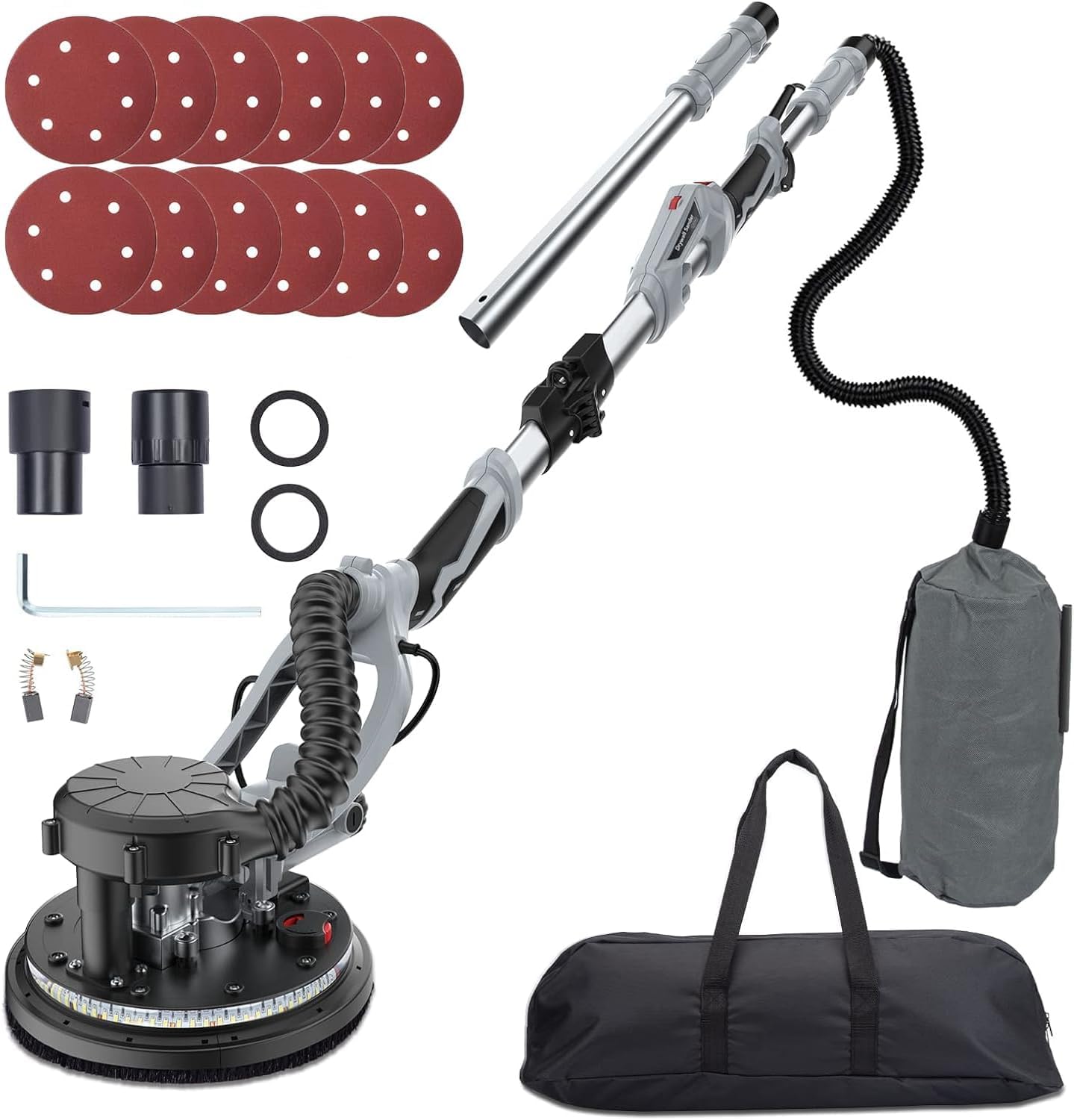
Figure 6.7: The Garvee drywall sander is designed for use on a variety of wall types, including latex, painted, silicate, atomic ash, and putty walls, ensuring smooth and polished finishes.
7. Maintenance
Regular maintenance ensures the longevity and optimal performance of your drywall sander.
- Cleaning: After each use, disconnect the power and clean the sander. Wipe down the exterior with a damp cloth. Remove any dust buildup from the sanding pad and ventilation openings.
- Dust Bag/Hose: Empty the dust bag regularly. Clean the dust hose to prevent blockages, which can impair dust collection efficiency.
- Carbon Brushes: Periodically inspect the carbon brushes for wear. Replace them when they are worn down to approximately 1/4 inch (6mm) or if the motor performance decreases. Refer to the diagram in the manual for brush replacement instructions.
- Storage: Store the sander in its carrying bag in a clean, dry place, out of reach of children. The foldable handle design facilitates compact storage.
8. Troubleshooting
If you encounter issues with your Garvee Drywall Sander, refer to the following common problems and solutions:
| Problem | Possible Cause | Solution |
|---|---|---|
| Sander does not turn on. | No power supply; Faulty switch; Worn carbon brushes. | Check power connection and outlet. Ensure switch is fully engaged. Inspect and replace carbon brushes if necessary. |
| Poor dust collection. | Dust bag full; Hose blocked; Loose connections; Internal restriction in dust path. | Empty dust bag. Clear any blockages in the hose. Ensure all hose connections are tight and sealed with gaskets. Inspect internal dust path for obstructions or design flaws. |
| Sander difficult to move on surface. | Suction too high; Incorrect sanding technique. | Adjust the dust collection control wheel to reduce suction. Apply lighter, more even pressure. |
| Excessive vibration or noise. | Damaged sanding pad; Loose components; Worn bearings. | Inspect sanding pad for damage and replace if needed. Check for any loose screws or parts. If issue persists, contact customer support. |
9. Specifications
| Feature | Specification |
|---|---|
| Brand | Garvee |
| Model Number | 800W |
| Power Source | Corded Electric |
| Voltage | 120 Volts |
| AC Adapter Current | 6 Amps |
| Motor Power | 800W |
| Maximum Rotational Speed | 1800 RPM |
| Minimum Rotational Speed | 800 RPM |
| Grit Type (Included Sandpaper) | Coarse (80, 100, 120, 150, 180, 240 grit) |
| Handle Length Adjustment | 4.6 ft to 6 ft |
| Item Weight | 14.12 pounds |
| Package Dimensions | 27.8 x 12.1 x 9.5 inches |
| UPC | 198290490653 |
| ASIN | B0CPVFHBV9 |
10. Warranty Information
For warranty details and claims, please refer to the warranty card included with your product or contact Garvee customer support directly. Keep your purchase receipt as proof of purchase.
11. Customer Support
If you have any questions, require technical assistance, or need to order replacement parts, please contact Garvee customer support through the retailer where you purchased the product or visit the official Garvee website for contact information.