
Introduction
Thank you for choosing PureGear PureBoom Wireless Earbuds. These earbuds are designed to provide high-quality audio and convenient hands-free communication. This manual will guide you through the setup, operation, and maintenance of your new earbuds to ensure optimal performance and longevity.
What's Included
Your PureGear PureBoom Wireless Earbuds package includes the following items:
- PureBoom True Wireless Earbuds
- Wireless Charging Case
- Adjustable Earbud Ear Tips (S, M, L sizes)
- USB-A to USB-C Charging Cable

Image: All items included in the PureGear PureBoom Wireless Earbuds package.
Product Overview
The PureGear PureBoom Wireless Earbuds offer a compact, lightweight, and ergonomic design for comfortable use. They feature high-quality sound and intuitive touch controls.
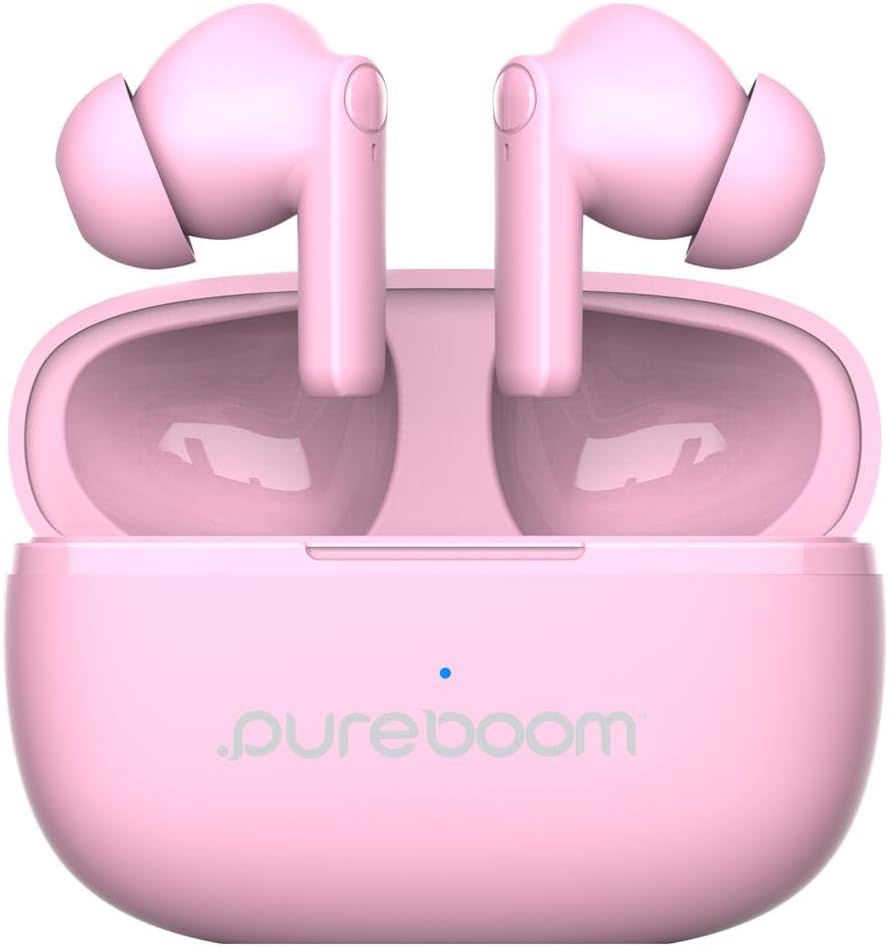
Image: PureGear PureBoom Wireless Earbuds and charging case.

Image: The compact design of the charging case, fitting easily into a pocket.

Image: User enjoying music with PureGear PureBoom Wireless Earbuds.
Setup
Initial Charging
Before first use, fully charge your earbuds and charging case. Place the earbuds into the charging case and connect the USB-C cable to the case and a power source. The indicator light on the case will show charging status.
Pairing with a Bluetooth Device
- Ensure the earbuds are in the charging case and the case is open.
- On your device (smartphone, tablet, laptop), go to Bluetooth settings.
- Select "PureBoom" from the list of available devices.
- Once connected, the earbuds are ready for use.
The earbuds are broadly compatible with Bluetooth devices including iOS (iPhone 16, 15, 14, 13, 12 series, SE, 11 series) and Android (Galaxy S25, S24, S23, S22, S21, S20 series, Note 20 series, Google Pixel 9/8/7/6/5) phones, laptops, PCs, tablets, iPads, smart TVs, gaming consoles, and smartwatches.
Operating Instructions
Touch Controls
The PureBoom earbuds feature convenient touch controls for managing your audio and calls. The touch-sensitive area is located on the outer surface of each earbud.
- Play/Pause: Tap once on either earbud.
- Answer Call: Tap once on either earbud.
- End Call: Tap once on either earbud during a call.
- Skip Track: Double-tap the right earbud for next track, double-tap the left earbud for previous track.
- Volume Control: Triple-tap the right earbud to increase volume, triple-tap the left earbud to decrease volume.
- Voice Assistance: Press and hold either earbud for 2 seconds to activate your device's voice assistant.

Image: Visual guide to the touch controls on the earbuds.
Battery Life and Charging
The earbuds provide up to 18 hours of listening time with the included charging case. The charging case itself offers additional charges to extend your usage throughout the day.

Image: Demonstrating the extended battery life with the charging case.

Image: Enjoying extended listening time with the earbuds.
Hands-Free Calling
With a built-in microphone, the earbuds allow for clear, hands-free calls within a 32-foot range from your connected device.
Video: An overview of the PureGear Wireless Earbuds, showcasing features like high-quality sound, 18 hours of listening time, and tap touch controls for music and phone calls.
Maintenance
To ensure the longevity and optimal performance of your PureGear PureBoom Wireless Earbuds, follow these maintenance guidelines:
- Cleaning: Regularly clean the earbuds and charging case with a soft, dry, lint-free cloth. Avoid using abrasive materials or harsh chemicals.
- Ear Tips: Remove and clean the ear tips periodically. You can gently wash them with water and mild soap, ensuring they are completely dry before reattaching.
- Storage: When not in use, store the earbuds in their charging case to protect them from dust and damage.
- Water Resistance: The earbuds are waterproof. However, avoid prolonged submersion in water and ensure they are dry before placing them back in the charging case to prevent damage to the charging contacts.
- Temperature: Avoid exposing the earbuds to extreme temperatures (hot or cold) as this can affect battery life and performance.
Troubleshooting
If you encounter issues with your PureGear PureBoom Wireless Earbuds, refer to the following common solutions:
| Problem | Solution |
|---|---|
| Earbuds not pairing | Ensure earbuds are charged. Turn off and on Bluetooth on your device. Forget "PureBoom" from your device's Bluetooth list and re-pair. |
| No sound from one earbud | Place both earbuds back in the case, close it, then open again. Ensure both are charged. Re-pair with your device. |
| Low volume | Increase volume using touch controls or your connected device. Ensure ear tips are properly sealed in your ear. |
| Charging case not charging | Check the USB-C cable and power adapter connection. Try a different cable or power source. |
| Touch controls unresponsive | Ensure earbuds are clean and dry. Restart the earbuds by placing them in the case and taking them out. |
If the issue persists, please contact PureGear customer support for further assistance.
Specifications
Detailed technical specifications for the PureGear PureBoom Wireless Earbuds:
- Model Number: 64719PG
- Connectivity: Wireless (Bluetooth 5.0)
- Bluetooth Range: Up to 32 feet
- Ear Placement: In Ear
- Noise Control: Sound Isolation
- Control Method: Touch
- Audio Driver Type: Dynamic Driver
- Frequency Range: 20 Hz - 20,000 Hz
- Battery Average Life (Earbuds): Up to 18 Hours (with charging case)
- Battery Charge Time: Approximately 1.5 Hours
- Water Resistance Level: Waterproof
- Material: Plastic, Silicone
- Item Weight: 3.04 ounces
- UPC: 810096258236
Warranty and Support
PureGear PureBoom Wireless Earbuds come with a Lifetime Warranty. For warranty claims, technical support, or any inquiries, please visit the official PureGear website or contact their customer service department.
You can find more information and support resources at the PureGear Store on Amazon.


