
Introduction
Thank you for choosing the BarberBoss QR-8083 Electric Shaver. This device is designed to provide a painless and efficient hair removal experience for women. Its portable and rechargeable design makes it ideal for use on various body areas, including the face, arms, legs, underarms, and bikini line. This manual provides essential information for the safe and optimal use of your new shaver.
Safety Information
Caution: This electric shaver is not fully waterproof. It must be used carefully in wet conditions to ensure its longevity and optimal performance. Always handle the shaver correctly to prevent skin irritation or damage. The device is designed for gentle hair removal and to protect sensitive skin from nicks and cuts. Do not immerse the shaver in water. Keep out of reach of children.
What's in the Box
Your BarberBoss QR-8083 package includes:
- BarberBoss QR-8083 Electric Shaver
- Blade protective cover
- USB-C charging cable
- Cleaning brush
Setup
- Initial Charge: Before first use, fully charge the shaver. Refer to the "Charging" section for detailed instructions.
- Inspect Blades: Ensure the shaver head and blades are clean and free from any debris.
- Attach Protective Cover: When not in use, always attach the blade protective cover to prevent damage and ensure hygiene.
Charging
The BarberBoss QR-8083 features a rechargeable battery, offering up to 150 minutes of continuous use on a single charge. A full charge typically takes approximately 90 minutes.
- Connect Cable: Insert the USB-C charging cable into the shaver's charging port.
- Power Source: Connect the other end of the USB-C cable to a 5V/1A USB power adapter (not included), a computer USB port, or a power bank.
- Charging Indicator: The indicator light on the shaver will illuminate during charging. It will change or turn off once the device is fully charged.
- Disconnect: Once fully charged, disconnect the shaver from the power source.

Image: The BarberBoss QR-8083 shaver being charged via a USB-C cable connected to a laptop. A green light indicates charging status.
Operating Instructions
General Use
- Power On: Press the power button to turn on the shaver.
- Shaving Technique: Hold the shaver at a 90-degree angle to your skin. Gently glide the shaver against the direction of hair growth for optimal results. Avoid pressing too hard to prevent irritation.
- Power Off: Press the power button again to turn off the shaver after use.
Wet and Dry Shaving
The BarberBoss QR-8083 supports both wet and dry shaving.
- Dry Shaving: For quick touch-ups, use the shaver on dry skin.
- Wet Shaving: For a smoother experience, use the shaver in the shower or bath with shaving cream or gel. Remember, the shaver is shower-resistant but not fully waterproof; do not submerge it.

Image: The BarberBoss QR-8083 shaver on a bath caddy, highlighting its showerproof design for wet use.
Areas of Use
This versatile shaver is suitable for various body areas:
- Facial Hair: Gently glide over facial contours.
- Arms and Legs: Use the straight blade for larger areas.
- Underarms and Bikini Line: The R-shaped blade and specially designed teeth provide painless precision for sensitive areas.

Image: Visual guide demonstrating the BarberBoss QR-8083 shaver's suitability for different body areas.
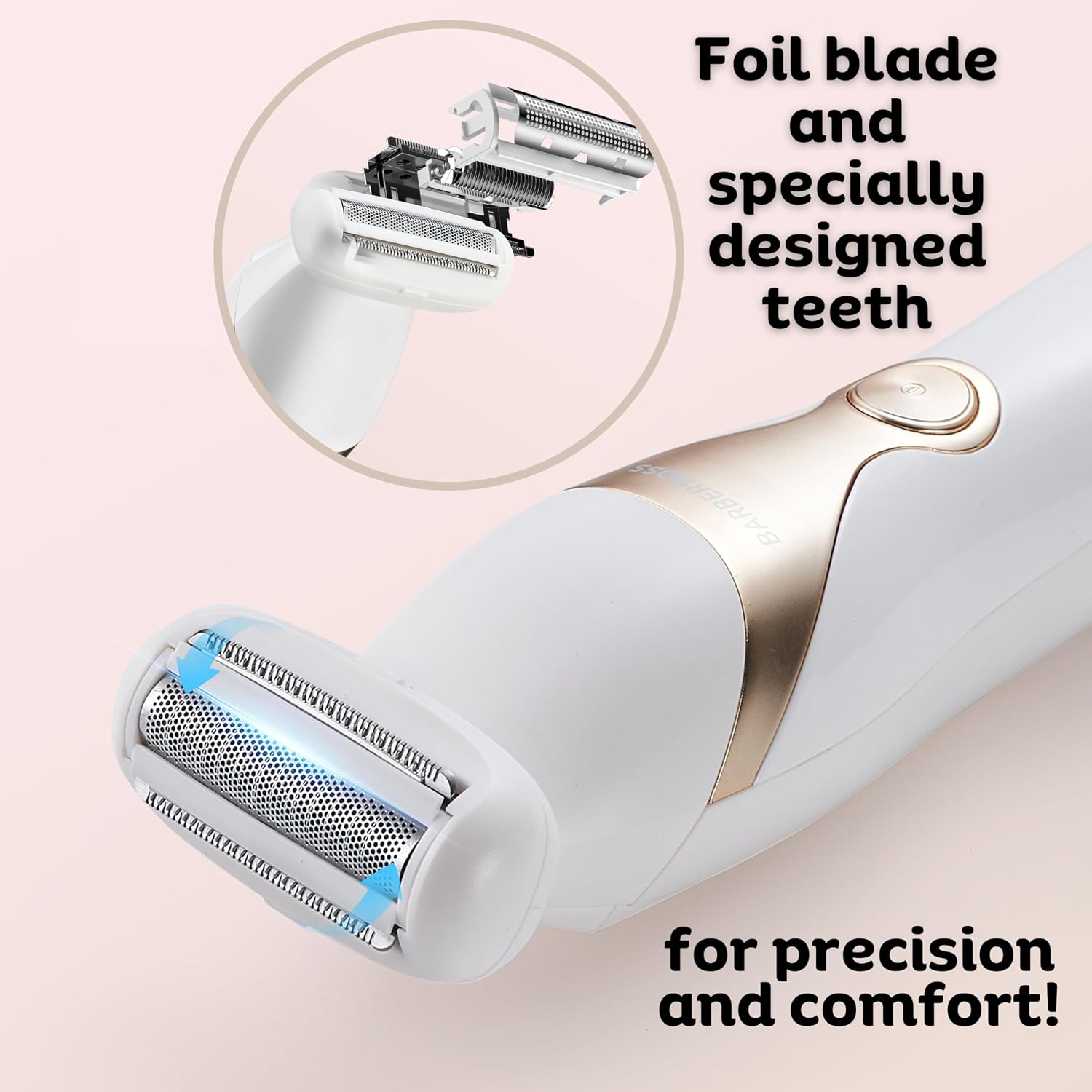
Image: Detailed view of the shaver's foil blade and specially designed teeth, engineered for precise and comfortable hair removal.
Maintenance and Cleaning
Regular cleaning ensures optimal performance and hygiene of your shaver.
- After Each Use: Turn off the shaver. Remove the blade head by gently pulling it upwards.
- Brush Cleaning: Use the provided cleaning brush to remove loose hairs from the blades and the shaver body.
- Rinsing: The shaver head can be rinsed under running water. Ensure the shaver body is not submerged. Shake off excess water and allow the head to air dry completely before reattaching or storing.
- Reattach Head: Once dry, carefully reattach the blade head to the shaver body.
- Storage: Store the shaver with its protective cover in a dry place.

Image: Step-by-step guide on how to remove and rinse the shaver head for cleaning.
Troubleshooting
| Problem | Possible Cause | Solution |
|---|---|---|
| Shaver does not turn on. | Battery is depleted. | Charge the shaver fully. |
| Poor shaving performance. | Blades are clogged with hair or dull. | Clean the shaver head thoroughly. Ensure blades are not damaged. |
| Skin irritation after shaving. | Pressing too hard, using on very dry skin, or sensitive skin reaction. | Use gentle pressure. Try wet shaving with shaving cream. Ensure skin is clean before shaving. |
| Shaver stops working during wet use. | Shaver was submerged or exposed to excessive water. | The shaver is shower-resistant, not fully waterproof. Avoid submerging. Allow to dry completely before attempting to use again. If issues persist, contact support. |
Specifications
| Model Number | QR-8083 |
| Brand | BARBERBOSS |
| Power Source | Rechargeable Battery |
| Battery Life | Up to 150 minutes |
| Charging Time | Approximately 90 minutes |
| Blade Material | Stainless Steel |
| Special Features | Cordless, Portable, Wet & Dry Use (with caution) |
| Dimensions | 22.5 x 14.2 x 7.1 cm |
| Weight | 430 g |
| Components Included | Shaver, Blade protective cover, USB-C cable, Cleaning brush |
Warranty and Support
For any questions, concerns, or support needs regarding your BarberBoss QR-8083 Electric Shaver, please contact BarberBoss customer service. Our dedicated team is committed to ensuring your satisfaction and is ready to assist you.
Please refer to the product packaging or the official BarberBoss website for specific warranty details and contact information.


