1. Introduction
This manual provides detailed instructions for the safe and effective operation of your Godox DP600III Professional Studio Flash Light. Please read this manual thoroughly before use to ensure optimal performance and to prevent damage to the product or injury to yourself.

Figure 1.1: Godox DP600III Studio Flash Light and included accessories.
2. Safety Information
WARNING:
- Not suitable for children.
- Read the product instructions and applicable age range carefully before purchase and use.
- Do not expose the unit to rain or damp conditions.
- Do not disassemble. If repairs become necessary, this unit must be sent to an authorized maintenance center.
- Keep out of reach of children.
- Do not operate in the presence of flammable gases or liquids.
- Unplug from power when not in use or before cleaning.

Figure 2.1: Important safety warnings regarding product use.
3. Package Contents
Verify that all items are included in your package:
- 1 x Godox DP600III Flash Light
- 1 x Power Line
- 1 x Lamp Protection Cover
- 1 x Model Lamp
4. Product Features
The Godox DP600III Studio Flash Light offers advanced features for professional photography:
- Wireless X System: Built-in Godox 2.4G wireless X system for remote triggering and control.
- Power Output Control: 61 steps of flash output from 1/64 to 1/1.
- Wireless ID: Newly added wireless ID (01-99) for enhanced anti-interference ability.
- Modeling Lamp: 150W modeling lamp with 5% to 100% dimmable brightness.
- Color Temperature: Stable 5600±200K color temperature.
- Recycle Time: Quick recycle time within 1 second.
- Bowens Mount: Compatible with a wide range of Bowens mount light shaping accessories.
- LCD Panel: Concise and clear LCD panel for easy operation.
- Memory Function: Auto-recovers adjusted settings after a restart.
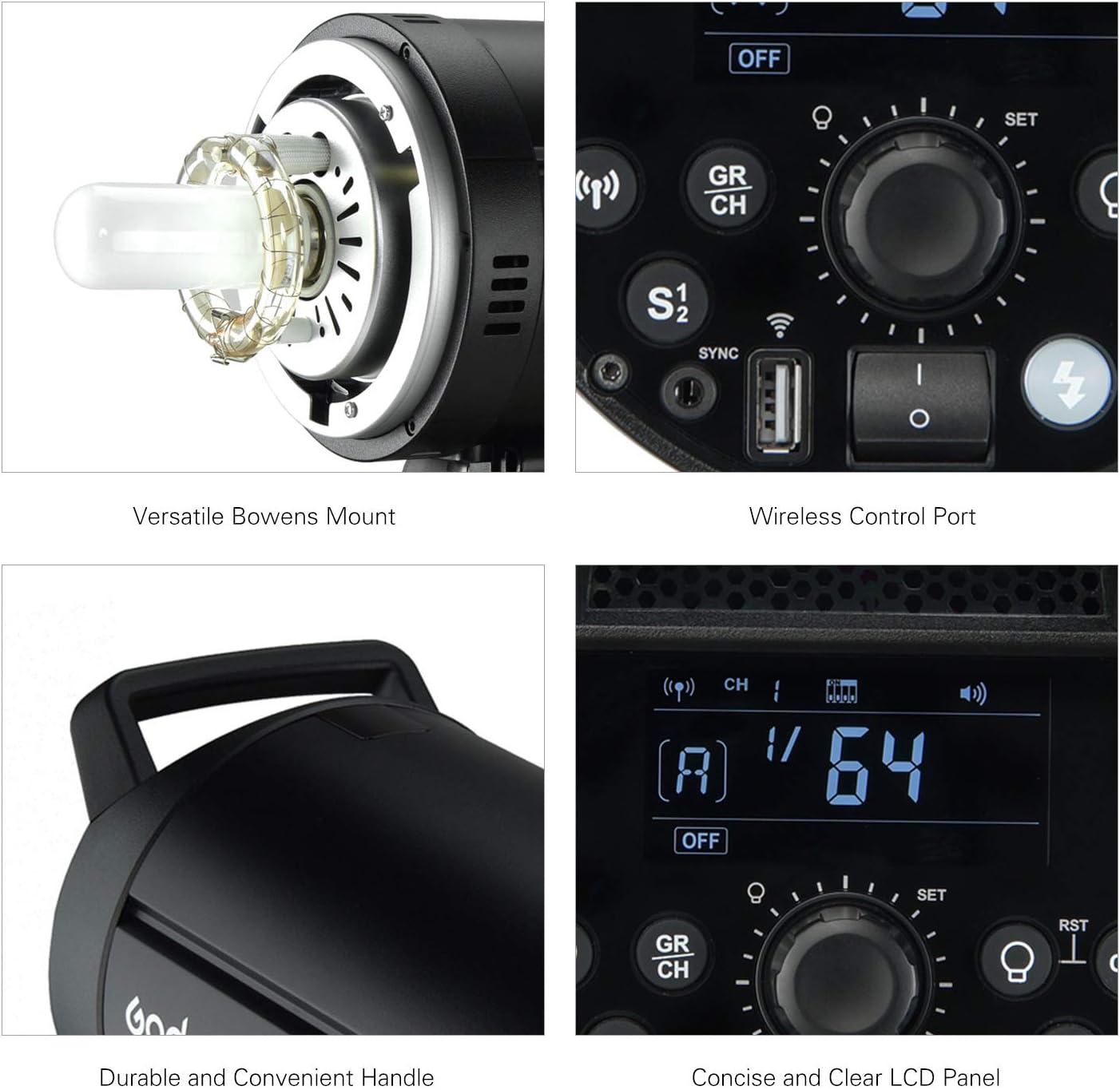
Figure 4.1: Key features including the versatile Bowens mount, wireless control port, durable handle, and clear LCD panel.

Figure 4.2: Control panel illustrating the 2.4G Wireless X System settings for groups and channels.
5. Setup
- Mounting: Attach the DP600III to a compatible light stand using the integrated mounting bracket. Secure it firmly.
- Angle Adjustment: The unit features a stepless adjustable angle and a fixed handle. Loosen the adjustment knob, set the desired angle, and tighten the knob to lock it in place.

Figure 5.1: Adjusting the angle of the flash head for precise light positioning.
- Power Connection: Connect the provided power line to the flash unit and then to a suitable power outlet (100-120V or 200-240V, 50/60Hz).
- Lamp Protection Cover: Remove the lamp protection cover before operation. Ensure the unit has cooled down before reattaching the cover after use.
- Bowens Mount Accessories: To attach light shaping accessories (e.g., softbox, reflector), align the accessory with the Bowens mount on the flash head and twist to lock.
6. Operating Instructions
6.1 Power On/Off
Press the power button on the control panel to turn the unit on or off. The LCD panel will illuminate upon power-on.
6.2 Adjusting Flash Output
The flash output can be adjusted from 1/64 to 1/1 in 61 steps. Use the dial on the control panel to increase or decrease the flash power. The current setting will be displayed on the LCD.
6.3 Modeling Lamp Control
The 150W modeling lamp has three modes: OFF, PROP (Proportional), and Percentage.
- OFF: Modeling lamp is off.
- PROP: Modeling lamp brightness changes proportionally with the flash output power.
- Percentage: Modeling lamp brightness is adjustable from 5% to 100% independently.
Use the dedicated modeling lamp button to cycle through modes and adjust brightness in Percentage mode.

Figure 6.1: Demonstrating the adjustable brightness of the 150W modeling lamp.
6.4 Wireless X System Operation
The built-in Godox 2.4G Wireless X System allows for remote control using compatible triggers (e.g., X2, XPro TTL wireless flash trigger, XT16, or FT-16 remote control, sold separately).
- Groups: Can be set up for 16 flash groups (0~9, A~F).
- Channels: Supports 32 channels (1~32).
- Wireless ID: Set a unique wireless ID (01-99) to prevent interference from other systems.
Refer to your wireless trigger's manual for specific pairing and control instructions.
6.5 Flash Trigger Control Methods
The DP600III supports various triggering methods:
- Synchronous Cord: Connect a sync cord to the synchronous port.
- Test Button: Press the test button on the unit for a manual flash.
- Slave Triggering: The unit can be set to slave mode (S1/S2) to be triggered by another flash.
- Wireless Control Port: Use with a Godox wireless receiver (e.g., XTR-16) for remote control.
7. Maintenance
- Cleaning: Use a soft, dry cloth to clean the unit. Do not use abrasive cleaners or solvents.
- Storage: Store the flash unit in a dry, dust-free environment when not in use. Ensure the lamp protection cover is in place.
- Lamp Replacement: If the modeling lamp or flash tube needs replacement, consult an authorized service center or refer to specific replacement instructions provided by Godox.
8. Troubleshooting
| Problem | Possible Cause | Solution |
|---|---|---|
| Flash not firing | Power not connected, unit off, trigger issue, low power setting. | Check power connection, turn unit on, verify trigger settings, increase flash power. |
| Modeling lamp not working | Lamp mode set to OFF, lamp faulty. | Check modeling lamp mode settings, replace lamp if necessary (consult service). |
| Wireless control not working | Incorrect group/channel/ID, trigger not compatible, trigger battery low. | Ensure matching group, channel, and ID settings. Check trigger compatibility and battery. |
| Overheating warning | Excessive continuous use. | Allow the unit to cool down. Reduce frequency of flashes. |
9. Specifications

Figure 9.1: Detailed technical specifications of the Godox DP600III.
| Parameter | Value |
|---|---|
| Model | DP600III |
| Max Power | 600Ws |
| Guide Number (m ISO 100) | 80 |
| Color Temperature | 5600±200K |
| Supply Voltage | 100-120V, 50/60Hz or 200-240V, 50/60Hz |
| Power Output Control | OFF, 4.0-10.0 (1/64-1/1) |
| Modeling Lamp Power | 150W |
| Modeling Lamp Brightness | 5~100% Dimmable |
| Flash Trigger Control Method | Synchronous Cord, Test Button, Slave Triggering, Wireless Control Port |
| Flash Duration | 1/2000-1/800s |
| Synchronous Port Output Parameter | 5V |
| USB Port Output | 5V/200mA (Limited to Godox receiver) |
| Safety Fuse | 8A |
| Recycle Time | 1s |
| Lamp Body Diameter | 12.5cm / 4.9in |
| Lamp Body Length (including protection cover) | 42cm / 16.5in |
| Item Weight | 2690g / 94.9oz (approx. 5.93 lbs) |
10. Warranty and Support
For warranty information and technical support, please refer to the official Godox website or contact your authorized dealer. Keep your purchase receipt as proof of purchase for warranty claims.
Manufacturer: GODOX
Model Number: DP600III


