
Introduction
Thank you for choosing the Sound Town CARPO-L2MKT3 Portable Column Speaker System. This comprehensive audio solution is designed for various applications, including live performances, speeches, and events in small to medium venues. This manual provides essential information for the safe and efficient setup, operation, and maintenance of your new system. Please read it thoroughly before use to ensure optimal performance and longevity of your equipment.
Important Safety Instructions
- Electrical Safety: Always connect the system to a grounded power outlet. Do not expose the unit to rain or moisture. Disconnect power during lightning storms or when unused for long periods.
- Ventilation: Ensure adequate ventilation around the subwoofer to prevent overheating. Do not block ventilation openings.
- Placement: Place the system on a stable, level surface. Avoid placing near heat sources or in direct sunlight.
- USB Port Warning: The USB port on this product is designed ONLY for connecting to a flash drive to play music. DO NOT attempt to use it to charge any devices, as it may cause damage to the amplifier.
- Hearing Protection: Prolonged exposure to high volume levels can cause permanent hearing damage. Use caution when adjusting volume.
Package Contents
The Sound Town CARPO-L2MKT3 system includes the following components:
- Two (2) Sound Town CARPO-L2 Powered Subwoofers (12-inch)
- Two (2) Column Speakers (each with 8 x 3-inch full-range speakers)
- Three (3) Sound Town STMICKT3 Professional Handheld Dynamic Microphones
- Necessary cables for system connection
- Carry bags for column speakers and a case for microphones

Image: The complete Sound Town CARPO-L2MKT3 system, showing two subwoofers, two column speakers, and three microphones with their accessories.
Product Overview
CARPO-L2 Column Speaker System (Each Unit)
- Powered Subwoofer: 12-inch driver, 400W RMS / 800W peak power.
- Column Speaker: Features 8 x 3-inch full-range speakers for clear audio dispersion.
- Built-in 2-Channel Mixer: Includes two 1/4" and XLR inputs for various audio sources.
- Mix-Out: For connecting to additional systems or recording devices.
- MP3 Module: Supports USB/SD inputs for flash drives only, allowing direct playback of music files.

Image: A single Sound Town CARPO-L2 column speaker system, showing the subwoofer base and the assembled column speaker.
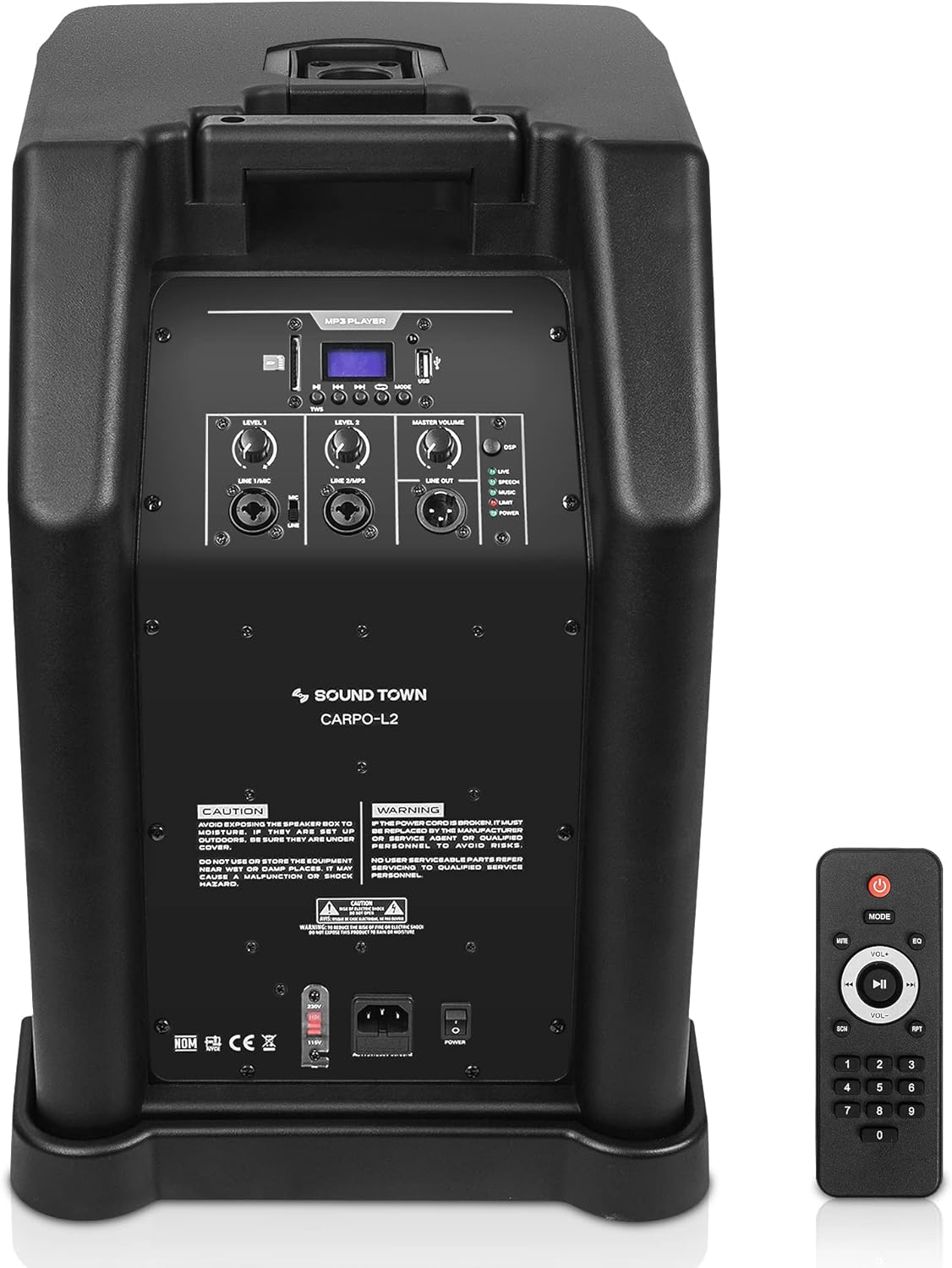
Image: Rear panel of the Sound Town CARPO-L2 subwoofer, displaying input/output connections, mixer controls, and the MP3 module with USB/SD slots.
STMICKT3 Handheld Dynamic Microphones
- Cardioid Pickup Pattern: Minimizes background noise and feedback for clear vocal reproduction.
- Compatibility: Designed for use with devices featuring a 1/4" mic input.

Image: The Sound Town STMICKT3 professional handheld dynamic microphone kit, including three microphones, cables, and a protective carrying case.

Image: A close-up view of a single Sound Town STMICKT3 handheld dynamic microphone with its microphone clip.
Setup Instructions
- Unpack Components: Carefully remove all components from their packaging.
- Assemble Column Speakers:
- Place the CARPO-L2 powered subwoofer on a stable, level surface.
- Insert the column speaker sections into the designated slot on top of the subwoofer. Ensure they are securely connected. The system is designed for quick assembly.
- Connect Microphones:
- Connect the STMICKT3 microphones to the 1/4" or XLR inputs on the CARPO-L2 subwoofer's mixer panel using the provided cables.
- Connect Other Audio Sources (Optional):
- For instruments or other media players, use appropriate 1/4" or XLR cables to connect them to the available inputs on the subwoofer.
- Power Connection:
- Ensure all connections are secure before plugging the subwoofer's power cord into a grounded electrical outlet.
- Turn on the power switch located on the subwoofer's rear panel.
Operating Instructions
Basic Operation
- Volume Control: Adjust the main volume knob on the subwoofer to control the overall output level. Individual channel volume controls are also available on the mixer.
- Microphone Usage: Ensure microphones are switched ON. Speak directly into the microphone for optimal sound capture. Adjust individual microphone volume on the mixer as needed.
- Audio Source Selection: If using multiple inputs, ensure the correct input is selected or mixed appropriately using the mixer controls.
MP3 Module Operation (USB/SD)
- Insert USB/SD: Insert a USB flash drive or SD card (containing MP3 audio files) into the corresponding slot on the subwoofer's rear panel.
- Select Input: Use the mode button on the MP3 module to select USB or SD input.
- Playback Controls: Use the play/pause, next, and previous buttons on the MP3 module or the included remote control to manage playback.
- Volume: Adjust the MP3 module's volume control, in addition to the main system volume.
Note: The USB port is exclusively for flash drives for music playback. Do not connect other devices for charging or data transfer, as this may damage the unit.
Maintenance
- Cleaning: Use a soft, dry cloth to clean the exterior surfaces of the speakers and microphones. Do not use abrasive cleaners or solvents.
- Storage: When not in use, store the system in a cool, dry place. Utilize the provided carry bags for column speakers and the case for microphones to protect them during transport and storage.
- Cable Care: Avoid sharp bends or kinks in cables. Store cables neatly to prevent damage.
Troubleshooting
| Problem | Possible Cause | Solution |
|---|---|---|
| No sound output | Power off; volume too low; incorrect input selected; faulty cable. | Check power connection and switch; increase master and channel volumes; verify input selection; test with different cables. |
| Distorted sound | Volume too high (clipping); faulty cable; damaged speaker. | Reduce volume levels; replace cables; contact support if speaker damage is suspected. |
| Microphone not working | Microphone off; cable not connected properly; microphone volume low. | Ensure microphone is switched ON; check cable connections; increase microphone channel volume. |
| USB/SD playback issues | Incorrect file format; USB/SD not properly inserted; USB port used for charging. | Ensure files are MP3 format; re-insert USB/SD; DO NOT use USB for charging devices. |
Specifications
- Brand: Sound Town
- Model Number: CARPO-L2MKT3
- Output Wattage: 1600 Watts (Peak)
- Subwoofer: 12-inch Powered
- Column Speakers: 2 x Columns, each with 8 x 3-inch full-range speakers
- Microphones: 3 x Handheld Dynamic Microphones (STMICKT3)
- Connectivity Technology: USB (for MP3 playback), Wired (XLR, 1/4")
- Number of Channels: 2 (Mixer)
- Audio Input: 1/4", XLR
- Power Source: Corded Electric
- Mounting Type: Tabletop (Subwoofer base)
- Color: Black or White (System variants may vary)
- UPC: 810141701243
Warranty Information
The Sound Town CARPO-L2MKT3 Portable Column Speaker System comes with a 1-year limited warranty from the date of purchase. This warranty covers manufacturing defects and workmanship under normal use. It does not cover damage caused by misuse, accidents, unauthorized modifications, or improper installation. Please retain your proof of purchase for warranty claims.
Support
For technical assistance, troubleshooting beyond this manual, or warranty inquiries, please contact Sound Town customer support. Refer to the official Sound Town website or your purchase documentation for the most current contact information.
Online Resources: For additional information and product updates, visit the Sound Town Store on Amazon.