
RESET RESET-028
RESET-028 Combination Cable Lock User Manual
Model: RESET-028
Introduction
The RESET-028 Combination Cable Lock provides a secure and versatile solution for protecting your belongings. This lock features a durable zinc alloy body, a 4-digit resettable combination, and interchangeable steel cables coated in PVC rubber. It is designed for various applications, including securing bikes, luggage, lockers, and cabinets.
The lock comes with three cable lengths (9.8 inches, 23.6 inches, and 47.2 inches) to adapt to different security needs. Its compact and lightweight design ensures portability without compromising security.
Package Contents
- 1 x RESET-028 Combination Cable Lock Unit
- 1 x 9.8-inch Steel Cable (approx. 25 cm)
- 1 x 23.6-inch Steel Cable (approx. 60 cm)
- 1 x 47.2-inch Steel Cable (approx. 120 cm)
- 1 x Small Precision Screwdriver
- 1 x User Manual
Setup Instructions
1. Setting Your Combination
The default combination for your lock is 0-0-0-0. Follow these steps to set your personalized 4-digit combination:
- Ensure the lock is set to the default combination 0-0-0-0.
- Locate the small reset button on the bottom side of the lock. Use the included precision screwdriver to push and slide this button to the left.
- While the reset button is held in the left position, rotate the dials to your desired 4-digit combination. Make sure to choose a memorable code.
- Once your new combination is set, release the reset button by sliding it back to its original position. Your new combination is now active.

Image: Combination Reset Guide
This image illustrates the four steps required to set a new combination for the lock. It shows the default '0-0-0-0', the action of sliding the bottom button, setting a new code '2-1-0-0', and then returning the button to its original position.
2. Changing the Cable
The RESET-028 lock allows you to interchange cables of different lengths. Follow these steps to replace the cable:
- Ensure the lock is in an unlocked state (cable can be freely moved). Under normal circumstances, the cable cannot be removed from the lock body.
- Locate the cable release switch on the side of the lock body, marked 'A' and 'B'. Use the precision screwdriver to slide the switch from position 'A' to position 'B'. This will release the currently attached cable.
- Remove the old cable and insert the desired new cable into the opening, pushing it in completely until it seats firmly.
- Slide the cable release switch back from position 'B' to position 'A' to secure the new cable. The cable is now locked in place.
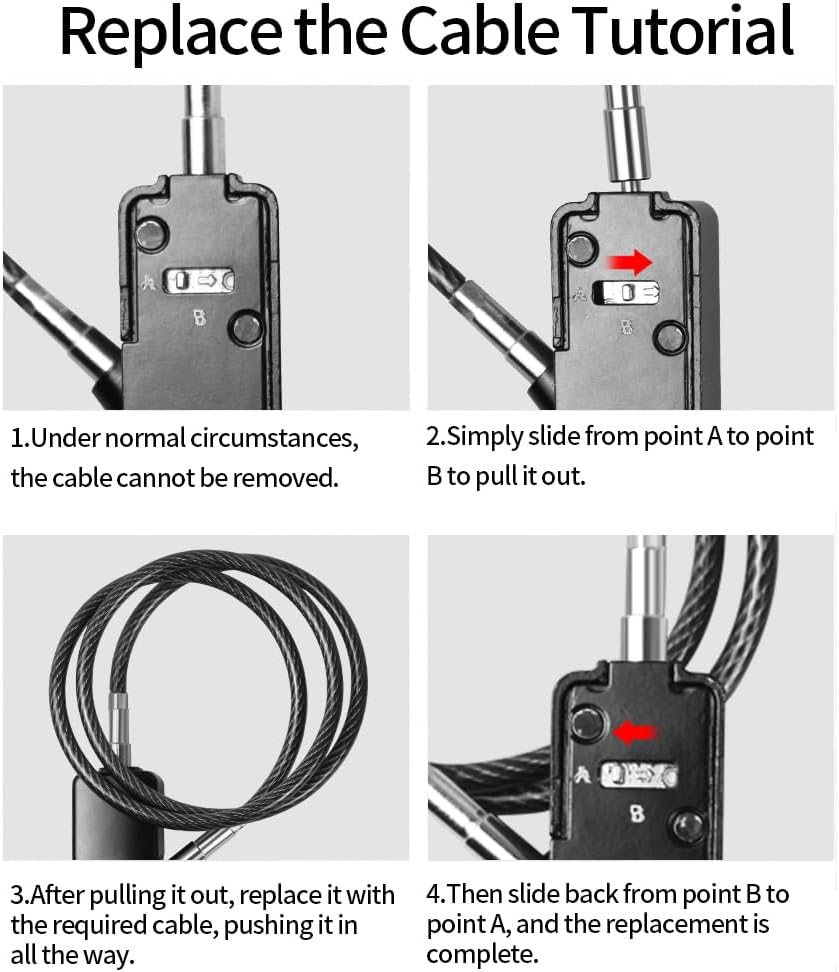
Image: Replace the Cable Tutorial
This image demonstrates how to change the cable. It shows the cable release switch, sliding it to release the cable, inserting a new coiled cable, and then securing it by sliding the switch back.
Operating the Lock
Locking
- Ensure the cable is securely attached to the lock body.
- Pass the cable through the items you wish to secure.
- Insert the free end of the cable into the locking mechanism on the lock body.
- Scramble the 4-digit combination dials to a random sequence. The lock is now secured.
Unlocking
- Rotate the 4-digit combination dials to your preset personal code.
- Press the release button located on the top surface of the lock body. The cable end will release, allowing you to remove it.

Image: Usage Examples
This image displays the versatility of the lock, showing it securing items such as a bicycle wheel, a garden gate, a car part, and a set of double doors.
Care and Maintenance
- Cleaning: Wipe the lock body and cables with a soft, damp cloth. Avoid using abrasive cleaners or solvents, which can damage the finish or PVC coating.
- Lubrication: If the dials become stiff or difficult to turn, apply a small amount of graphite lubricant or a silicone-based spray to the moving parts. Avoid oil-based lubricants as they can attract dirt.
- Storage: Store the lock in a dry environment when not in use to prevent corrosion, especially if exposed to moisture.
- Cable Inspection: Periodically inspect the steel cables for any signs of wear, fraying, or damage to the PVC coating. Replace damaged cables immediately to maintain security.
Troubleshooting
| Problem | Possible Cause | Solution |
|---|---|---|
| Cannot set a new combination. | The reset button is not fully engaged, or the current combination is incorrect. | Ensure the lock is set to the correct current combination (default 0-0-0-0 if never changed). Push the reset button firmly and slide it completely to the left before setting the new code. |
| Cable cannot be removed or inserted. | The cable release switch is not in the correct position, or the lock is not unlocked. | Ensure the lock is set to your correct combination and the top release button is pressed. For cable replacement, ensure the side cable release switch is slid to position 'B'. |
| Dials are stiff or difficult to turn. | Dirt or debris accumulation, lack of lubrication. | Clean the dials with a soft cloth. Apply a small amount of graphite powder or silicone spray lubricant to the dials. |
| Forgotten combination. | Combination was not recorded or remembered. | Unfortunately, without the correct combination, the lock cannot be opened non-destructively. It is recommended to keep a record of your combination in a secure place. |
Specifications
| Feature | Detail |
|---|---|
| Brand | RESET |
| Model | RESET-028 |
| Lock Type | 4-Digit Resettable Combination Cable Lock |
| Body Material | Zinc Alloy |
| Cable Material | Hardened Steel with PVC Rubber Coating |
| Cable Diameter | 3/16 inch (approx. 4 mm) |
| Cable Lengths Included | 9.8 inches (25 cm), 23.6 inches (60 cm), 47.2 inches (120 cm) |
| Dimensions (Lock Body) | 8.6 x 3.9 x 0.98 inches (approx. 21.8 x 9.9 x 2.5 cm) |
| Weight (Lock Unit) | 5.6 ounces (approx. 158 grams) |
| Special Features | Passcode Unlock, Portable, Resettable, Interchangeable Cables |
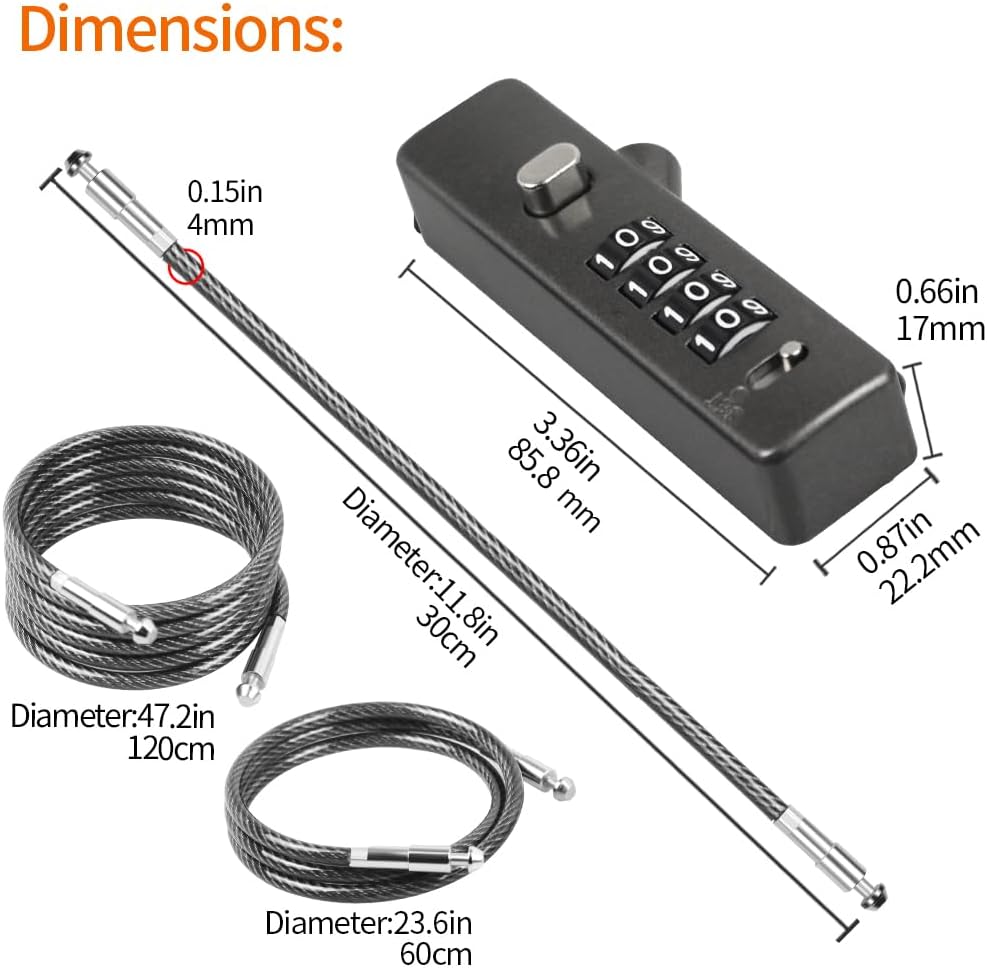
Image: Product Dimensions and Cable Lengths
This image provides detailed measurements for the lock body and illustrates the three different cable lengths (9.8, 23.6, and 47.2 inches) included with the product, along with their diameters.

Image: Cable Construction Detail
A detailed view of the cable, highlighting its 3/16 inch diameter and the protective PVC soft rubber coating over the braided steel core, designed for resilience and anti-cutting properties.
Warranty and Customer Support
For warranty information, product support, or any inquiries regarding your RESET-028 Combination Cable Lock, please refer to the manufacturer's official website or contact the seller directly through the platform where the product was purchased.
You can visit the official RESET store on Amazon for more information: RESET Store
Related documentsRESET-028


Ask a question about this manual
Ask about setup, troubleshooting, compatibility, parts, safety, or missing instructions. Manuals+ will review the question and use this page’s manual context to help answer it.