
1. Product Overview
The Loop Switch earplugs are designed to provide adjustable passive hearing protection, allowing you to control the level of noise reduction in various environments. With three distinct modes, these reusable earplugs adapt to your needs for focus, social interaction, or quiet relaxation.

Image: A person wearing Loop Switch earplugs, highlighting their discreet fit and integrated control dial.
Key Features:
- Three Adjustable Modes: Easily switch between Engage, Experience, and Quiet modes using a mechanical dial.
- Passive Noise Reduction: Provides multi-level sound support without the need for batteries or charging.
- Comfortable Fit: Comes with four sizes of silicone ear tips (XS/S/M/L) for a personalized and secure fit.
- Reusable Design: Durable and easy to clean for long-term use.
- Portable: Includes a compact carry case for protection and convenience on the go.
2. Setup and Fitting
2.1 What's in the Box
Your Loop Switch package includes:
- 1 pair of Loop Switch earplugs
- 4 pairs of silicone ear tips (sizes XS, S, M, L)
- 1 compact Carry Case

Image: The Loop Switch earplugs, various silicone ear tip sizes, and the protective carry case.
2.2 Finding Your Ideal Fit
A proper fit is crucial for optimal noise reduction and comfort. Experiment with the different ear tip sizes to find the best seal for your ears.
- Insert and Twist: Gently insert the earplug into your ear canal and twist it slightly until it feels secure and comfortable. The Loop earplugs should not protrude excessively or be visible from the front.
- Test All Ear Tips: If the earplug feels loose, falls out, or does not provide sufficient noise reduction, try a larger ear tip. If it feels uncomfortable or causes pressure, try a smaller ear tip.

Image: Visual guide on inserting earplugs and selecting the appropriate ear tip size for a comfortable and effective seal.
Ensure the earplug is marked 'L' for the left ear and 'R' for the right ear for correct orientation.
3. Operating Instructions
The Loop Switch features a mechanical dial on each earplug to switch between three noise reduction modes. No batteries or charging are required.
3.1 How to Switch Modes
- Wear the Earplugs: Ensure the earplugs are properly inserted into your ears.
- Adjust the Dial: Locate the small mechanical dial on the exterior of each earplug. Gently turn the dial to cycle through the three available modes.
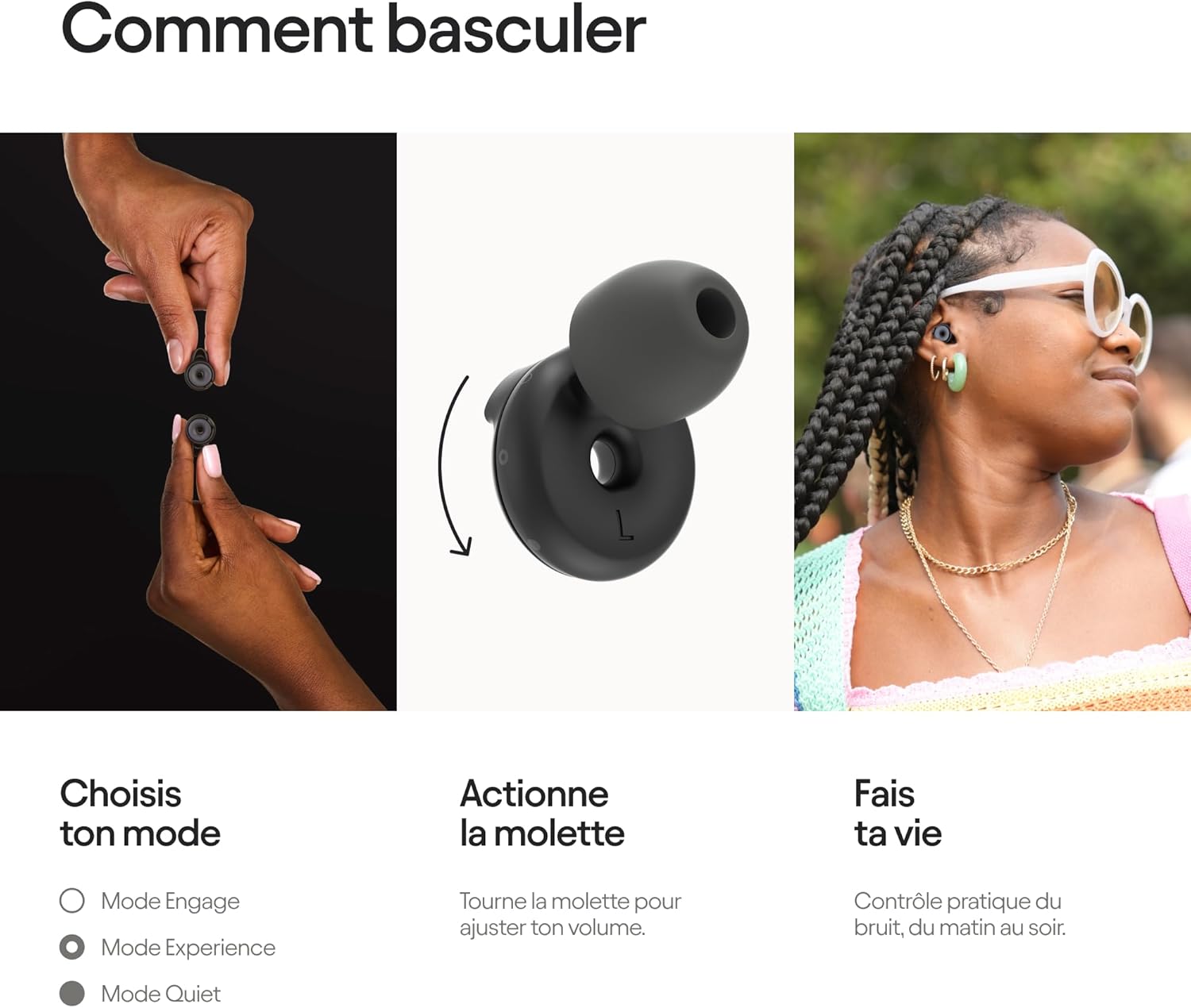
Image: A close-up showing the mechanical dial on the Loop Switch earplug and the action of turning it to select a mode.
3.2 Understanding the Modes
Each mode is designed for specific environments and noise reduction levels:

Image: Overview of the three modes (Quiet, Experience, Engage), their decibel reduction (SNR), and ideal applications.
-
Quiet Mode (25 dB SNR):
Reduces noise significantly to help you concentrate, travel, or relax. Ideal for environments where you need to minimize distractions and achieve deep focus or calm.
- Deep concentration
- Travel and commuting
- Relaxation
-
Experience Mode (21 dB SNR):
Lowers overall volume while maintaining sound clarity. Perfect for enjoying live events without damaging your hearing, ensuring you still hear music and conversations clearly.
- Concerts and festivals
- Live entertainment
- Sporting events
-
Engage Mode (17 dB SNR):
Reduces background noise while keeping speech clear. This mode is designed for social settings, meetings, or any situation where you need to hear conversations distinctly without being overwhelmed by ambient sound.
- Social gatherings
- Conversations
- Childcare
4. Maintenance
To ensure the longevity and hygiene of your Loop Switch earplugs, follow these maintenance guidelines:
- Cleaning: Regularly clean your earplugs and silicone ear tips with a soft, damp cloth and mild soap. Ensure they are completely dry before storing or reusing. Do not use harsh chemicals or abrasive materials.
- Storage: Always store your Loop Switch earplugs in the provided carry case when not in use. This protects them from dust, dirt, and damage.
- Inspection: Periodically inspect the earplugs and ear tips for any signs of wear or damage. Replace ear tips if they become torn or lose their elasticity to maintain an effective seal.
5. Troubleshooting
If you encounter any issues with your Loop Switch earplugs, refer to the following common solutions:
| Problem | Possible Cause | Solution |
|---|---|---|
| Insufficient Noise Reduction | Incorrect ear tip size or improper insertion. | Ensure earplugs are inserted correctly and form a tight seal. Try different ear tip sizes (XS/S/M/L) to find the best fit for your ear canal. |
| Discomfort or Pain | Ear tip size is too large or earplugs are inserted too deeply. | Try a smaller ear tip size. Re-insert the earplugs gently, ensuring they are comfortable and not causing pressure. |
| Earplugs Fall Out Easily | Ear tip size is too small or earplugs are not inserted securely. | Try a larger ear tip size. Ensure the earplugs are twisted gently into place for a secure fit. |
| Difficulty Switching Modes | Debris in the dial mechanism or improper handling. | Gently clean the dial area. Ensure you are turning the dial firmly but not forcefully. If the issue persists, contact customer support. |
| Sound Quality Issues (e.g., muffled speech in Engage mode) | Improper fit or earwax buildup. | Verify proper fit and ear tip size. Clean earplugs and ear tips thoroughly. Ensure the correct mode is selected for your activity. |
6. Specifications
| Model Name | Loop Switch |
| Model Number | en-sw-blk-01 |
| Brand | Loop |
| Dimensions (L x W x H) | 7.8 x 7.6 x 1.9 cm |
| Weight | 37 Grams |
| Color | Black |
| Material | Acrylonitrile Butadiene Styrene (ABS), Silicone |
| Noise Attenuation (SNR) | Up to 25 dB (Quiet Mode) |
| Reusability | Reusable |
| Included Ear Tips | 4 pairs (XS, S, M, L) |
| Recommended Use | Noise protection for concentration, social settings, live events, travel, and relaxation. |
7. Warranty and Support
7.1 Warranty Information
For detailed warranty information regarding your Loop Switch earplugs, please refer to the official Loop website or contact Loop customer service directly. Warranty terms and conditions may vary by region.
7.2 Customer Support
If you have any questions, require assistance, or need further troubleshooting beyond this manual, please visit the official Loop support page or contact their customer service team. Contact details can typically be found on the manufacturer's website.
Official Website: www.loopearplugs.com


