1. Introduction
Thank you for choosing the VINABTY TM2360E Smart Voice Remote Control. This remote is designed as a direct replacement and compatible alternative for various Samsung S90C and S95C Series OLED TVs, as well as other compatible Samsung Smart TV models. It offers essential control functions and integrated voice control for enhanced user experience.
Please read this manual carefully before using the remote control to ensure proper operation and to maximize its features.
2. Safety Information
- Do not expose the remote control to direct sunlight, heat sources, or extreme temperatures.
- Avoid dropping or subjecting the remote control to strong impacts.
- Do not disassemble the remote control. This will void the warranty.
- Keep batteries out of reach of children. If swallowed, seek immediate medical attention.
- Dispose of used batteries properly according to local regulations. Do not mix old and new batteries or different types of batteries.
3. Package Contents
- 1 x VINABTY TM2360E Smart Voice Remote Control
- (Batteries are not included)
4. Setup
4.1 Inserting Batteries
- Locate the battery compartment on the back of the remote control.
- Slide the battery cover downwards to open it.
- Insert two (2) AAA batteries, ensuring the positive (+) and negative (-) terminals align correctly with the markings inside the compartment.
- Slide the battery cover back into place until it clicks securely.
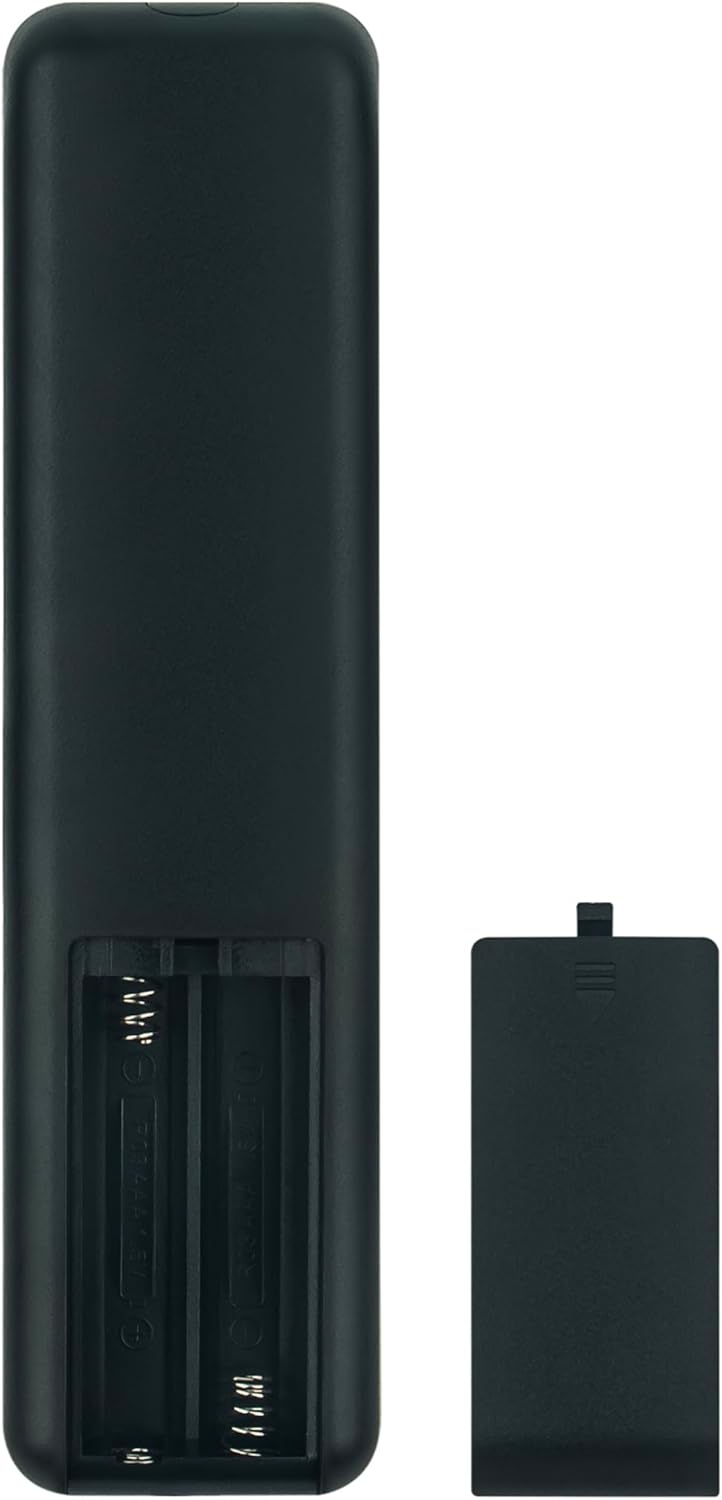
Figure 1: Battery Compartment (Open)

Figure 2: Battery Compartment (Closed)
4.2 Initial Connection / Pairing
For many compatible Samsung TV models, the TM2360E remote control will function immediately upon battery insertion without requiring any complex pairing steps. Simply point the remote towards your TV and attempt to use basic functions like power or volume.
If the remote does not respond immediately, or if you wish to utilize the voice control feature, pairing may be required. Refer to your Samsung TV's user manual for specific instructions on pairing a new remote control. Typically, this involves pressing and holding specific buttons on the remote (e.g., 'Return' and 'Play/Pause' simultaneously) for a few seconds while pointing it at the TV's IR receiver.
The remote is designed to be compatible with the following Samsung TV series and models:
- Samsung S90C Series OLED TV: QN55S90CAFXZA, QN65S90CAFXZA, QN77S90CAFXZA, QN83S90CAEXZA
- Samsung S95C Series OLED TV: QN55S95CAFXZA, QN65S95CAFXZA, QN77S95CAFXZA
- Sub remote control for models: BN59-01432A, BN59-01432D, BN59-01455E, BN59-01432B, BN59-01385A, BN59-01385B, BN59-01391A, BN59-01391B
- Compatible with The Frame Crystal UHD Series Neo QLED 8K HDR Ultra HD Smart TVs Series (e.g., 65QN800C, 75QN800C, 85QN800C, 65QN900C, 75QN900C, 85QN900C)
5. Operating Instructions
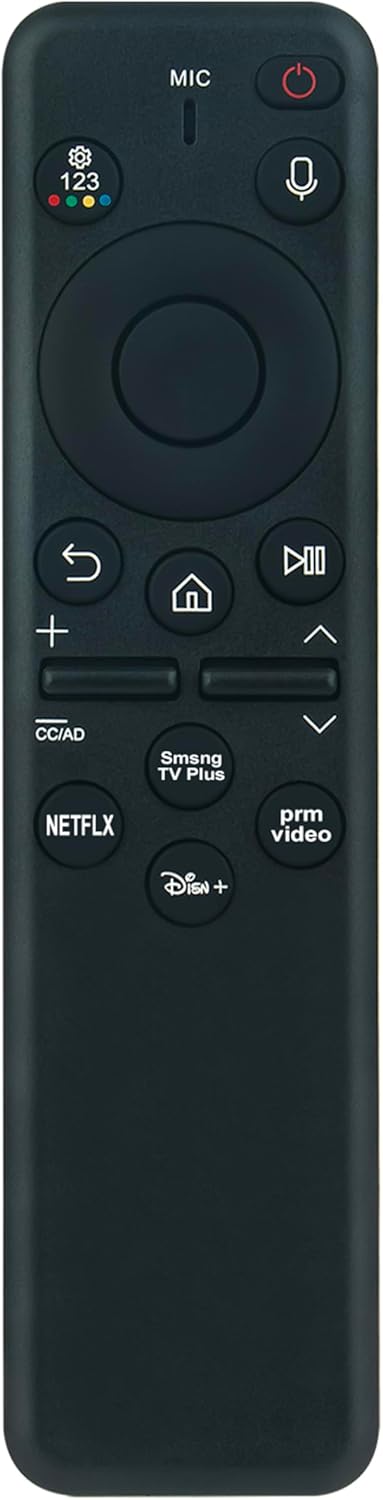
Figure 3: Front View of the Remote Control
5.1 Basic Functions
- Power Button (⏻): Turns the TV on or off.
- Navigation Pad (Circular): Use the directional arrows (Up, Down, Left, Right) to navigate menus and select items. Press the center button to confirm selections.
- Volume Buttons (+ / -): Adjust the TV volume up or down.
- Channel Buttons (∧ / ∨): Change TV channels up or down.
- Return Button (↩): Returns to the previous screen or menu.
- Home Button (⌂): Accesses the TV's Smart Hub or Home screen.
- Play/Pause Button (▷‖): Controls media playback (play, pause).
5.2 Voice Control
The TM2360E remote features a built-in microphone for voice commands. To use voice control:
- Press and hold the Voice Button (🎤) located near the top of the remote.
- Speak clearly into the microphone (located at the top of the remote, labeled "MIC").
- Release the Voice Button when you have finished speaking.
You can use voice commands to search for content, change channels, adjust settings, and more, depending on your TV's capabilities.
5.3 Dedicated App Buttons
The remote includes dedicated buttons for quick access to popular streaming services:
- NETFLIX: Launches the Netflix application.
- prm video (Prime Video): Launches the Amazon Prime Video application.
- Disney+: Launches the Disney+ application.
- Samsung TV Plus: Launches the Samsung TV Plus service.

Figure 4: Remote Control in Use
6. Maintenance
- Cleaning: Wipe the remote control with a soft, dry cloth. Do not use liquid cleaners or abrasive materials.
- Battery Replacement: Replace batteries when the remote's response becomes sluggish or stops working. Always replace both batteries at the same time.
- Storage: If the remote control will not be used for an extended period, remove the batteries to prevent leakage and damage. Store in a cool, dry place.
7. Troubleshooting
| Problem | Possible Cause | Solution |
|---|---|---|
| Remote not responding. | Dead or incorrectly inserted batteries. Obstruction between remote and TV. Remote not paired (for voice functions). | Replace batteries, ensuring correct polarity. Remove any obstructions. Re-pair the remote with the TV if necessary (refer to Section 4.2). |
| Voice control not working. | Remote not paired for voice. Microphone obstructed. TV settings. | Ensure the remote is properly paired for voice control. Check for any debris blocking the microphone. Verify voice control settings on your TV. |
| Buttons not functioning correctly. | Low batteries. Button stuck or damaged. | Replace batteries. Gently press the button to ensure it's not stuck. If damage is suspected, consider replacement. |
| Short operating range. | Low batteries. Interference. | Replace batteries. Ensure no strong light sources or electronic devices are causing interference. Maintain a clear line of sight to the TV's IR receiver. |
8. Specifications
- Model Number: TM2360E
- Dimensions: 6.5 x 2 x 0.7 inches (approximately)
- Weight: 1.44 ounces (without batteries)
- Power Source: 2 x AAA batteries
- Color: Black
- Special Feature: Voice Search
- Compatible Devices: Television (Samsung S90C, S95C Series OLED TVs and other specified models)
- Max Number of Supported Devices: 1
- Manufacturer: XINHAO
- Country of Origin: China
9. Warranty Information
This product is typically covered by a standard manufacturer's warranty against defects in materials and workmanship. Please retain your purchase receipt as proof of purchase. For specific warranty terms and conditions, refer to the product packaging or contact the seller directly.
10. Customer Support
If you encounter any issues or have questions regarding the VINABTY TM2360E Smart Voice Remote Control that are not addressed in this manual, please contact the seller or manufacturer for assistance. Provide your product model number and a detailed description of the issue when seeking support.
