
1. Introduction
Thank you for choosing the Avhrit 850N.m 1/2 Inch Cordless Impact Wrench. This manual provides essential information for the safe operation, setup, maintenance, and troubleshooting of your new tool. Please read this manual thoroughly before first use and keep it for future reference.
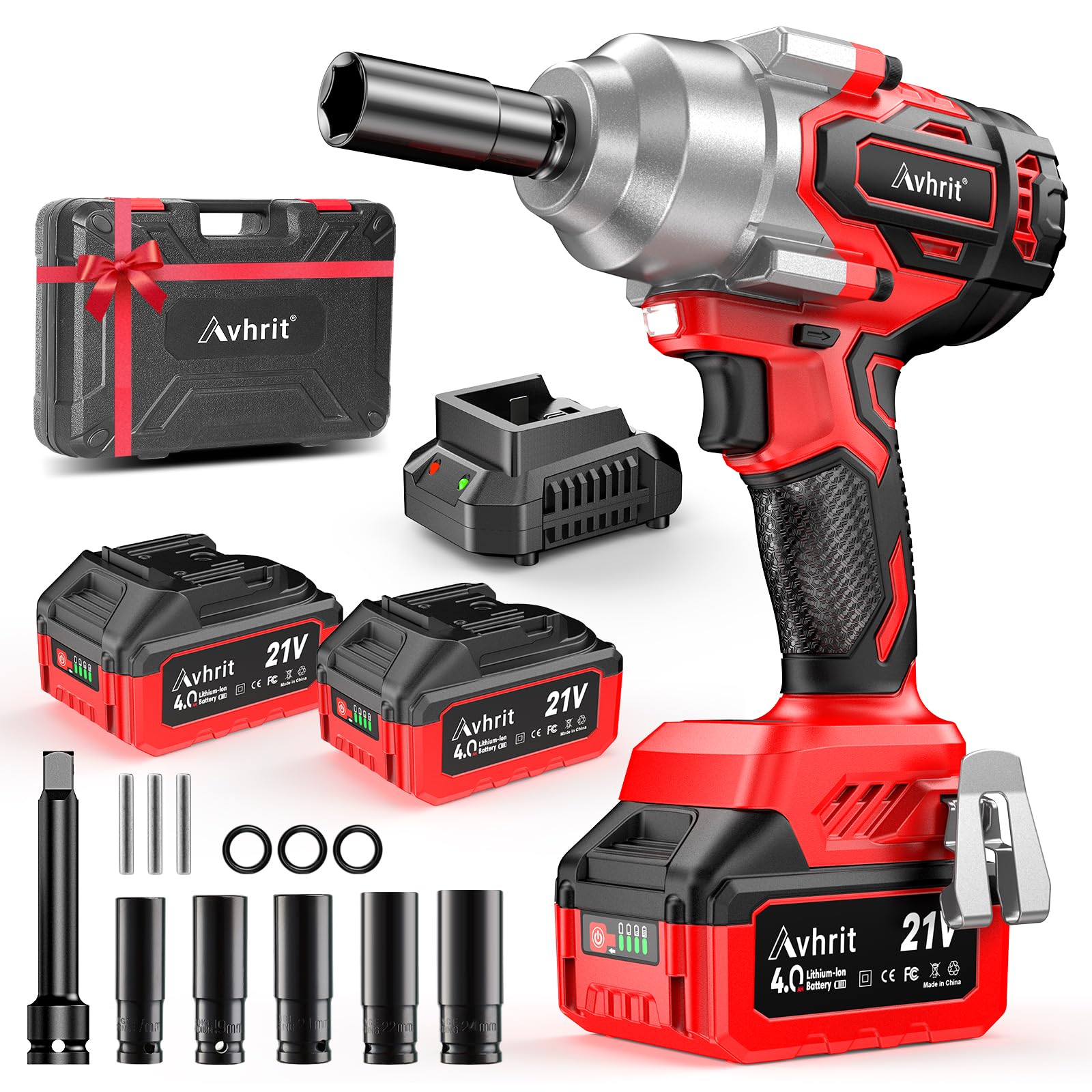
Figure 1: Avhrit 850N.m 1/2 Inch Cordless Impact Wrench
2. Safety Information
Always observe basic safety precautions when using electric tools to reduce the risk of fire, electric shock, and personal injury.
- Wear Eye Protection: Always wear safety goggles or safety glasses with side shields.
- Wear Hearing Protection: Prolonged use may cause hearing damage.
- Keep Work Area Clean: Cluttered areas invite accidents.
- Avoid Dangerous Environments: Do not use power tools in damp or wet locations, or expose them to rain.
- Keep Children Away: Do not let children or untrained persons operate the tool.
- Secure Workpiece: Use clamps or a vise to hold the workpiece. This is safer than using your hand and frees both hands to operate the tool.
- Do Not Overreach: Keep proper footing and balance at all times.
- Disconnect Tools: Disconnect the battery pack from the tool before making any adjustments, changing accessories, or storing the tool.
- Use Correct Tool: Do not force small tools or attachments to do the job of a heavy-duty tool.
- Maintain Tools With Care: Keep cutting tools sharp and clean for better and safer performance. Follow instructions for lubricating and changing accessories.
- Check for Damaged Parts: Before using the tool, carefully check for any damaged parts. Ensure all guards and other parts are in proper working order.
- Battery Safety: Use only the specified charger for the battery. Do not incinerate the battery pack even if it is severely damaged or completely worn out.
3. Package Contents
Verify that all items listed below are included in your package. If any items are missing or damaged, please contact customer support.
- Avhrit 1/2 Inch Cordless Impact Wrench
- 2 x 4000mAh Lithium-Ion Batteries
- 1 x Fast Charger
- 5 x Sockets
- 1 x Carrying Case

Figure 2: Included components of the Avhrit Impact Wrench kit
4. Product Overview
Familiarize yourself with the components of your Avhrit Cordless Impact Wrench for optimal use.
- 1/2 Inch Square Drive Chuck: For attaching sockets.
- Brushless Motor: Provides increased power and efficiency.
- Variable Speed Trigger: Allows for precise speed control based on pressure.
- Forward/Reverse Switch: Changes rotation direction for tightening or loosening.
- LED Work Light: Illuminates the work area for improved visibility.
- Battery Indicator: Displays remaining battery charge.
- Belt Buckle: For convenient carrying.

Figure 3: Internal view of the brushless motor

Figure 4: Built-in LED light for clear visibility
5. Setup
5.1 Charging the Battery
- Connect the fast charger to a standard power outlet.
- Slide the battery pack onto the charger. Ensure it clicks into place.
- The charger's indicator light will show the charging status. A full charge typically takes approximately 1.5 hours for a 4000mAh battery.
- Once fully charged, remove the battery from the charger.

Figure 5: 4000mAh Lithium-Ion Batteries and Fast Charger
5.2 Installing and Removing the Battery
- To Install: Align the battery pack with the base of the impact wrench and slide it in until it locks securely.
- To Remove: Press the battery release button (if present) and slide the battery pack out.
5.3 Attaching Sockets
- Ensure the tool is off and the battery is removed before attaching or removing accessories.
- Push the desired 1/2 inch socket firmly onto the square drive anvil until it locks into place.
- To remove, pull the socket off the anvil.
6. Operating Instructions
6.1 Powering On/Off and Speed Control
- The tool is activated by pressing the variable speed trigger. The harder you press, the faster the tool operates.
- Release the trigger to turn the tool off.
- The impact wrench features 3 adjustable speed modes, allowing you to select the appropriate torque and speed for different applications. These modes are typically selected via a mode button on the tool.

Figure 6: Three adjustable speed settings
6.2 Forward/Reverse Operation
- The forward/reverse switch is located near the trigger.
- Push the switch to the left for forward rotation (tightening).
- Push the switch to the right for reverse rotation (loosening).
- A central position locks the trigger, preventing accidental startup.

Figure 7: Forward, Stop, and Reverse switch positions
6.3 Applications
This cordless impact wrench is suitable for various tasks requiring high torque, such as:
- Automotive repairs, including tire changes and suspension work.
- Scaffolding assembly and disassembly.
- Equipment maintenance and repair.

Figure 8: Impact wrench in use for car tire repair

Figure 9: Impact wrench in use for scaffolding installation

Figure 10: Impact wrench in use for equipment repair
7. Maintenance
7.1 Cleaning
- Keep the tool's ventilation openings clean and free from debris to prevent overheating.
- Wipe the tool's exterior with a soft, damp cloth. Do not use harsh chemicals or abrasive cleaners.
7.2 Battery Care and Storage
- Store batteries in a cool, dry place away from direct sunlight and extreme temperatures.
- For long-term storage, charge batteries to approximately 50% capacity.
- Avoid fully discharging batteries before recharging to prolong their lifespan.
7.3 General Storage
- Store the impact wrench and its accessories in the provided carrying case when not in use.
- Keep the tool out of reach of children and in a secure location.
8. Troubleshooting
If you encounter issues with your impact wrench, refer to the following common problems and solutions:
| Problem | Possible Cause | Solution |
|---|---|---|
| Tool does not start | Battery not charged or improperly installed; Trigger lock engaged. | Charge battery fully; Ensure battery is securely installed; Disengage trigger lock. |
| Low power/torque | Battery low; Incorrect speed setting; Worn carbon brushes (for brushed motors, not applicable here as it's brushless). | Recharge battery; Select a higher speed mode; Ensure proper socket size. |
| Tool overheats | Prolonged heavy use; Blocked ventilation. | Allow tool to cool down; Clear any obstructions from vents. |
| Excessive vibration | Loose socket; Damaged anvil. | Ensure socket is securely attached; Inspect anvil for damage and replace if necessary. |
9. Specifications
| Feature | Specification |
|---|---|
| Brand | Avhrit |
| Model Number | 400NM (AT750) |
| Max Torque | 850 N.m (630 Ft-lbs) |
| Chuck Size | 1/2 Inch Square Drive |
| Operation Mode | Battery, Electric |
| Battery Type | 21V 4000mAh Lithium-Ion |
| Material | Metal |
| Color | Red |
10. Official Product Video
Video 1: Official product demonstration of the Avhrit Cordless Impact Wrench, showcasing its features and applications.
11. Warranty and Support
Avhrit products are manufactured to high-quality standards and come with a manufacturer's warranty. For detailed warranty information, product support, or to purchase replacement parts, please refer to the warranty card included with your product or visit the official Avhrit website. You may also contact customer service for assistance.
- Customer Service: Please refer to the contact information provided in your product packaging.
- Online Support: Visit the Avhrit official website for FAQs and additional resources.
