
1. Introduction
This manual provides essential information for the installation, operation, and maintenance of the SPEDWHEL Controller for Kugoo Kukirin M4 and M4 Pro electric scooters. Please read these instructions carefully before proceeding with installation or use to ensure proper function and safety.
2. Product Overview
The SPEDWHEL Controller is a replacement or spare part designed specifically for Kugoo Kukirin M4 and M4 Pro electric scooters. It manages the power distribution and control signals for various scooter functions, ensuring smooth and reliable operation. This unit is constructed with an aluminum exterior for durability and efficient heat dissipation.
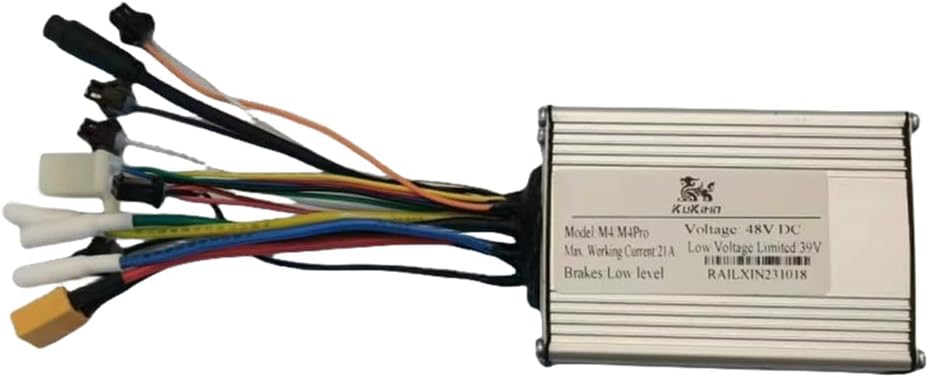
Image 2.1: Front view of the SPEDWHEL Controller, showing the main unit and various connected wiring harnesses for different scooter components.
3. Specifications
Below are the technical specifications for the SPEDWHEL Controller:
- Model: Kukirin M4 / M4 Pro
- Voltage: 48V DC
- Maximum Working Current: 21A
- Low Voltage Limited: 39V
- Brakes: Low level
- Material: Aluminum (Exterior Finish, Metal Type, Handle Material)
- Color: Silvery
- Product Dimensions: Approximately 4"L x 2"W
- Item Weight: Approximately 7 ounces
- Special Feature: Easy to Install
- UPC: 744612869234

Image 3.1: Detailed view of the controller's label, indicating key electrical specifications such as model compatibility, voltage, and current ratings.
4. Setup and Installation
Installation of an electric scooter controller requires technical knowledge and should ideally be performed by a qualified technician. Incorrect installation can lead to damage to the scooter or personal injury. Always ensure the scooter is powered off and disconnected from any power source before beginning installation.
4.1 Safety Precautions
- Disconnect the scooter's battery before starting any work.
- Wear appropriate personal protective equipment (PPE), such as gloves and eye protection.
- Ensure the work area is clean, dry, and well-lit.
- Do not attempt installation if you are unsure of any steps. Consult a professional.
4.2 Installation Steps (General Guidance)
- Access the Existing Controller: Locate and carefully remove the cover or housing that protects the scooter's original controller.
- Disconnect Old Controller: Systematically disconnect all wiring harnesses from the old controller. It is recommended to take photos or label each connection to ensure correct re-connection.
- Install New Controller: Position the SPEDWHEL Controller in the designated space.
- Connect Wiring: Carefully connect each wiring harness from the scooter to the corresponding port on the new controller. Refer to your scooter's specific wiring diagram if available. Common connections include motor phase wires, hall sensor wires, battery power, display, throttle, brake levers, and lights.
- Secure the Controller: Ensure the controller is securely mounted to prevent movement or damage during operation.
- Test Connections: Before fully reassembling, perform a preliminary check of all connections.
- Reassemble: Carefully replace any covers or housings removed during the process.
- Initial Power-Up: Reconnect the battery and power on the scooter. Observe for any unusual behavior or error codes.
Note: This controller is designed for specific models (Kugoo Kukirin M4 / M4 Pro). Using it with incompatible models may result in damage or malfunction.
5. Operating Instructions
The SPEDWHEL Controller functions as the central processing unit for your electric scooter. Once correctly installed, its operation is integrated with the scooter's existing systems (e.g., display, throttle, brakes). There are no direct user controls on the controller itself.
- Ensure all connections are secure and correct after installation.
- Operate your scooter according to its original user manual.
- The controller will manage power delivery to the motor based on throttle input and regulate battery usage.
- Brake inputs will signal the controller to cut power to the motor.
If the scooter exhibits unusual behavior after controller installation, refer to the troubleshooting section.
6. Maintenance
Proper maintenance ensures the longevity and reliable performance of your SPEDWHEL Controller.
- Keep Clean: Periodically inspect the controller and its housing for dirt, dust, or debris. Clean with a soft, dry cloth. Avoid using liquids directly on the controller.
- Check Connections: Regularly inspect all wiring connections to ensure they are tight and free from corrosion or damage. Loose connections can lead to intermittent power or malfunction.
- Avoid Moisture: While the controller has an aluminum exterior, it is not fully waterproof. Protect it from heavy rain and submersion to prevent internal damage.
- Temperature Control: Ensure the controller is not exposed to extreme temperatures for prolonged periods, as this can affect its electronic components.
- Physical Damage: Avoid impacts or physical damage to the controller's housing.
7. Troubleshooting
If you encounter issues after installing the SPEDWHEL Controller, consider the following troubleshooting steps:
- Scooter Not Powering On:
- Check battery connection and charge level.
- Verify the main power connection to the controller.
- Ensure the display unit is correctly connected.
- Motor Not Responding / Erratic Behavior:
- Inspect all motor phase wires and hall sensor wires for secure connections.
- Check throttle connection and functionality.
- Ensure brake lever sensors are not stuck in the 'engaged' position.
- Error Codes on Display:
- Refer to your scooter's original user manual for specific error code meanings.
- Common error codes often relate to motor, hall sensor, or throttle issues.
- Overheating:
- Ensure the controller is not obstructed and has adequate airflow.
- Avoid prolonged heavy loads on the scooter.
If these steps do not resolve the issue, it is recommended to consult a professional electric scooter repair service or contact SPEDWHEL customer support.
8. Warranty and Support
For warranty information, technical support, or replacement parts, please contact your retailer or the manufacturer, SPEDWHEL, directly. When contacting support, please provide the product model (Kukirin M4 / M4 Pro) and UPC (744612869234) for quicker assistance.
Please retain your proof of purchase for warranty claims.
