
Important Safety Instructions
When using electrical appliances, basic safety precautions should be followed, including the following:
- Read all instructions before using the appliance.
- To reduce the risk of fire, electric shock, or injury to persons, do not operate the oven when empty.
- Do not heat liquids or other foods in sealed containers as they are liable to explode.
- Do not attempt to tamper with or make any adjustments or repairs to the door, control panel, safety interlock switches, or any other part of the oven.
- Do not use corrosive chemicals or vapors in this appliance.
- Close supervision is necessary when the appliance is used by or near children.
- Always ensure the turntable and roller ring are correctly positioned before operation.
- Only use utensils suitable for microwave ovens.
Product Overview
The Beautiful by Drew Barrymore 1.1 Cu Ft 1000 Watt Sensor Microwave Oven is designed for convenient and efficient cooking. It features sensor technology for precise cooking results and a spacious interior to accommodate various dish sizes.

Image: Front view of the Beautiful by Drew Barrymore 1.1 Cu Ft 1000 Watt Sensor Microwave Oven in White Icing.
Key Features:
- 1.1 Cu Ft Capacity: Accommodates a wide variety of dishes.
- 1000 Watt Power: Provides efficient and fast cooking.
- Sensor Cooking: Automatically adjusts cooking time and power for optimal results.
- Easy to Clean: Features a stain-resistant exterior and a removable turntable.
- Smart Features: Includes preheat, mute, and child lock functions for added convenience.
Setup
Unpacking and Placement:
- Remove all packaging materials from the oven cavity and accessories.
- Inspect the oven for any damage, such as dents or a broken door. Do not operate if damaged.
- Place the microwave oven on a flat, stable surface that can support its weight and the heaviest food item likely to be cooked in the oven.
- Ensure adequate ventilation by leaving a minimum of 3 inches (7.5 cm) of space on the top, sides, and rear of the oven.
Turntable Installation:
The turntable system consists of a glass tray and a roller ring. Ensure these are correctly installed before use.
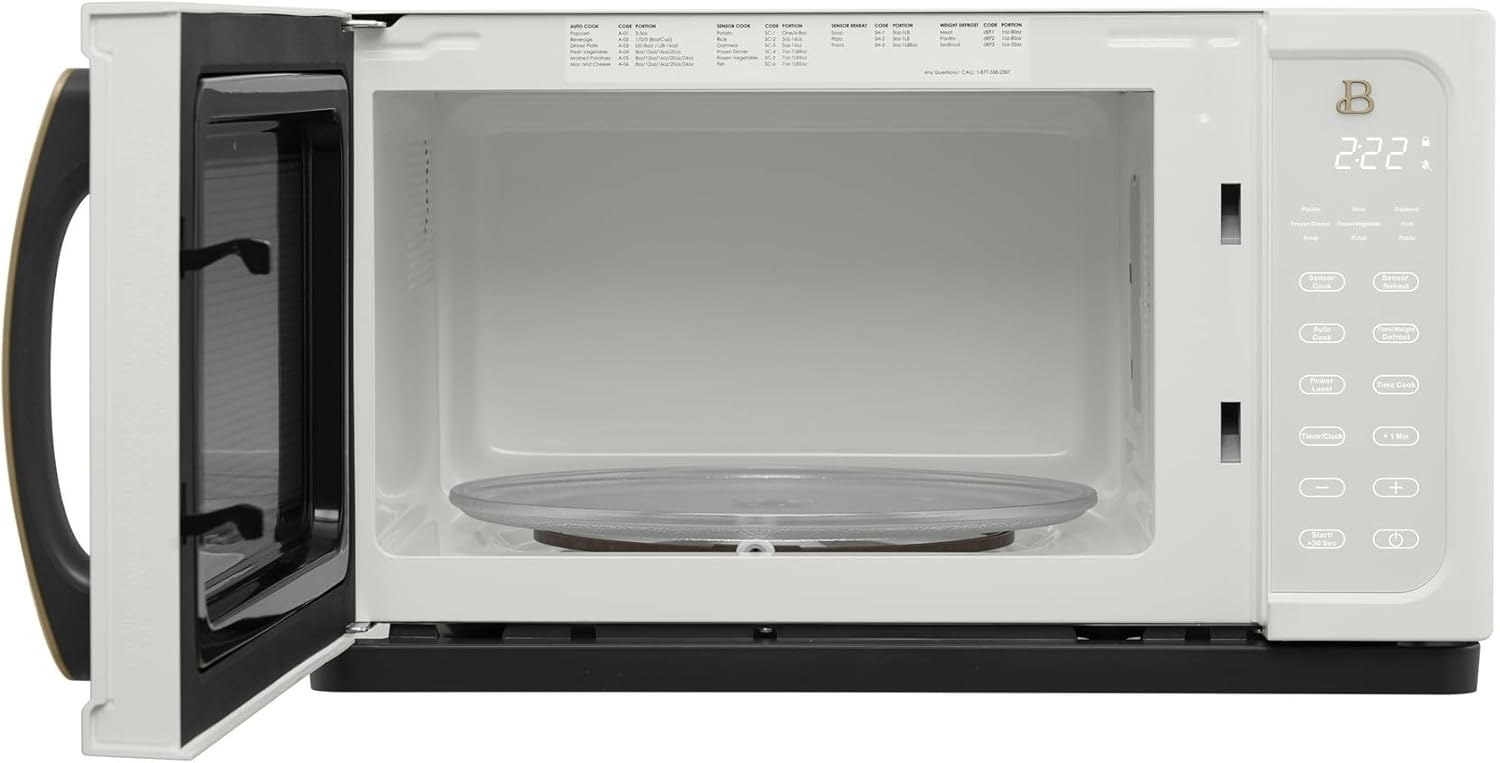
Image: Interior view of the microwave oven showing the glass turntable and roller ring in place.
- Place the roller ring in the center depression on the oven floor.
- Place the glass turntable on top of the roller ring, ensuring it sits securely in the center support.
- The turntable must always be used during operation.
Power Connection:
Plug the power cord into a standard 3-prong grounded electrical outlet. Do not use an extension cord or adapter.
Operating Instructions
Familiarize yourself with the control panel for optimal use of your microwave oven.

Image: Close-up view of the microwave's control panel with various function buttons and digital display.
Setting the Clock:
- Press the 'Time/Clock' button once.
- Use the number pads to enter the current time.
- Press 'Time/Clock' again to confirm.
Basic Microwave Cooking:
- Place food in a microwave-safe container on the turntable.
- Close the door securely.
- Enter the desired cooking time using the number pads.
- Press the 'Power Level' button and select the desired power level (1-10). For full power, skip this step.
- Press 'Start/+30 Sec' to begin cooking.
Sensor Cooking:
The sensor cooking feature automatically detects humidity released from food and adjusts cooking time for optimal results.
- Place food in the oven.
- Press the 'Sensor Cook' button.
- Select the desired food category (e.g., Potato, Rice, Frozen Vegetable).
- Press 'Start/+30 Sec'. The oven will automatically determine the cooking time.
Defrosting:
Use the defrost function to thaw frozen foods by weight or time.
- Weight Defrost: Press 'Time/Weight Defrost', enter the weight of the food, then press 'Start/+30 Sec'.
- Time Defrost: Press 'Time/Weight Defrost' twice, enter the defrosting time, then press 'Start/+30 Sec'.
Child Lock:
To activate the child lock, press and hold the 'Stop/Clear' button for 3 seconds. The lock indicator will appear on the display. To deactivate, press and hold 'Stop/Clear' again for 3 seconds.
Maintenance and Cleaning
Regular cleaning and maintenance will ensure the longevity and optimal performance of your microwave oven.
Exterior Cleaning:
Wipe the exterior surface with a damp cloth and mild soap. Avoid abrasive cleaners or harsh chemicals.
Interior Cleaning:
Clean the oven cavity regularly. For stubborn food splatters, place a cup of water with lemon slices in the oven and heat for 2-3 minutes. The steam will loosen food particles, making them easier to wipe away with a soft, damp cloth.
Turntable and Roller Ring:
The glass turntable and roller ring can be removed for cleaning. Wash them in warm, soapy water or in the dishwasher. Ensure they are completely dry before placing them back in the oven.
Troubleshooting
If you encounter issues with your microwave oven, refer to the following common problems and solutions:
| Problem | Possible Cause | Solution |
|---|---|---|
| Oven will not start | Power cord not plugged in; Door not closed properly; Fuse blown or circuit breaker tripped. | Ensure power cord is securely plugged in; Close door firmly; Check household fuse or reset circuit breaker. |
| Food not cooking evenly | Food not stirred or turned; Improper power level; Incorrect cooking time. | Stir or turn food halfway through cooking; Adjust power level; Adjust cooking time. |
| Turntable makes noise | Roller ring or turntable not positioned correctly; Debris under turntable. | Ensure roller ring and turntable are correctly seated; Clean under the turntable. |
| Display shows error code | Internal malfunction. | Unplug the oven for 30 seconds, then plug it back in. If the error persists, contact customer support. |
Specifications
Technical details for the Beautiful by Drew Barrymore 1.1 Cu Ft 1000 Watt Sensor Microwave Oven.

Image: Diagram illustrating the dimensions of the microwave oven: 21 inches (width), 12 inches (depth), and 17 inches (height).
| Feature | Detail |
|---|---|
| Model Number | BBDMWWI |
| Capacity | 1.1 Cubic Feet |
| Wattage | 1000 Watts |
| Voltage | 120 Volts |
| Product Dimensions (D x W x H) | 17 x 21 x 12 inches |
| Item Weight | 11 Pounds |
| Installation Type | Countertop |
| Material Type | Stainless Steel (Exterior), Metal (Interior) |
| Special Features | Auto Cook, Digital Control, One Touch Button, Sensor Cooking |
| Included Components | Roller Ring |
Warranty and Support
For warranty information or technical support, please refer to the warranty card included with your product or contact the manufacturer's customer service. Keep your purchase receipt for warranty claims.