
1. Introduction
Thank you for choosing the Edison 12 Liter Electric Pressure Cooker. This appliance is designed to provide efficient and convenient cooking for a variety of dishes. To ensure safe and optimal performance, please read this instruction manual thoroughly before first use and retain it for future reference. This manual contains important information regarding operation, maintenance, and safety precautions.
2. Important Safety Instructions
When using electrical appliances, basic safety precautions should always be followed to reduce the risk of fire, electric shock, and/or injury to persons, including the following:
- Read all instructions carefully before operating the appliance.
- Do not touch hot surfaces. Use handles or knobs.
- To protect against electrical shock, do not immerse cord, plugs, or the main unit in water or other liquid.
- Close supervision is necessary when any appliance is used by or near children.
- Unplug from outlet when not in use and before cleaning. Allow to cool before putting on or taking off parts.
- Do not operate any appliance with a damaged cord or plug, or after the appliance malfunctions or has been damaged in any manner.
- The use of accessory attachments not recommended by the appliance manufacturer may cause injuries.
- Do not use outdoors.
- Do not let cord hang over edge of table or counter, or touch hot surfaces.
- Do not place on or near a hot gas or electric burner, or in a heated oven.
- Extreme caution must be used when moving an appliance containing hot oil or other hot liquids.
- Always attach plug to appliance first, then plug cord into the wall outlet. To disconnect, turn any control to "off", then remove plug from wall outlet.
- Do not use appliance for other than intended use.
- This pressure cooker operates under pressure. Improper use may result in scalding injury. Make certain unit is properly closed before operating. See "Operating Instructions".
- Never force open the pressure cooker. Ensure internal pressure is completely released before opening. The built-in safety features prevent the pot from being opened until the steam is fully exhausted.
- Do not fill the unit over 2/3 full. When cooking foods that expand during cooking, such as rice or dried vegetables, do not fill the unit over 1/2 full. Overfilling may cause a risk of clogging the vent pipe and developing excess pressure.
- Be aware that certain foods, such as applesauce, cranberries, pearl barley, oatmeal or other cereals, split peas, noodles, macaroni, rhubarb, or spaghetti can foam, froth, and sputter, and clog the pressure release device. These foods should not be cooked in a pressure cooker.
- Always check the pressure release device for clogging before use.
- Do not use this pressure cooker for pressure frying with oil.
3. Product Overview
3.1 Components
The Edison Electric Pressure Cooker consists of the following main parts:
- Main Unit: The outer housing containing the heating element and control panel.
- Inner Pot: A removable stainless steel pot where food is cooked.
- Lid: The cover with a sealing gasket, pressure release valve, and float valve.
- Control Panel: Digital display and various function buttons for operation.
- Power Cord: For connecting the appliance to an electrical outlet.
3.2 Visual Reference

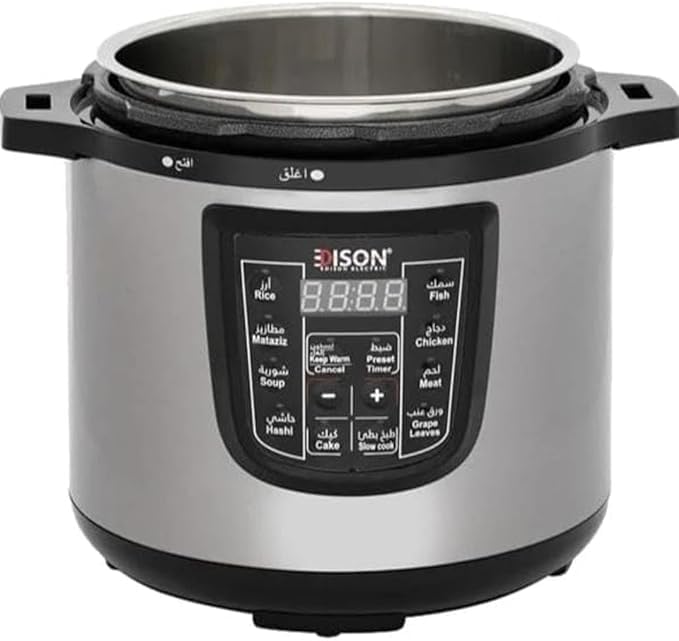
3.3 Control Panel Functions
The control panel features a digital display and several buttons for selecting cooking programs and settings:
- Digital Display: Shows cooking time, pressure level, and status indicators.
- Program Buttons: Dedicated buttons for various food types and cooking methods:
- Rice
- Matabiz
- Soup
- Hashi
- Cake
- Fish
- Chicken
- Meat
- Grape Leaves
- Slow Cook
- Keep Warm / Cancel: Initiates the automatic warming function or cancels the current cooking program.
- Preset / Timer: Used to set a delayed start time or adjust cooking duration.
- +/- Buttons: Adjusts cooking time or preset delay time.
4. Setup
4.1 Unpacking
Carefully remove all packaging materials from the pressure cooker. Inspect the appliance for any damage. Ensure all components listed in Section 3.1 are present.
4.2 Initial Cleaning
Before first use, wash the inner pot, lid, and sealing gasket with warm, soapy water. Rinse thoroughly and dry completely. Wipe the exterior of the main unit with a damp cloth. Do not immerse the main unit in water.
4.3 Assembly
- Place the inner pot into the main unit. Ensure it sits properly and is level.
- Check that the sealing gasket is correctly seated around the lid's rim.
- Align the lid with the main unit, ensuring the arrow on the lid aligns with the "Open" indicator on the main unit.
- Rotate the lid clockwise until it locks into place, aligning with the "Close" indicator.
- Ensure the pressure release valve is in the "Sealing" position for pressure cooking.
5. Operating Instructions
5.1 Before Each Use
- Ensure the inner pot is clean and properly placed.
- Verify the sealing gasket is clean and correctly installed in the lid.
- Check the pressure release valve and float valve for any obstructions.
5.2 Cooking with Preset Programs
- Add ingredients and liquid to the inner pot. Do not exceed the MAX fill line (2/3 full for most foods, 1/2 full for expanding foods).
- Secure the lid as described in Section 4.3. Ensure the pressure release valve is in the "Sealing" position.
- Plug the power cord into a grounded electrical outlet. The digital display will illuminate.
- Select the desired cooking program by pressing the corresponding button (e.g., Rice, Chicken, Soup). The display will show a default cooking time.
- If desired, adjust the cooking time using the +/- buttons.
- The cooker will automatically begin preheating. Once pressure is reached, the cooking timer will start counting down.
- Upon completion of the cooking cycle, the cooker will beep and automatically switch to the Keep Warm function.
5.3 Manual Operation (Pressure Cooking)
For recipes requiring specific pressure cooking times not covered by preset programs:
- Add ingredients and liquid to the inner pot and secure the lid.
- Plug in the cooker.
- Press the Preset / Timer button.
- Use the +/- buttons to set the desired cooking time.
- The cooker will begin preheating and then pressure cook for the set duration.
- After cooking, the cooker will automatically switch to Keep Warm.
5.4 Releasing Pressure
There are two methods for releasing pressure:
- Natural Release: Allow the cooker to cool down naturally. The pressure will gradually decrease, and the float valve will drop. This method is suitable for foods that benefit from additional cooking time, such as large cuts of meat.
- Quick Release: Carefully turn the pressure release valve to the "Venting" position. Steam will rapidly escape. CAUTION: Keep hands and face away from the steam vent. This method is suitable for delicate foods or when you need to stop cooking quickly.
The lid cannot be opened until the float valve has dropped, indicating that all internal pressure has been released. Do not attempt to force the lid open.
5.5 Keep Warm Function
The cooker automatically switches to the Keep Warm mode after cooking is complete. This function maintains the food at a serving temperature. To cancel, press the Keep Warm / Cancel button.
6. Cleaning and Maintenance
Proper cleaning and maintenance will extend the life of your pressure cooker.
- Always unplug the appliance and allow it to cool completely before cleaning.
- Inner Pot: The stainless steel inner pot is dishwasher safe. Alternatively, wash with warm, soapy water and a non-abrasive sponge. Rinse and dry thoroughly.
- Lid: Wash the lid, including the sealing gasket, pressure release valve, and float valve, with warm, soapy water. Pay special attention to cleaning any food particles from the valves. The sealing gasket can be removed for thorough cleaning and should be reinstalled correctly.
- Main Unit: Wipe the exterior of the main unit with a damp cloth. Do not immerse the main unit in water or any other liquid.
- Storage: Ensure all parts are clean and dry before storing. Store the lid inverted on the inner pot to prevent the gasket from compressing permanently.
7. Troubleshooting
If you encounter issues with your pressure cooker, refer to the following common problems and solutions:
| Problem | Possible Cause | Solution |
|---|---|---|
| Pressure not building up. | Lid not properly sealed; pressure release valve in "Venting" position; sealing gasket damaged or improperly installed; insufficient liquid. | Ensure lid is locked correctly. Turn pressure release valve to "Sealing". Check and adjust/replace sealing gasket. Add minimum required liquid. |
| Lid cannot be opened after cooking. | Internal pressure has not been fully released. | Allow pressure to release naturally or use quick release method. Do not force the lid. Wait until the float valve drops. |
| Food is undercooked. | Insufficient cooking time; too much food; pressure not maintained. | Increase cooking time. Reduce food quantity. Ensure proper pressure build-up. |
| Steam leaking from lid. | Sealing gasket dirty, damaged, or improperly installed; food debris on rim. | Clean and properly install the sealing gasket. Clean the lid rim. Replace gasket if damaged. |
If the problem persists, please contact customer support.
8. Specifications
| Brand | Generic (Edison) |
| Model | 12 Liter Electric |
| Capacity | 12 Liters |
| Power / Wattage | 1200 Watts |
| Material | Stainless steel |
| Control Method | Touch, Push Button |
| Operation Mode | Automatic |
| Special Features | Dishwasher Safe (inner pot), Locking Lid, 10 Cooking Programs, Automatic Keep Warm |
| ASIN | B0CPM9PFV4 |
9. Warranty and Support
Specific warranty information for this product may vary by region and retailer. Please refer to the warranty card included with your purchase or contact the retailer where you purchased the product for details regarding warranty coverage and claims.
For technical support or further assistance, please contact the customer service department of your retailer or the manufacturer, if contact information is provided with the product packaging.
