
Geloo B-8415A
Geloo Marine Stereo Radio Nautica B-8415A User Manual
Waterproof AM/FM MP5 Player with 4.1-inch Digital Display
Introduction
This manual provides detailed instructions for the installation, operation, and maintenance of your Geloo Marine Stereo Radio Nautica B-8415A. Please read this manual thoroughly before using the product to ensure proper function and to prevent damage.
The Geloo Marine Stereo Radio Nautica is a versatile and durable audio-visual system designed for marine and various vehicle applications. It features AM/FM radio, MP3/MP5 playback, Bluetooth connectivity, and a 4.1-inch digital display, all within an IPX67 waterproof and dustproof enclosure.
Safety Information
- Ensure the power supply is disconnected before installation or maintenance to prevent electric shock.
- Install the unit in a location that does not obstruct visibility or interfere with vehicle operation.
- Use appropriate tools and follow wiring diagrams carefully to avoid short circuits or damage.
- This unit is IPX67 waterproof, but avoid submerging it or exposing it to high-pressure water jets.
- Do not attempt to disassemble or modify the unit. This will void the warranty and may cause damage.
- Keep the unit away from extreme temperatures, direct sunlight for prolonged periods, and corrosive substances.
Package Contents
Verify that all items are present in the package:
- Marine Stereo Player
- Instruction Manual
- Remote Control
- Mounting Bracket
- Power Cord
- Long Screws (for mounting)
- Packing Box

Figure 1: Package Contents
Product Overview
The Geloo Marine Stereo Radio Nautica B-8415A features a compact design with a 4.1-inch digital display and intuitive controls. Its robust construction ensures durability in marine environments.

Figure 2: Front View of the Marine Stereo Player
Key Features:
- Marine Stereo Radio: Wireless AM/FM radio with automatic search, manual fine-tuning, and automatic channel storage.
- Waterproof and Dustproof: IPX67 rated for protection against water and dust.
- MP5 Player: Supports MP3, MP5, and FM functions, including mobile phone connections, USB disk playback, AUX inputs, RCA outputs, and SUB outputs. Supports FLAC lossless audio.
- 4.1-inch LCD Screen: High-definition display for MP5 movies and videos.
- Wide Application: Suitable for boats, yachts, motorcycles, cars, ATVs, UTVs, SUVs, RVs, golf carts, campers, RZRs, harvesters, and trucks.
Installation
Dimensions:
Before installation, ensure adequate space is available for the unit. Refer to the dimensions below:

Figure 3: Product Dimensions
Wiring Diagram:
Connect the power cord and audio cables according to the diagram. Ensure all connections are secure and properly insulated.

Figure 4: Basic Key Functions and Wiring Introduction
- Power Connection: Connect the yellow wire to the constant 12V power supply, the red wire to the accessory 12V power supply (switched), and the black wire to ground.
- Speaker Connections: Connect speaker wires to the corresponding positive and negative terminals. Ensure correct polarity.
- Antenna: Connect the AM/FM antenna to the designated input.
- AUX Input: Use the AUX input for external audio devices.
- RCA Output: Connect to external amplifiers for additional speakers.
- SUB Output: Connect to a subwoofer for enhanced bass.
Operating Instructions
General Controls:
- Power/SEL/VOL knob: Press to power on/off, rotate to adjust volume, press to select menu options.
- MODE button: Press to cycle through input modes (Radio, Bluetooth, USB, AUX).
- BAND/AV button: In radio mode, press to change radio bands (FM1, FM2, FM3, AM1, AM2). In video mode, press for AV options.
- MENU button: Access system settings and options.
- CH+/CH- buttons: In radio mode, short press to tune to the next/previous preset station; long press to seek. In playback mode, short press for next/previous track.
- Play/Pause button: Play or pause media playback.
- AMS button: Automatic Memory Store for radio stations.
Radio Operation (AM/FM):
- Press the MODE button to select "Radio" mode.
- Press the BAND/AV button to select the desired band (FM1, FM2, FM3, AM1, AM2).
- Automatic Search: Long press the CH+ or CH- buttons to automatically search for the next or previous strong station.
- Manual Tuning: Short press the CH+ or CH- buttons to manually tune the frequency step by step.
- Store Presets: Long press a number button (1-6) to store the current station to that preset. Short press to recall a stored station.
- Automatic Memory Store (AMS): Press the AMS button to automatically scan and store the strongest stations in the current band to presets.
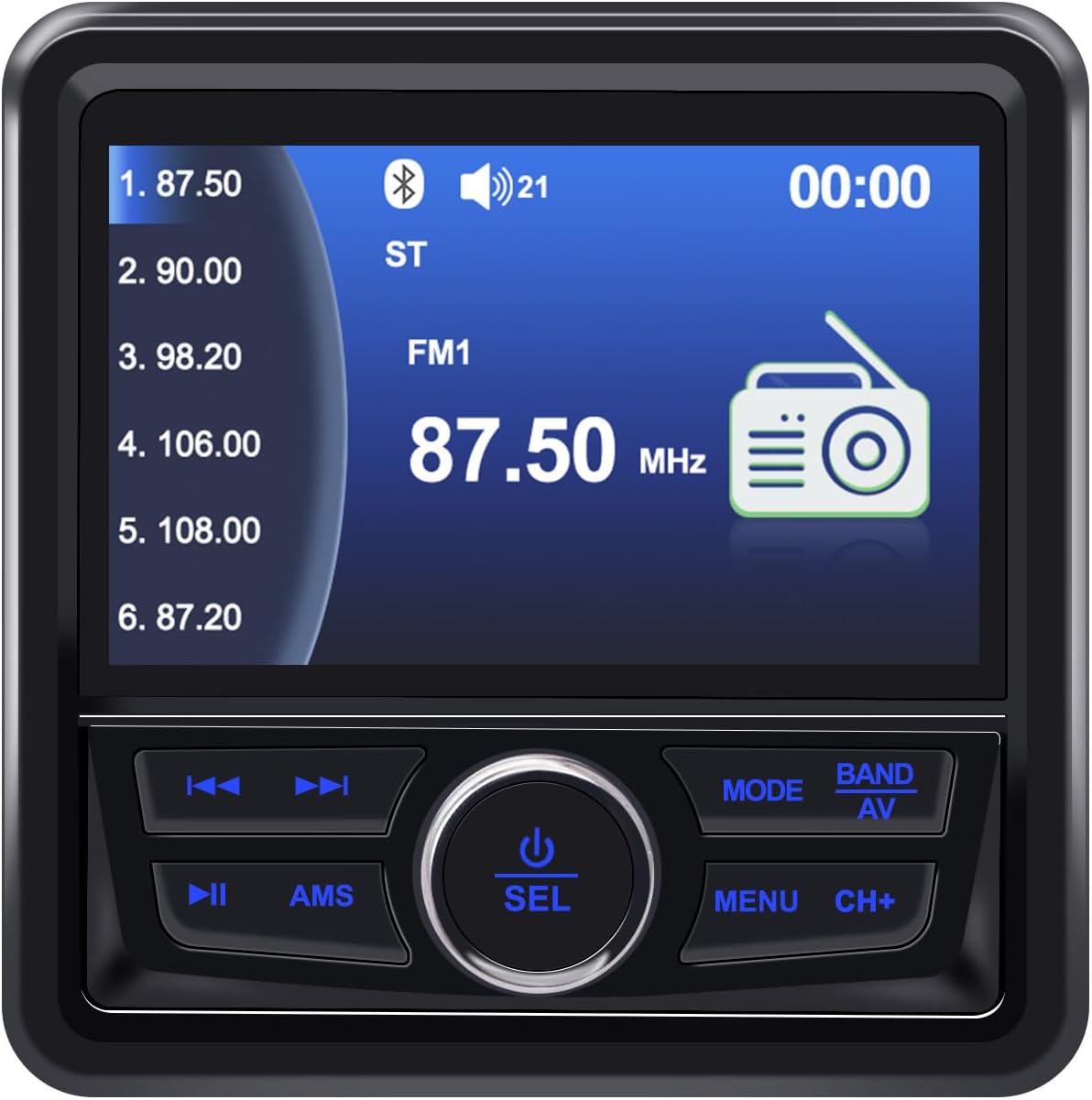
Figure 5: FM Radio Display
Bluetooth Operation:
- Press the MODE button to select "BT" (Bluetooth) mode.
- On your mobile device, enable Bluetooth and search for available devices.
- Select "Geloo Marine Stereo" (or similar name) from the list to pair.
- Once paired, you can play audio from your device through the stereo. Use the CH+, CH-, and Play/Pause buttons to control playback.

Figure 6: Bluetooth Music Playback
USB/MP5 Playback:
- Insert a USB drive containing MP3/MP5 files into the USB port. The unit will automatically switch to USB mode or you can select it using the MODE button.
- Use the CH+ and CH- buttons to navigate between tracks or video files.
- Press the Play/Pause button to start or pause playback.
- The 4.1-inch LCD screen will display video content for MP5 files.

Figure 7: MP5 Video Playback
AUX Input:
- Connect an external audio device to the AUX input using a 3.5mm audio cable.
- Press the MODE button to select "AUX" mode.
- Control playback from the connected external device.
Maintenance
- Cleaning: Use a soft, damp cloth to clean the unit's surface. Do not use abrasive cleaners or solvents.
- Screen Care: Wipe the screen gently with a microfiber cloth. Avoid pressing hard on the screen.
- Connections: Periodically check all wiring connections for corrosion or looseness, especially in marine environments.
- Storage: If the unit will not be used for an extended period, ensure it is clean and stored in a dry, cool place.
Troubleshooting
| Problem | Possible Cause | Solution |
|---|---|---|
| No power | Incorrect wiring; Blown fuse; Low battery voltage. | Check power connections (yellow, red, black wires). Replace fuse if blown. Verify battery voltage. |
| No sound | Volume too low; Mute activated; Speaker wires disconnected; Incorrect input mode. | Increase volume. Deactivate mute. Check speaker connections. Select correct input mode. |
| Poor radio reception | Antenna not connected; Weak signal area; Damaged antenna. | Ensure antenna is properly connected. Try moving to an area with better signal. Inspect antenna for damage. |
| Bluetooth not connecting | Bluetooth not enabled on device; Unit not in BT mode; Device too far. | Enable Bluetooth on your device. Switch stereo to BT mode. Ensure device is within range. |
| USB not playing | Unsupported file format; USB drive corrupted; USB drive not inserted correctly. | Ensure files are in supported formats (MP3, MP5, FLAC). Try a different USB drive. Reinsert USB drive. |
| Screen fogging/dust inside | Improper installation; Seal compromised. | Ensure proper sealing during installation. If fogging persists, contact support. |
Specifications
| Feature | Detail |
|---|---|
| Brand | Geloo |
| Model Number | B-8415A |
| Color | Black |
| Special Features | ARC, FM Tuner |
| Connectivity Technology | Bluetooth (BT), USB |
| Tuner Technology | DAB/DAB+ (Broadcast System) |
| Power Source | Corded Electric |
| Supported Radio Bands | AM (522-1620 KHz), FM (87.5-108 MHz) |
| Included Components | Player |
| Compatible Devices | Television (likely refers to video output capability) |
| Audio Output Mode | Stereo |
| Screen Type | LCD |
| Manufacturer | Geloo |
| Manufacturer Part Number | B-8415 |
Application Examples:

Figure 8: Wide Range of Applications
Warranty Information
Geloo products are designed for quality and reliability. Specific warranty terms and conditions may vary by region and retailer. Please retain your proof of purchase for warranty claims.
For detailed warranty information, please refer to the warranty card included with your product or contact Geloo customer support.
Customer Support
If you encounter any issues or have questions regarding your Geloo Marine Stereo Radio Nautica B-8415A that are not covered in this manual, please contact our customer support team.
Contact information can typically be found on the product packaging, the official Geloo website, or through your retailer.
Please have your model number (B-8415A) and purchase details ready when contacting support.
Ask a question about this manual
Ask about setup, troubleshooting, compatibility, parts, safety, or missing instructions. Manuals+ will review the question and use this page’s manual context to help answer it.