
Geloo b94bd7ad-2885-4afa-bd4f-d3eb2f3b55ef
Geloo Marine Stereo Receiver User Manual
Model: b94bd7ad-2885-4afa-bd4f-d3eb2f3b55ef
Introduction
This user manual provides detailed instructions for the installation, operation, and maintenance of your Geloo Marine Stereo Receiver. Please read this manual thoroughly before using the product to ensure proper function and longevity. This digital media MP5 player is designed for marine environments, offering waterproof features, wireless connectivity, and multimedia playback capabilities.
Safety Information
Always observe the following safety precautions to prevent injury or damage to the unit:
- Ensure the power supply is disconnected before installation or maintenance.
- Do not expose the unit to extreme temperatures or direct sunlight for prolonged periods.
- Use only specified voltage (DC 12V) for operation.
- Professional installation is recommended for optimal performance and safety.
- Keep the unit away from flammable materials.
Package Contents
Verify that all items are present in the package:
- Geloo Marine Stereo Receiver (Main Unit)
- Power Cord
- Remote Control
- Mounting Bracket
- Long Screws (for mounting)
- User's Manual (this document)

Image showing the Geloo Marine Stereo Receiver and its included accessories: the main unit, remote control, power cord, mounting bracket, screws, and the user manual.
Setup
Dimensions and Mounting
The unit has dimensions of 5.5 x 5.5 x 5.5 inches. Ensure adequate space for installation and ventilation. The provided mounting bracket can be used for secure installation.

Diagram illustrating the dimensions of the Geloo Marine Stereo Receiver, including its front face and side profile measurements for installation planning.
Wiring Instructions
Refer to the wiring diagram for correct connections. Incorrect wiring can damage the unit or vehicle's electrical system. The unit operates on a DC 12V power supply.

Detailed wiring diagram for the Geloo Marine Stereo Receiver, indicating connections for power (DC 12V), speaker outputs (front and rear), AUX input, USB input, RCA audio output, and video input/output.
Initial Power On and Interface Overview
After successful wiring, power on the unit. The 4.1-inch LCD display will show the welcome screen, followed by the main interface. Navigate through modes using the physical buttons and the rotary knob.
Video demonstrating the initial power-on sequence and basic interface navigation of the Geloo Marine Stereo Receiver, showing how to switch between different modes like radio, Bluetooth, and media playback.
Operating Instructions
Button Functions
Familiarize yourself with the buttons on the unit and the remote control for seamless operation.

Illustration detailing the function of each button on the main unit and the remote control, including power, volume, mode selection, track control, and menu navigation.
Wireless Connection (Bluetooth)
The unit features Bluetooth 5.0 for wireless audio streaming. To connect your device:
- Turn on the unit and select the Bluetooth mode.
- Enable Bluetooth on your mobile device (phone, tablet, etc.).
- Search for "CAR BT" in your device's Bluetooth settings and pair.
- Once connected, you can stream audio from your device.

Image showing the Geloo Marine Stereo Receiver wirelessly connected to a smartphone, demonstrating music playback via Bluetooth.
AM/FM Radio Operation
Select the Radio mode to access AM/FM tuning. Use the channel buttons to scan for stations or manually tune to a frequency. The digital anti-interference IC module enhances signal reception.
Multimedia Playback (USB/AUX)
Connect USB drives or AUX devices to play audio and video files. The unit supports MP5 format for video playback.
- USB: Insert a USB drive into the designated port. The unit will automatically detect and play compatible media.
- AUX: Connect an external audio source using a 3.5mm AUX cable to the AUX input.
Audio Settings (EQ)
Adjust audio output settings such as bass, treble, balance, and fader using the built-in equalizer (EQ) to customize your listening experience. The maximum power output is 4x 50W.
Maintenance
Cleaning the Unit
Wipe the unit with a soft, damp cloth. Do not use abrasive cleaners or solvents. The unit's waterproof design (IPX5) allows for easy cleaning of the surface.
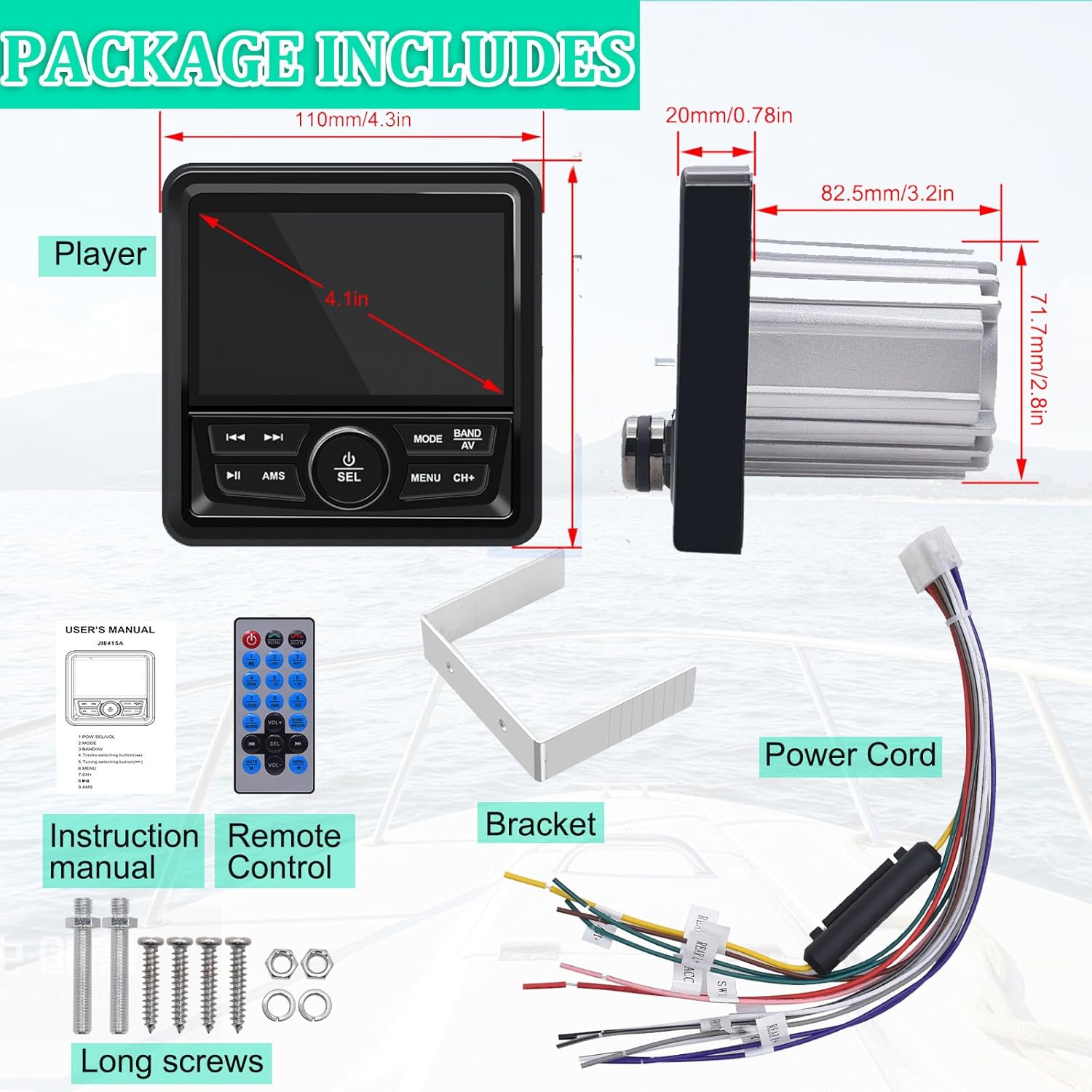
Image highlighting the dustproof and waterproof capabilities of the Geloo Marine Stereo Receiver, indicating its suitability for harsh environments.
Waterproof Feature Demonstration
The unit is designed to withstand water splashes and humid conditions, making it ideal for marine use. Avoid submerging the unit.
Video demonstrating the waterproof capabilities of the Geloo Marine Stereo Receiver, showing water being splashed onto the unit without affecting its operation.
Troubleshooting
| Problem | Possible Cause | Solution |
|---|---|---|
| No Power | Incorrect wiring; Blown fuse; Low battery voltage. | Check power connections (DC 12V). Inspect and replace fuse if necessary. Verify battery voltage. |
| No Sound | Incorrect speaker wiring; Volume too low; Mute function active. | Ensure speakers are correctly connected. Increase volume. Deactivate mute. |
| Poor Radio Reception | Antenna not connected or damaged; Weak signal area; Interference. | Check antenna connection. Relocate to an area with better signal. Identify and reduce sources of interference. |
| Bluetooth Connection Issues | Device not in pairing mode; Out of range; Interference. | Ensure unit is in Bluetooth mode and device is discoverable. Move device closer to the unit. Restart both devices. |
| Screen Blank/Unresponsive | Power issue; Software glitch. | Check power supply. Try resetting the unit (if a reset button is available, otherwise disconnect power for a few minutes). If problem persists, contact support. |
If the problem persists after attempting these solutions, please contact Geloo customer support.
Specifications
- Product Dimensions: 5.5 x 5.5 x 5.5 inches
- Item Weight: 1.59 pounds
- Model Number: b94bd7ad-2885-4afa-bd4f-d3eb2f3b55ef
- Brand: Geloo
- Connectivity Technology: Auxiliary, USB, Wireless (Bluetooth 5.0)
- Controller Type: Hand Control, Push Button
- Special Features: IPX5 Water Resistant, HD Video Play, USB AUX-in, Equalizer, Subwoofer Output, 4.1 Inch Digital Display Screen, Multi Color Illumination, MUTE Control, FM AM Tuner, Support MP5 music format, Super electronic anti-shock
- Compatible Devices: Amplifier, Smartphone, Speaker
- Connector Type: RCA
- Audio Output Mode: Stereo
- Surround Sound Channel Configuration: 2.1
- Video Encoding: H.264, H.265 (HEVC)
- Color: Black
- Maximum Power Output: 4x 50W
- Working Voltage: DC 12V
Warranty and Support
Geloo products are designed for reliability and performance. For warranty information and technical support, please refer to the official Geloo website or contact your retailer. Keep your purchase receipt as proof of purchase for warranty claims.
For further assistance, you may visit the official Geloo Store: Geloo Store on Amazon.
Ask a question about this manual
Ask about setup, troubleshooting, compatibility, parts, safety, or missing instructions. Manuals+ will review the question and use this page’s manual context to help answer it.