
PAWPRO ALPHA1
PAWPRO Bark Control Collar User Manual
Model: ALPHA1
Introduction
Thank you for choosing the PAWPRO Bark Control Collar. This device is designed to help manage your dog's excessive barking through humane and safe methods, adhering to animal welfare regulations. It features advanced Artificial Intelligence for accurate bark detection and offers multiple correction modes without electric shock.
This manual provides detailed instructions for the proper setup, operation, and maintenance of your PAWPRO collar to ensure optimal performance and the well-being of your pet.
Product Features
- Humane Correction Modes: Offers Beep, Vibration, and Beep+Vibration modes. No electric shock.
- Artificial Intelligence Bark Detection: Advanced AI and sensors filter external noise, accurately detecting your dog's barks and preventing accidental triggers.
- Color Display Screen: Premium color screen for easy monitoring and setting adjustments.
- Automatic Operation: 100% automatic learning program for gradual bark correction.
- Adjustable Sensitivity: Features 5 effective sensitivity levels to adapt to different barking behaviors.
- Wide Compatibility: Suitable for dogs of all sizes and breeds, from 2kg to 70kg.
- Durable & Waterproof: IPX7 waterproof rating, lightweight, adjustable, and made from hypoallergenic materials for optimal comfort.
- Long Battery Life: Recharges in 2 hours and offers up to 15 days of autonomy.
Package Contents
Please check the package contents upon unboxing:
- PAWPRO Bark Control Collar Unit
- Adjustable Nylon Strap
- Magnetic Charging Cable
- Protective Skin Caps (for contact points)
- User Manual (this document)

Image: The PAWPRO Bark Control Collar, showing the main unit, adjustable strap, and product packaging. The collar features a digital display and is presented with a dog in the background, emphasizing its purpose.
Setup Guide
1. Charging the Collar
Before first use, fully charge the collar. Connect the magnetic charging cable to the charging port on the collar and plug the USB end into a standard USB power adapter (not included). The screen will indicate charging status. A full charge takes approximately 2 hours.

Image: The PAWPRO Bark Control Collar unit shown with its magnetic charging cable, illustrating how to connect it for charging. The image highlights the magnetic connection point on the collar.
2. Attaching the Strap
Thread the adjustable nylon strap through the loops on the collar unit. Ensure the strap is securely fastened.
3. Fitting the Collar on Your Dog
Proper fit is crucial for the collar's effectiveness and your dog's comfort. The collar should be snug but not too tight. You should be able to fit one or two fingers comfortably between the collar and your dog's neck. The contact points on the back of the collar unit should touch your dog's skin. If your dog has long fur, you may need to trim the fur slightly around the contact points to ensure good contact.
Important: Do not leave the collar on your dog for more than 12 hours a day. Regularly check your dog's neck for any signs of irritation or pressure sores. If irritation occurs, discontinue use and consult a veterinarian.

Image: A dog wearing the PAWPRO Bark Control Collar, demonstrating the correct placement and fit around the neck. The collar unit is visible on the front of the dog's throat.
Operating Instructions
1. Powering On/Off
To power on the collar, press and hold the power button (usually located on the side or front of the unit) until the screen illuminates. To power off, press and hold the power button again until the screen turns off.
2. Understanding the Display Screen
The color display screen provides key information:
- Battery Indicator: Shows the current battery level.
- Sensitivity Level: Displays the current sensitivity setting (1-5).
- Mode Indicator: Shows the active correction mode (Beep, Vibration, or Beep+Vibration).
- Bark Counter: May display the number of barks detected (refer to specific model features).

Image: A detailed close-up of the PAWPRO Bark Control Collar's color display screen, showing icons for sound, vibration, battery level, and sensitivity setting (e.g., '5 Sensitivity').
3. Adjusting Sensitivity Levels
The collar has 5 sensitivity levels. A higher number indicates higher sensitivity, meaning the collar will trigger with softer barks. Adjust the sensitivity based on your dog's barking volume and the environment. Use the '+' and '-' buttons (or equivalent) on the collar to cycle through sensitivity levels.
- Level 1: Lowest sensitivity, for very loud barks.
- Level 5: Highest sensitivity, for soft barks or whispers.
4. Selecting Correction Modes
The PAWPRO collar offers three humane correction modes:
- Beep Mode: Emits an audible tone when barking is detected. This mode often serves as an initial warning.
- Vibration Mode: Delivers a gentle vibration when barking is detected.
- Beep + Vibration Mode: Combines both an audible tone and vibration. This is often the most effective mode for many dogs.
Refer to the collar's interface or specific buttons to switch between these modes. The collar's AI system will gradually increase the intensity within the chosen mode if barking persists, providing a progressive learning experience for your dog.
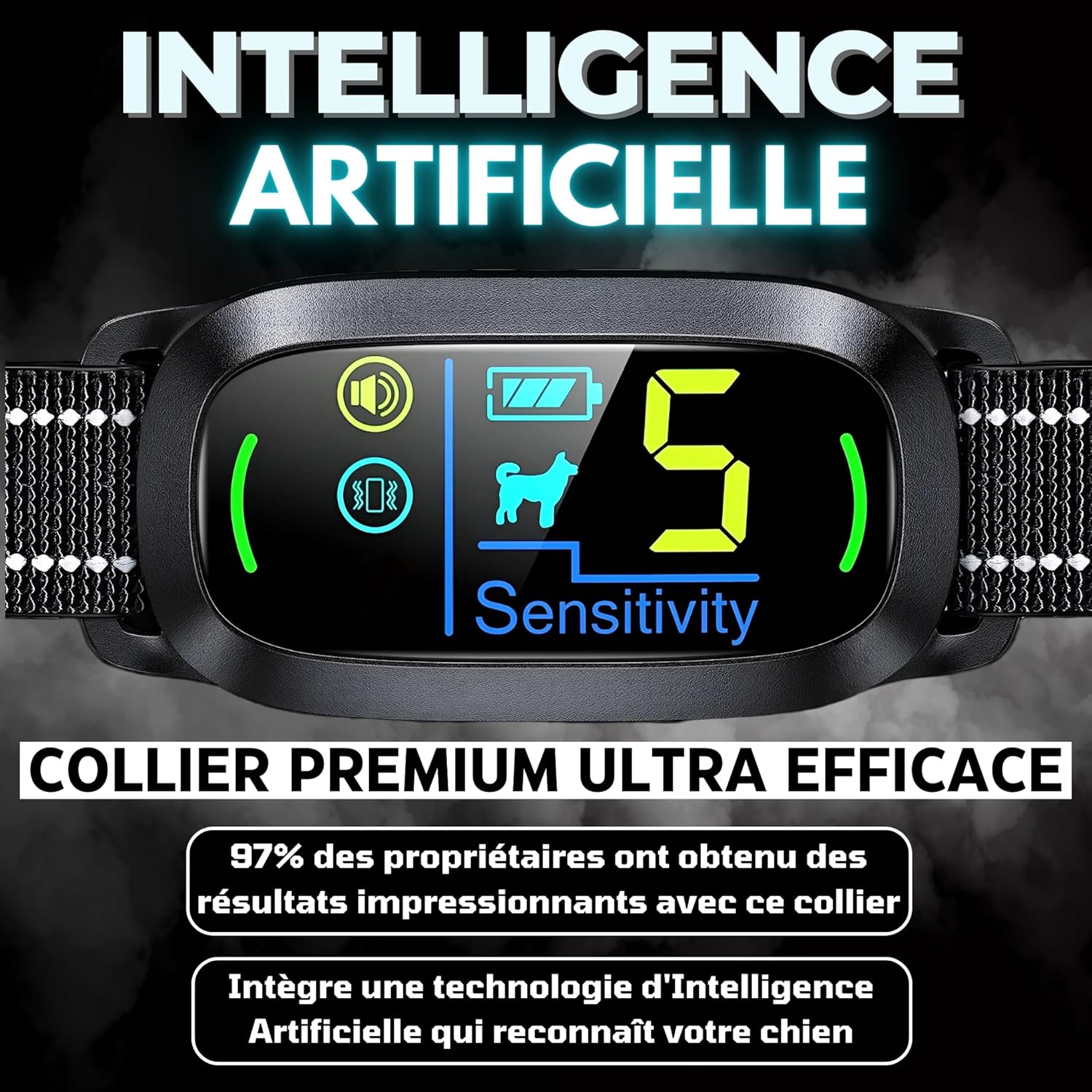
Image: An illustrative image of the PAWPRO Bark Control Collar, highlighting the three respectful functions: Beep (6 modes), Vibration (3 modes), and Beep + Vibration (6 modes), indicating the progressive nature of the correction.
Maintenance
- Cleaning: Wipe the collar unit with a soft, damp cloth. Do not use harsh chemicals or abrasive cleaners. The strap can be hand-washed with mild soap and water.
- Regular Inspection: Periodically check the collar for any signs of wear and tear, especially the strap and contact points.
- Skin Health: Regularly inspect your dog's neck area where the collar sits for any redness, irritation, or sores. If any issues are observed, remove the collar immediately and consult a veterinarian.
- Storage: When not in use for extended periods, store the collar in a cool, dry place. Ensure it is fully charged before storing to preserve battery life.
Troubleshooting
| Problem | Possible Cause | Solution |
|---|---|---|
| Collar not turning on. | Low battery; Power button not pressed correctly. | Charge the collar fully. Press and hold the power button firmly for a few seconds. |
| Collar not activating when dog barks. | Collar too loose; Sensitivity too low; External noise interference. | Adjust the collar for a snug fit. Increase sensitivity level. Ensure the collar is not picking up other loud noises. |
| Collar activating without dog barking. | Sensitivity too high; Collar picking up other sounds (e.g., other dogs barking, loud noises). | Decrease sensitivity level. Test the collar in a quieter environment. The AI is designed to filter external noise, but extreme conditions might affect it. |
| Battery life is shorter than expected. | Frequent activation; Old battery; Extreme temperatures. | Reduce sensitivity if collar is over-activating. Ensure full charge cycles. Avoid extreme temperatures. If issues persist, contact customer support. |
Specifications
| Feature | Detail |
|---|---|
| Model Number | ALPHA1 |
| Brand | PAWPRO |
| Recommended for Species | All dog breeds |
| Weight | 180 grams (approx.) |
| Waterproof Rating | IPX7 |
| Charging Time | Approx. 2 hours |
| Battery Autonomy | Up to 15 days |
| Correction Modes | Beep, Vibration, Beep+Vibration (No electric shock) |
| Sensitivity Levels | 5 levels |
| Compatibility | Dogs from 2kg to 70kg |
Warranty and Support
PAWPRO products are designed for quality and durability. Your PAWPRO Bark Control Collar is protected by a Long-Term Warranty. For warranty claims, technical support, or any questions regarding your product, please contact PAWPRO customer service.
As a French brand, PAWPRO offers responsive customer service. Please refer to the contact information provided on the product packaging or the official PAWPRO website for assistance.
Important Notes
- This collar is designed to assist in training and should not be used as a punishment tool.
- Always supervise your dog, especially during the initial training phase.
- Ensure the collar is removed or turned off when not needed to prevent over-correction or desensitization.
- Consult with a professional dog trainer or veterinarian if you encounter persistent behavioral issues or have concerns about your dog's health.
Related documentsALPHA1


Ask a question about this manual
Ask about setup, troubleshooting, compatibility, parts, safety, or missing instructions. Manuals+ will review the question and use this page’s manual context to help answer it.