
1. Introduction
Thank you for choosing the Newday 142 cm White Ceiling Fan. This manual provides essential information for the safe installation, operation, and maintenance of your new ceiling fan. Please read these instructions thoroughly before installation and keep them for future reference.
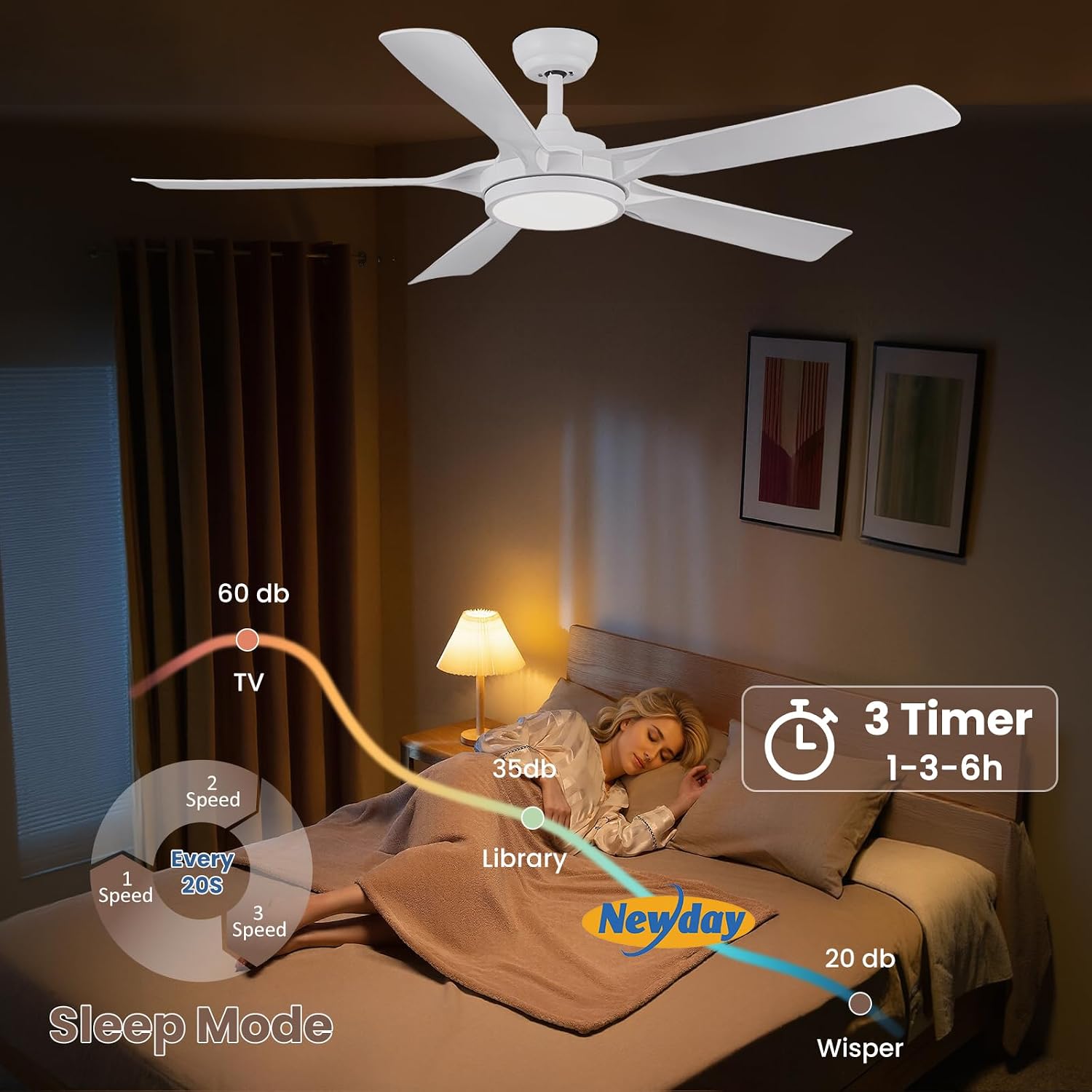
Image 1.1: The Newday 142 cm White Ceiling Fan, showcasing its modern design and integrated LED light.
2. Safety Information
Always follow basic safety precautions when installing and operating electrical appliances to reduce the risk of fire, electric shock, and personal injury.
- Ensure the power supply is disconnected before installation, cleaning, or maintenance.
- Installation must be performed by a qualified electrician in accordance with local electrical codes.
- The mounting structure must be capable of supporting the weight of the fan (approximately 8.59 kg).
- Do not insert objects into the fan blades while the fan is operating.
- This fan is designed for indoor use only.
3. Package Contents
Verify that all components are present and undamaged before beginning installation.
- Ceiling Fan Unit with 5 ABS Blades
- Integrated Dimmable LED Light
- Remote Control (requires 2 AAA batteries, included)
- Mounting Hardware
- User Manual
4. Installation
This section outlines the general steps for installing your Newday ceiling fan. Professional installation is recommended.
- Prepare the Mounting Location: Ensure the ceiling junction box is securely mounted and can support the fan's weight. The fan can be installed on flat ceilings or sloped ceilings up to 15 degrees.
- Install the Mounting Bracket: Attach the mounting bracket to the ceiling junction box using the provided hardware.
- Assemble the Fan: Attach the fan blades to the motor housing. Connect the LED light assembly.
- Wire the Fan: Connect the fan's electrical wires to the household wiring according to the wiring diagram in the full installation guide (not included in this summary). Ensure all connections are secure.
- Mount the Fan: Carefully lift the fan assembly and hang it on the mounting bracket. Secure the fan to the bracket.
- Test Operation: Restore power and test the fan and light functions using the remote control.

Image 4.1: This image illustrates the fan's dimensions (142 cm width, 32 cm height), recommended room size (16-36 m²), and compatible mounting types (flat mount and slope mount up to 15°).
5. Operating Instructions
Your Newday ceiling fan is controlled by a remote control, offering convenience and a range of customizable settings.
5.1 Remote Control Functions
- Power On/Off: Turns the fan and light on or off.
- Fan Speed Control: Adjusts between 6 fan speeds (77, 96, 121, 145, 163, and 185 RPM).
- Light On/Off: Controls the LED light independently.
- Light Color Temperature Adjustment: Cycles through 3 color temperatures: 3000K (Warm White), 4000K (Natural Light), and 6500K (Cool White).
- Light Brightness Dimming: Adjusts LED brightness from 20% to 100%.
- Timer Function: Set the fan to turn off automatically after 1, 3, or 6 hours.
- Reversible Function (Summer/Winter Mode): Changes the direction of blade rotation.
5.2 Fan Speed Control
The fan offers 6 adjustable speeds to suit your comfort needs. Speed 1-2 provides a gentle breeze, 3-4 a natural wind, and 5-6 a strong cooling wind, with a maximum air volume of 8000 CFM.

Image 5.1: This image details the 6 adjustable fan speeds, categorized into Slow (1-2), Medium (3-4), and Fast (5-6) settings, along with their respective RPM ranges and power consumption. The maximum air volume is 7000 CFM.
5.3 Light Control
The integrated 24W LED light is dimmable from 20% to 100% and offers three color temperatures: 3000K (Warm White, 2080 LM), 4000K (Natural Light, 2474 LM), and 6500K (Cool White, 2194 LM).

Image 5.2: This image demonstrates the stepless adjustable color temperature (3000K, 4200K, 6500K) and brightness (20% to 100%) of the fan's LED light.
5.4 Timer and Quiet Operation
The fan features a 1, 3, or 6-hour timer for convenient automatic shut-off. The DC motor ensures quiet operation, making it suitable for bedrooms and other quiet environments. The fan also has a memory function that recalls the last setting after power off.

Image 5.3: This image highlights the fan's sleep mode, indicating low noise levels (as low as 20 dB) and the 1, 3, or 6-hour timer function.
5.5 Reversible Function (Summer/Winter Use)
The fan includes a reversible motor for year-round comfort. In summer, the fan rotates counter-clockwise to create a cooling downdraft. In winter, it rotates clockwise to circulate warm air trapped near the ceiling, balancing room temperature.

Image 5.4: This image visually explains the reversible function, showing counter-clockwise rotation for rapid cooling in summer and clockwise rotation for balancing heating in winter.
6. Maintenance
Regular maintenance ensures optimal performance and extends the lifespan of your ceiling fan.
- Cleaning: Dust the fan blades and motor housing periodically with a soft, damp cloth. Do not use abrasive cleaners or solvents.
- Blade Balance: If the fan wobbles, check that all blade screws are tight and that the blades are properly balanced.
- Light Source: The LED light source is replaceable. Refer to the full service manual for instructions on how to change it.
- Power Disconnection: Always disconnect power at the circuit breaker before performing any cleaning or maintenance.
7. Troubleshooting
If you encounter issues with your fan, refer to the following common problems and solutions:
| Problem | Possible Cause | Solution |
|---|---|---|
| Fan does not start | No power supply; Remote control batteries dead; Incorrect wiring. | Check circuit breaker; Replace remote batteries; Verify wiring connections. |
| Light does not work | LED light source faulty; Incorrect wiring. | Replace LED light source; Verify wiring connections. |
| Fan wobbles | Loose blade screws; Unbalanced blades; Loose mounting bracket. | Tighten all blade screws; Balance blades using a balancing kit (not included); Ensure mounting bracket is secure. |
| Remote control not working | Dead batteries; Remote not paired. | Replace batteries (2 AAA); Refer to the full manual for remote pairing instructions. |
If problems persist, contact customer support.
8. Specifications
| Brand | Newday |
| Model Number | ND-56-1126WT-DE |
| Dimensions (L x W x H) | 142 x 142 x 35.5 cm |
| Net Weight | 8.59 kg |
| Blade Material | ABS |
| Housing Material | Acrylonitrile Butadiene Styrene, Acrylic, Metal |
| Color | White |
| Motor Type | DC Motor |
| Fan Speeds | 6 speeds (77, 96, 121, 145, 163, 185 RPM) |
| Max Air Volume | 8000 CFM |
| Light Type | Integrated Dimmable LED |
| LED Wattage | 24 Watts |
| Brightness Range | 20% - 100% |
| Color Temperatures | 3000K (Warm White), 4000K (Natural Light), 6500K (Cool White) |
| Max Luminous Flux | 2474 Lumens (at 4000K) |
| Control Method | Remote Control |
| Timer Settings | 1h, 3h, 6h |
| Installation Slope | Up to 15° |
| Power Source | Corded Electric |
| Remote Batteries | 2 AAA (included) |
| Energy Label | F |
9. Warranty and Support
Newday is committed to providing quality products and excellent customer service. While specific warranty details are not provided in this document, please retain your proof of purchase for any warranty claims.
For technical assistance, troubleshooting beyond this manual, or to inquire about warranty service, please contact Newday customer support through the retailer where the product was purchased or visit the official Newday website.