1. Introduction
This manual provides detailed instructions for the OUGETHER 13-in-1 WiFi Air Quality Monitor. This device is designed to detect various air quality parameters in real-time, including CO2, TVOC, HCHO, PM2.5, PM1.0, PM10, temperature, and humidity. It also features time and date display, alarm clock, timer, and stopwatch functions, with support for remote monitoring via the Tuya Smart APP.
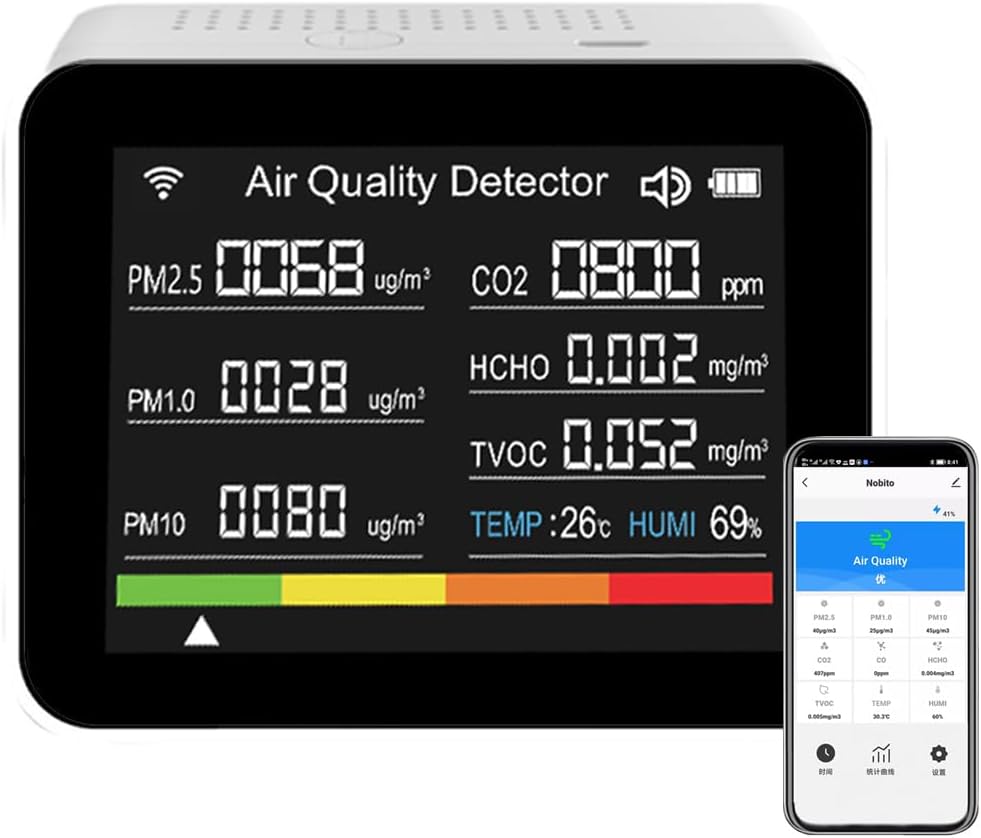
Figure 1: OUGETHER Air Quality Monitor with its display and companion mobile application.
2. Product Components
The package includes:
- 1 x OUGETHER Air Quality Monitor
- 1 x USB Cable (Type-C)
- 1 x User Manual

Figure 2: Overview of the 13-in-1 monitoring capabilities and additional functions.
3. Setup and Basic Operation (Without WiFi Connection)
3.1 Initial Power On
- Press the "Power" button for more than 3 seconds to start the device.
- After starting, the device will count for 60 seconds. Current air quality parameters will be detected and displayed. The data generally becomes more accurate after 30 minutes of startup.
- Press the "Power" button twice to turn off the sound alarm.
- Press the "Power" button once to turn on and off the device screen.
3.2 Display Modes
The device supports multiple display modes:
- Display Mode 1: Landscape display of 8 air parameters (default).
- Display Mode 2: Vertical time display.
- Display Mode 3: Vertical stopwatch display.
To switch between display modes, press the button three times consecutively.

Figure 3: Various display modes and detection ranges for the monitor.
3.3 Temperature Unit Switching
To switch between Celsius and Fahrenheit, press the power switch to change from Celsius to Fahrenheit, then press the switch again to revert to Celsius.
3.4 PM2.5 Alarm Function
If the PM2.5 reading exceeds 100, a rapid 4-sound alarm will be triggered once every second.
4. Tuya Smart APP Connection
The device can be connected to the Tuya Smart APP for remote monitoring and advanced features.
- Install the Tuya Smart APP: Search for "Tuya Smart" in your mobile phone's application market and install it. Register an account after installation.
- Enable WiFi Pairing: Within 2 minutes after the device is turned on, press the button 5 times continuously. The WiFi symbol on the device display will flash quickly, indicating that pairing mode is active.
- Add Device in APP: Open the Tuya Smart APP and click "Add device". Search for WiFi devices and follow the prompts to add the device. Enter your WiFi name and password. Confirm the pairing. The WiFi symbol on the device will stop flashing once connected.

Figure 4: Device connected to the Tuya Smart APP for remote monitoring.
4.1 APP Remote Monitoring and Historical Data
- Once successfully connected to WiFi, the mobile phone installed Tuya Smart APP can remotely monitor 8 air parameters in real-time and view historical data.
- The APP displays PM2.5 data color warnings: 0-50 (green), 51-100 (excellent), 101-150 (orange, moderately polluted), >151 (red, heavily polluted).
- To view historical data, click "Statistical curve" in the Tuya Smart APP. You can view day, month, and year curves for CO2, HCHO, TVOC, PM2.5, PM1.0, PM10, temperature, and humidity.
5. Advanced Features
5.1 Alarm Settings (via APP)
When the display is in vertical time mode (Figure 3, Display Mode 2):
- Click the menu icon in the Tuya Smart APP.
- Select the alarm settings. For example, set alarm 1 to 10:00 and alarm 2 to 10:30. Press "OK" to confirm.
- The alarm clock symbol will flash on the device display when an alarm is active. Press the button twice to cancel the alarm sound.
5.2 Vertical Stopwatch Display
When the display is in vertical stopwatch mode (Figure 3, Display Mode 3):
- Press the button once to start the stopwatch.
- Press the button once to pause the stopwatch.
- Press the button twice to clear the stopwatch.
5.3 Vertical Timer Display
When the display is in vertical time mode (Figure 3, Display Mode 2):
- Long press the "H" button to set the hour (1-9).
- Long press the "Min" button to set the minute (1-59).
- Press the "Start" button to begin the countdown.
- Press the "Start" button twice to cancel the timer.

Figure 5: Stopwatch and time display functions.
6. Maintenance
6.1 Charging and Battery Care
- The device has a built-in 2000mAh lithium battery. Use a standard DC-5V charger.
- It takes 3-4 hours for the battery to fully charge, providing 6-7 hours of continuous operation.
- For first-time unpacking, charge the device for 24 hours of continuous power operation.

Figure 6: Device design emphasizing built-in battery and heat dissipation.
6.2 Environmental Considerations
- Do not use the device in high temperature, high humidity, or dirty environments.
- Avoid exposing the device to strong magnetic fields or internal circuit failures.
- The device is suitable for temperatures between -10°C and 50°C. Extreme temperatures can cause malfunctions.
- Avoid dropping, running, or exposing the device to moisture.
- Do not insert sharp objects into the air inlet or outlet.
6.3 Cleaning
- When first taking the device out of the box, if there is an alcohol odor, clean it with alcohol and ventilate for 1-2 hours. The data will return to normal.
- TVOC sensors can be affected by smoke, alcohol, formaldehyde, perfume, and other odors. If affected, ventilate the device for a period of time to return to normal.
- If zero operation is needed, place the device in a well-ventilated environment, restart it, and let it count down for 10-18 seconds. Shut down, restart again, and clear the data to zero.
7. Troubleshooting
If you encounter issues, consider the following:
- Inaccurate Readings: Ensure the device has been powered on for at least 30 minutes for optimal accuracy. Avoid placing it near sources of strong odors or pollutants immediately after startup.
- WiFi Connection Issues: Ensure your WiFi network is 2.4GHz. Verify the WiFi symbol is flashing rapidly during pairing. Re-enter WiFi credentials carefully in the Tuya Smart APP.
- Device Not Responding: Try pressing the power button for 3 seconds to restart. If unresponsive, connect to the USB cable to check battery status.
- PM2.5 Alarm Constantly Triggering: Check the air quality in the environment. If the environment is clean, consider performing a zero operation as described in the cleaning section.
8. Product Specifications
| Parameter | Specification |
|---|---|
| CO2 Detection Range | 400-6000 PPM, ±50±15%PPM |
| CO2 Detection Sensitivity | 1PPM |
| TVOC Detection Range | 0-2.0 mg/m³ |
| HCHO Detection Range | 0-0.6 mg/m³ |
| PM2.5 Detection Range | 0-1000 ug/m³ |
| PM2.5 Detection Accuracy | 1ug/m³ |
| PM1.0 Detection Range | 0-1000 ug/m³ |
| PM10 Detection Range | 0-1000 ug/m³ |
| Temperature Measurement Range | -10 ~ 50 °C |
| Temperature Measurement Accuracy | ±2 °C |
| Humidity Measurement Range | 0% ~ 99%RH |
| Humidity Measurement Accuracy | ±3%RH |
| Charging Mode | DC5V 1A TYPE-C USB interface |
| Battery | Built-in lithium battery 2000mAh |
| Working Current | 260mA |
| Working Voltage | 3.7V |
| Weight | Approx. 160g |
9. Important Attention
This product has detection and alarm functions, but cannot prevent dangerous substances leakage. We do not assume responsibility for accidents caused by loss.
- Please pay attention to the following conditions before using the air detector.
- The air inlet and outlet must not be blocked to avoid numerical deviation.
- Do not use it frequently in a dusty environment with poor air quality to prolong its service life.


