
Introduction
This manual provides detailed instructions for the safe and effective operation of your SEBRUANC RGBW 4-in-1 LED Par Lights. Please read this manual thoroughly before use and retain it for future reference.
The SEBRUANC LED Par Lights feature 4-in-1 RGBW beads, offering a wide spectrum of colors and control options suitable for various events and stage setups.
Safety Information
- Ensure the power supply matches the specified voltage (110 Volts AC).
- Do not expose the device to rain or moisture.
- Avoid direct eye exposure to the light source.
- Always disconnect power before cleaning or servicing.
- Ensure proper ventilation to prevent overheating. The unit includes a cooling fan.
Package Contents
Verify that all items are present in the package:
- SEBRUANC RGBW 4-in-1 LED Par Light (quantity as purchased, e.g., 4 units for 4Pack)
- Remote Control (quantity as purchased)
- Power Cord (quantity as purchased)
- Mounting Bracket (2 per light)
- Mounting Screws (2 per light)
- User Manual (1 per package)

Image: Contents of the product package, showing one par light, remote, power cord, bracket, screws, and manual.
Setup
1. Mounting
The LED Par Light features a versatile mounting bracket for various installations:
- Floor Stand: Position the light on a flat surface using the bracket as a stable base.
- Truss Mounting: Attach the bracket to a lighting truss using appropriate clamps (not included).
- Wall Mounting: Secure the bracket to a wall using suitable fasteners (not included).
The bracket allows for a 360-degree adjustable angle to direct the light as needed.

Image: Product dimensions and features, including the adjustable mounting bracket.
2. Power Connection
Connect the provided power cord to the "POWER IN" port on the back of the light and then to a standard 110V AC power outlet. The unit also features a "POWER OUT" port for daisy-chaining multiple lights.

Image: Detailed view of the rear panel, highlighting the power interface, LCD display, and DMX In/Out ports.
3. DMX Connection (Optional)
For DMX control, connect a DMX cable from your DMX controller's output to the "DMX IN" port on the first light. For multiple lights, connect from the "DMX OUT" of the first light to the "DMX IN" of the next, forming a daisy chain.
Operating Instructions
The SEBRUANC LED Par Lights offer multiple control modes:
1. Panel Control
Use the LCD display and buttons (MENU, UP, DOWN, ENTER) on the rear panel to navigate and select modes and settings directly on the unit.
Image: Close-up of the LCD display and control buttons on the rear panel.
2. Remote Control
The included remote control provides convenient access to various functions:
- ON/OFF Switch: Power the light on or off.
- AUTO Mode: Activates self-propelled automatic programs.
- Jump Change: Switches between colors abruptly.
- Strobe Mode: Creates a flashing effect.
- DMX Mode: Activates DMX control.
- Function Select (MENU): Accesses menu options.
- Flash Mode: Similar to strobe, for rapid light changes.
- Sound Active: Light reacts to ambient sound.
- RGB Monochrome Choice: Select individual Red, Green, Blue colors.
- White/Amber/Cayenne/Purple Monochrome Choice: Select individual White, Amber, Cayenne, or Purple colors.
- Speed Adjustment: Use arrow buttons to adjust the speed of Jump/Flash modes and Sound Sensitivity.

Image: Layout and functions of the included remote control.
3. DMX Control
The lights support professional DMX512 control with 4-channel or 8-channel modes. Refer to your DMX controller's manual for specific programming instructions. The DMX address can be set via the unit's panel control.
DMX channels allow control over various parameters including:
- Red, Green, Blue, White intensity (dimmer 0-100%)
- Strobe speed
- Color change speed (for Gradient and Jumping modes)
- Mode selection (e.g., Auto, Sound Active)
4. Sound Activated Mode
In this mode, the lights respond to ambient sound, changing patterns and colors in sync with music or other audio. Activate this mode via the remote or panel control.
5. Master-Slave Mode
Connect multiple lights via DMX cables. Set one light as the "Master" and the others as "Slave" units. The slave units will then mirror the master's settings and effects, allowing for synchronized lighting displays without a DMX controller.
6. Color Modes
- Strobe: Rapid flashing of a single color or a combination of colors.
- Gradient: Smooth transitions between different colors.
- Jumping: Abrupt switching between different colors.
The speed of these modes can be adjusted via DMX control or the remote.
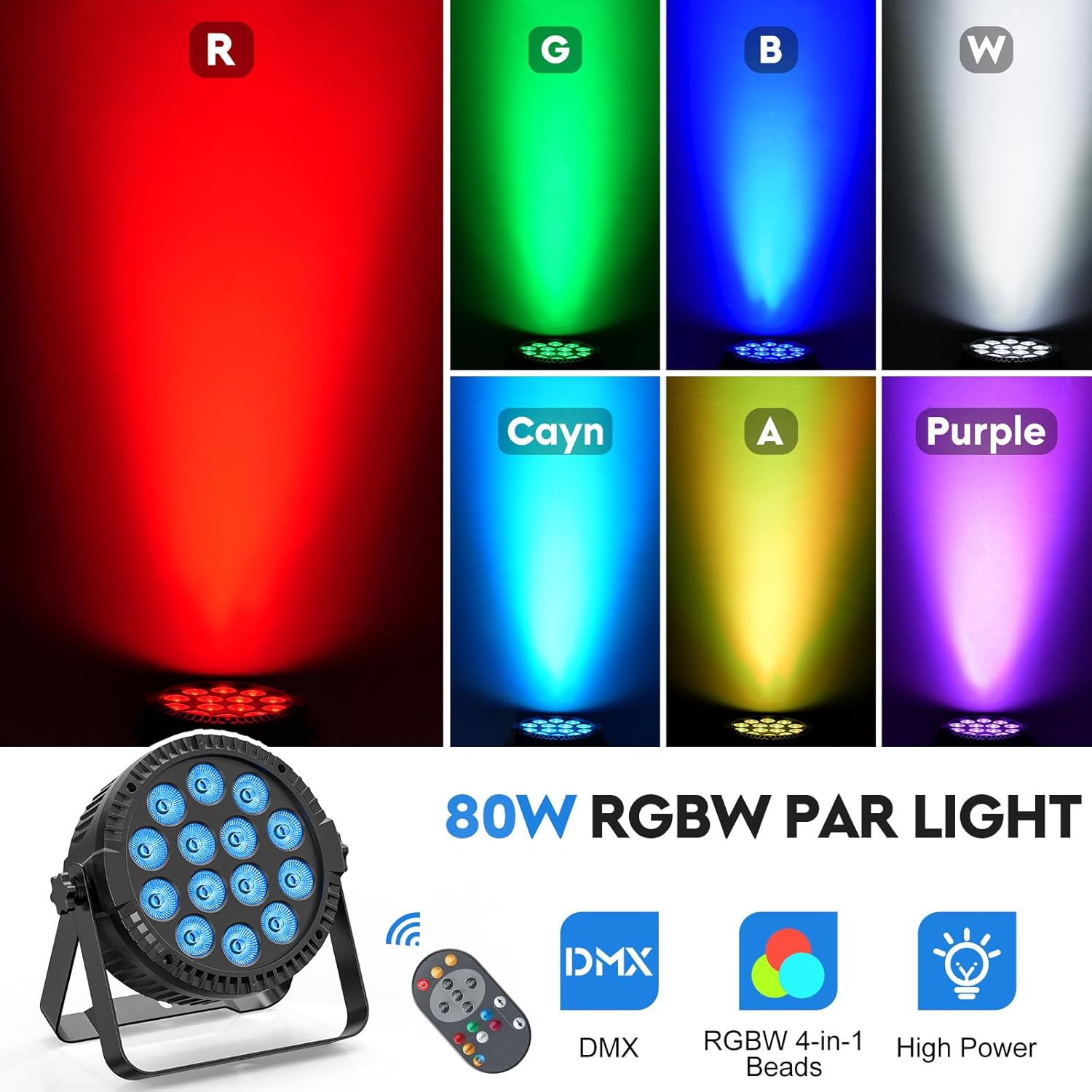
Image: Visual representation of the various colors achievable with the RGBW 4-in-1 LED beads.
Maintenance
- Cleaning: Regularly clean the lens and housing with a soft, dry cloth. Do not use abrasive cleaners or solvents.
- Ventilation: Ensure the cooling fan and vents are free from dust and obstructions to maintain optimal performance and prevent overheating.
- Storage: When not in use, store the lights in a dry, dust-free environment.
- Lifespan: The LED light beads have an estimated lifespan of up to 50,000 hours under normal operating conditions.
Troubleshooting
| Problem | Possible Cause | Solution |
|---|---|---|
| Light does not turn on. | No power, faulty cable, unit malfunction. | Check power connection and outlet. Test with a different power cord. If issue persists, contact support. |
| Remote control not working. | Dead battery, sensor blocked, remote not paired. | Replace remote battery (CR2025). Ensure no obstructions between remote and light's sensor. Check if the remote sensor is enabled via the unit's panel (refer to "Iron/Iroff" setting if available). |
| DMX control not responding. | Incorrect DMX address, faulty DMX cable, DMX mode not activated. | Verify DMX address settings. Check DMX cable connections. Ensure DMX mode is selected on the light. |
| Light overheats or fan is noisy. | Blocked ventilation, excessive ambient temperature. | Ensure vents are clear. Operate in a well-ventilated area. If fan noise is excessive, it may indicate a fan issue. |
| Inconsistent color output. | Internal component issue. | Contact support for assistance. |
Specifications
| Feature | Detail |
|---|---|
| Model Number | ZQ01424X4 |
| Light Source Type | LED (RGBW 4-in-1 Beads) |
| Number of Light Sources | 14 |
| Light Source Wattage | 84 Watts (14 * 6W) |
| Maximum Compatible Light Source Wattage | 80 Watts |
| Brightness | 8400 lumen |
| Voltage | 110 Volts (AC) |
| Material | Acrylonitrile Butadiene Styrene (ABS) |
| Product Dimensions | 8.18"L x 3.78"W x 8.66"H |
| Item Weight | 12.67 pounds (for 4-pack) |
| Mounting Type | Multiple Mount |
| Control Modes | DMX512 (4CH/8CH), Panel Control, Sound Activated, Master-Slave, Auto |
| Bulb Features | Dimmable, RGBW 4-in-1 |
Warranty
This SEBRUANC product comes with a 2-year warranty from the date of purchase. This warranty covers manufacturing defects and malfunctions under normal use. It does not cover damage caused by misuse, accidents, unauthorized modifications, or improper installation.
Please retain your proof of purchase for warranty claims.
Support
For technical assistance, troubleshooting, or warranty inquiries, please contact SEBRUANC customer support through the retailer where the product was purchased or visit the official SEBRUANC website for contact information.
When contacting support, please have your model number (ZQ01424X4) and purchase details ready.