
1. Product Overview
The SEBRUANC RGBW 4-in-1 LED Par Light is a versatile stage lighting fixture designed for various events and applications. It features 4-in-1 RGBW LED beads, offering a wide spectrum of colors and dynamic lighting effects. This manual provides essential information for safe installation, operation, and maintenance of your device.

Image 1.1: The SEBRUANC RGBW 4-in-1 LED Par Light with its included remote control.
This par light is suitable for Christmas, stage performances, weddings, DJ setups, parties, bars, churches, and live events, providing uplighting and atmospheric effects.

Image 1.2: Examples of the SEBRUANC LED Par Light in various event settings.
2. Safety Information
- Electrical Safety: Ensure the power supply voltage matches the device's requirements (110V AC). Always connect to a grounded outlet. Disconnect power before cleaning or servicing.
- Heat Management: The fixture generates heat during operation. Ensure adequate ventilation and do not block cooling vents. Maintain a safe distance from flammable materials.
- Mounting: Securely mount the fixture using the provided bracket. Ensure the mounting surface can support the weight of the light.
- Eye Protection: Avoid direct eye exposure to the light source, as it can be intense.
- Environmental Conditions: Do not expose the device to rain, moisture, or extreme temperatures. Use indoors or in protected environments only.
- Maintenance: Refer to the maintenance section for cleaning and care instructions. Do not attempt repairs yourself; contact qualified personnel.
3. Package Contents
Verify that all items listed below are included in your package:
- Par Light *1
- Remote Control *1
- Power Cord *1
- Bracket *2
- Screw *2
- User Manual *1

Image 3.1: Illustrated packing list of the SEBRUANC LED Par Light.
4. Product Features
The SEBRUANC RGBW 4-in-1 LED Par Light offers a range of features for dynamic lighting:
- Vibrant RGBW Colors: Utilizes 4-in-1 RGBW LED beads for a broad spectrum of colors. Built-in control for seven mainstream colors: Red, Green, Blue, White, Amber, Cyan, and Rose.
- Multiple Control Modes: Supports Professional DMX512 console control (4CH/8CH), Panel control, Sound Activated mode, Master-Slave synchronization, and Self-propelled (AUTO) mode.
- Dynamic Color Modes: Includes Strobe (single or multi-color flash), Gradient (smooth color transitions), and Jumping (instant color changes). Speed for these modes is adjustable via DMX control.
- Long Lifespan: LED light beads are designed for an extended operational life of up to 50,000 hours under normal use.
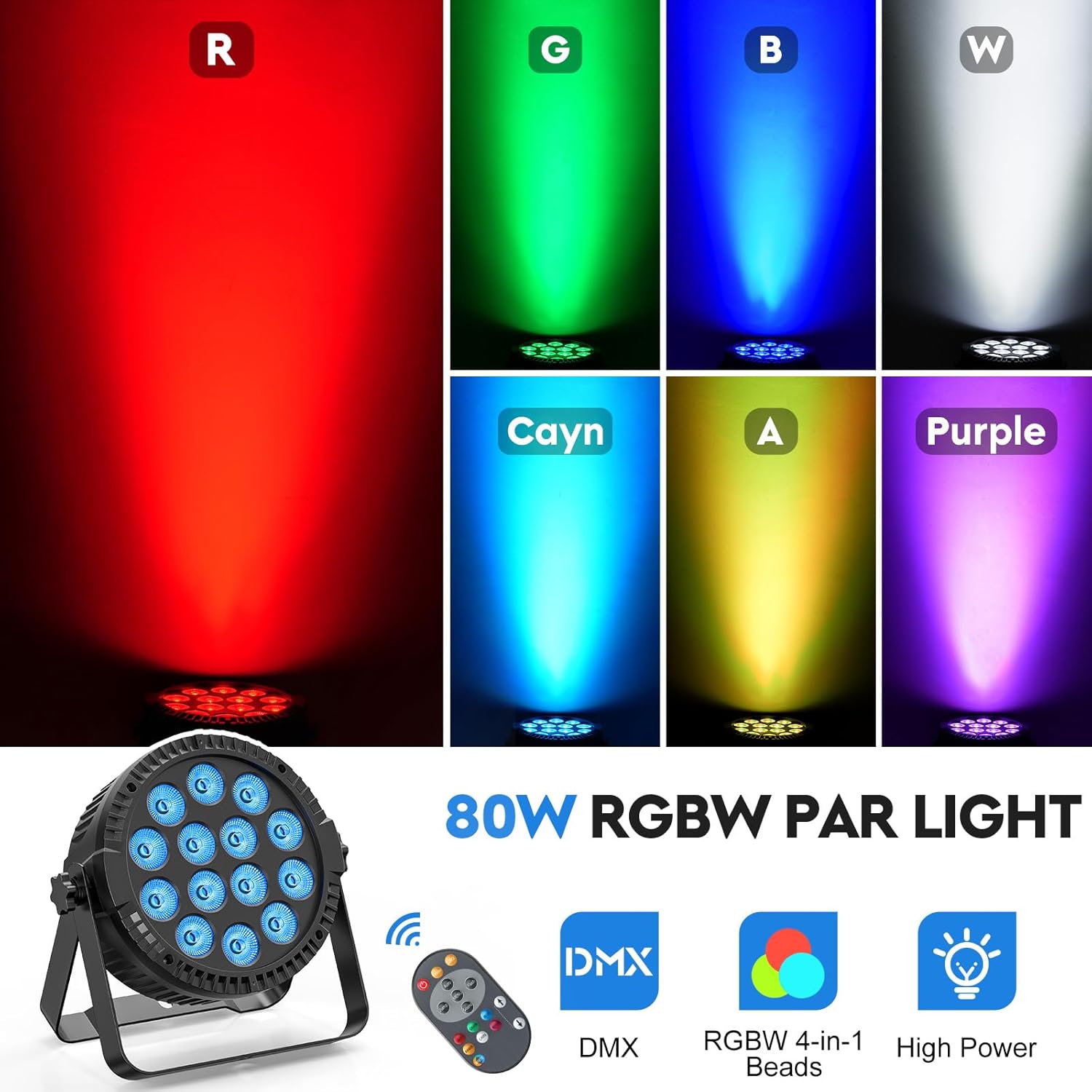
Image 4.1: Examples of the vibrant colors achievable with the RGBW 4-in-1 LED beads.
5. Setup
5.1 Mounting the Light
- Attach the two included brackets to the sides of the par light using the provided screws.
- Ensure the screws are tightened securely to prevent movement.
- The bracket allows for easy installation on trusses, walls, or floors. Choose a stable location that can support the fixture's weight.
- Adjust the angle of the light as needed using the bracket's pivot points.
5.2 Power Connection
- Connect the power cord to the 'POWER IN' port on the back of the par light.
- Plug the other end of the power cord into a standard 110V AC grounded electrical outlet.
- For daisy-chaining multiple lights, use the 'POWER OUT' port to connect to the 'POWER IN' of another fixture. Ensure not to exceed the maximum power load for the circuit.

Image 5.1: Rear panel of the par light, illustrating power and DMX connections.
5.3 DMX Connection (Optional)
- To control the light via DMX, connect a DMX cable from your DMX controller's output to the 'DMX IN' port on the par light.
- For multiple lights in a DMX chain, connect a DMX cable from the 'DMX OUT' port of the first light to the 'DMX IN' port of the next light, and so on.
- Set the DMX address for each fixture according to your DMX controller's instructions.
6. Operation
6.1 Control Panel Operation
The par light features an LCD display and control buttons (MENU, UP, DOWN, ENTER) on the rear panel for direct mode and setting adjustments.
- MENU: Cycles through different modes and settings.
- UP/DOWN: Adjusts values or navigates through options within a mode.
- ENTER: Confirms selections.
6.2 Remote Control Operation
The included remote control provides convenient access to various functions:

Image 6.1: Remote control layout and button functions.
- ON/OFF Switch: Powers the unit on or off.
- AUTO Mode: Activates automatic program cycling.
- Jump Change: Initiates the jumping color mode.
- Strobe Mode: Activates the strobe effect.
- DMX Mode: Switches the light to DMX control.
- Function Select (MENU): Cycles through various functions.
- Flash Mode: Activates a flashing effect.
- Sound Active: Enables sound-activated mode, where lights react to music.
- RGB Monochrome Choice: Selects individual Red, Green, or Blue colors.
- White/Amber/Cayn/Purple Monochrome Choice: Selects individual White, Amber, Cyan, or Rose colors.
- Up/Down Arrows: Adjusts the speed of Jump/Flash modes and Sound Sensitivity.
6.3 Control Modes Explained
- DMX512 Control (4CH/8CH): Allows professional control over color, dimming, strobe, and other parameters via a DMX console. Refer to the DMX channel chart in the full user manual for specific assignments.
- Sound Activated: The light responds to ambient sound or music, changing patterns and colors in sync with the beat.
- Master-Slave: Connect multiple par lights via DMX cables. Set one unit as 'Master' and others as 'Slave' to synchronize their operation.
- Self-propelled (AUTO): The light cycles through pre-programmed patterns and color changes automatically.
7. Maintenance
- Cleaning: Regularly clean the lens and housing with a soft, lint-free cloth. Do not use abrasive cleaners or solvents. Ensure the device is unplugged before cleaning.
- Inspection: Periodically check power cables, DMX cables, and mounting hardware for any signs of wear or damage. Replace damaged components immediately.
- Storage: When not in use, store the par light in a dry, dust-free environment.
8. Troubleshooting
| Problem | Possible Cause | Solution |
|---|---|---|
| Light does not turn on | No power supply; Faulty power cable; Unit malfunction | Check power connection and outlet; Try a different power cable; Contact support if issue persists. |
| No DMX control | Incorrect DMX address; Faulty DMX cable; DMX controller issue | Verify DMX address settings; Check DMX cable connections; Test with a different DMX controller or cable. |
| Remote control not working | Battery depleted; Obstruction between remote and sensor; Remote sensor disabled | Replace remote battery (CR2025); Ensure clear line of sight to the light's sensor; Check if 'Iron/Iroff' setting is enabled on the light's menu. |
| Light flickers or behaves erratically | Unstable power supply; DMX signal interference; Overheating | Ensure stable power; Check DMX connections for interference; Ensure adequate ventilation. |
9. Specifications
| Feature | Detail |
|---|---|
| Model Number | ZQ01424 |
| Light Source Type | LED (RGBW 4-in-1) |
| Number of Light Sources | 14 |
| Light Source Wattage | 6 Watts per LED (Total 80 Watts) |
| Voltage | 110 Volts (AC) |
| Material | Acrylonitrile Butadiene Styrene (ABS) |
| Finish Type | Polished |
| Mounting Type | Bracket Mount |
| Product Dimensions | 8.18"L x 3.78"W x 8.66"H (20.78cm L x 9.6cm W x 22cm H) |
| Item Weight | 2.48 pounds (1.12 kg) |
| Special Features | Dimmable, RGBW 4-in-1 Beads |

Image 9.1: Product dimensions and features like high brightness beads, cooling fan, and 360° adjustable angle.
10. Warranty and Support
This SEBRUANC product comes with a 2-year warranty from the date of purchase. This warranty covers manufacturing defects and ensures the product functions as intended under normal use.
For technical support, warranty claims, or any inquiries regarding your SEBRUANC RGBW 4-in-1 LED Par Light, please visit the official SEBRUANC store or contact customer service through the retailer where the product was purchased.
You can find more information and support resources on the SEBRUANC Brand Store.