
1. Introduction
Thank you for choosing the GOLDCHAMP T0-TS58 Digital Insulation Resistance Tester. This instrument is designed for accurate measurement of insulation resistance, AC/DC voltage, and features data storage capabilities. Its robust, dustproof, and moisture-proof design makes it suitable for various indoor and outdoor electrical testing applications. Please read this manual thoroughly before operation to ensure safe and correct usage.

Figure 1: Front view of the GOLDCHAMP T0-TS58 Digital Insulation Resistance Tester.
2. Safety Information
Always adhere to the following safety precautions to prevent electric shock, injury, or damage to the instrument:
- Do not operate the instrument if it appears damaged or if the test leads are compromised.
- Ensure proper battery installation and replacement. Observe correct polarity.
- Do not use the instrument in wet environments or during electrical storms.
- Always disconnect power to the circuit under test before connecting or disconnecting test leads for insulation resistance measurements.
- Be aware of high voltage output during insulation resistance testing. Avoid contact with test leads and the circuit under test.
- Do not exceed the maximum input ratings for voltage and resistance.
- Refer to local and national safety codes for electrical work.
- This device is intended for professional use or by individuals with adequate electrical knowledge.
3. Product Overview
3.1 Key Features
- Insulation Resistance Measurement: Range from 0.1MΩ to 20GΩ.
- DC/AC Voltage Measurement: Range from 10V to 600V.
- High-Definition LCD Display: Maximum display of 2000 counts with backlight.
- Data Storage: Stores up to 100 sets of measurement data.
- Auto Range: Simplifies measurement selection.
- Low Battery Indication: Alerts when battery replacement is needed.
- Dustproof and Moisture-proof Structure: Suitable for outdoor use.
- Automatic Power Off: Conserves battery life.
3.2 Components and Controls
Familiarize yourself with the various parts of the GOLDCHAMP T0-TS58 tester:

Figure 2: Labeled diagram of the tester's components.
- Insulation resistance measurement high voltage output jack L
- Positive terminal of AC/DC voltage measurement
- Voltage measurement input negative shielding end G (shielding end)
- Insulation resistance measurement sampling jack E
- Display LCD screen
- Insulation resistance measurement high voltage start button (TEST)
- Insulation resistance voltage selection button "▲" (Up)
- Insulation resistance voltage selection button "▼" (Down)
- Data hold/backlight button (HOLD / ☆)
- Data read/save button (MEM / READ)
- Function selection button (SELECT) - for Insulation Resistance, AC/DC voltage
- Polarization index DAR and absorption ratio PI buttons (PI/DAR)
- Power switch button (⑁)
4. Setup
4.1 Unpacking and Inspection
Carefully unpack the GOLDCHAMP T0-TS58 tester and all accessories. Inspect for any signs of damage. If any components are missing or damaged, contact your supplier immediately.
4.2 Battery Installation
The instrument requires 8 x 1.5V AA batteries (not included). To install:
- Locate the battery compartment on the back of the device.
- Open the battery compartment cover.
- Insert 8 x 1.5V AA batteries, ensuring correct polarity as indicated inside the compartment.
- Close the battery compartment cover securely.
4.3 Connecting Test Leads
Connect the test leads to the appropriate jacks on the top of the instrument based on the measurement type:
- For Insulation Resistance: Connect leads to L and E jacks.
- For AC/DC Voltage: Connect leads to AC/DC 600V and G jacks.
5. Operating Instructions
5.1 Power On/Off
- To power on, press the Power Switch Button (⑁).
- To power off, press the Power Switch Button (⑁) again. The device also features automatic power-off to conserve battery.
5.2 Function Selection
Press the SELECT button to cycle through measurement functions: Insulation Resistance, AC Voltage, and DC Voltage.
5.3 Insulation Resistance Measurement
This function measures the resistance of insulating materials in electrical equipment.
- Ensure the circuit under test is de-energized and safely discharged.
- Connect the test leads to the L and E jacks on the tester.
- Connect the other ends of the test leads to the appliance or circuit under test.
- Use the ▲ and ▼ buttons to select the desired output test voltage (e.g., 100V, 250V, 500V, 1000V).
- Press and hold the TEST button for approximately 1 second to initiate the measurement. The instrument will automatically discharge after the test.
- Read the insulation resistance value on the LCD display.

Figure 3: Example of insulation resistance measurement in progress.
5.4 AC/DC Voltage Measurement
This function measures AC or DC voltage.
- Press the SELECT button until the ACV or DCV mode is displayed.
- Connect the test leads to the AC/DC 600V and G jacks on the tester.
- Connect the other ends of the test leads to the circuit where voltage is to be measured.
- Read the voltage value on the LCD display. The instrument features auto-ranging.
6. Data Management
The GOLDCHAMP T0-TS58 can store up to 100 sets of measurement data.
6.1 Data Storage
After a measurement is completed and the reading is stable:
- Press the MEM button (part of the HOLD/MEM button) to save the current measurement data.
- The display will indicate successful storage.
6.2 Data Recall and Deletion
To review or delete stored data:
- Press the READ button (part of the MEM/READ button) to enter data recall mode.
- Use the ▲ and ▼ buttons to navigate through stored data sets.
- To delete a specific data set or all data, refer to the detailed instructions in the included user manual for specific key combinations.
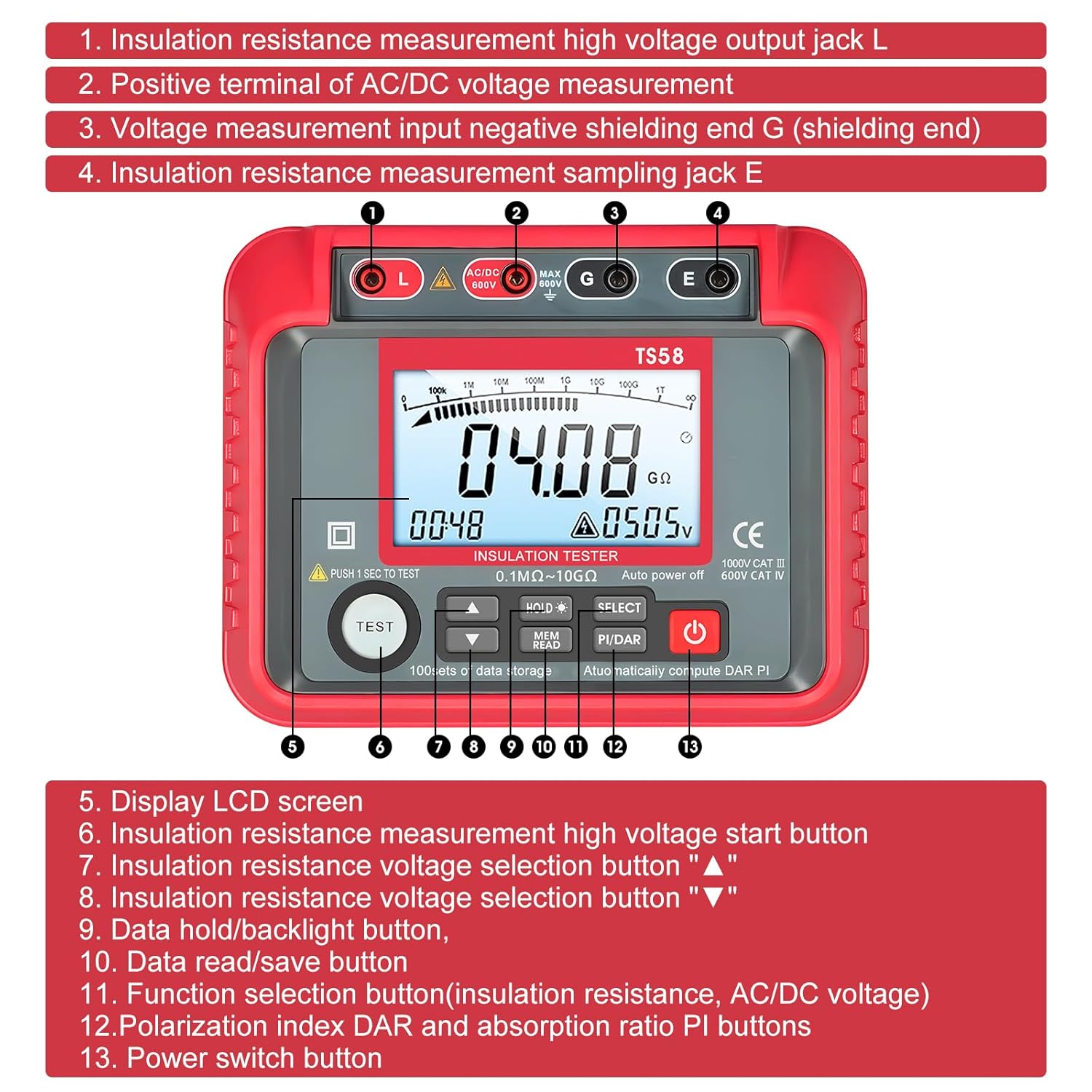
Figure 4: The display indicating data storage functionality.
7. Display and Indicators
7.1 LCD Backlight
The LCD display features a backlight for improved visibility in low-light conditions.
- Press the ☆ button (part of the HOLD/☆ button) to turn the backlight on or off.
7.2 Low Battery Indicator
A low battery indicator icon will appear in the upper right corner of the display when the battery level is low. When this indicator appears, replace all 8 x 1.5V AA batteries promptly to ensure accurate measurements and proper operation.
8. Maintenance
8.1 Cleaning
Wipe the instrument's casing with a damp cloth and mild detergent. Do not use abrasive cleaners or solvents. Ensure the instrument is completely dry before use.
8.2 Storage
When not in use for extended periods, remove the batteries to prevent leakage. Store the instrument in a cool, dry place, away from direct sunlight and extreme temperatures. The included storage bag is ideal for protection.

Figure 5: The GOLDCHAMP T0-TS58 stored in its protective bag.
8.3 Battery Replacement
Replace batteries as described in Section 4.2 when the low battery indicator appears. Always replace all batteries simultaneously with new ones of the same type.
9. Troubleshooting
If you encounter issues with your GOLDCHAMP T0-TS58, refer to the following common problems and solutions:
- No Display/Power: Check battery installation and ensure batteries are not depleted. Replace if necessary.
- Inaccurate Readings: Ensure test leads are properly connected and not damaged. Verify the correct measurement function is selected. Check battery level.
- No Insulation Resistance Measurement: Ensure the TEST button is pressed and held correctly. Verify the circuit under test is properly connected and de-energized.
- Data Storage Issues: Ensure there is available memory. Follow the data storage procedure carefully.
If the problem persists, contact customer support for assistance.
10. Specifications
| Parameter | Value |
|---|---|
| Max Display | 2000 counts |
| Working Temperature | 0~40°C |
| Weight | 800g (including battery) |
| DC/AC Voltage Range | 10 to 600V |
| AC Voltage Frequency | 40Hz~70Hz |
| Resistance Range | 0.1MΩ to 20GΩ |
| Insulation Resistance (1000V) | ≥500MΩ |
| Dimensions | 180 x 140 x 70mm (7.1 x 5.5 x 2.7in) |
| Power Source | Battery Powered (8 x 1.5V AA) |
| Data Storage | 100 sets |
| Safety Compliance | CE, IP 67, UL (as per product information) |
11. What's in the Box
The GOLDCHAMP T0-TS58 package includes the following items:

Figure 6: All items included in the product package.
- 1 x GOLDCHAMP T0-TS58 Digital Insulation Resistance Tester
- 2 x Test Leads
- 2 x Alligator Clips
- 1 x Storage Bag
- 1 x User Manual
- 1 x Screwdriver
- 8 x 1.5V Batteries (as per product description, though specifications state 'No' for included batteries, please verify upon receipt)
12. Warranty and Support
Specific warranty information for the GOLDCHAMP T0-TS58 is not provided in the available product details. For warranty claims, technical support, or service inquiries, please contact your retailer or the manufacturer directly using the contact information provided at the point of purchase.