
1. Introduction
The TELESIN Camera 360 Strap Mount is a versatile accessory designed for securely attaching action cameras to various objects. Its flexible silicone band and 360-degree rotating adapter allow for diverse mounting options and adjustable camera angles. This manual provides essential information for the proper setup, operation, and maintenance of your strap mount.

Image 1.1: TELESIN Camera 360 Strap Mount in use on a bicycle handlebar.
2. Product Overview
The TELESIN Camera 360 Strap Mount features a flexible silicone band and a 360-degree rotating mount adapter. It is designed for compatibility with a wide range of action cameras, including GoPro Hero series, Insta360, DJI Osmo Action, and AKASO models.
Key Features:
- 360-Degree Rotation: The integrated mount adapter allows for full 360-degree steering and 180-degree pitch adjustment for optimal camera positioning.
- Flexible Silicone Band: Made from high-quality silicone, the band offers strong stretching capabilities for secure attachment.
- Dual Locking Holes: Features two sizes of locking holes to accommodate various object diameters: a small hole for 22-38mm objects and a larger hole for 45-60mm objects.
- Wide Compatibility: Supports action cameras such as GoPro Hero (13, 12, 11, 10, 9, 8, 7, 6, 5, 4, 3), Insta360 (One R, RS, X2, X3, X4, X5, Go2, Go 3, Ace, Ace&Pro), DJI Action (3, 4, 5pro), Osmo 360, Osmo Nano, Pocket (2, 3), and AKASO.

Image 2.1: Illustrates the dual-port adjustment for different pipe diameters.
3. Setup and Installation
Follow these steps to properly install your TELESIN Camera 360 Strap Mount:
- Prepare the Mount: Ensure the silicone band and camera mount adapter are clean and free from debris.
- Secure the Band: Wrap the flexible silicone band tightly around the desired object (e.g., handlebar, pole).
- Adjust Length: Based on the object's diameter or width, pull the band to stretch it and fit it around the object.
- Choose Hole Size: Select the appropriate locking hole for desired tightness. The small hole fits 22-38mm objects, and the larger hole fits 45-60mm objects.
- Lock the Band: If using the small hole, loop the remaining part of the band through the larger hole or secure it as shown in the installation diagrams to prevent it from coming loose. The design allows you to pull to open and snap to secure.
- Attach Camera: Mount your action camera to the standard mount adapter on the strap. Ensure it is securely fastened.

Image 3.1: Visual guide for installation steps.
4. Operating Instructions
Once installed, the TELESIN Camera 360 Strap Mount allows for flexible camera positioning.
- Adjusting Camera Angle: The mount features a 360-degree steering capability and a 180-degree pitch adjustment. Loosen the thumb screw slightly to adjust the camera to your desired angle, then tighten it firmly to secure the position.
- Versatile Applications: This mount is suitable for various activities and perspectives, including cycling, fishing, paddle boarding, and capturing unique pet views.

Image 4.1: Demonstrates the 360-degree damping adjustment feature.

Image 4.2: Examples of diverse usage scenarios for the strap mount.
5. Maintenance
To ensure the longevity and optimal performance of your TELESIN Camera 360 Strap Mount, follow these maintenance guidelines:
- Cleaning: Clean the silicone band and plastic components with a damp cloth. Avoid using harsh chemicals or abrasive cleaners, as these can degrade the material.
- Storage: Store the mount in a cool, dry place away from direct sunlight when not in use. Its compact size (approximately 5cm when stored) makes it easy to carry.
- Avoid Damage: Keep the silicone band away from sharp objects to prevent cuts or tears. Avoid contact with grease or chemicals to prevent silicone corrosion.
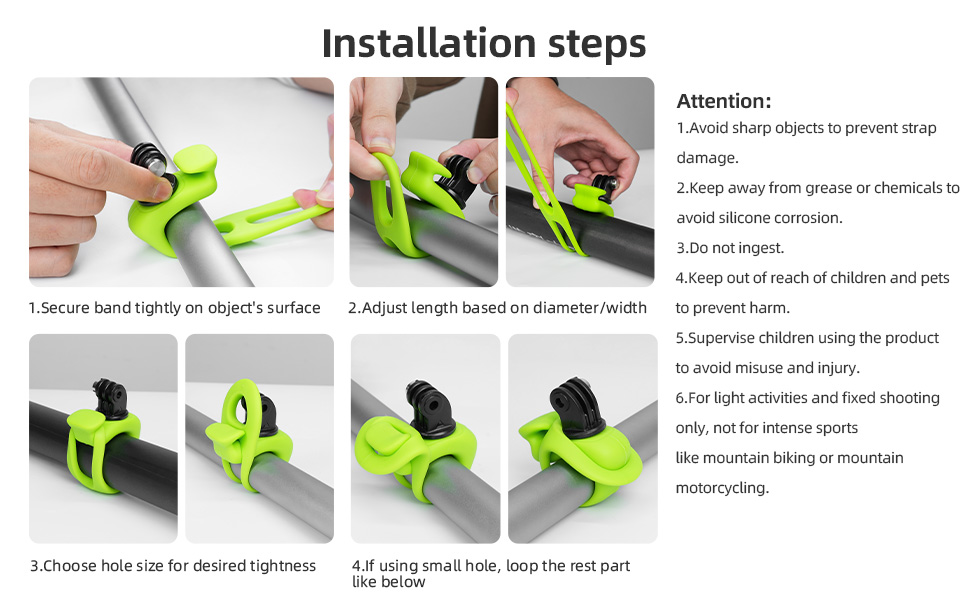
Image 5.1: The mount's compact design for easy storage.
6. Troubleshooting
If you encounter issues with your strap mount, consider the following:
- Mount Slipping: If the mount slips on smooth surfaces like metal handlebars, ensure the band is pulled as tight as possible using the correct hole size. For enhanced stability, especially on rough terrain, consider adding friction tape to the mounting surface before attaching the strap.
- Camera Leaning Backwards: Ensure the thumb screw securing the camera mount adapter is fully tightened after adjusting the angle. If the issue persists, check for any obstructions or improper seating of the camera.
- Band Damage: Inspect the silicone band for any signs of wear, cuts, or tears. A damaged band may compromise the security of your camera. Replace if necessary.
7. Safety Information
Please observe the following safety precautions:
- Intended Use: This mount is designed for light activities and fixed shooting. It is not recommended for intense sports like mountain biking or mountain motorcycling where extreme vibrations or impacts may occur.
- Choking Hazard: Do not ingest any parts of the product. Keep out of reach of children and pets.
- Child Supervision: Supervise children when they are using the product to avoid misuse and injury.
8. Specifications
| Feature | Detail |
|---|---|
| Model Number | Kamera 360 Strap Mount |
| Brand | TELESIN |
| Material | High-quality Silicone |
| Color | Black |
| Item Weight | 3.17 ounces |
| Package Dimensions | 3.23 x 2.87 x 1.73 inches |
| Mounting Type | Vehicle Mount (Flexible Strap) |
| Special Features | Adjustable, 360-degree Rotation |
| Compatible Devices | Action Cameras (GoPro, Insta360, DJI Osmo, AKASO, etc.) |
| Small Hole Fit | 22-38mm diameter objects |
| Larger Hole Fit | 45-60mm diameter objects |
9. Warranty and Support
Specific warranty details for the TELESIN Camera 360 Strap Mount are not provided within this document. For warranty claims, technical support, or further assistance, please refer to the official TELESIN website or contact their customer service directly. Keep your purchase receipt as proof of purchase.