
Consciot CL17001216
Consciot 44-Inch Low Profile Ceiling Fan with Light User Manual
Model: CL17001216
Brand: Consciot
1. Introduction
Thank you for choosing the Consciot 44-Inch Low Profile Ceiling Fan with Light. This modern ceiling fan is designed to provide efficient air circulation and adjustable lighting for both indoor and covered outdoor spaces. Featuring a quiet, reversible DC motor, 6-speed settings, a dimmable 3-color temperature LED light, and convenient remote control, this fan enhances comfort and ambiance in your home.

Image: The Consciot 44-inch black ceiling fan with its remote control, showcasing its sleek design.
2. Important Safety Information
Please read all instructions carefully before installation and use to ensure safe operation and prevent injury or damage. Retain this manual for future reference.
- Electrical Safety: Always disconnect power at the circuit breaker or fuse box before beginning installation or performing any maintenance. Ensure all electrical connections comply with local codes and ordinances.
- Installation: Installation should be performed by a qualified electrician or a person with sufficient electrical knowledge. Use only the hardware provided. For safety, it is recommended that two people install the fan.
- Location: This fan is suitable for indoor and covered outdoor use. Do not expose the fan directly to rain or excessive moisture. Ensure the mounting location can support the fan's weight.
- Blade Clearance: Maintain a minimum clearance of 7 feet from the floor to the fan blades and 18 inches from the wall to the blade tips.
- Remote Control: Keep the remote control out of reach of children. Do not mix old and new batteries.
3. Package Contents
Verify that all components are present and undamaged before proceeding with installation.
- Ceiling Fan Unit (Motor Housing, Blades)
- Integrated LED Light Kit
- Remote Control (2 AAA batteries not included)
- Mounting Bracket
- Hardware Pack (screws, wire nuts, etc.)
- Instruction Manual
4. Specifications
| Feature | Specification |
|---|---|
| Brand | Consciot |
| Model Name | Sovia L (CL17001216) |
| Color | Black |
| Size | 44 Inch |
| Style | Flush Mount |
| Product Dimensions | 44"D x 44"W x 10.4"H |
| Power Source | AC |
| Motor Type | DC Motor (Reversible) |
| Noise Level | 42 dB (Max) |
| Wattage | 35 watts |
| Voltage | 120 Volts |
| Air Flow Capacity | 3840 Cubic Feet Per Minute (CFM) |
| Number of Blades | 3 |
| Light Source | Integrated LED (1500LM) |
| Color Temperatures | 3000K (Warm White), 4000K (Cool White), 5000K (Daylight) |
| Dimmable | Yes (5%-100%) |
| Fan Speeds | 6 Levels |
| Control Method | Remote Control |
| Timer Function | 2H/4H Sleep Shutdown |
| Indoor/Outdoor Usage | Indoor, Covered Outdoor (Damp-rated) |
| Item Weight | 8.7 Pounds |
| UPC | 850053671869 |
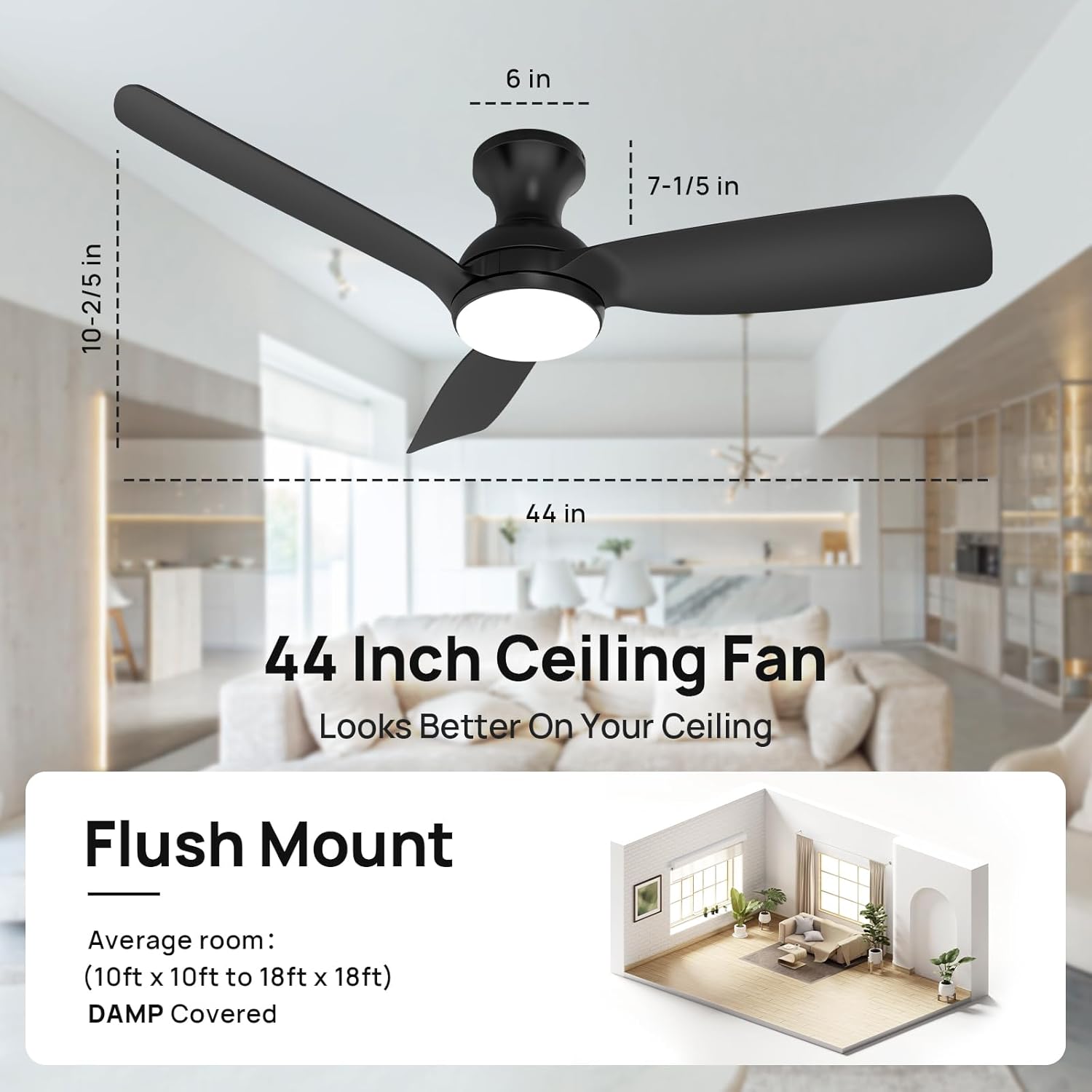
Image: Dimensional diagram of the 44-inch flush mount ceiling fan, indicating its suitability for average rooms (10ft x 10ft to 18ft x 18ft) and damp covered areas.
5. Setup and Installation
The Consciot ceiling fan is designed for easy and fast installation, typically completed in under 30 minutes. Follow these general steps. Refer to the detailed instructions included in your package for specific diagrams and safety warnings.

Image: A person installing the ceiling fan, illustrating the ease of setup.
- Prepare for Installation: Ensure the power supply to the installation location is turned off at the circuit breaker. Clear the work area and gather all necessary tools (screwdriver, wire strippers, ladder, etc.).
- Mounting Bracket Installation: Secure the mounting bracket to the ceiling junction box. Ensure the bracket is firmly attached and can support the fan's weight.
- Wiring Connections: Connect the fan's electrical wires to the household wiring according to the provided wiring diagram. Use the included wire nuts to secure connections. Ensure proper grounding.
- Attach Fan Body: Carefully lift the fan body and attach it to the mounting bracket. Ensure all connections are secure and the fan is properly seated.
- Blade Attachment: Attach the fan blades to the motor housing using the provided screws. Ensure blades are securely fastened.
- Light Kit Installation: Connect the light kit wiring and attach the LED light assembly to the fan body.
- Restore Power: Once installation is complete and all connections are checked, restore power at the circuit breaker.
6. Operating Instructions
Your Consciot ceiling fan is operated using the included remote control. Insert two AAA batteries (not included) into the remote before use.
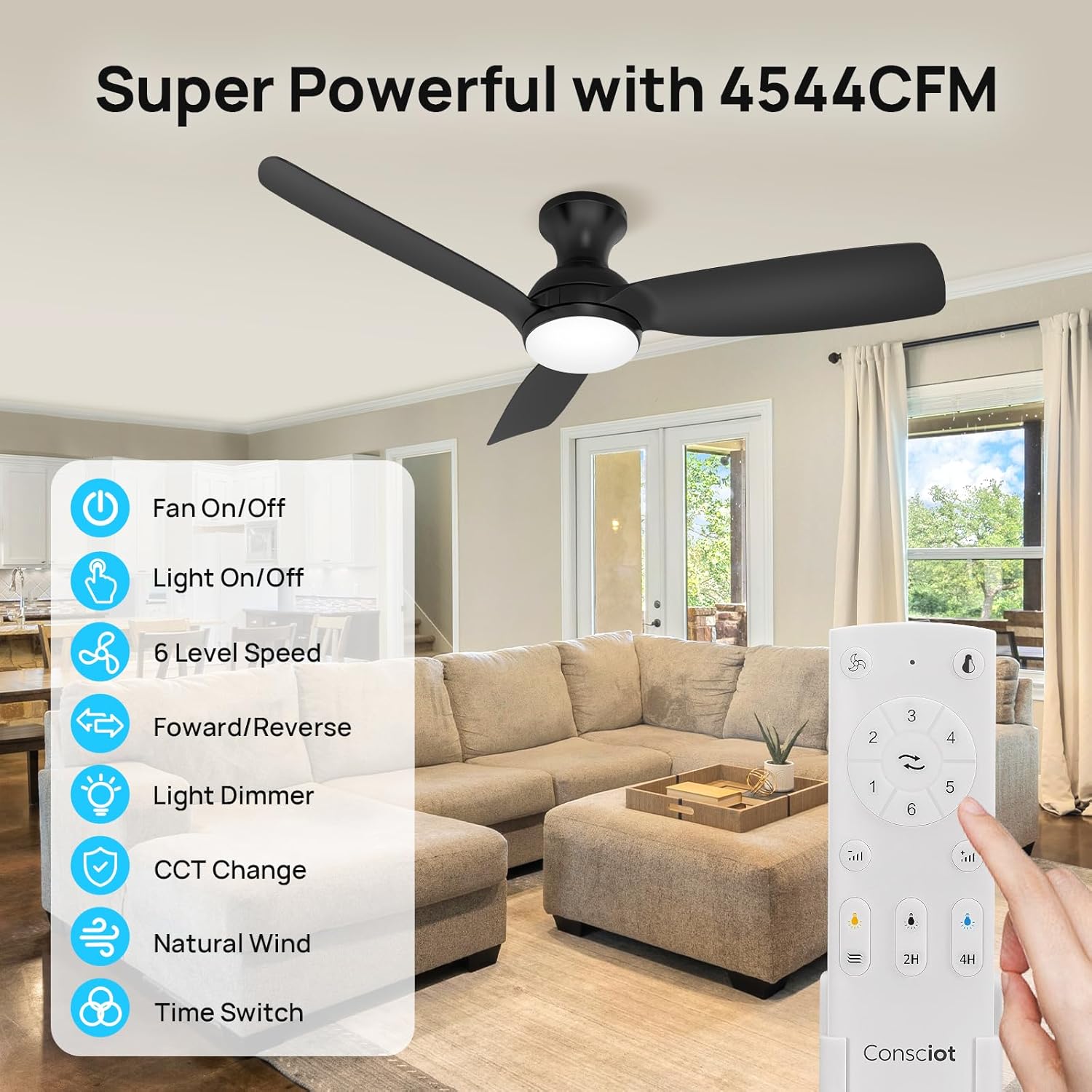
Image: The remote control highlighting its various functions for fan and light operation.
6.1 Remote Control Functions
- Fan On/Off: Press to turn the fan on or off.
- Light On/Off: Press to turn the LED light on or off.
- Fan Speed Control (1-6): Select from 6 different fan speeds. Speed 1-2 for sleeping/reading, 3-4 for sports/fitness, 5-6 for entertainment/party.
- Forward/Reverse: Press to change the direction of blade rotation. This function allows for summer (downdraft) and winter (updraft) modes.
- Light Dimmer: Adjust the brightness of the LED light from 5% to 100%.
- CCT Change (Color Temperature): Cycle through 3 color temperatures: 3000K (Warm White), 4000K (Cool White), and 5000K (Daylight).
- Natural Wind: Activates a mode that simulates natural breeze by varying fan speed.
- Timer Switch (2H/4H): Set the fan to automatically turn off after 2 or 4 hours.
6.2 Light and Wind Memory Function
The fan and light settings are memorized after being turned off. When you turn the unit back on, it will resume the last used fan speed and light color temperature/brightness settings.

Image: Illustration of the 3-color temperature options (3000K, 4000K, 5000K) and dimmable feature of the LED light.
6.3 Reversible DC Motor
The reversible DC motor allows you to change the direction of the fan blades to optimize air circulation for different seasons.
- Summer Mode (Downdraft): Blades rotate counter-clockwise, pushing cool air downwards to create a cooling effect.
- Winter Mode (Updraft): Blades rotate clockwise, drawing cool air up and pushing warm air down from the ceiling, helping to redistribute heat.

Image: Visual representation of the reversible function, showing downdraft for summer and updraft for winter.
7. Maintenance
Regular cleaning and simple maintenance will help prolong the life and maintain the performance of your ceiling fan.
- Cleaning: To clean the fan, wipe the blades and motor housing with a soft, damp cloth. Do not use abrasive cleaners or solvents, as these can damage the finish. Ensure the fan is completely dry before operating.
- Blade Care: The fan features durable plastic blades. Periodically check that all blade screws are tight. Loose blades can cause wobbling and noise.
- Light Cover: The LED light cover can be gently wiped with a soft, dry cloth.
- No Lubrication Required: The DC motor is permanently lubricated and does not require oiling.
8. Troubleshooting
If you experience issues with your fan, refer to the following common problems and solutions before contacting customer support.
| Problem | Possible Cause | Solution |
|---|---|---|
| Fan does not start | No power to the fan; Loose wire connections; Remote control not paired or batteries dead. | Check circuit breaker/fuse; Ensure all wiring connections are secure; Replace remote batteries or re-pair remote (refer to remote pairing instructions in full manual). |
| Light does not work | No power to the light; Loose wire connections; LED driver issue. | Check power supply; Verify light kit wiring; If problem persists, contact customer support. |
| Fan wobbles | Loose blade screws; Unbalanced blades; Loose mounting bracket. | Tighten all blade screws; Ensure blades are installed correctly; Check mounting bracket for secure attachment. |
| Noisy operation | Loose screws; Fan not properly secured; Internal motor issue. | Check and tighten all screws; Ensure fan is securely mounted; If noise persists, contact customer support. |
| Remote control not responding | Dead batteries; Remote not paired; Obstruction between remote and receiver. | Replace batteries; Re-pair remote control; Ensure clear line of sight to the fan's receiver. |
9. Warranty and Support
Consciot stands behind the quality of its products.
- Warranty: This product comes with a Lifetime Warranty for the motor and a 2-year warranty for accessories.
- Customer Support: For any product problems, questions, or warranty claims, please contact our after-sales support team. Refer to the contact information provided in your product packaging or on the official Consciot website.
Related documentsCL17001216


Ask a question about this manual
Ask about setup, troubleshooting, compatibility, parts, safety, or missing instructions. Manuals+ will review the question and use this page’s manual context to help answer it.