1. Introduction
This manual provides essential instructions for the safe and efficient operation of your NANKADF DC Power Supply Variable 0-60V 0-10A. Please read this manual thoroughly before use and retain it for future reference. This bench power supply is designed for applications requiring adjustable and stable DC voltage and current, featuring a precise encoder knob and comprehensive protection functions.
2. Safety Information
Always observe the following safety precautions to prevent electric shock, injury, or damage to the device:
- Ensure the power supply is connected to a grounded outlet.
- Do not operate the device in wet or damp conditions.
- Avoid touching live terminals or exposed wiring.
- Verify voltage and current settings before connecting to a load.
- Do not exceed the maximum rated voltage (60V) or current (10A) of the device.
- In case of malfunction, disconnect the power supply immediately.
- Keep the device away from flammable materials.
- Ensure adequate ventilation around the unit to prevent overheating.
3. Package Contents
The following items are included in your package:
- 1 x NANKADF DC Power Supply (Model: 0-60V 0-10A)
- 1 x Output Power Cord (with copper lugs for wiring)
- 1 x Input Power Cord
- 1 x User Manual
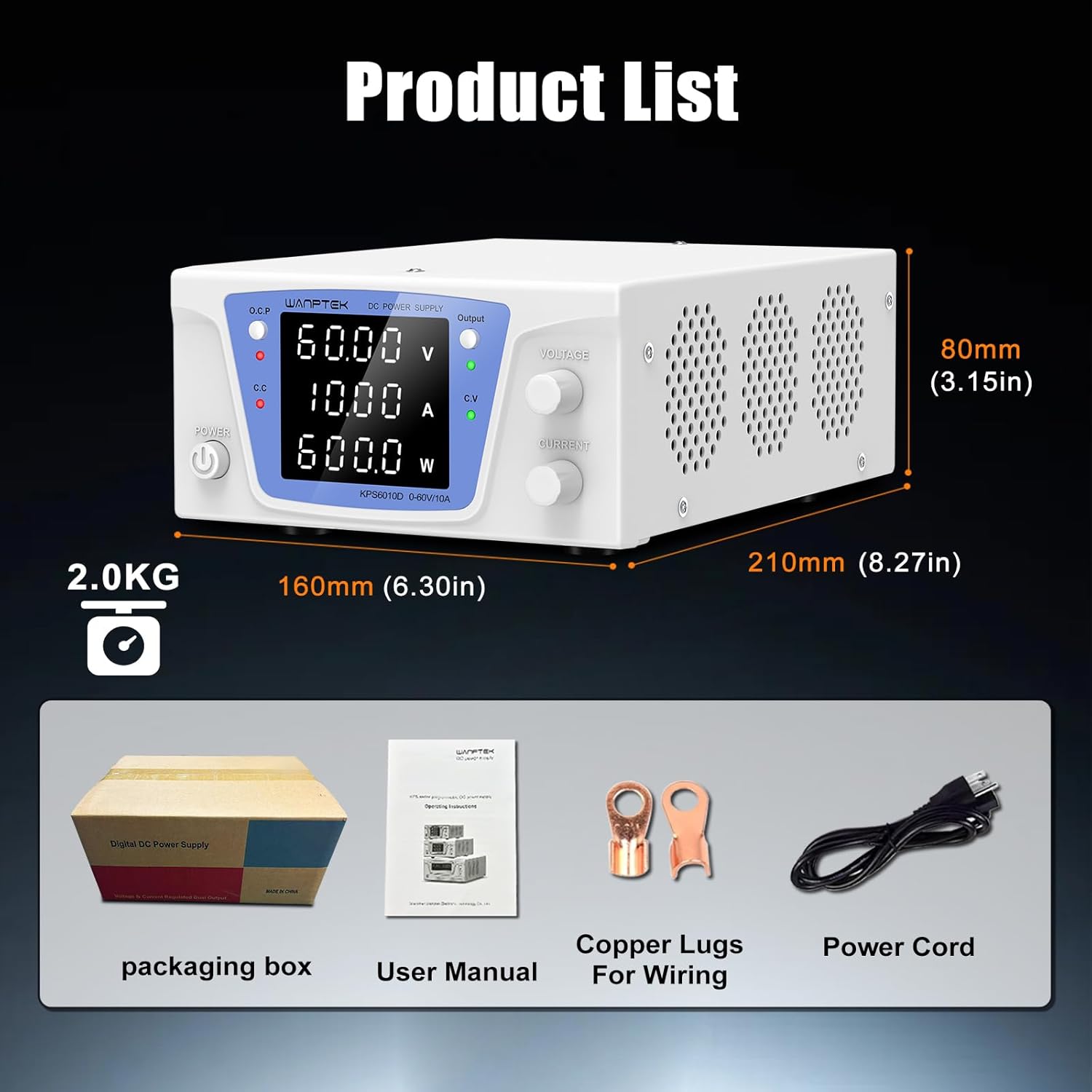
Figure 1: Contents of the NANKADF DC Power Supply package, including the power supply unit, power cords, and user manual.
4. Product Overview
4.1 Front Panel

Figure 2: Front panel of the NANKADF DC Power Supply, showing the display, control knobs, and buttons.
- Power Switch: Turns the device on/off.
- Voltage Display: 4-digit display for output voltage.
- Current Display: 4-digit display for output current.
- Power Display: Displays output wattage.
- Encoder Knob (Voltage/Current): Precise adjustment for voltage and current. Press to switch between digits for fine-tuning.
- Output Button: Enables or disables power output to the terminals.
- OCP (Over Current Protection) Switch: Activates or deactivates the short-circuit alarm function.
- Output Indicator Light: Illuminates when output is active.
- Constant Voltage (C.V.) Indicator Light: Illuminates when the power supply is operating in constant voltage mode.
- Constant Current (C.C.) Indicator Light: Illuminates when the power supply is operating in constant current mode.
- Short Circuit Protection Indicator Light: Illuminates when OCP is triggered.
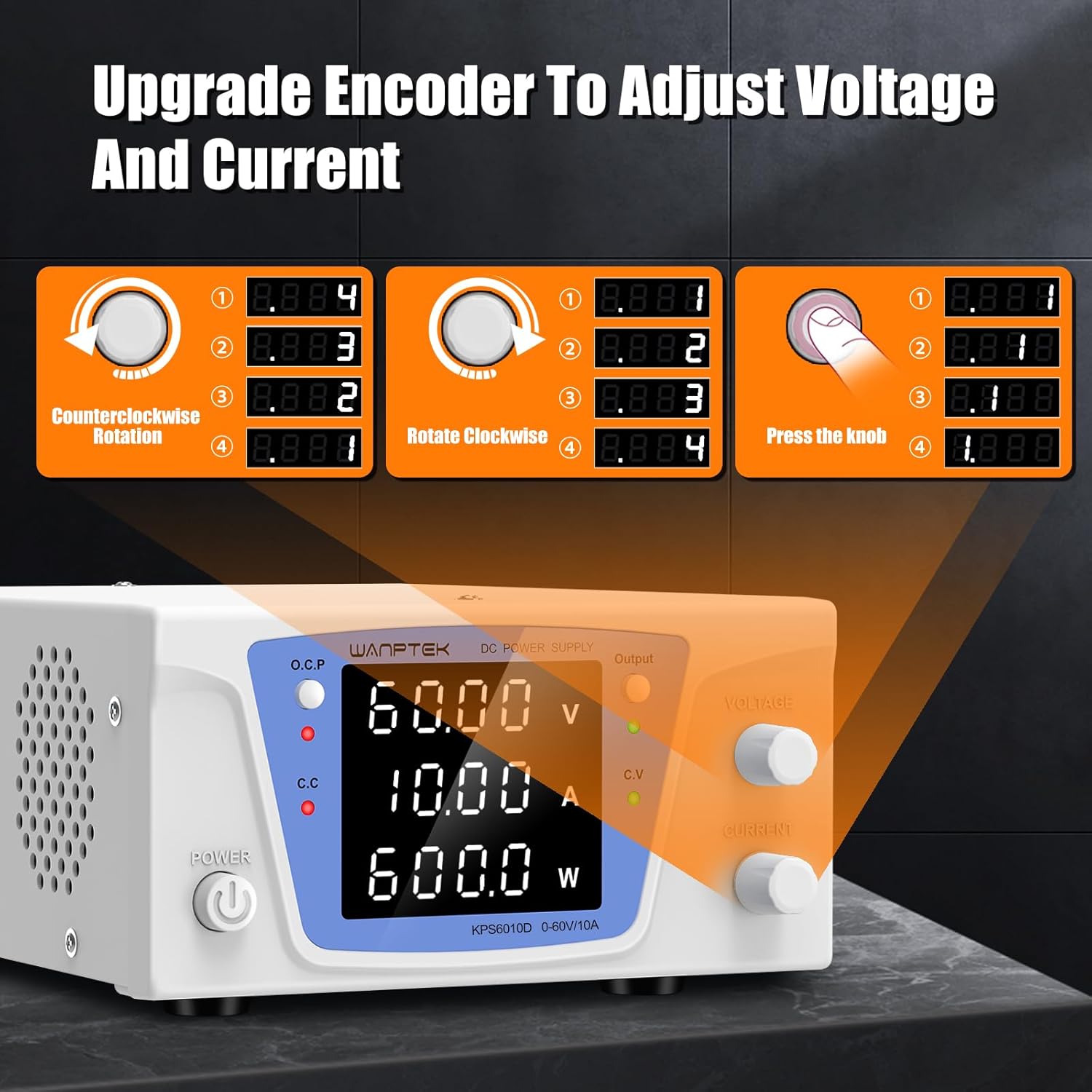
Figure 3: Close-up of the encoder knob, illustrating its function for precise voltage and current adjustment by pressing to select digits and rotating to change values.

Figure 4: Close-up of the OCP (Over Current Protection) and Output switches, highlighting their functions for safety and control.
4.2 Rear Panel

Figure 5: Rear panel of the NANKADF DC Power Supply, showing the cooling fan, power input, fuse box, and output terminals.
- Intelligent Cooling Fan: Automatically activates to maintain optimal operating temperature.
- Power Input Socket: Connects the input power cord.
- Fuse Box: Houses the protective fuse.
- Negative Output Terminal (Black): Connects to the negative terminal of the load.
- Positive Output Terminal (Red): Connects to the positive terminal of the load.
- Grounding Terminal (Green): Provides a safety ground connection.
- RS232/RS485 Communication Interface (Customizable): For advanced control and data logging (if applicable to specific models).
5. Setup
- Unpacking: Carefully remove all components from the packaging. Inspect for any damage.
- Placement: Place the power supply on a stable, level surface with adequate ventilation. Ensure no objects obstruct the cooling fan on the rear panel.
- Power Connection:
- Connect the provided input power cord to the Power Input Socket on the rear panel.
- Plug the other end of the input power cord into a grounded AC power outlet.
- Grounding: For safety, connect the grounding terminal (green) to an appropriate ground point if available in your setup.
- Initial Power On: Press the Power Switch on the front panel. The display should illuminate.
6. Operation
6.1 Adjusting Voltage and Current
- Ensure the Output Button is in the OFF position (output disabled) before adjusting.
- Voltage Adjustment:
- Rotate the Voltage Encoder Knob to set the desired coarse voltage.
- Press the Voltage Encoder Knob to select a specific digit (e.g., tens, units, tenths, hundredths) for fine adjustment. Rotate the knob to change the value of the selected digit.
- Current Adjustment:
- Rotate the Current Encoder Knob to set the desired coarse current limit.
- Press the Current Encoder Knob to select a specific digit for fine adjustment. Rotate the knob to change the value of the selected digit.
Figure 6: Visual guide for using the encoder knob to adjust voltage and current settings precisely.
6.2 Output Enable/Disable
- After setting the desired voltage and current, connect your load to the output terminals (Red for positive, Black for negative).
- Press the Output Button to enable power to the load. The Output Indicator Light will illuminate.
- To disable output, press the Output Button again.
Video 1: Demonstration of the NANKADF DC Power Supply's output enable/disable function and basic operation.
6.3 Over Current Protection (OCP)
- The OCP function protects the power supply and the connected load from short circuits or excessive current.
- To activate OCP, press the OCP Switch.
- If a short circuit or overcurrent condition occurs while OCP is active, the power supply will automatically stop output, and an alarm sound will be emitted. The Short Circuit Protection Indicator Light will illuminate.
- To clear the OCP alarm, resolve the fault condition and then press the OCP switch again or cycle the power.

Figure 7: Overview of multiple circuit protection features, including Over Voltage Protection (OVP), Over Current Protection (OCP), Overload Protection (OPP), and Over Temperature Protection (OTP).
7. Maintenance
- Cleaning: Disconnect the power supply from the main power before cleaning. Use a soft, dry cloth to wipe the exterior. Do not use abrasive cleaners or solvents.
- Ventilation: Regularly check that the cooling fan and ventilation openings are free from dust and obstructions. Proper airflow is crucial for preventing overheating.
- Storage: Store the device in a cool, dry place away from direct sunlight and extreme temperatures.
8. Troubleshooting
| Problem | Possible Cause | Solution |
|---|---|---|
| No power/display off | Power cord not connected, power switch off, blown fuse. | Check power cord connection, turn on power switch, check/replace fuse. |
| No output voltage/current | Output button off, OCP triggered, load disconnected. | Press Output button, check OCP status and reset if needed, verify load connection. |
| OCP alarm triggered | Short circuit in load, excessive current draw. | Disconnect load, check for short circuits, reduce current demand, reset OCP. |
| Unit overheating | Blocked ventilation, prolonged high load operation. | Ensure clear ventilation, reduce load, allow unit to cool down. |
9. Specifications
| Feature | Value |
|---|---|
| Model Number | 0-60V 0-10A |
| Output Voltage Range | 0-60V |
| Output Current Range | 0-10A |
| Output Wattage | 600 Watts |
| Input Voltage | 120 Volts (AC) |
| Current Rating | 10 Amps |
| Cooling Method | Air |
| Display | 4-digit LED |
| Protection Features | OVP, OCP, OPP, OTP |
| Dimensions | 11.73 x 7.68 x 5.31 inches |
| Item Weight | 5.5 pounds |
10. Warranty & Support
NANKADF provides technical support for this product. For assistance, troubleshooting, or warranty inquiries, please refer to the contact information provided with your purchase or visit the official NANKADF website.


