
1. Introduction
This manual provides detailed instructions for the safe and effective use of your CLEVAST Classic2 3-in-1 Electric Air Duster, Mini Vacuum, and Inflator. Please read this manual thoroughly before operating the device and retain it for future reference.
2. Product Overview
The CLEVAST Classic2 is a versatile device designed for various cleaning and inflating tasks. It functions as an electric air duster, a mini vacuum cleaner, and an inflator, offering a comprehensive solution for maintaining cleanliness and convenience.
Key Features:
- 3-in-1 Functionality: Air duster, mini vacuum, and inflator.
- Powerful Motor: Upgraded 110,000 RPM motor for strong airflow.
- 3 Speed Settings: Customizable airflow for different tasks.
- Integrated LED Light: Illuminates dark areas for precise cleaning.
- Cordless Design: Rechargeable 7800mAh battery for portable use.
- Type-C Charging: Convenient and fast charging.
- Multiple Accessories: Includes 9 detachable nozzles for various applications.
Package Contents:
The package includes the CLEVAST Classic2 main unit, various blowing nozzles, vacuuming accessories (dust collection cup), inflating nozzles, a USB-C charging cable, and a storage bag.

Figure 2.1: The CLEVAST Classic2 device, its packaging, and all included accessories, including various nozzles, a dust collection cup, charging cable, and storage bag.

Figure 2.2: Illustration of the CLEVAST Classic2 and its nine detachable components, highlighting their suitability for various cleaning and inflating scenarios such as computers, keyboards, air conditioners, windows, swimming rings, and sofas.
3. Safety Instructions
- Do not operate the device while it is charging.
- Keep the device away from water and other liquids.
- Do not block the air inlet or outlet during operation.
- Avoid pointing the air duster directly at people or animals.
- Do not use the device in explosive atmospheres or near flammable materials.
- Store the device in a cool, dry place, out of reach of children.
- Only use the provided charging cable and accessories.
- If the device shows signs of damage, discontinue use immediately.
4. Setup
Attaching Accessories:
- For Blowing Function: Select the appropriate blowing nozzle and firmly attach it to the air outlet at the front of the device.
- For Vacuuming Function: Attach the dust collection cup to the designated vacuum inlet. Ensure it is securely fastened. Note: Do not attach both blowing and vacuuming accessories simultaneously, as this will reduce performance.
- For Inflating Function: Select the correct inflating nozzle and attach it to the air outlet.

Figure 4.1: The CLEVAST Classic2 in use, illustrating its blowing function to remove dust from a keyboard (top image) and its vacuuming function to collect debris from a keyboard (bottom image).
5. Operating Instructions
Power On/Off and Speed Adjustment:
- To power on the device, press and hold the power button.
- Press the power button repeatedly to cycle through the three speed settings:
- Gear 1: 51,000 RPM (approx. 35 minutes runtime)
- Gear 2: 81,000 RPM (approx. 25 minutes runtime)
- Gear 3: 110,000 RPM (approx. 20 minutes runtime)
- To power off the device, press and hold the power button again.

Figure 5.1: Visual representation of the three gear speed modes for the CLEVAST Classic2, indicating the RPM and approximate runtime for each setting.
LED Light Function:
The device is equipped with LED lights to assist in cleaning dimly lit areas. The LED lights activate automatically when the device is powered on.

Figure 5.2: The CLEVAST Classic2 demonstrating its LED light feature, which illuminates the cleaning area for improved visibility, particularly in hard-to-reach or dark spaces.
Multipurpose Applications:
The various nozzles allow for diverse applications:
- Dusting: Computers, keyboards, electronics, car interiors, air conditioners.
- Vacuuming: Small particles, crumbs from desktops, sofas, car seats.
- Inflating: Swimming rings, air mattresses, balloons.
- Other uses: Blowing charcoal for barbecues.

Figure 5.3: A collage of images showcasing the CLEVAST Classic2 performing various tasks, including cleaning window sills, circuit boards, car vents, blowing charcoal for a BBQ, dusting stuffed animals, cleaning camera equipment, inflating an air mattress, cleaning air filters, and maintaining air conditioner units.
6. Charging
The CLEVAST Classic2 is equipped with a 7800mAh rechargeable Lithium Ion battery. It supports Type-C fast charging.
- Connect the provided USB-C cable to the charging port on the device and to a compatible USB power source (e.g., computer, power bank, car charger, or adapter).
- A full charge typically takes 3-4 hours.
- Do not use the device while it is charging.
Important Battery Protection Note: Do not charge the device immediately after extensive use. The battery temperature may be high. Please wait approximately 10 minutes for the device to cool down before initiating charging.
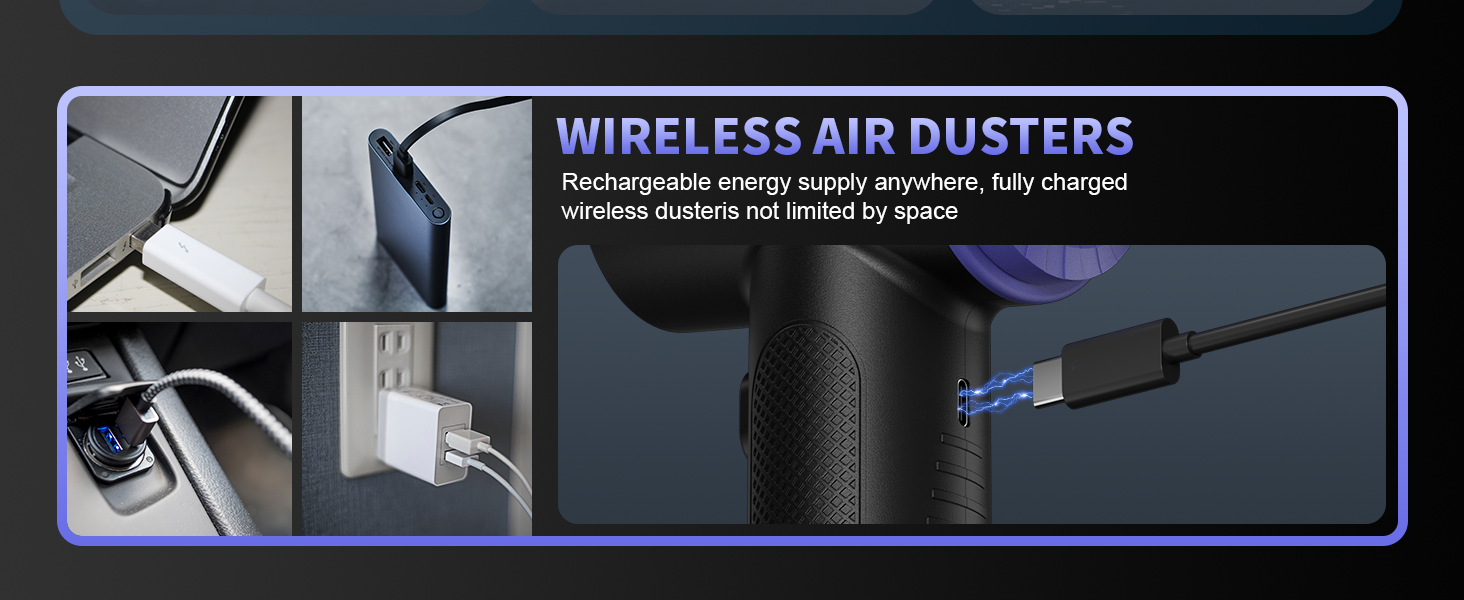
Figure 6.1: The CLEVAST Classic2 illustrating its wireless charging capability via a Type-C port, showing compatibility with various power sources such as laptops, power banks, wall adapters, and car chargers.
7. Maintenance
- Cleaning the Device: Wipe the exterior of the device with a soft, dry cloth. Do not use harsh chemicals or abrasive cleaners.
- Cleaning the Dust Collection Cup: For vacuuming, regularly empty and clean the dust collection cup to maintain optimal suction performance. Wash with water if necessary and ensure it is completely dry before reattaching.
- Accessory Care: Clean nozzles and brushes as needed. Ensure they are free of debris before storage.
- Storage: Store the device and its accessories in the provided storage bag in a cool, dry place.
8. Troubleshooting
Common Issues and Solutions:
| Problem | Possible Cause | Solution |
|---|---|---|
| Device does not turn on. | Low battery; device not charged. | Charge the device fully using the provided USB-C cable. |
| Weak airflow/suction. | Dust collection cup is full; nozzle/filter is blocked; low battery. | Empty and clean the dust collection cup and filter. Clear any blockages from nozzles. Charge the device. |
| Device stops working during use. | Overheating; low battery. | Allow the device to cool down. Charge the device. |
| Charging indicator light is dim or not visible. | Viewing angle; minor design aspect. | Ensure you are looking directly at the indicator light. This is a known characteristic and does not affect charging functionality. |
9. Specifications
- Model: Classic2
- Brand: CLEVAST
- Item Weight: 1.52 pounds (approx. 0.69 kg)
- Product Dimensions: 5.51 x 5.51 x 8.27 inches (approx. 14 x 14 x 21 cm)
- Motor Speed: Up to 110,000 RPM (3 adjustable gears)
- Battery Type: 3 Lithium Ion batteries (included)
- Battery Capacity: 7800mAh
- Charging Port: USB Type-C
- Charging Time: 3-4 hours (approx.)
- Runtime: 20-40 minutes (depending on speed setting)
10. Warranty and Customer Support
CLEVAST is committed to customer satisfaction and offers lifetime customer service support for this product. If you have any questions, encounter issues, or require assistance, please contact CLEVAST customer service directly through the official channels provided at the point of purchase or on the CLEVAST website.


