
Accutime SPD4753AZ
Accutime Marvel Spider-Man Digital Learning Watch User Manual
Model: SPD4753AZ
Introduction
This manual provides instructions for the Accutime Marvel Spider-Man Educational Learning Digital Watch, model SPD4753AZ. Please read this manual thoroughly before using the watch to ensure proper operation and to understand all its features.

Figure 1: Front view of the Accutime Marvel Spider-Man Digital Learning Watch. The watch features a blue casing with a Spider-Man mask design on the cover and a red silicone strap.
Product Features
- Digital Time Display (12/24 hour format)
- Multiple Changeable Watch Faces
- Timer Function
- Stopwatch Function
- Alarm Function
- Built-in Educational Games
- Durable Construction with Silicone Strap
- Officially Licensed Marvel Product

Figure 2: The watch display showcasing key features including 10 changeable watch faces, a snug silicone strap, and a kid-tough design for durability.
Setup
1. Initial Power On and Battery
The watch typically comes with a pre-installed battery. If the display is not active, press any button to wake it up. If the watch does not power on, the battery may need replacement. Refer to the "Maintenance" section for battery replacement instructions.
2. Setting Time and Date
- Press and hold the SET button (usually located on the side or bottom of the watch face) until the time display begins to flash.
- Use the MODE or ADJUST button to cycle through hours, minutes, month, day, and year.
- Use the SET button to adjust the flashing value (e.g., increase hour, minute).
- Once all settings are correct, press the SET button again to confirm and exit the setting mode.
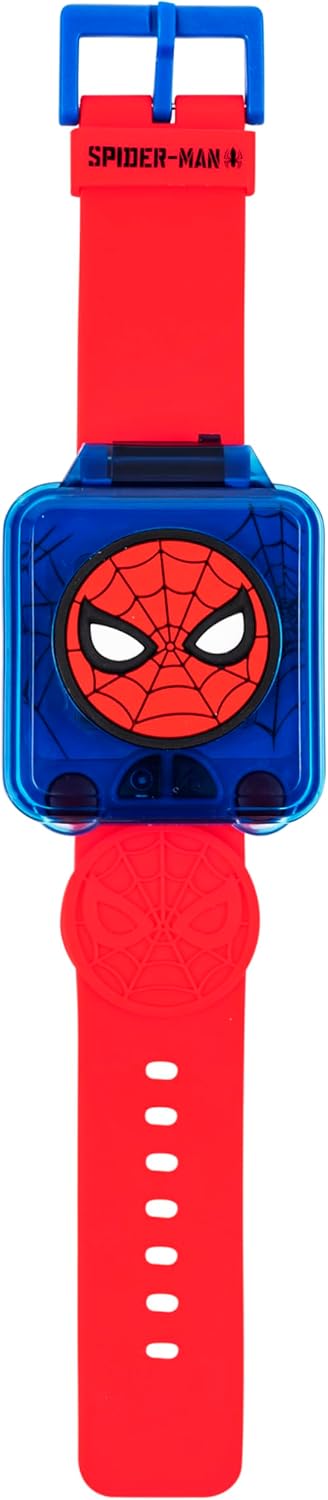
Figure 3: The watch comfortably worn on a child's wrist, demonstrating its size and fit. Ensure the strap is adjusted for a secure fit.
Operating Instructions
1. Basic Time Display and Watch Faces
The watch defaults to displaying the current time. To change the watch face:
- Press the MODE button repeatedly until the watch face selection screen appears.
- Use the SET or ADJUST button to cycle through the available watch face designs.
- Once your desired watch face is displayed, press the MODE button to return to the main time display, or wait a few seconds for it to automatically set.

Figure 4: A close-up of the watch display illustrating the variety of Spider-Man themed watch faces available for selection.
2. Using the Timer
- Press the MODE button until the Timer function is displayed.
- Use the SET button to adjust the desired countdown time (hours, minutes, seconds).
- Press the START/STOP button to begin the countdown.
- Press START/STOP again to pause, and once more to resume.
- When the timer reaches zero, an alert will sound. Press any button to stop the alert.
3. Using the Stopwatch
- Press the MODE button until the Stopwatch function is displayed.
- Press the START/STOP button to begin timing.
- Press START/STOP again to pause.
- Press the RESET button (often the same as SET or MODE when paused) to clear the stopwatch to zero.
4. Setting an Alarm
- Press the MODE button until the Alarm setting screen appears.
- Use the SET button to adjust the alarm hour and minute.
- Press the MODE button to toggle the alarm ON/OFF. An alarm icon will typically appear on the display when activated.
- Press the MODE button again to exit the alarm setting.
5. Playing Games
The watch includes several built-in educational games. To access them:
- Press the MODE button until the Games menu is displayed.
- Use the SET or ADJUST button to select a game.
- Press the START/OK button to begin the selected game.
- Follow the on-screen instructions to play.
Maintenance
1. Cleaning
To clean the watch, wipe it gently with a soft, damp cloth. Do not use harsh chemicals or abrasive cleaners, as these can damage the watch's finish or internal components. Ensure the watch is dry before storage.
2. Water Resistance
This watch is designed for everyday wear and is splash-resistant. It is not suitable for swimming, showering, or submersion in water. Avoid exposing the watch to excessive moisture.
3. Battery Replacement
The watch uses a standard watch battery (e.g., CR2032, specific type may vary, check watch back for details). Battery replacement should ideally be performed by an adult or a qualified technician. Improper replacement can damage the watch or compromise its water resistance.
- Using a small screwdriver, carefully remove the screws on the back cover of the watch.
- Gently lift the back cover.
- Note the orientation of the existing battery. Carefully remove the old battery.
- Insert the new battery with the correct polarity.
- Replace the back cover and secure it with the screws, ensuring a snug fit to maintain splash resistance.
Troubleshooting
| Problem | Possible Cause | Solution |
|---|---|---|
| Watch display is blank or dim. | Low or dead battery. | Replace the battery as per "Battery Replacement" instructions. |
| Buttons are unresponsive. | Temporary software glitch or low battery. | Try pressing all buttons firmly. If unresponsive, replace battery. If issue persists, contact support. |
| Time is incorrect. | Time not set correctly or battery low. | Re-set the time and date. If it frequently loses time, replace the battery. |
| Alarm does not sound. | Alarm not activated or volume too low (if adjustable). | Ensure the alarm is set and activated (check for alarm icon). |
Specifications
- Model Number: SPD4753AZ
- Brand: Accutime
- Product Type: Digital Learning Watch
- Recommended Age: 3+ years
- Strap Material: Silicone
- Display Type: Digital
- Features: Time, Date, Timer, Stopwatch, Alarm, Multiple Watch Faces, Educational Games
- Dimensions (Package): 6.93 x 3.86 x 2.4 inches
- Weight (Package): 4.16 ounces
- Manufacturer: Accutime Watch Corp.
Warranty and Support
Specific warranty information is not provided in the product data. For details regarding warranty coverage or technical support, please refer to the product packaging or contact Accutime customer service directly. You may also visit the official Accutime website for further assistance.
Accutime Store Link: Visit the Accutime Store on Amazon
Related documentsSPD4753AZ


Ask a question about this manual
Ask about setup, troubleshooting, compatibility, parts, safety, or missing instructions. Manuals+ will review the question and use this page’s manual context to help answer it.