
Introduction
This manual provides essential instructions for the installation, operation, and maintenance of the Red Lion Controls PGMMOD05 Programming Display Module. The PGMMOD05 is designed as an HMI accessory to facilitate programming and display functions for compatible Red Lion Controls devices. Please read this manual thoroughly before using the module to ensure proper functionality and safety.
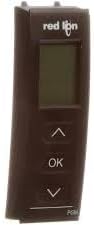
Figure 1: Red Lion Controls PGMMOD05 Programming Display Module. This image shows the compact, dark-colored module with a small display screen at the top and three buttons below it: an 'Up' arrow, an 'OK' button, and a 'Down' arrow. The 'Red Lion' logo is visible above the display.
Setup
1. Physical Installation
- Power Off: Ensure that the host device and any connected equipment are powered off before beginning installation.
- Mounting: Securely attach the PGMMOD05 module to the designated port or slot on the compatible Red Lion Controls host device. Refer to the host device's manual for specific mounting instructions.
- Connection: Verify that the module is firmly seated and all connections are secure.
2. Initial Configuration
- Power On: After physical installation, power on the host device. The PGMMOD05 display should illuminate.
- Language Selection: If prompted, use the Up and Down buttons to navigate language options and press OK to confirm.
- Device Recognition: The module should automatically detect and connect to the host device. A confirmation message may appear on the display.
Operating Instructions
1. Navigating the Display
The PGMMOD05 features a simple three-button interface for navigation and selection:
- Up Arrow (⌃): Used to scroll up through menus, increase values, or move the cursor left.
- Down Arrow (⌄): Used to scroll down through menus, decrease values, or move the cursor right.
- OK Button: Used to select an option, confirm a setting, or enter a submenu.
2. Programming Functions
The PGMMOD05 allows for direct programming and configuration of the connected host device. Specific programming menus and parameters will vary depending on the host device's capabilities and firmware version. Generally, you can expect to:
- Access device settings and parameters.
- Modify operational values and thresholds.
- View diagnostic information and status.
- Save and load configurations.
Refer to the specific documentation for your Red Lion Controls host device for detailed programming procedures and available functions.
Maintenance
1. Cleaning
To maintain optimal performance and readability of the display:
- Use a soft, lint-free cloth slightly dampened with water or a mild, non-abrasive cleaner.
- Avoid harsh chemicals, solvents, or abrasive materials, as these can damage the display and casing.
- Ensure the module is powered off and disconnected from the host device before cleaning.
2. Firmware Updates
Periodically check the Red Lion Controls website for available firmware updates for the PGMMOD05 module. Firmware updates can provide new features, performance enhancements, and bug fixes. Follow the instructions provided with the firmware update package carefully.
Troubleshooting
| Problem | Possible Cause | Solution |
|---|---|---|
| Display is blank | No power to host device; module not properly connected. | Ensure host device is powered on. Verify module is securely seated in its port. |
| Buttons unresponsive | Module frozen; physical damage. | Power cycle the host device. If issue persists, contact technical support. |
| Module not recognized by host device | Improper installation; incompatible firmware. | Re-seat the module. Check host device documentation for compatibility. Update firmware if necessary. |
If troubleshooting steps do not resolve the issue, please contact Red Lion Controls technical support.
Specifications
- Model: PGMMOD05
- Description: Programming Display Module, HMI Accessories
- Manufacturer: Red Lion Controls
- ASIN: B0CPFWZ7PC
- Date First Available: December 4, 2023
- Best Sellers Rank (Programmable Logic Circuits): #875
Warranty and Support
Red Lion Controls products are backed by a standard warranty. For detailed warranty information, please refer to the official Red Lion Controls website or contact their customer service. For technical assistance, product inquiries, or to report issues, please visit the Red Lion Controls Support Page or contact their authorized distributors.