
Introduction
Thank you for choosing the JOYROOM Fits MagSafe Car Mount. This manual provides detailed instructions for the proper installation, operation, and maintenance of your new car mount. Please read this manual thoroughly before use to ensure optimal performance and longevity of the product.

Image: The JOYROOM MagSafe Car Mount, showcasing its compact and foldable design on a car dashboard.
Product Features
The JOYROOM Fits MagSafe Car Mount is designed with advanced features to provide a secure and convenient phone holding solution in your vehicle.
All-Metal Foldable Design
Constructed entirely from high-hardness aluminum alloy, this car mount offers superior durability and strength compared to plastic alternatives. Its foldable design allows for discreet storage, minimizing obstruction of your driving view and car space when not in use.
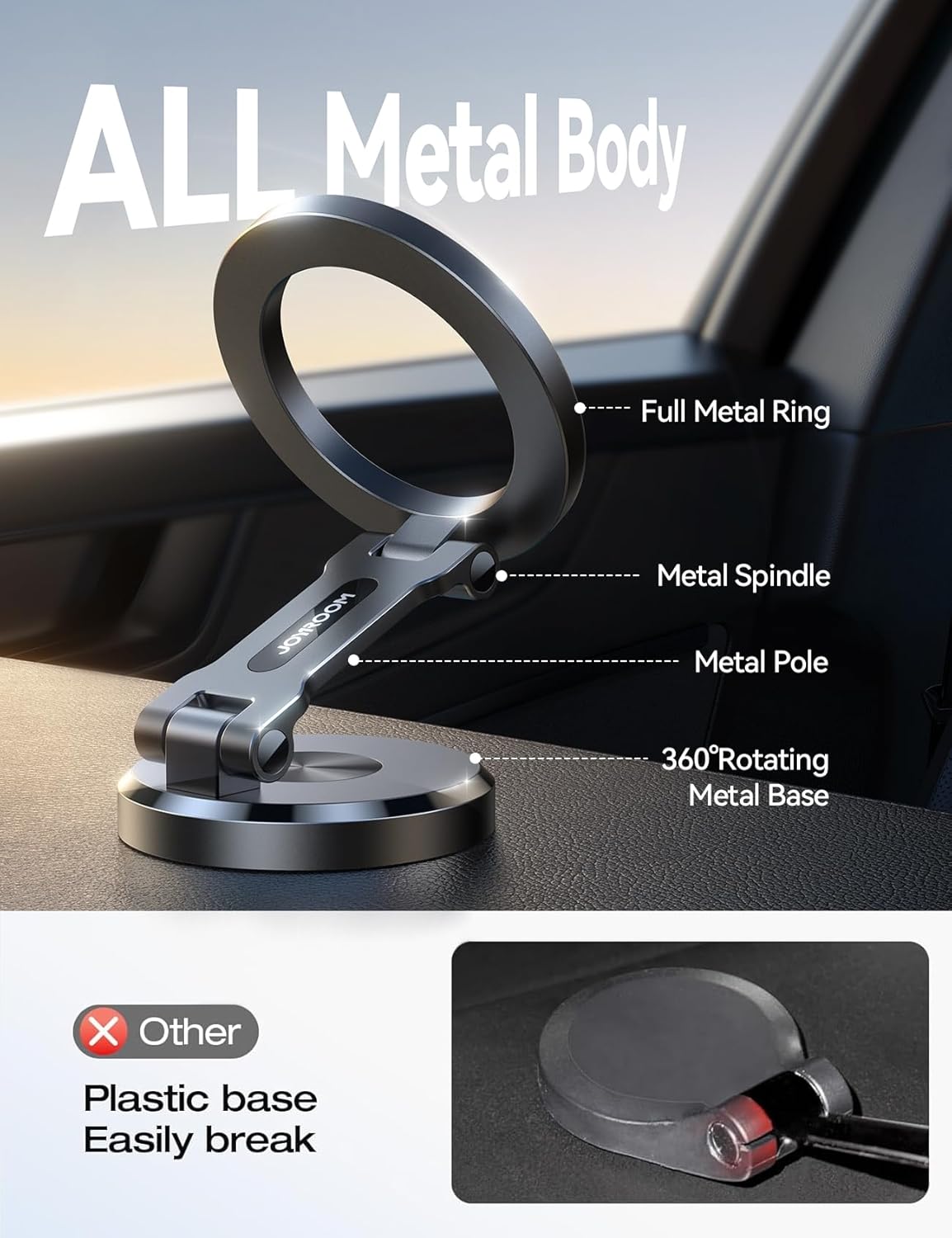
Image: Breakdown of the all-metal construction, highlighting the full metal ring, spindle, pole, and rotating base.
360° Rotation Base & Multi-angle Adjustment
The mount features a built-in mechanical shaft structure in its base, enabling a full 360° rotation for flexible angle adjustments. This allows you to position your phone optimally for navigation or calls. Note: The swivel base is reinforced for durability and may feel stiff when not mounted, but rotates easily once installed on the dashboard.

Image: Illustration of the 360-degree rotation feature, emphasizing flexible angle adjustments and the upgraded axle for anti-loosening.
Powerful N55 Magnets
Equipped with 20 N55 ring-shaped neodymium magnets, this car mount provides exceptional magnetic force, ensuring your phone remains securely in place even during bumpy rides, sudden braking, or sharp turns.

Image: Visual representation of the powerful N55 magnets, highlighting their strong holding capability.
Premium 3M Adhesive
The mount utilizes authentic 3M GPH-160 adhesive for enhanced stability. This adhesive maintains strong adhesion across extreme temperatures (-40°F to +300°F), providing long-lasting stability. Spare adhesive pads are included for replacement. Important: 3M adhesive tape is not suitable for genuine leather, suede, or oil-coated fabric surfaces.
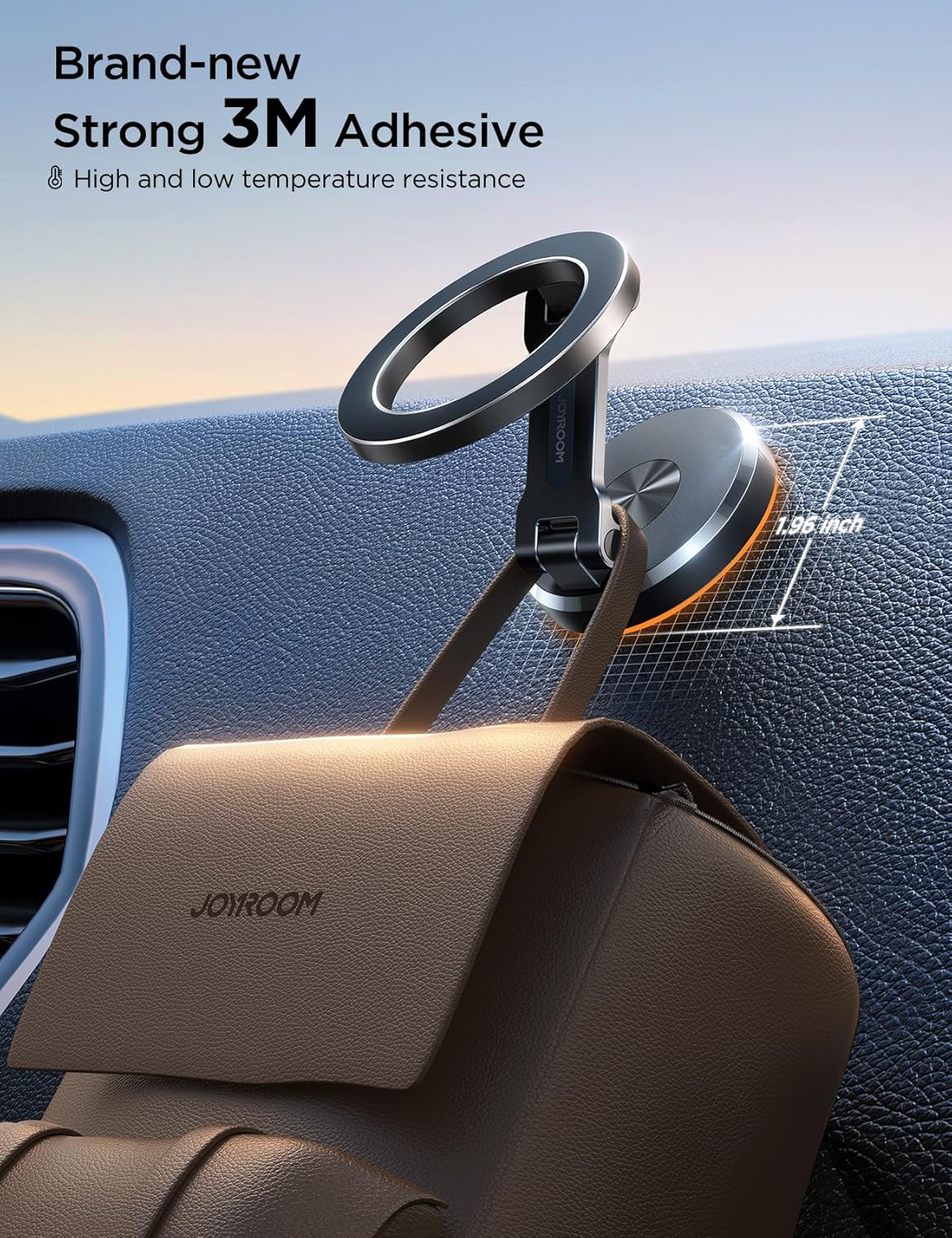
Image: The car mount secured with 3M adhesive on a dashboard, demonstrating its compact form factor.
Wide Compatibility
This magnetic car phone holder works directly with iPhone 16/15/14/13/12 series and MagSafe-supported phone cases. For phones or cases without MagSafe functionality, an included magnetic sheet can be affixed to the back of a regular phone case, making it compatible with all phone brands including Apple, Samsung, HTC, Google, and more.

Image: Compatibility chart showing how the mount works with MagSafe iPhones, other phones with an included metal ring, and smooth phone cases.
Ring Ventilation Design
The mount features a ring ventilation design that aids in dissipating heat from your phone during use. It is also compatible with MagSafe-enabled Pop Grips, allowing use without removing the magnetic ring.
Package Contents
Verify that all items are present in the package:
- JOYROOM Fits MagSafe Car Mount
- Spare 3M Adhesive Pads
- Magnetic Sheet (for non-MagSafe phones/cases)
Setup and Installation
Follow these steps for proper installation of your car mount:
- Choose a Flat, Clean Surface: Select a flat and clean area on your car's dashboard for installation. Ensure the surface is free from dust, grease, or moisture. The 3M adhesive requires a clean and flat surface for optimal adhesion. Avoid curved dashboards or surfaces made of genuine leather, suede, or oil-coated fabrics.
- Clean the Surface: Use an alcohol wipe or a clean cloth with a mild cleaner to thoroughly clean the chosen installation area. Allow it to dry completely.
- Apply the Adhesive: Peel off the protective film from the 3M adhesive pad on the base of the car mount.
- Attach the Mount: Firmly press the car mount onto the cleaned surface. Apply strong, consistent pressure for at least 30 seconds to ensure good contact.
- Allow Adhesion Time: For best results, allow the adhesive to cure for at least 24 hours before attaching your phone or adjusting the mount. This allows the adhesive to achieve its maximum bonding strength.
- (Optional) For Non-MagSafe Devices: If your phone or case does not have MagSafe functionality, attach the provided magnetic sheet to the back of your phone case. Ensure it is centered for optimal magnetic connection.

Image: Visual guide for installing the car mount, including surface preparation and adhesive application.
Operating Instructions
Using your JOYROOM MagSafe Car Mount is simple and intuitive:
- Attaching Your Phone: Bring your MagSafe-compatible iPhone (or phone with the magnetic sheet attached) close to the magnetic ring of the mount. The powerful magnets will automatically align and secure your phone in place. This can be done with one hand.
- Adjusting the Angle: Gently rotate the base of the mount 360° to achieve your desired viewing angle. The foldable arm also allows for upward, semi-fold, or fully folded positions to optimize visibility and space.
- Detaching Your Phone: Simply pull your phone away from the magnetic ring to detach it.

Image: Demonstrates the mount's flexibility with "Upward," "Semi Fold," and "Fold" positions for various viewing needs.
Maintenance
To ensure the longevity and optimal performance of your car mount, follow these simple maintenance tips:
- Cleaning: Wipe the mount regularly with a soft, dry cloth to remove dust and fingerprints. For stubborn dirt, a slightly damp cloth can be used, followed by immediate drying. Avoid abrasive cleaners or solvents.
- Adhesive Care: If you need to reposition the mount or if the adhesive loses its stickiness over time, use one of the provided spare 3M adhesive pads. Ensure the new surface is clean and dry before application.
- Avoid Excessive Force: While the mount is durable, avoid applying excessive force when adjusting its position or attaching/detaching your phone to prevent damage to the mechanical components.
Troubleshooting
If you encounter any issues with your JOYROOM Fits MagSafe Car Mount, please refer to the following common problems and solutions:
| Problem | Possible Cause | Solution |
|---|---|---|
| Mount is not sticking to the dashboard. | Surface is not clean, not flat, or made of unsuitable material (leather, suede, oil-coated fabric). Adhesive not fully cured. | Ensure the surface is clean, dry, flat, and suitable for 3M adhesive. Apply firm pressure for 30 seconds and allow 24 hours for curing. Use a spare adhesive pad if necessary. |
| Phone is not holding securely. | Phone/case not MagSafe compatible. Magnetic sheet not properly placed or used. Excessive phone weight. | Ensure your phone or case is MagSafe compatible. If not, use the provided magnetic sheet and ensure it's centered on your phone case. Verify phone weight is within reasonable limits for car mounts. |
| Mount rotation is stiff. | This is normal when not mounted due to reinforced design. | The mount is designed to be stiff when not installed to prevent loosening. It will rotate easily once securely mounted on the dashboard. |
Specifications
| Feature | Detail |
|---|---|
| Model Number | JR-ZS403-BK |
| Material | All-metal (Aluminum Alloy) |
| Magnets | 20 x N55 Neodymium Magnets |
| Adhesive Type | 3M GPH-160 |
| Temperature Resistance | -40°F to +300°F |
| Rotation | 360° |
| Mounting Type | Dashboard Adhesive |
| Compatible Devices | iPhone 16/15/14/13/12 series (direct), All cell phones (with included magnetic sheet) |
| Package Dimensions | 4.02 x 2.99 x 1.46 inches |
| Item Weight | 3.52 ounces |
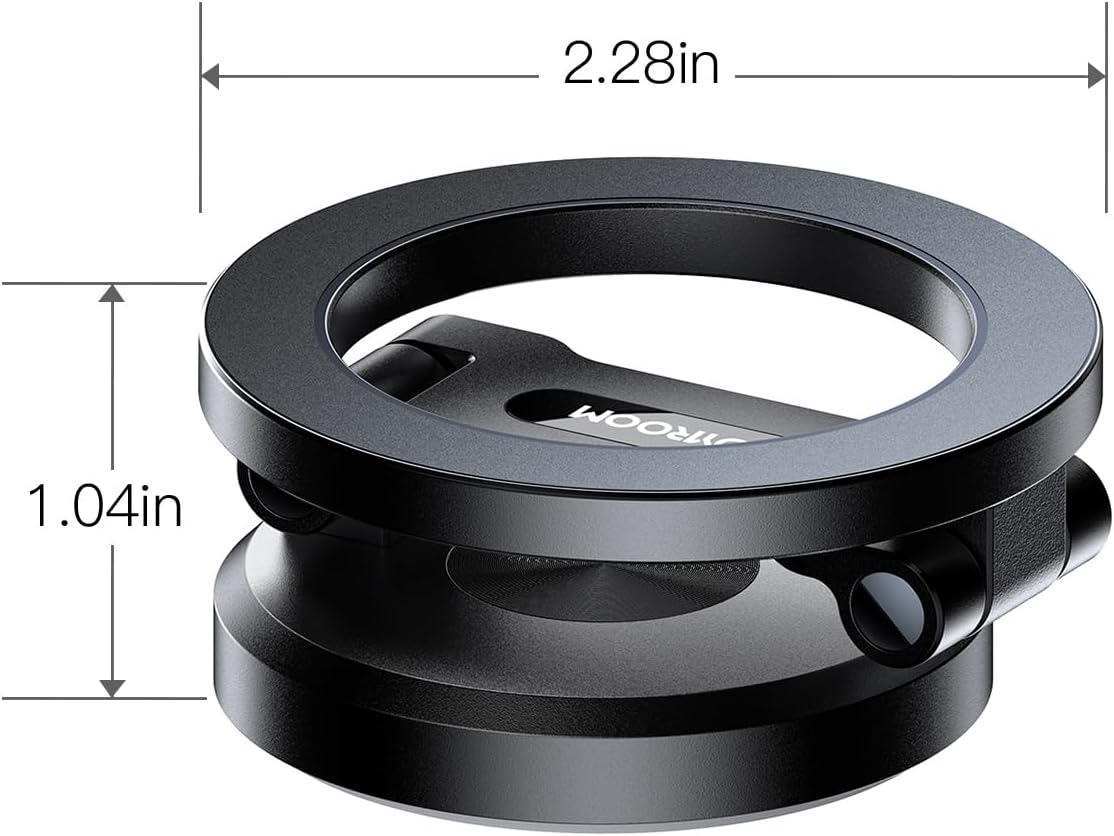
Image: Dimensions of the folded car mount for reference.
Warranty and Support
JOYROOM products are manufactured to high quality standards. For specific warranty information, please refer to the official product documentation or contact JOYROOM customer support.
For a detailed user manual in PDF format, please click here.
If you require further assistance or have any questions not covered in this manual, please contact JOYROOM customer support through their official website or the retailer where you purchased the product.