
1. Introduction
This manual provides detailed instructions for the assembly, operation, and maintenance of your Rolanstar Full Size Bed Frame. Designed for comfort and convenience, this bed frame features a storage headboard with integrated USB charging, multi-functional LED lighting, and ample under-bed storage. Please read this manual thoroughly before assembly and use to ensure proper setup and longevity of your product.
2. Important Safety Information
WARNING: To prevent serious injury, always adhere to the following safety guidelines:
- Do not exceed the maximum weight capacity of 700 pounds. Overloading can lead to structural failure and injury.
- Exercise caution during assembly. Some components may have sharp edges. It is recommended to wear protective gloves.
- Always follow the assembly instructions provided with the product carefully. Improper assembly can compromise the bed frame's stability and safety.
- Ensure all bolts and fasteners are securely tightened before use and periodically check them for looseness.
- Keep small parts and packaging materials away from children to prevent choking hazards.
- Do not jump on the bed frame.
3. Included Components
Before beginning assembly, verify that all parts listed below are present. If any parts are missing or damaged, please contact customer support.
- Bed Frame Components (Metal Slats, Side Rails, Headboard Sections, Footboard)
- Assembly Bag (Hardware: bolts, nuts, washers, Allen key, screwdriver)
- Instruction Manual
- USB Charging Station (pre-installed in headboard)
- LED Strip (pre-installed in headboard)

Figure 3.1: Overview of bed frame dimensions and key components.
4. Setup and Assembly
Assembly of the Rolanstar Bed Frame typically requires two people and takes approximately 1-2 hours. All necessary tools are included. Please refer to the detailed step-by-step instructions provided in the separate "Instruction Manual" included in your package.
General Assembly Tips:
- Clear a spacious area for assembly to avoid damaging components or your flooring.
- Organize all parts and hardware according to the labels in the instruction manual.
- Do not fully tighten all bolts until the entire frame is assembled, then go back and secure them. This allows for minor adjustments during alignment.
- Ensure the headboard is correctly oriented to access the charging station and LED controls.

Figure 4.1: Key features for easy assembly and stability.
5. Operating Instructions
5.1 Headboard Storage and Charging Station
The integrated headboard provides convenient storage shelves for items such as books, glasses, or decorative pieces. The charging station includes 2 USB ports and 1 Type-C port, allowing you to charge multiple devices simultaneously.

Figure 5.1: Headboard storage and charging station in use.

Figure 5.2: Detailed view of the charging ports.
5.2 Multi-functional LED Lights
The bed frame features RGB LED light strips that can be controlled via a mobile application or directly from the headboard. You can customize brightness, color, mode, and timer settings. The lights can also sync with music to create a dynamic ambiance.
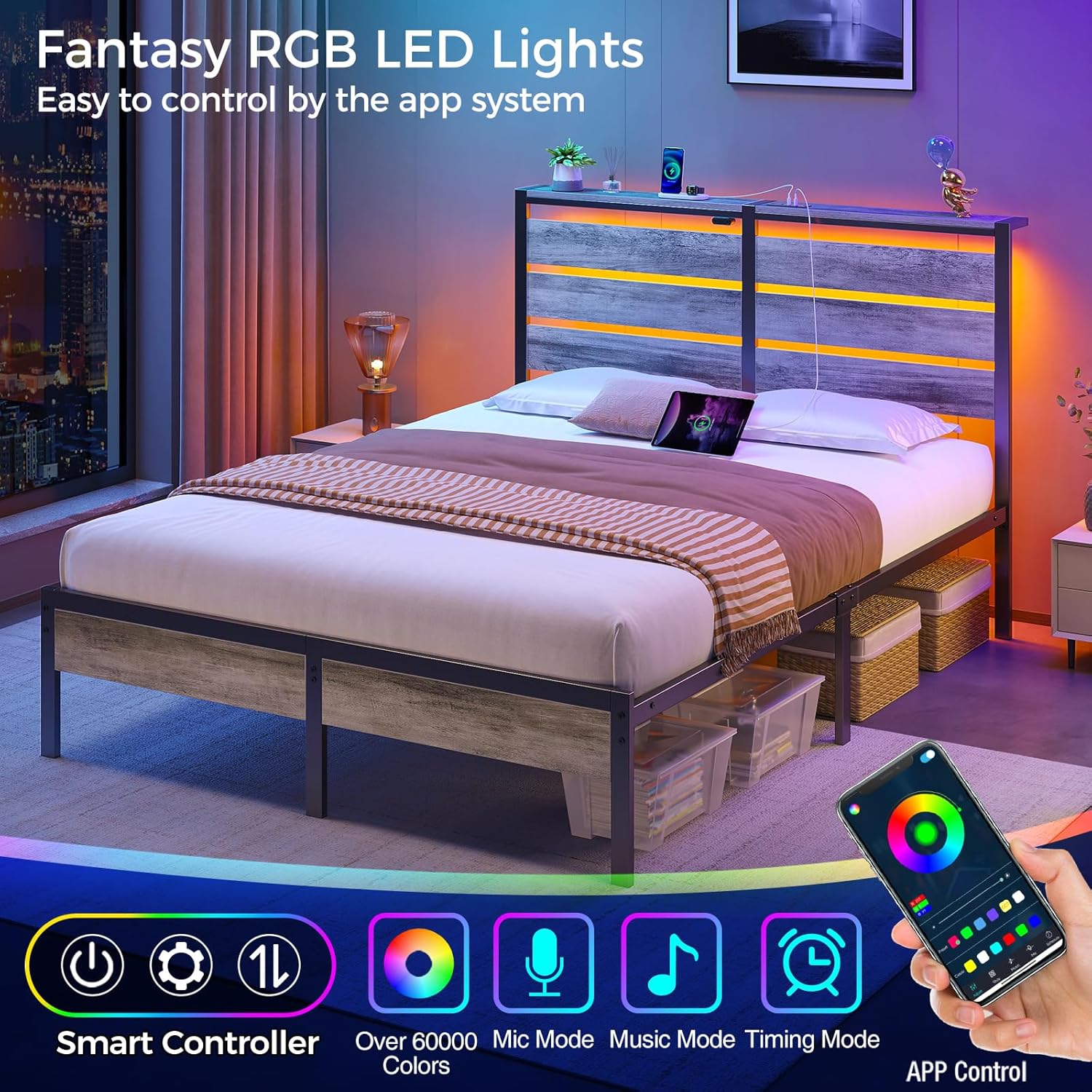
Figure 5.3: LED lights in operation with app control interface.

Figure 5.4: Example of the mobile application interface for LED control.
5.3 Under-Bed Storage
The bed frame offers 12.4 inches of clearance for under-bed storage, providing ample space for bins, luggage, or other items to keep your bedroom tidy and organized.

Figure 5.5: Illustration of available under-bed storage.

Figure 5.6: Measurement of under-bed clearance.
5.4 Official Product Video
Video 5.1: An official product video demonstrating the Rolanstar Bed Frame with its charging station and features. This video is provided by the seller, Homelly Direct.
6. Maintenance and Care
- To clean the bed frame, wipe surfaces with a damp cloth. Avoid using harsh chemicals or abrasive cleaners, which can damage the finish.
- Periodically check all bolts and connections to ensure they remain tight. Re-tighten as necessary to maintain stability and prevent noise.
- Keep the LED strips and charging ports free from dust and debris. Use a soft, dry cloth for cleaning these components.
7. Troubleshooting
| Problem | Possible Cause | Solution |
|---|---|---|
| Bed frame is noisy/squeaky. | Loose bolts or uneven assembly. | Ensure all bolts are securely tightened. Re-check assembly steps for proper alignment. |
| LED lights not working or flickering. | Loose connection, power issue, or app malfunction. | Check all power connections to the LED strip. Ensure the power adapter is plugged in. If using the app, try restarting it or reconnecting. If the issue persists, use the manual controls on the headboard. |
| Charging ports not functioning. | Power supply issue or damaged port. | Verify the bed frame's power cord is securely plugged into a working outlet. Test with different devices and cables. If only one port is affected, it might be damaged. |
8. Product Specifications
| Brand | Rolanstar |
| Model Number | hq-chj026-01 |
| Size | Full |
| Color | Light Grey |
| Product Dimensions | 80.5"L x 54.5"W x 43.3"H |
| Item Weight | 55.7 pounds |
| Weight Capacity | 700 pounds |
| Special Features | Storage Headboard, LED strips, Charging Station (2 USB, 1 Type-C) |
| Compatible Mattress Size | Full |
| Assembly Required | Yes |
| Care Instructions | Wipe with Damp Cloth |
9. Warranty and Support
For warranty information or technical support, please refer to the documentation included with your purchase or contact Rolanstar customer service directly. Keep your purchase receipt for warranty claims.


