
1. Introduction
The HOSHI K102 MAX Drone is a professional foldable quadcopter designed for various aerial activities. It features a 2-axis gimbal with a 4K HD dual camera, 360° obstacle avoidance technology, GPS positioning, 5G Wi-Fi FPV (First Person View), and Electronic Image Stabilization (EIS). This drone is equipped with intelligent functions such as automatic following, gesture recognition for photo and video capture, and trajectory flight planning.

Image 1.1: HOSHI K102 MAX Drone, remote control, and smartphone setup.
2. What's in the Box
Please verify that all the following components are included in your package:
- HOSHI K102 MAX Drone (excluding batteries)
- Remote Control
- Battery (1 unit)
- Wind Blades (4 units)
- Charging Cable / Screwdriver
- Storage Bag
- Color Box (Packaging)

Image 2.1: Package contents of the HOSHI K102 MAX Drone.
3. Setup Guide
3.1 Unfolding the Drone
- Gently unfold the front arms of the drone until they lock into place.
- Unfold the rear arms of the drone until they are fully extended.
- Ensure all arms are securely locked before proceeding.
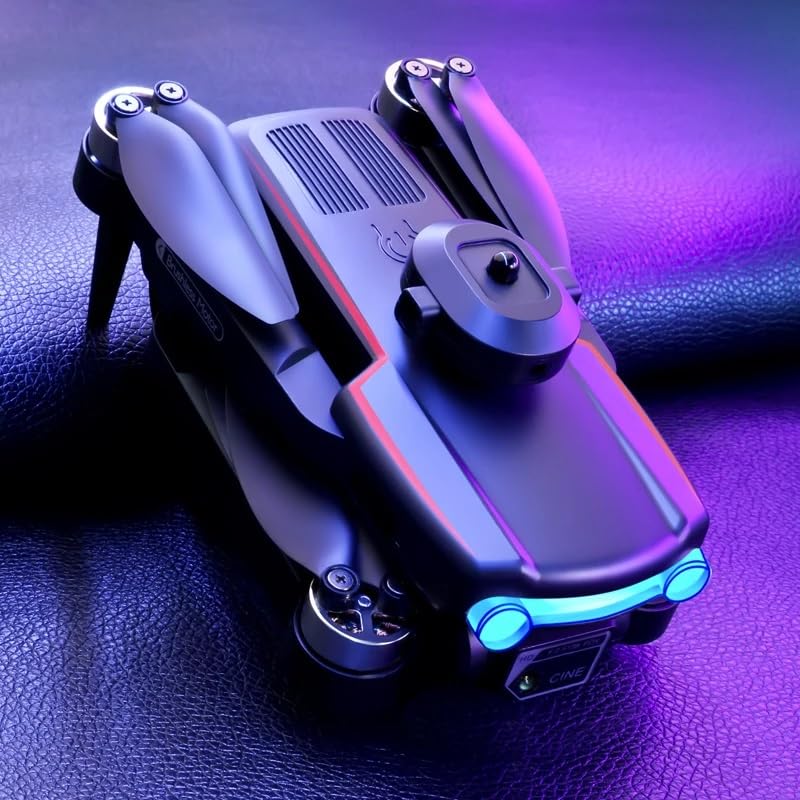
Image 3.1: HOSHI K102 MAX Drone in folded configuration.
3.2 Battery Installation and Charging
- Insert the provided battery into the drone's battery compartment, ensuring it clicks into place.
- To charge the battery, connect the charging cable to the battery and a suitable USB power source. The charging indicator will show the charging status.
- Ensure the battery is fully charged before first use.
3.3 Propeller Installation
If propellers are not pre-installed, attach them according to the markings (A and B) on the propellers and motor shafts. Use the provided screwdriver to secure them if necessary.
3.4 Remote Control and App Setup
- Install batteries into the remote control (not included, typically AA batteries).
- Download the official drone application from your smartphone's app store. Search for "HOSHI K102 MAX" or refer to the QR code in the quick start guide (if provided).
- Mount your smartphone onto the remote control holder.
4. Operating Instructions
4.1 Powering On/Off and Pairing
- Power On: Press and hold the power button on the drone until the indicator lights turn on. Power on the remote control.
- Pairing: The drone and remote control should automatically pair. If not, follow the pairing instructions in the app or quick start guide.
- Connect to App: Enable Wi-Fi on your smartphone and connect to the drone's Wi-Fi network (e.g., "HOSHI_K102_MAX_XXXX"). Open the drone application.
- Power Off: Press and hold the power button on the drone and remote control until they power off.
4.2 Basic Flight Controls
- Takeoff/Landing: Use the one-key takeoff/landing button on the remote or in the app. Alternatively, push both joysticks to the bottom-outer corners to arm motors, then push the left joystick up to ascend.
- Ascend/Descend: Use the left joystick (throttle).
- Forward/Backward/Left/Right: Use the right joystick.
- Hovering: The drone features optical flow hovering for stable flight.
4.3 Advanced Features
- 4K HD Dual Camera: Access camera controls via the app. Adjust camera angle, switch between front and bottom cameras, and utilize the 50x optical zoom.
- 360° Obstacle Avoidance: The drone is equipped with sensors to detect and avoid obstacles in its path. Maintain a safe distance from objects.
- GPS Functions:
- Auto Follow: Enable this mode in the app, and the drone will automatically follow your movements.
- Trajectory Flight: Draw a desired flight path on the app screen, and the drone will follow it.
- Automatic Landing Point: Set a specific landing point in the app for automated return and landing.
- Gesture Recognition: Perform specific hand gestures (as detailed in the app or quick start guide) to trigger photo or video recording.
- 360° Roll: Execute acrobatic rolls using the dedicated button on the remote control.
- Headless Mode: Simplifies flight by orienting the drone relative to the pilot, regardless of the drone's actual front direction.

Image 4.1: HOSHI K102 MAX Drone ready for flight.
5. Maintenance
5.1 Cleaning
- Use a soft, dry cloth to clean the drone body and camera lens.
- Avoid using liquid cleaners or solvents that may damage components.
5.2 Propeller Inspection and Replacement
- Regularly inspect propellers for cracks, bends, or damage.
- Replace damaged propellers immediately using the spare blades provided and the screwdriver. Ensure correct A/B propeller placement.
5.3 Battery Care
- Do not overcharge or over-discharge the battery.
- Store batteries in a cool, dry place away from direct sunlight and extreme temperatures.
- If storing for extended periods, charge the battery to approximately 50-60% capacity.
5.4 Storage
- Fold the drone arms for compact storage.
- Store the drone and accessories in the provided storage bag to protect them from dust and damage.
6. Troubleshooting
- Drone not powering on: Ensure the battery is fully charged and correctly inserted. Press and hold the power button for a few seconds.
- No connection with remote control/app: Ensure both drone and remote are powered on. Re-pair the drone and remote. Check Wi-Fi connection on your smartphone and ensure it's connected to the drone's network.
- Unstable flight: Calibrate the drone before flight (refer to app instructions). Check propellers for damage or incorrect installation. Ensure flight is in an open area away from strong winds or magnetic interference.
- Camera not working/poor image quality: Check the camera connection in the app. Ensure the lens is clean. Verify sufficient light conditions.
- Obstacle avoidance not functioning: Ensure sensors are clean and unobstructed. Avoid flying in extremely dark or reflective environments that may interfere with sensor performance.
7. Specifications
| Feature | Detail |
|---|---|
| Brand | Hoshi (Manufacturer) / Generic (Brand Listing) |
| Model Name | K102 Max |
| Special Features | Auto Follow, Auto-Landing, Auto-Orientation, Portable, 360° Obstacle Avoidance |
| Age Range (Description) | Adult |
| Color | Black |
| Video Capture Resolution | 4K |
| Connectivity Technology | Wi-Fi (5G) |
| Included Components | Battery |
| Skill Level | All |
| Item Weight | 0.4 Kilograms (400 g) |
| Battery Capacity | 1800 Milliamp Hours |
| Video Capture Format | MP4 |
| Control Type | App Control |
| Material | Plastic |
| Battery Cell Composition | Alkaline |
| Are Batteries Included | Yes |
| Supported Image Format | JPEG |
| Video Output Resolution | 4K |
| Remote Control Included? | Yes |
| Optical Sensor Technology | CMOS |
| Rechargeable Battery Included | Yes |
| Product Dimensions | 23L x 18W x 10H Centimeters |
8. Warranty and Support
Specific warranty details and customer support contact information are not provided in the available product data. Please refer to the product packaging, the official HOSHI website, or your point of purchase for warranty claims and technical assistance.


