
1. Introduction
This manual provides essential information for setting up, operating, maintaining, and troubleshooting your Xiaomi Redmi 13C smartphone. Please read this guide carefully to ensure proper use and optimal performance of your device.
The Xiaomi Redmi 13C is a new product featuring 128GB storage and 6GB RAM, with Dual SIM capability, in Midnight Black. This device is supplied by a specialized distributor.
2. What's in the Box
Upon unboxing your Xiaomi Redmi 13C, verify that all the following items are included:
- Xiaomi Redmi 13C Smartphone
- USB Cable
- Charger
- SIM Tray Ejector Tool
3. Device Overview
Familiarize yourself with the key components of your Redmi 13C.

Figure 3.1: Overview of Xiaomi Redmi 13C key features, including its 6.74-inch 90Hz display, 50MP AI triple camera, 5000mAh battery with 18W fast charging, and powerful octa-core processor.
The Redmi 13C features a large 6.74-inch display with a 90Hz refresh rate for smooth visuals. It is equipped with a 50MP AI triple camera system and a robust 5000mAh battery supporting 18W fast charging. The device is powered by an octa-core processor, ensuring efficient performance.
4. Setup
4.1. Inserting SIM and SD Card
Your Redmi 13C supports Dual SIM cards and expandable storage via a microSD card (up to 128GB). Use the provided SIM tray ejector tool to open the SIM card slot.
- Locate the SIM tray on the side of your phone.
- Insert the SIM ejector tool into the small hole next to the tray and press firmly until the tray pops out.
- Place your Nano-SIM card(s) and/or microSD card into the designated slots on the tray. Ensure the gold contacts are facing down.
- Carefully reinsert the tray into the phone.
4.2. Initial Power On and Configuration
- Press and hold the Power button until the Xiaomi logo appears.
- Follow the on-screen instructions to select your language, region, connect to Wi-Fi, and set up your Google account.
- You can also set up fingerprint recognition for enhanced security during this initial setup.
5. Operating Your Device
5.1. Display Features

Figure 5.1: The Redmi 13C features an immersive 6.74-inch display, providing a fluid visual experience.
The Redmi 13C boasts a 6.74-inch display with a 90Hz refresh rate, offering a smooth and immersive viewing experience for all your content. The maximum display resolution is 720x1600 pixels with a 16:9 aspect ratio.
5.2. Camera Usage
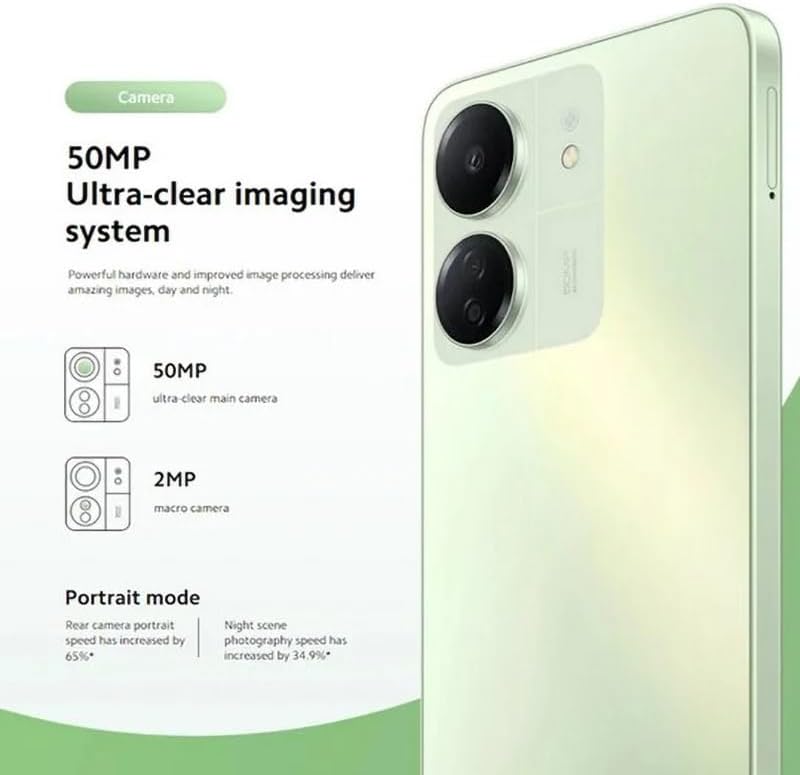
Figure 5.2: The Redmi 13C's 50MP Ultra-clear imaging system includes a 50MP main camera and a 2MP macro camera, supporting Portrait and Night modes.
The device is equipped with a 50MP Ultra-clear imaging system. The rear camera setup includes a 50MP main sensor and a 2MP macro camera. The front camera has an 8MP sensor. Utilize various shooting modes such as Portrait mode and Night mode to capture high-quality photos in different conditions.
5.3. Battery Management
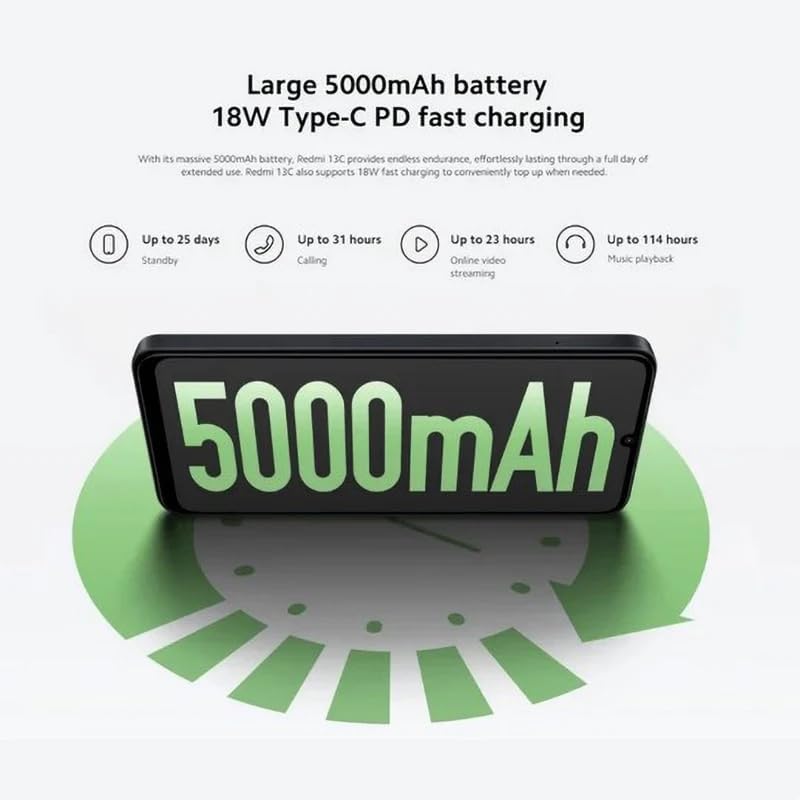
Figure 5.3: The Redmi 13C features a large 5000mAh battery with 18W Type-C PD fast charging, offering extended usage times.
Your Redmi 13C comes with a large 5000mAh Lithium-ion battery, providing extended usage. It supports 18W Type-C PD fast charging, allowing for quick power-ups. For optimal battery life, use the provided charger and avoid extreme temperatures.
- Up to 25 days standby
- Up to 31 hours calling
- Up to 23 hours online video streaming
- Up to 114 hours music playback
5.4. Performance

Figure 5.4: The Redmi 13C is powered by an Octa-core MediaTek Helio G85 processor, delivering smooth and stable performance.
The Redmi 13C is powered by a MediaTek Helio G85 octa-core processor, ensuring smooth and stable performance for daily tasks and applications. It comes with 6GB of RAM and 128GB of internal storage, expandable up to 1TB with a microSD card.
5.5. Connectivity and Security
The device supports Wi-Fi, Bluetooth, and 4G cellular technology. It is an unlocked phone, allowing use with various wireless carriers. For security, the Redmi 13C includes a fingerprint recognition feature.
6. Maintenance
6.1. Cleaning Your Device
To clean your Redmi 13C, use a soft, lint-free cloth. Avoid using harsh chemicals or abrasive materials, as these can damage the screen and finish. The device is not water-resistant, so avoid exposure to liquids.
6.2. Software Updates
Regularly check for and install software updates to ensure your device has the latest features, security patches, and performance improvements. You can usually find this option in the phone's settings under "About phone" or "System updates."
6.3. Battery Care
To prolong battery life, avoid fully discharging the battery frequently. Charge your phone using the original charger and cable. Do not expose the device to extreme heat or cold.
7. Troubleshooting
This section addresses common issues you might encounter with your Redmi 13C.
- Device not turning on: Ensure the battery is charged. Connect the phone to the charger and wait a few minutes before attempting to power it on again.
- Apps crashing or freezing: Close background apps. Clear the cache of the problematic app or reinstall it. If the issue persists, consider a factory reset (back up your data first).
- Poor battery life: Reduce screen brightness, disable unnecessary features like GPS or Bluetooth when not in use, and check for apps consuming excessive power in battery settings.
- Network connectivity issues: Ensure your SIM card is properly inserted. Try restarting the device. Check your network settings and contact your carrier if problems persist.
- Fingerprint sensor not working: Ensure your finger is clean and dry. Re-register your fingerprints in the security settings.
8. Specifications
| Feature | Specification |
|---|---|
| Brand | XIAOMI |
| Model Name | Redmi 13C |
| Operating System | Android |
| Installed RAM Size | 6 GB |
| Memory Storage Capacity | 128 GB (Expandable up to 1TB) |
| CPU Model | MediaTek Helio G85 (Octa-core) |
| CPU Speed | Up to 2.0 GHz |
| Display Type | AMOLED |
| Display Size | 6.74 inches |
| Max Display Resolution | 720x1600 |
| Refresh Rate | 90 Hz |
| Rear Camera Sensor Resolution | 50 Megapixels (Main), 2 Megapixels (Macro) |
| Front Camera Sensor Resolution | 8 Megapixels |
| Battery Capacity | 5000 mAh (Lithium-ion) |
| Charging | 18W Type-C PD Fast Charging |
| Connectivity Technology | Bluetooth, Wi-Fi, 4G LTE |
| SIM Card Slots | Dual SIM (Nano) |
| Biometric Security | Fingerprint Recognition |
| Headphone Jack | USB Type-C |
| Color | Midnight Black |
| Item Weight | 410 Grams |
| Water Resistance Level | Not Water Resistant |
| Model Year | 2023 |
9. Warranty and Support
9.1. Warranty Information
The Xiaomi Redmi 13C comes with a standard manufacturer's warranty. Please refer to the warranty card included with your product for specific terms and conditions. Spare parts availability is stated as 2 years.
9.2. Official Documents and Support
For additional information and support, you can refer to the official user guide and data transparency statement:
For further assistance, please visit the official XIAOMI support website or contact their customer service.


