1. Introduction
This manual provides essential information for the safe and effective use of your Hymnxemo Biometric Gun Safe. Please read these instructions carefully before installation and operation to ensure proper functionality and security. This gun safe is designed to provide secure storage for firearms and valuables, featuring advanced biometric technology, a digital keypad, and emergency key access.
2. Product Features
- Rugged and Durable Construction: Constructed from premium thickened steel with a heavy-duty reinforced burglar door and wall, offering enhanced security against forced entry.
- Spacious Interior: Measures 15.7"D × 17.7"W × 55.1"H, providing ample storage for rifles, shotguns, pistols, and other valuables.
- Organized Storage: Features three specialized pistol pockets, multiple compartments, and two freely adjustable gun shelves to accommodate various firearm lengths and accessories.
- Biometric Technology: Advanced and precise chip for accurate bio-information recognition, allowing quick access within 2 seconds.
- Multiple Access Methods: Biometric fingerprint, digital password, and emergency keys provide flexible access options.
- Enhanced Security: Equipped with three sturdy steel locking bolts and an impact alarm system for superior burglary protection.
- Family Safety: Designed to keep firearms and dangerous items away from children. Pre-drilled holes for secure floor mounting to prevent tipping.
- Integrated LED Lighting: Internal LED lights illuminate the safe's interior for easy access in low-light conditions.
- Emergency Power: Includes facilities for emergency charging to access the safe even if internal batteries are discharged.

Figure 2.1: Interior layout of the gun safe, highlighting heavy-duty shelving, large capacity bullet compartment, removable gun rack, cabinet for bullets, and LED lights.
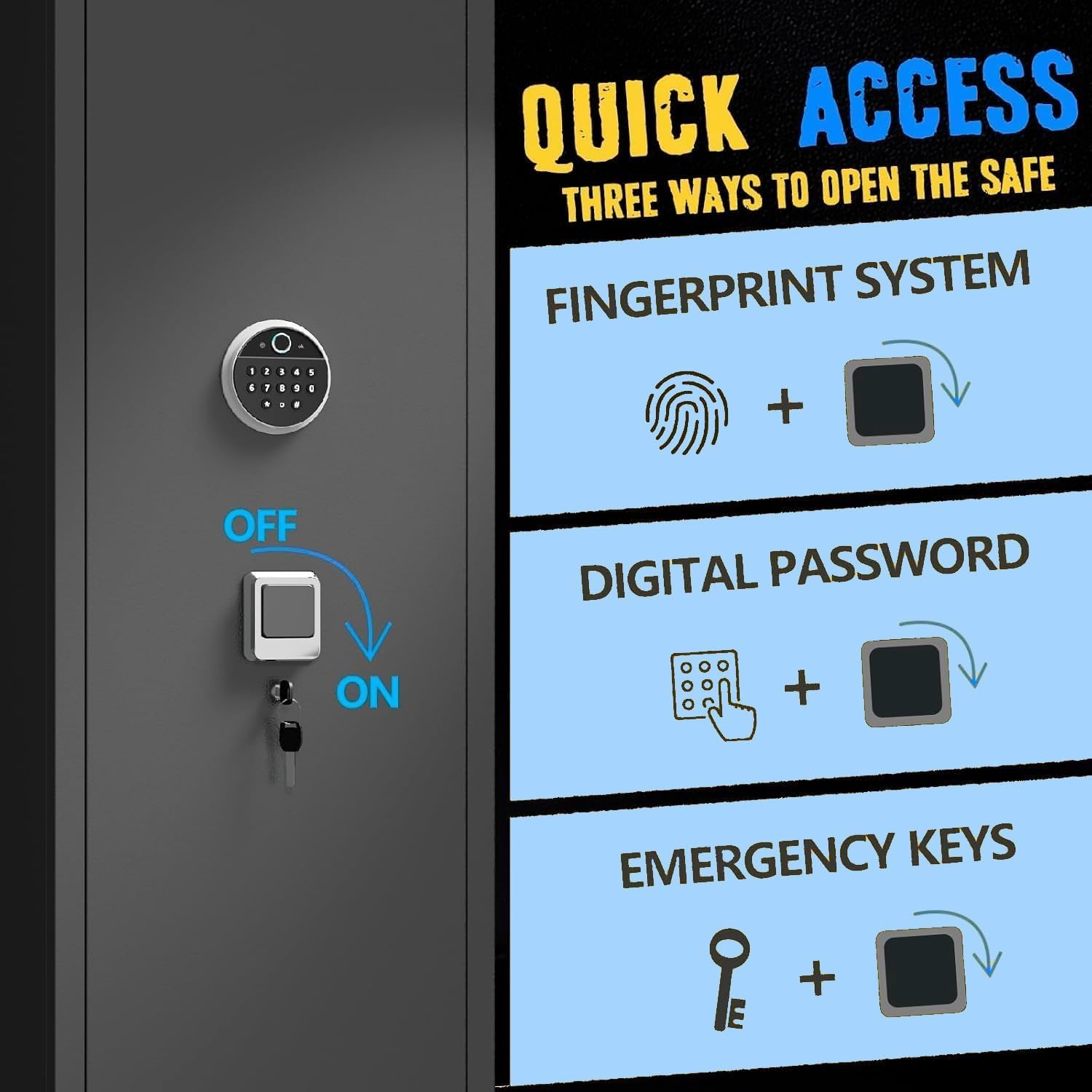
Figure 2.2: Illustration of the safe's robust construction, including solid lock cylinders and thickened door panels, along with various alarm triggers for enhanced security.
3. Package Contents
Verify that all components are present before beginning installation:
- Hymnxemo Biometric Gun Safe Unit
- Racks (Adjustable Shelves and Gun Rack)
- Emergency Keys
- Mounting Hardware (Expansion bolts for floor mounting)
- User Manual (This document)
4. Setup and Installation
Follow these steps for initial setup and installation of your gun safe.
4.1 Initial Setup and Battery Installation
Before first use, batteries must be installed to power the electronic lock system.
- Open the gun cabinet door using the provided emergency key.
- Locate the battery compartment on the inside of the door.
- Install 4 AA batteries (not included) into the battery compartment, ensuring correct polarity.
4.2 Setting a Digital Password
The initial password is "1234#". It is highly recommended to change this immediately.
- With the safe door open, enter the initial password "1234#".
- Press the 'e' button (or equivalent reset button, typically located behind the door or on the keypad).
- Enter your desired new password (4-8 digits) followed by '#'.
- The green "OK" light will illuminate, indicating successful password setting.
4.3 Setting a Fingerprint
The safe supports up to 28 fingerprints.
- With the safe door open, press the red button located behind the door.
- Place your finger on the fingerprint sensor. The sensor will light up.
- Lift and place your finger on the sensor three times, ensuring full contact each time.
- The green "OK" light will illuminate, indicating successful fingerprint registration.
4.4 Floor Mounting
The safe is equipped with pre-drilled holes for secure floor mounting. This prevents tipping and unauthorized removal.
- Choose a suitable location for the safe, ensuring it is level and stable.
- Mark the drilling points on the floor through the pre-drilled holes at the back of the safe.
- Move the safe and drill holes at the marked points using an appropriate drill bit for your floor type.
- Insert the expansion bolts into the drilled holes.
- Position the safe over the bolts and secure it tightly using the provided nuts or washers.
Video 4.1: Installation and Setup Guide for the Hymnxemo Biometric Gun Safe. This video demonstrates initial battery installation, setting a digital password, and registering a fingerprint.

Figure 4.1: The Hymnxemo Biometric Gun Safe, illustrating its design and capacity when open and closed.
5. Operating Instructions
Your Hymnxemo gun safe offers three primary methods for access.
5.1 Opening with Digital Password
- Enter your programmed digital password on the keypad.
- Press '#'.
- The safe will unlock, and the green "OK" light will illuminate. Turn the handle to open the door.
5.2 Opening with Fingerprint
- Place your registered finger firmly on the fingerprint sensor.
- The safe will unlock if the fingerprint is recognized, and the green "OK" light will illuminate. Turn the handle to open the door.
5.3 Opening with Emergency Key
The emergency key provides mechanical access in case of battery failure or forgotten codes.
- Locate the emergency keyhole, usually concealed behind a cover on the keypad panel.
- Insert the emergency key and turn it to unlock the safe.
- Turn the handle to open the door.
5.4 Emergency Battery Box Usage
If the internal batteries are discharged and you do not have the emergency key, you can use an external emergency battery box (if provided) to power the lock temporarily.
- Connect the emergency battery box to the external power port on the safe's keypad.
- Once connected, the keypad will be powered, allowing you to enter your digital password or use your fingerprint to open the safe.

Figure 5.1: Visual guide to the quick access methods: fingerprint system, digital password, and emergency keys.
6. Maintenance
Regular maintenance ensures the longevity and reliable operation of your safe.
- Battery Replacement: Replace batteries annually or when the low battery indicator appears. Always use new, high-quality AA alkaline batteries.
- Cleaning: Wipe the exterior and interior surfaces with a soft, damp cloth. Avoid abrasive cleaners or solvents that could damage the finish or electronic components.
- Lock Mechanism: Do not lubricate the lock mechanism. If the lock feels stiff, contact customer support.
- Bolt Inspection: Periodically check the locking bolts for any obstructions or signs of wear.
7. Troubleshooting
This section addresses common issues you might encounter.
7.1 Alarm System
The safe is equipped with an anti-theft alarm system that triggers under certain conditions:
- Multiple Validation Failure: If incorrect passwords or fingerprints are entered multiple times consecutively.
- Strong Impact: If the safe detects a strong impact or attempted prying.
To silence the alarm, enter a correct password or use a registered fingerprint.

Figure 7.1: Illustration of the smart access alarm system, designed to deter unauthorized access through impact or drilling attempts.
7.2 Forgotten Password or Fingerprint
If you forget your password or your registered fingerprints are not working, you can restore factory settings.
- Open the safe using the emergency key.
- Locate and press the red reset button behind the door for 3 seconds.
- All previously set passwords and fingerprints will be cleared. You can then set new ones following the instructions in Section 4.
7.3 Safe Not Opening Electronically
- Check Batteries: Ensure batteries are correctly installed and not depleted. Replace if necessary.
- Emergency Battery Box: If batteries are dead, use the emergency battery box to power the unit temporarily.
- Emergency Key: Always use the emergency key as a backup.
8. Specifications
| Feature | Detail |
|---|---|
| Brand | Hymnxemo |
| Model Number | GUN SAFE-1400-450-400 |
| Product Dimensions | 15.7"D x 17.7"W x 55"H |
| Lock Type | Biometric, Digital Keypad, Emergency Key |
| Material | Alloy Steel |
| Special Features | Alarm System, Biometric Fingerprint, Combination Lock, Anti-Theft, Removable Shelf |
| Mounting Type | Floor Mount |
| Included Components | Racks |
| Water Resistance Level | Not Water Resistant |
9. Warranty and Support
For warranty information or technical support, please contact Hymnxemo customer service through the retailer where the product was purchased or visit the official Hymnxemo website. Please have your model number and purchase date available when contacting support.


