1. Introduction
Welcome to the GODOX Lux Cadet Retro Camera Flash instruction manual. This manual provides detailed information on the safe and effective use of your new flash unit. The Lux Cadet combines vintage aesthetics with modern flash technology, offering a compact and versatile lighting solution for various camera systems.
2. Safety Information
- Do not disassemble or modify the unit.
- Keep out of reach of children.
- Do not expose to water or high humidity.
- Avoid direct eye exposure to the flash.
- Use only the specified charging cable.
3. What's in the Box
Verify that all items are included in your package:
- Godox Lux Retro Camera Flash
- USB-C Charging Cable
- Storage Bag
- USB Light (1 piece, random color)
4. Product Overview
The GODOX Lux Cadet features a compact design with a classic flower-type reflector. It offers both Manual (M) and Automatic (A) flash modes for versatile control.

Image: Front view of the GODOX Lux Cadet flash with its flower-type reflector extended, showcasing the control dials and buttons.

Image: Side view of the GODOX Lux Cadet flash, highlighting its compact and slim design, along with the USB-C charging port.
Key Features:
- Compact and Slim Design: Easy to carry and mount on various cameras.
- Classic Flower-Type Reflector: Provides unique light distribution and a retro aesthetic.
- Manual (M) and Automatic (A) Flash Modes: Offers control over flash output.
- S1/S2 Optical Control: Allows the flash to be triggered by another flash.
- USB-C Rechargeable: Convenient charging for the built-in lithium-ion battery.
5. Setup
5.1 Charging the Battery
The Lux Cadet flash is equipped with a built-in 1700mAh lithium-ion battery. Before first use, fully charge the battery.
- Connect the supplied USB-C charging cable to the USB-C port on the side of the flash.
- Connect the other end of the USB-C cable to a 5V/2A USB power adapter (not included).
- The charging indicator will show the charging status. A full charge typically takes approximately 2 hours.
5.2 Mounting the Flash
The Lux Cadet can be mounted on a camera's hot shoe or used off-camera.
- Slide the flash's hot shoe mount into your camera's hot shoe.
- Tighten the locking ring on the flash to secure it to the camera.
- Ensure the flash is firmly attached before operation.
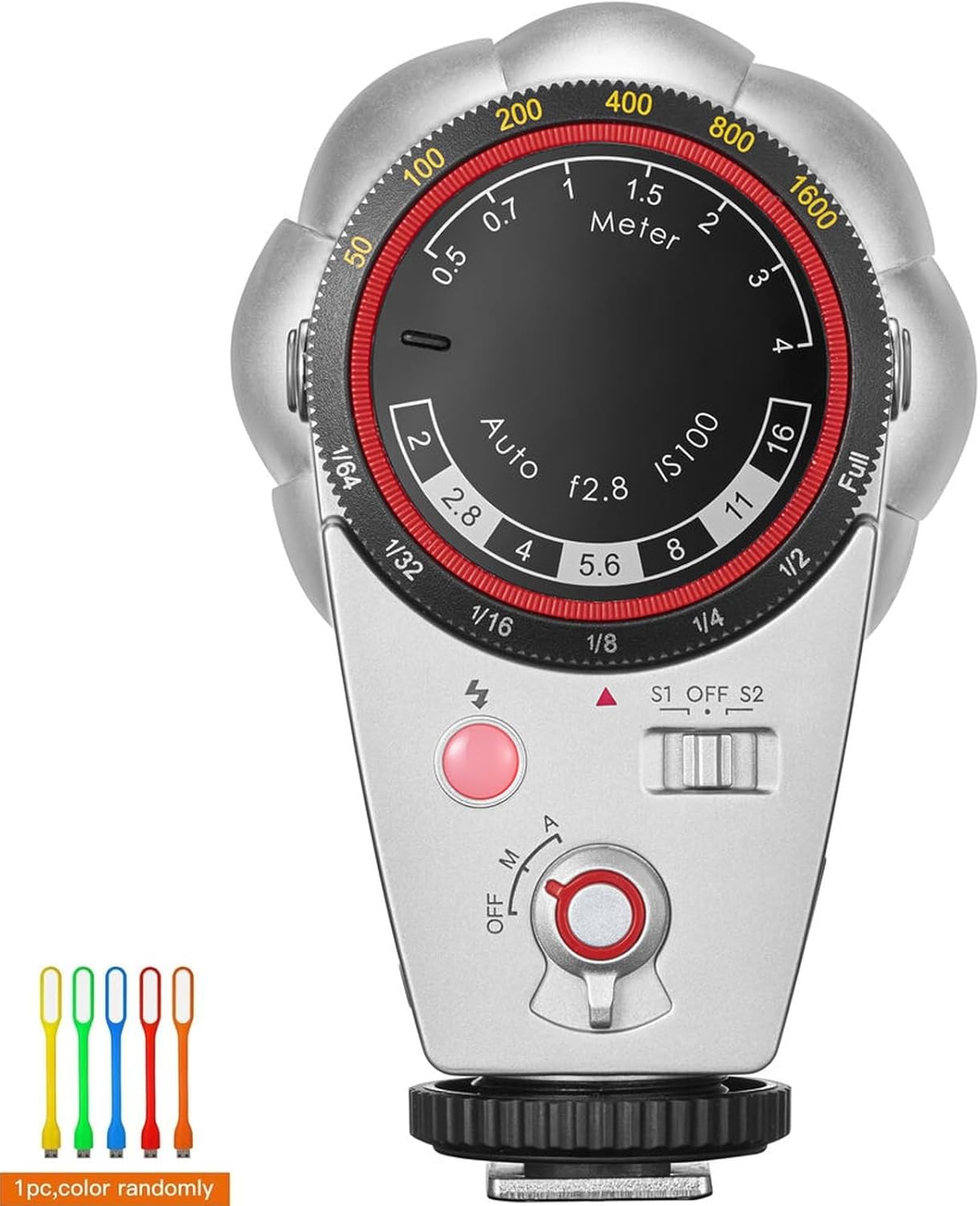
Image: The GODOX Lux Cadet flash securely mounted on a camera's hot shoe, ready for use.
6. Operating the Flash
6.1 Power On/Off
To power on the flash, rotate the main dial to either 'M' (Manual) or 'A' (Automatic) mode. To power off, rotate the dial to 'OFF'.
6.2 Flash Modes
The Lux Cadet offers two primary flash modes:
- Manual (M) Mode: In M mode, you manually set the flash output power. Rotate the outer dial to select power levels from Full (1/1) down to 1/64.
- Automatic (A) Mode: In A mode, the flash automatically adjusts its output based on the ambient light and selected aperture. Set your camera's ISO to 100 and choose an aperture (e.g., f/2.8, f/4, f/5.6, f/8, f/11, f/16) on the flash dial. The flash will then calculate the appropriate output.

Image: A close-up view of the GODOX Lux Cadet's control panel, showing the dials for selecting Manual (M) or Automatic (A) flash modes and adjusting settings.
6.3 Optical Control (S1/S2)
The Lux Cadet supports S1 and S2 optical slave modes, allowing it to be triggered wirelessly by another flash.
- S1 Mode: The flash will fire in response to the first flash it detects. This is suitable for manual flash units.
- S2 Mode: The flash will ignore the pre-flash of a TTL flash and fire on the main flash. This is suitable for TTL flash units.
To activate S1 or S2 mode, slide the switch located on the side of the flash to the desired setting.
6.4 Reflector Adjustment
The flower-type reflector can be extended for broader light coverage or retracted for a more focused beam and compact storage. Use the slide button on the side to extend or retract the reflector.

Image: Side view of the GODOX Lux Cadet flash with its flower-type reflector retracted, showing the compact form factor.

Image: Side view of the GODOX Lux Cadet flash with its flower-type reflector extended, ready for use.
7. Maintenance
- Clean the flash unit with a soft, dry cloth. Do not use solvents or abrasive cleaners.
- Store the flash in a cool, dry place when not in use, preferably in the provided storage bag.
- Avoid dropping or subjecting the flash to strong impacts.
- Charge the battery periodically if the flash is stored for extended periods to maintain battery health.
8. Troubleshooting
| Problem | Possible Cause | Solution |
|---|---|---|
| Flash does not fire. | Low battery; Flash not powered on; Incorrect mode; Poor hot shoe connection. | Charge battery; Turn flash on; Select M or A mode; Re-mount flash securely. |
| Flash output is too weak/strong. | Incorrect power setting (M mode); Incorrect aperture/ISO (A mode). | Adjust power in M mode; Verify camera ISO 100 and adjust aperture on flash in A mode. |
| Optical slave (S1/S2) not triggering. | Insufficient light from master flash; Incorrect S1/S2 mode selected. | Ensure master flash is strong enough; Select appropriate S1 or S2 mode. |
9. Specifications
| Feature | Detail |
|---|---|
| Model Number | LuxCadet |
| Guide Number (GN) | 10 (ISO 100, meters) |
| Flash Power Levels | 7 levels (1/1 to 1/64) |
| Color Temperature | 6200K ± 300K |
| Optical Control | S1/S2 Slave Modes |
| Battery | 1 Lithium Ion battery (1700mAh) |
| Battery Life | Approx. 2 hours (continuous use) |
| Charging Port | USB-C |
| Product Dimensions | 2.8 x 2.01 x 3.7 inches |
| Item Weight | 6 ounces |
| Compatible Mountings | Fujifilm, Nikon, Olympus (Universal hot shoe) |
| Flash Sync Speed | Up to 1/250s (camera dependent) |
10. Warranty and Support
For warranty information and technical support, please refer to the official GODOX website or contact your local distributor. Keep your purchase receipt as proof of purchase for warranty claims.
GODOX Official Website: www.godox.com
11. Product Video
Video: An official product video demonstrating the GODOX Lux Cadet Flash in use, highlighting its compact design, classic reflector, and ease of operation in various shooting scenarios.


