
1. Introduction
Thank you for choosing the ENVENTOR 11A Circular Saw, Model SGCS1400. This powerful 7-1/4-inch electric circular saw is designed for efficient and precise cutting in various materials such as wood, plastics, PVC pipe, and plasterboard. Featuring an 11A pure copper motor, laser guide, and adjustable cutting depth and angle, this tool is suitable for a range of woodworking tasks. Please read this manual thoroughly before operation to ensure safe and optimal performance.
2. General Safety Instructions
WARNING: Read all safety warnings, instructions, illustrations, and specifications provided with this power tool. Failure to follow all instructions listed below may result in electric shock, fire, and/or serious injury.
- Work Area Safety: Keep work area clean and well-lit. Do not operate power tools in explosive atmospheres, such as in the presence of flammable liquids, gases, or dust.
- Electrical Safety: Power tool plugs must match the outlet. Never modify the plug. Avoid body contact with earthed or grounded surfaces. Do not expose power tools to rain or wet conditions.
- Personal Safety: Always wear eye protection, hearing protection, and a dust mask. Dress properly; avoid loose clothing or jewelry. Secure long hair. Stay alert and use common sense when operating a power tool.
- Power Tool Use and Care: Do not force the power tool. Use the correct power tool for your application. Disconnect the plug from the power source before making any adjustments, changing accessories, or storing power tools.
- Circular Saw Specific Safety: Always ensure the blade guard is functioning correctly. Use only sharp, correctly sized blades. Secure the workpiece firmly. Be aware of kickback potential and maintain a firm grip.
3. Package Contents
Verify that all items listed below are included in your package:
- 1 x ENVENTOR 11A Circular Saw
- 1 x 24T Saw Blade (7-1/4-Inch)
- 1 x 40T Saw Blade (7-1/4-Inch)
- 1 x Wrench
- 1 x Rip Guide
- 2 x AAA Batteries (for Laser Guidance)
- 1 x User Manual
4. Product Features and Components
Familiarize yourself with the parts of your ENVENTOR Circular Saw:
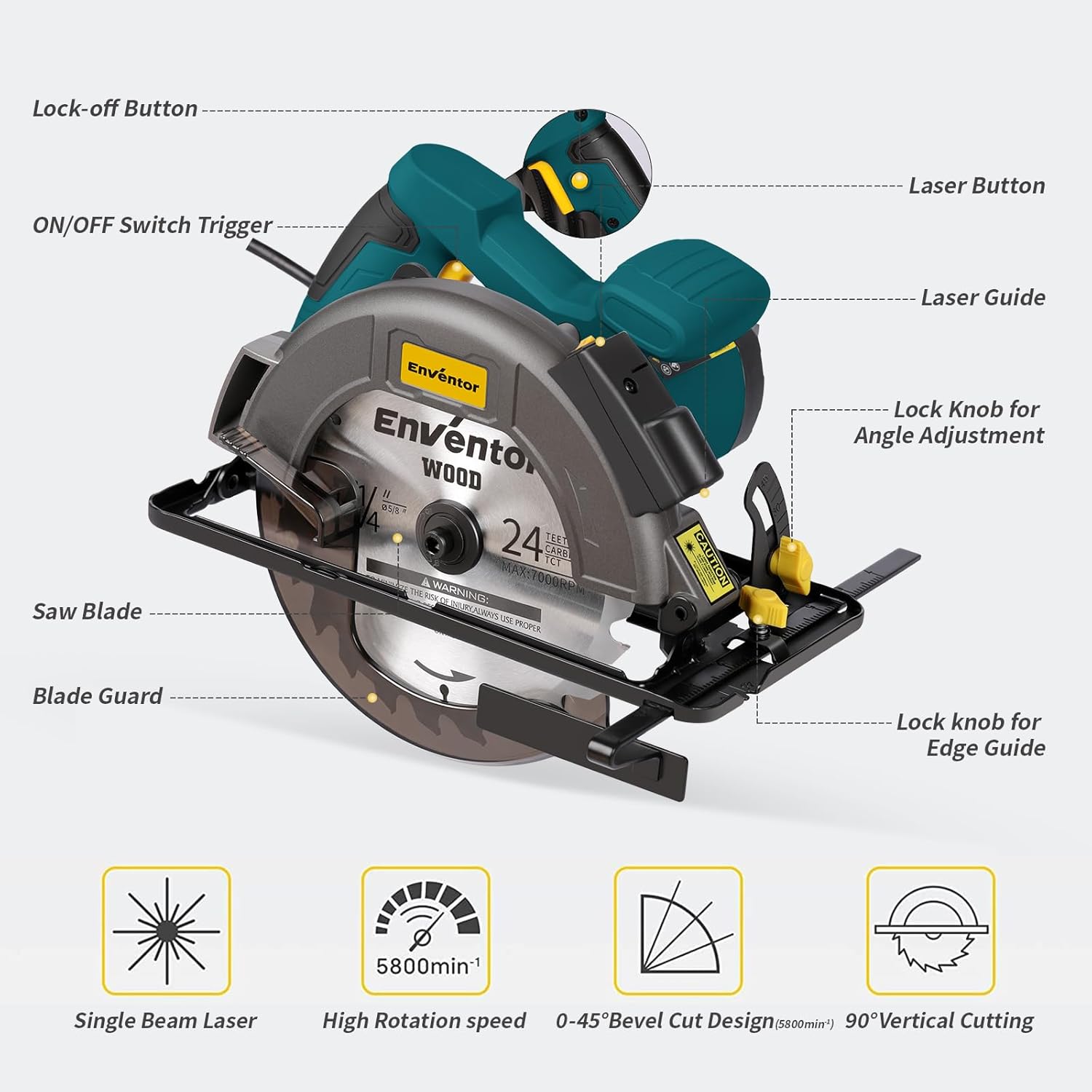
Figure 4.1: Key Components of the ENVENTOR Circular Saw
- 11A Pure Copper Motor: Provides a powerful 5800 RPM for efficient cutting.
- Laser Guide (Class II, <1 mW): Ensures accurate and straight cuts by providing a visible guide line.
- Adjustable Cutting Depth: Max cutting depth of 62mm (90°) and 42mm (45°).
- Adjustable Cutting Angle: Bevel adjustment from 0° to 45° for versatile cuts.
- Double Protection Switch: Prevents accidental startup, enhancing user safety.
- Dust Collection Port: Connects to a vacuum cleaner to maintain a clean work environment.

Figure 4.2: Double Protection Switch for enhanced safety.
5. Setup
5.1 Blade Installation/Replacement
Always disconnect the saw from the power source before installing or changing blades.
- Press and hold the spindle lock button (located on the rear axle of the machine).
- Use the provided wrench to loosen and remove the bolt securing the saw blade.
- Carefully remove the old blade (if replacing) and install the new blade, ensuring the rotation direction matches the arrow on the saw guard.
- Re-insert the bolt and tighten it securely with the wrench while holding the spindle lock button.

Figure 5.1: Blade Installation Steps
5.2 Laser Guide Battery Installation
The laser guide requires 2 AAA batteries. Open the battery compartment on the laser module and insert the batteries, observing polarity. Close the compartment securely.
5.3 Installing the Rip Guide
Slide the rip guide into the slot on the front of the saw base. Adjust it to the desired width and tighten the locking knob to secure it for parallel cuts.
6. Operating Instructions
Always wear appropriate personal protective equipment (PPE) including eye protection, hearing protection, and gloves during operation.
6.1 Adjusting Cutting Depth
Loosen the depth adjustment lever, move the saw base to achieve the desired cutting depth, and then securely tighten the lever. For optimal performance and safety, set the blade depth so that the blade extends approximately 1/8 inch (3mm) below the workpiece.
6.2 Adjusting Cutting Angle (Bevel)
Loosen the bevel adjustment knob, tilt the saw base to the desired angle (0° to 45°), and then securely tighten the knob.

Figure 6.1: Adjusting Cutting Depth and Angle
6.3 Making a Cut
- Ensure the workpiece is securely clamped.
- Plug in the saw. Turn on the laser guide by pressing the laser button.
- Align the laser line with your cutting mark.
- To start the saw, press the lock-off button and then squeeze the ON/OFF switch trigger.
- Allow the blade to reach full speed before contacting the workpiece.
- Guide the saw smoothly through the material, maintaining a steady pace. Do not force the saw.
- Once the cut is complete, release the trigger and allow the blade to stop completely before lifting the saw from the workpiece.

Figure 6.2: Using the Laser Guide for Straight Cuts

Figure 6.3: Performing a Bevel Cut
6.4 Dust Collection
Connect a vacuum cleaner hose to the dust collection port to minimize sawdust in your work area.
6.5 Applicable Cutting Materials
The ENVENTOR Circular Saw is suitable for cutting various materials:

Figure 6.4: Examples of Applicable Cutting Materials
6.6 Video Demonstration
Watch this video for a visual guide on product features, operation, and blade installation:
Video 6.1: ENVENTOR Circular Saw Overview and Operation
7. Maintenance
Regular maintenance ensures the longevity and safe operation of your circular saw.
- Cleaning: After each use, disconnect the saw from power and clean sawdust and debris from the tool, especially around the blade guard and motor vents. Use a soft brush or compressed air.
- Blade Inspection: Regularly inspect saw blades for sharpness, cracks, or missing teeth. Replace dull or damaged blades immediately.
- Cord Inspection: Check the power cord for any damage, cuts, or fraying. Do not use the saw if the cord is damaged.
- Storage: Store the saw in a dry, secure location out of reach of children.
8. Troubleshooting
If you encounter issues with your circular saw, refer to the following common problems and solutions:
| Problem | Possible Cause | Solution |
|---|---|---|
| Saw does not start | No power supply; Double protection switch not engaged; Damaged power cord. | Check power outlet and connection. Ensure both lock-off button and trigger are pressed. Inspect power cord for damage. |
| Poor cutting performance / Blade binds | Dull or incorrect blade; Incorrect cutting depth; Workpiece not secured; Overheating. | Replace blade or use appropriate blade for material. Adjust cutting depth. Secure workpiece firmly. Allow saw to cool down. |
| Laser guide not working | Dead batteries; Laser module obstruction. | Replace AAA batteries. Clean the laser output window. |
| Excessive vibration | Loose blade; Damaged blade; Loose components. | Tighten blade bolt. Replace damaged blade. Check for loose screws on the saw housing. |
If the problem persists after attempting these solutions, please contact customer support.
9. Specifications
Technical specifications for the ENVENTOR Circular Saw SGCS1400:

Figure 9.1: Product Dimensions and Weight
| Feature | Detail |
|---|---|
| Brand | Enventor |
| Model Number | SGCS1400 |
| Power Source | Corded Electric |
| Current Rating | 11 Amps |
| Wattage | 1400 Watts |
| Voltage | 120 Volts |
| Speed | 5800 RPM (Max 7000 RPM on blade) |
| Blade Diameter | 7-1/4 Inches (185mm) |
| Blade Material | Metal |
| Max Cutting Depth (90°) | 2-7/16 Inches (62mm) |
| Max Cutting Depth (45°) | 1-13/16 Inches (42mm) |
| Cutting Angle | 0-45 Degrees (Adjustable) |
| Special Features | Laser Guide, Depth Adjustment, Keyed Blade Change, Double Protection Switch |
| Product Dimensions (L x W x H) | 30.5 x 22.9 x 17.8 Centimetres |
| Handle Material | Plastic |
10. Warranty and Support
The ENVENTOR Circular Saw SGCS1400 comes with a 12-month warranty from the date of purchase. This warranty covers defects in materials and workmanship under normal use.
For warranty claims, technical support, or any questions regarding your product, please contact ENVENTOR customer service. Please have your model number (SGCS1400) and purchase information ready when contacting support.
Contact Information:
Email: support@enventor.com (Example - please refer to your product packaging or official website for actual contact details.)
Website: www.enventor.com (Example - please refer to your product packaging or official website for actual contact details.)
