
1. Product Overview
The Tuya WiFi Intelligent Air Housekeeper is a comprehensive 6-in-1 air quality monitor designed to provide real-time detection of various environmental parameters. This device integrates the monitoring of PM2.5, Formaldehyde, TVOC, Carbon Dioxide (CO2), Temperature, and Humidity, offering a complete overview of your indoor air quality.
It connects to the Tuya APP via WiFi, allowing for remote viewing of air parameters and intelligent linkage with other smart home appliances such as air conditioners, fresh air fans, humidifiers, and air purifiers. This functionality helps in automatically optimizing your air environment to maintain a healthy living space.

Image 1.1: Front view of the Tuya WiFi Intelligent Air Housekeeper. The device is white and square with a perforated top surface and a central circular indicator.
Key Features:
- 6-in-1 Detection: Monitors PM2.5, Formaldehyde, TVOC, CO2, Temperature, and Humidity.
- Multiple Sensors: Equipped with semiconductor air sensor, PM2.5 infrared sensor, and temperature/humidity sensor for accurate and reliable detection.
- Tuya APP Integration: Real-time data display, alarm value settings, and remote monitoring via the Tuya Smart application.
- Intelligent Linkage: Automatically optimizes air quality by connecting with compatible smart home appliances.
- Durable Design: High-quality ABS housing with multiple vents for efficient air sampling.

Image 1.2: Graphic illustrating the "Intelligent Air Housekeeper" with text highlighting "Six detections | Real-time data reporting | Remote alarm | Intelligent linkage". The device is shown with a blue glow emanating from its center, suggesting active monitoring.

Image 1.3: Illustration showing a room environment with the air quality monitor on a table, and icons representing the six detected parameters (PM2.5, TVOC, CO2, Formaldehyde, Temperature, Humidity) floating in the air. Text indicates "6 KINDS OF TESTING ITEMS TO FULLY CONTROL THE AIR ENVIRONMENT".
2. Setup Guide
2.1 Package Contents
Before proceeding with the setup, please verify that all items are present in the package:
- 1 x Air Housekeeper Device
- 1 x USB Power Cord
- 1 x User's Manual (this document)
2.2 Powering On the Device
- Locate the USB power port on the device.
- Connect the provided USB Power Cord to the device.
- Plug the other end of the USB Power Cord into a compatible 5V, 1A USB power adapter (not included) or a USB port.
- The device will power on automatically, and the indicator light will illuminate. Allow a few moments for the device to initialize.
2.3 Tuya APP Installation and Pairing
To utilize the full range of features, including remote monitoring and intelligent linkage, you need to connect the device to the Tuya Smart APP.
- Download the Tuya Smart APP: Search for "Tuya Smart" in your mobile device's app store (App Store for iOS or Google Play Store for Android) and install it.
- Register/Log In: Open the Tuya Smart APP and either register for a new account or log in with an existing one.
- Add Device:
- Ensure your mobile device is connected to a 2.4GHz WiFi network. The air quality monitor only supports 2.4GHz WiFi.
- In the Tuya Smart APP, tap the "+" icon in the top right corner to add a device.
- Select "Environmental Sensor" or search for "Air Quality Monitor" in the device list.
- Follow the on-screen instructions in the app to put the device into pairing mode. This usually involves pressing and holding a button on the device until an indicator light flashes rapidly. (Note: Refer to the device's specific indicator behavior for pairing mode if different from general Tuya devices.)
- Confirm the indicator light is flashing rapidly in the app.
- Enter your 2.4GHz WiFi network password when prompted.
- The app will begin searching for and connecting to the device. Once connected, the device's indicator light will typically become solid, and the app will confirm successful pairing.
- You can then rename the device and assign it to a specific room within the app.
3. Operation
3.1 Understanding Air Quality Parameters
The device monitors six key parameters:
- PM2.5: Fine particulate matter, often associated with respiratory issues. Measured in micrograms per cubic meter (µg/m³).
- Formaldehyde (HCHO): A volatile organic compound (VOC) commonly found in building materials and household products, known for its pungent odor and health effects. Measured in milligrams per cubic meter (mg/m³).
- Total Volatile Organic Compounds (TVOC): A group of various organic chemicals that can be emitted from paints, cleaning supplies, and other sources, potentially affecting indoor air quality. Measured in parts per million (ppm).
- Carbon Dioxide (CO2): A gas naturally present in the atmosphere, but high indoor levels can indicate poor ventilation and lead to drowsiness or headaches. Measured in parts per million (ppm).
- Temperature: The ambient air temperature. Measured in degrees Celsius (°C).
- Humidity: The amount of water vapor in the air. Measured as a percentage (%).
3.2 Real-time Monitoring and Data Display
Once connected to the Tuya Smart APP, you can view real-time data and historical trends:
- On the Device: The device itself may have an indicator or a simple display (if applicable, not explicitly stated in product description but common for such devices) to show a general air quality status or specific readings.
- Via Tuya Smart APP: Open the Tuya Smart APP and select your Air Housekeeper device. The main screen will display the current readings for all six parameters. You can often tap on individual parameters to view historical data, trends, and more detailed information.
3.3 Setting Alarm Values
The Tuya Smart APP allows you to set custom alarm thresholds for each monitored parameter. When a detected value exceeds your preset limit, the app will send a notification.
- In the Tuya Smart APP, navigate to your Air Housekeeper device.
- Look for settings related to "Alarm Settings" or "Thresholds".
- Select the parameter (e.g., PM2.5, Formaldehyde) for which you want to set an alarm.
- Enter your desired upper limit.
- Save the settings.
3.4 Intelligent Linkage with Other Appliances
One of the advanced features of this device is its ability to intelligently interact with other Tuya-compatible smart home appliances to automatically improve your air environment.
- Scenario Creation: In the Tuya Smart APP, go to the "Smart" or "Automation" section.
- Create a New Automation:
- Set a condition: For example, "When PM2.5 > 75 µg/m³" (using the Air Housekeeper as the trigger).
- Set an action: For example, "Turn on Air Purifier" or "Turn on Fresh Air Fan".
- You can create similar automations for other parameters, such as turning on a humidifier when humidity drops below a certain percentage, or activating an air conditioner based on temperature.
- Save and Activate: Save your automation rule. Ensure the linked appliances are also connected to the Tuya Smart APP and are online.
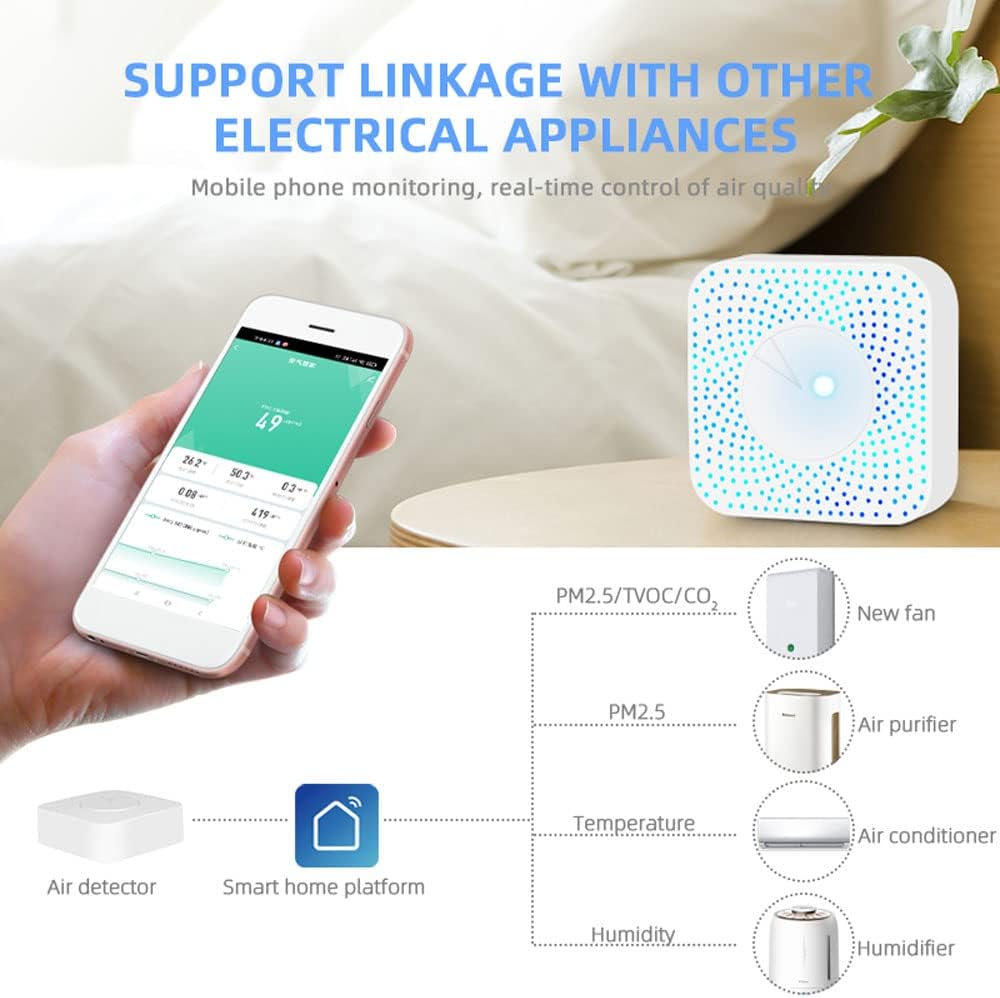
Image 3.1: Diagram illustrating the intelligent linkage capability. The Air Detector connects to a Smart Home Platform (Tuya APP), which then controls various appliances like a new fan (for PM2.5/TVOC/CO2), an air purifier (for PM2.5), an air conditioner (for Temperature), and a humidifier (for Humidity). A smartphone displaying the app interface is also shown.
4. Maintenance
Proper maintenance ensures the longevity and accuracy of your air quality monitor.
4.1 Cleaning the Device
- Ensure the device is powered off and unplugged before cleaning.
- Use a soft, dry cloth to gently wipe the exterior of the device.
- Do not use liquid cleaners, abrasive materials, or chemical solvents, as these can damage the device or interfere with sensor performance.
- Avoid blocking the ventilation holes on the device, as these are crucial for accurate air sampling.
4.2 Storage
- When not in use for extended periods, store the device in a cool, dry place, away from direct sunlight and extreme temperatures.
- Keep it away from dust and corrosive gases.
5. Troubleshooting
If you encounter issues with your Air Housekeeper, please refer to the following common problems and solutions:
| Problem | Possible Cause | Solution |
|---|---|---|
| Device does not power on. | No power supply or faulty USB cable/adapter. | Ensure the USB power cord is securely connected. Try a different USB power adapter or USB port. |
| Cannot connect to Tuya APP (WiFi pairing fails). | Incorrect WiFi band (not 2.4GHz), wrong password, or device not in pairing mode. |
|
| Readings appear inaccurate or fluctuate significantly. | Environmental interference, device placement, or initial calibration period. |
|
| Tuya APP not displaying data or showing "offline". | Device lost WiFi connection or app synchronization issue. |
|
6. Specifications
Detailed technical specifications for the Tuya WiFi Intelligent Air Housekeeper:

Image 6.1: Diagram showing the dimensions of the device (100x100x40mm) and a list of key product parameters.
| Parameter | Value |
|---|---|
| Model | B0CP9JBSZ1 |
| Brand | VISLONE |
| Color | White |
| Material | ABS |
| Working Voltage | 5V, 1A (Rated: 4.8~12V) |
| Working Current | 10-496mA |
| Communication Protocol | WIFI 2.4GHz |
| Working Temperature | -20°C to 85°C |
| Formaldehyde Range | 0-10.00mg/m³ |
| VOC Range | 0-99.9ppm |
| CO2 Range | 0-1000ppm |
| Temperature Range | 0-60°C |
| Humidity Range | 0-95% |
| PM2.5 Range | 0-1000µg/m³ |
| Item Size | 100 x 100 x 40mm (3.9 x 3.9 x 1.6in) |
| Item Weight | 98g (3.5oz) / 4.5 ounces |
| Manufacturer | Vislone |
7. Warranty and Support
For warranty information, please refer to the documentation provided at the time of purchase or contact the seller directly. VISLONE, as the manufacturer, typically provides support for their products.
If you require further assistance or have questions not covered in this manual, please contact the retailer or manufacturer's customer support. Ensure you have your product model number (B0CP9JBSZ1) and purchase details ready when seeking support.
You can visit the VISLONE Store on Amazon for more information or to contact their support channels.