1. Introduction
Thank you for choosing the JARXIOKE 3000W Modified Sine Wave Power Inverter. This device converts 12V DC power from your vehicle battery or other 12V DC source into 110V/120V AC household power, allowing you to operate various electronic devices and appliances on the go. This manual provides essential information for safe and efficient operation, installation, and maintenance of your inverter.

Image 1.1: JARXIOKE 3000W Power Inverter with included accessories.
2. Safety Instructions
Read all safety warnings and instructions carefully before using the inverter. Failure to follow these instructions may result in electric shock, fire, or serious injury.
- Ventilation: Ensure adequate ventilation around the inverter. Do not block ventilation openings.
- Environment: Do not expose the inverter to rain, moisture, direct sunlight, or extreme temperatures. Operate in a dry, cool, and well-ventilated area.
- Flammable Materials: Do not operate the inverter near flammable materials, gases, or vapors.
- Electrical Connections: Ensure all DC input and AC output connections are secure and correctly polarized. Loose connections can cause overheating and damage.
- Grounding: The inverter should be properly grounded. Consult a qualified electrician if unsure.
- Overload: Do not exceed the inverter's continuous power rating. Overloading can damage the inverter and connected devices.
- Children: Keep the inverter out of reach of children.
- Maintenance: Do not attempt to disassemble or modify the inverter. Refer all servicing to qualified personnel.

Image 2.1: Inverter internal components highlighting multiple protection features.
3. Package Contents
Verify that all items are present in the package:
- 1x JARXIOKE 3000W Modified Sine Wave Power Inverter (12V DC to 110V/120V AC)
- 1x User Manual
- 1x Set of 10² Battery Cables (1x Red, 1x Black)
- 1x Remote Control

Image 3.1: Inverter package contents and typical applications.
4. Product Overview and Features
The JARXIOKE 3000W Power Inverter is designed for reliable power conversion with several key features:
- Continuous Power: 3000 Watts
- Peak Power: 6000 Watts
- Input Voltage: 12V DC
- Output Voltage: 110V/120V AC
- AC Outlets: 3
- USB Port: 1 (3.4A)
- Remote Control: Wireless control for convenient operation within approximately 100 meters.
- LED Display: Provides real-time status information including input voltage, output voltage, output frequency, battery level, and fan status.
- Safety Protections: Overvoltage, undervoltage, overload, short circuit, overheat, and soft start technology.
- Cooling System: Equipped with dual cooling fans for efficient heat dissipation.
4.1 Inverter Panel Description
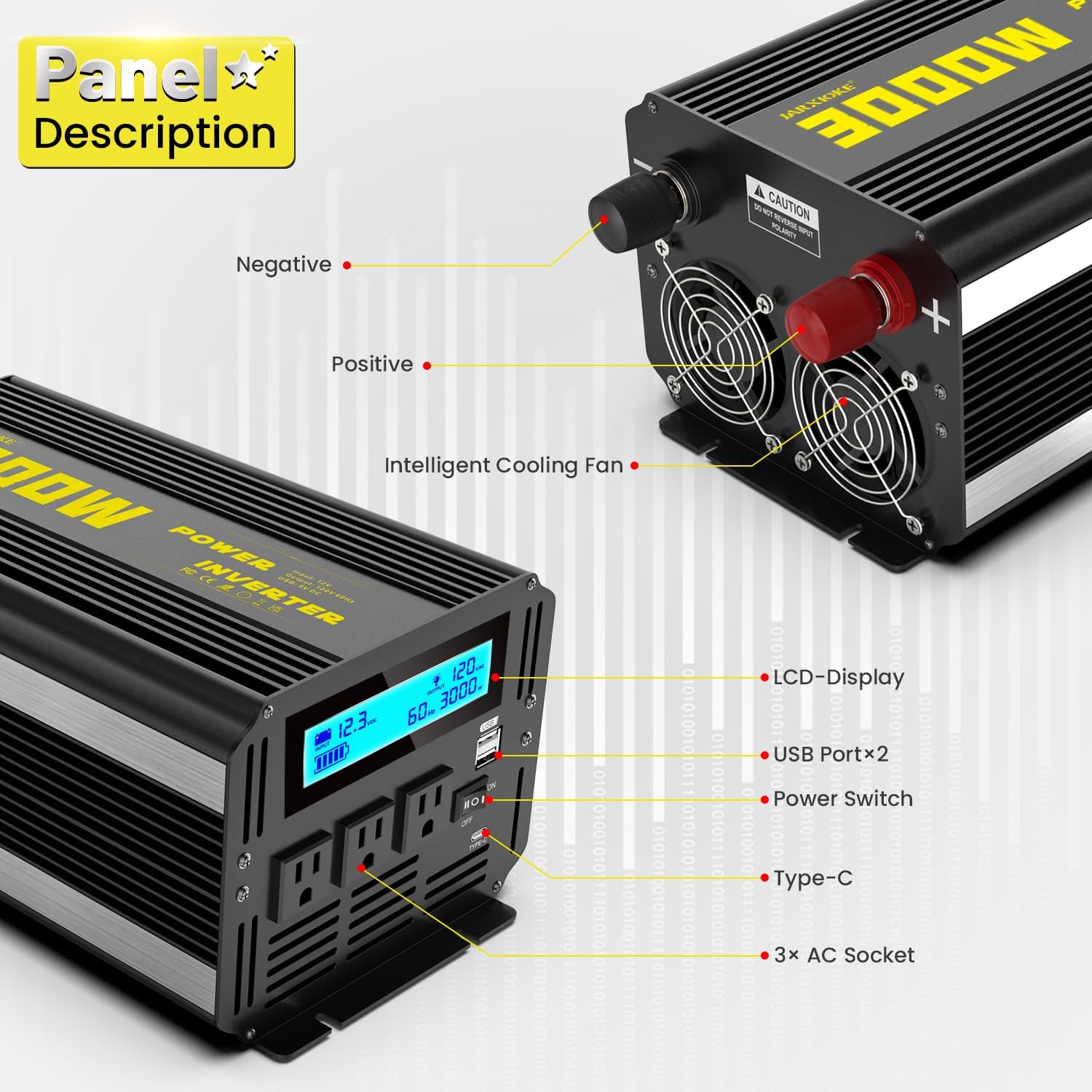
Image 4.1: Front and rear panel descriptions of the inverter.
Front Panel:
- LCD Display: Shows operational status.
- USB Ports: For charging USB-powered devices.
- Power Switch: Main ON/OFF switch for the inverter.
- AC Sockets: Three standard 110V/120V AC outlets.
Rear Panel:
- Negative Terminal (Black): Connects to the negative terminal of the 12V DC battery.
- Positive Terminal (Red): Connects to the positive terminal of the 12V DC battery.
- Intelligent Cooling Fans: Automatically activate to dissipate heat.
5. Setup and Installation
Proper installation is crucial for the safe and efficient operation of your inverter.
5.1 Connecting to a 12V DC Power Source
- Ensure the inverter's power switch is in the OFF position.
- Connect the red battery cable to the positive (+) terminal of your 12V DC battery.
- Connect the other end of the red cable to the positive (+) terminal on the inverter.
- Connect the black battery cable to the negative (-) terminal of your 12V DC battery.
- Connect the other end of the black cable to the negative (-) terminal on the inverter.
- Ensure all connections are tight and secure to prevent arcing or overheating.
Important: Always connect the inverter to a 12V DC battery. Connecting to a 24V or higher voltage source will damage the inverter.
5.2 Ventilation and Placement
- Place the inverter on a flat, stable surface.
- Ensure there is at least 6 inches (15 cm) of clear space around the inverter for proper airflow.
- Avoid placing the inverter in direct sunlight or near heat sources.
5.3 Optional: Solar Panel Connection
The inverter can be integrated into a solar power system. This typically involves connecting solar panels to a charge controller, which then charges a 12V deep cycle battery. The inverter then draws power from this battery.

Image 5.1: Example of solar panel connection for charging a 12V battery that powers the inverter.
6. Operating Instructions
Follow these steps to operate your JARXIOKE power inverter.
6.1 Powering On the Inverter
- After ensuring all DC connections are secure, press the power switch on the inverter to the ON position.
- The LED display will illuminate, showing the input voltage, output voltage, and other status indicators.
6.2 Connecting AC Devices
- Plug your 110V/120V AC devices into the AC outlets on the front panel of the inverter.
- Ensure the total wattage of all connected devices does not exceed the inverter's continuous power rating (3000W).
- For devices with high starting current (e.g., motors, compressors), ensure their surge wattage is within the inverter's peak capacity (6000W).
6.3 Using the USB Port
Plug your USB-powered devices into the 3.4A USB port for charging.
6.4 Remote Control Operation
The included remote control allows you to turn the inverter ON/OFF from a distance (up to 100 meters).
- Ensure the inverter's main power switch is in the OFF position before attempting to use the remote to turn it ON.
- Press the 'ON' button on the remote to activate the inverter.
- Press the 'OFF' button on the remote to deactivate the inverter.

Image 6.1: Intelligent LCD Display showing operational parameters.

Image 6.2: Remote control for the inverter.
7. Troubleshooting
If you encounter issues with your inverter, refer to the following troubleshooting guide:
| Problem | Possible Cause | Solution |
|---|---|---|
| No power output | Inverter switch OFF; Loose battery connections; Low battery voltage; Blown fuse | Turn inverter ON; Check and tighten battery cables; Recharge or replace battery; Check and replace internal fuses (professional service recommended) |
| Low output voltage | Overload; Low battery voltage; Excessive cable length/gauge | Reduce load; Recharge battery; Use shorter/thicker battery cables |
| Inverter shuts down (Overload) | Connected load exceeds 3000W continuous or 6000W peak | Reduce the total wattage of connected devices. Restart the inverter. |
| Inverter shuts down (Overheat) | Poor ventilation; High ambient temperature; Blocked cooling fans | Ensure adequate ventilation; Move inverter to a cooler location; Clear any obstructions from cooling fans. |
| Remote control not working | Inverter main switch is ON; Remote battery low; Out of range | Ensure inverter main switch is OFF before using remote; Replace remote battery; Operate within 100 meters. |
8. Maintenance
Regular maintenance ensures the longevity and optimal performance of your inverter.
- Cleaning: Periodically clean the exterior of the inverter with a dry, soft cloth. Ensure ventilation openings and cooling fans are free from dust and debris.
- Connections: Regularly check all DC input and AC output connections for tightness. Loose connections can lead to power loss and overheating.
- Storage: If storing the inverter for an extended period, ensure it is in a cool, dry place, away from direct sunlight and moisture. Disconnect it from the battery.
- Battery Maintenance: Ensure your 12V DC battery is properly maintained and charged according to its manufacturer's instructions. A healthy battery is essential for inverter performance.

Image 8.1: Inverter cooling fan for heat dissipation.
9. Specifications
Technical specifications for the JARXIOKE 3000W Modified Sine Wave Power Inverter:
| Feature | Specification |
|---|---|
| Model Name | 12V-3000w |
| Continuous Output Power | 3000 Watts |
| Peak Output Power | 6000 Watts |
| Input Voltage | 12V DC |
| Output Voltage | 110V/120V AC |
| Output Frequency | 60 Hz |
| USB Output | 3.4A (5V DC) |
| AC Outlets | 3 |
| Power Source | Battery Powered |
| Item Weight | 10.67 pounds |
| Package Dimensions | 17.09 x 9.72 x 8.23 inches |
| Recommended Uses | Boat, Camping, Car, Home, Recreational Vehicle, Truck, Workshop |
10. Warranty and Support
The JARXIOKE 3000W Modified Sine Wave Power Inverter comes with a 24-month maintenance period from the date of purchase, covering manufacturing defects.
For technical support, warranty claims, or any questions regarding your product, please contact JARXIOKE customer service through the retailer where the product was purchased. Please have your purchase receipt and product model number ready when contacting support.