
FLAMMA FV01, FV03
FLAMMA Pitch Correction and Character Vocal Effects Pedals User Manual
Models: FV01 (Corrector) & FV03 (Character)
1. Introduction
This manual provides detailed instructions for the FLAMMA FV01 Pitch Correction (Corrector) and FV03 Character Vocal Effects Pedals. Please read this manual thoroughly to understand the features and proper operation of your new effects pedals. Retain this manual for future reference.
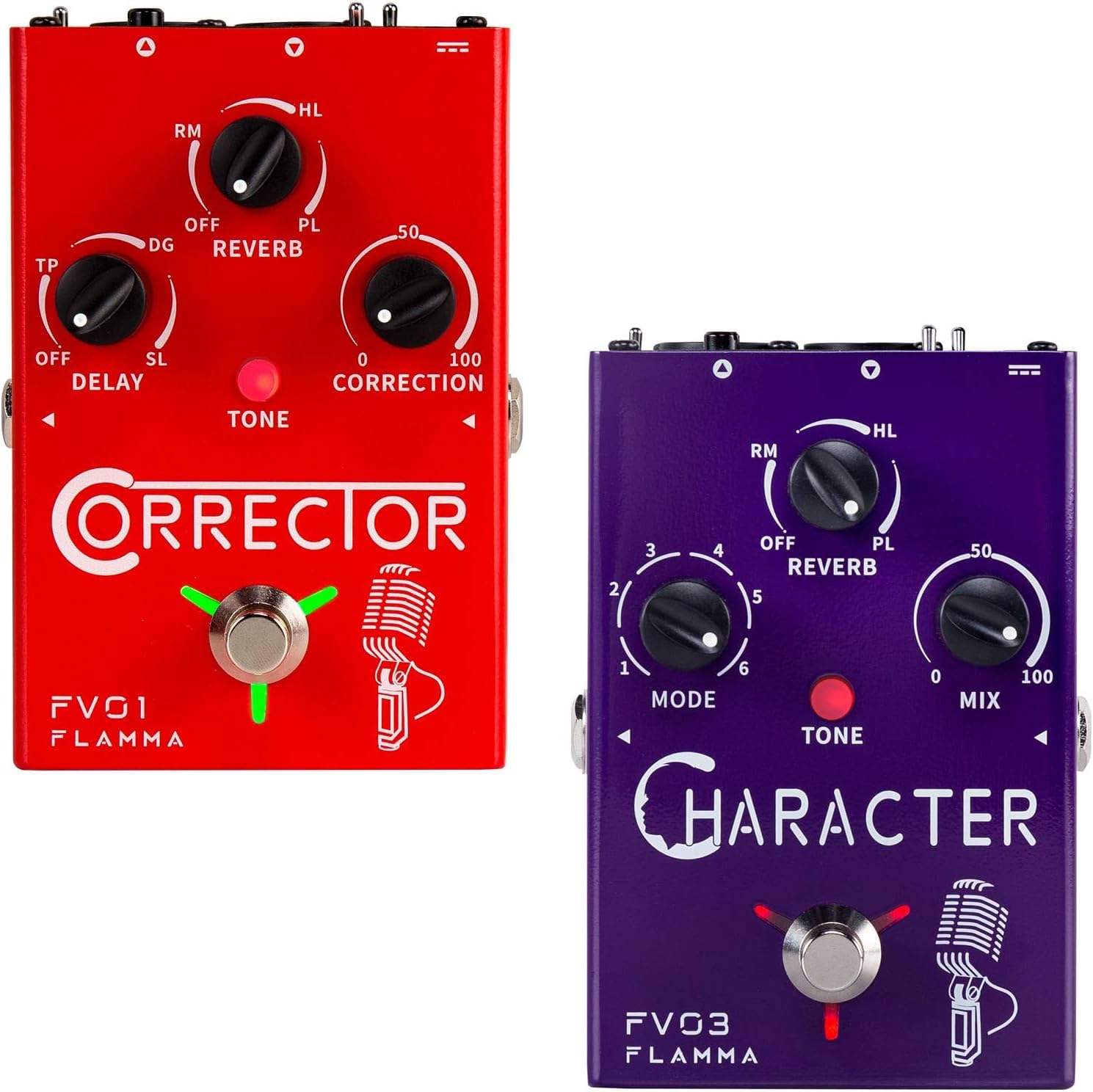
Image: The FLAMMA FV01 Corrector (red) and FV03 Character (purple) vocal effects pedals. The FV01 is on the left, featuring controls for Delay, Reverb, and Correction. The FV03 is on the right, with controls for Mode, Reverb, and Mix.
2. Key Features
- FV01 Corrector: Primarily a pitch-correction pedal with additional vocal effects.
- FV03 Character: Offers various vocal character effects.
- Tone LED: This LED indicates the current EQ mode (WARM, BRIGHT, NORMAL).
- Reverb Effects: Three distinct reverb options to enhance vocal presence.
- Vocal Character Modes (FV03): Includes Male, Female, Baby, and three Robot voice effects.
- Multiple Output Modes (FV01): Supports individual and mixed output modes for flexible signal routing.
- Connectivity: Guitar In/Out, XLR Out, Line In, 48V Phantom Power support.

Image: An illustration highlighting the key features of the FLAMMA FV01 Corrector pedal, such as pitch correction, multiple reverb and delay effects, tap tempo, vocal tone adjustments, dual output modes, guitar input/output, 48V phantom power, XLR output, and line input.
3. Setup and Connections
3.1 Power Supply
Connect a 9V DC 500mA power adapter (external power source) to the "DC IN" jack on the pedal. Ensure the power supply meets the specified voltage and current requirements to prevent damage.
3.2 Audio Connections
The pedals offer various input and output options:
- MIC Input: Connect your microphone to the XLR input. The pedal supports 48V phantom power for condenser microphones.
- LINE IN: Connect line-level audio sources here.
- GUITAR IN/OUT: Connect your guitar to the "GUITAR IN" jack and route the processed signal from "GUITAR OUT" to your amplifier or other effects.
- XLR OUT: Connect to a mixer, audio interface, or PA system.

Image: The rear panel of the FLAMMA FV03 Character pedal, illustrating the DC IN 9V 500mA power input, 48V phantom power switch, MIC XLR input, XLR OUT, LIFT switch, and GND switch for ground lift.
4. Operating Instructions
4.1 FV01 Corrector Pedal Operation
The FV01 is designed for pitch correction and vocal effects. It features controls for Delay, Reverb, and Correction.
- TONE LED: This LED indicates the current EQ mode (WARM, BRIGHT, NORMAL). Press the footswitch to cycle through these modes.
- REVERB Knob (RM/HL/PL): Adjusts the reverb type and level. RM (Room), HL (Hall), PL (Plate).
- DELAY Knob (TP/DG/SL): Controls the delay type and level. TP (Tape), DG (Digital), SL (Slapback).
- CORRECTION Knob (0-100): Adjusts the intensity of pitch correction. Higher values apply more correction.
4.1.1 Output Modes (FV01)
The FV01 supports two distinct output modes:
- Individual Output Mode: Vocal signal is routed through the XLR OUT, and guitar signal through GUITAR OUT.
- Mixed Output Mode: Both vocal and guitar signals are mixed and routed through the XLR OUT.
To switch between modes, press and hold the footswitch while powering on the pedal:
- Blinking Blue LED: Individual Output Mode.
- Blinking Red LED: Mixed Output Mode.

Image: A visual guide demonstrating the FV01's Individual Output Mode (guitar and mic signals separated) and Mixed Output Mode (guitar and mic signals combined), along with the corresponding LED indicators (blinking blue for individual, blinking red for mixed).
4.2 FV03 Character Pedal Operation
The FV03 focuses on vocal character effects. It features controls for Mode, Reverb, and Mix.
- MODE Knob (1-6): Selects different vocal character effects.
- Male
- Female
- Baby
- Robot 1
- Robot 2
- Robot 3
- REVERB Knob (RM/HL/PL): Adjusts the reverb type and level. RM (Room), HL (Hall), PL (Plate).
- MIX Knob (0-100): Controls the blend between the dry vocal signal and the wet (effected) signal.
- TONE LED: Similar to FV01, indicates EQ mode (WARM, BRIGHT, NORMAL).

Image: A side view of the FLAMMA FV03 Character pedal, clearly showing the "MODE" knob and its six distinct vocal character settings: Male, Female, Baby, Robot 1, Robot 2, and Robot 3. The Guitar Out jack is also visible.
5. Maintenance
- Cleaning: Use a soft, dry cloth to clean the pedal's surface. Do not use abrasive cleaners or solvents.
- Storage: Store the pedal in a cool, dry place away from direct sunlight and extreme temperatures.
- Power: Always disconnect the power supply when the pedal is not in use for extended periods.
- Handling: Avoid dropping or subjecting the pedal to strong impacts, as this can damage internal components.
6. Troubleshooting
| Problem | Possible Cause | Solution |
|---|---|---|
| No sound output. | Incorrect cable connections, power issue, pedal bypassed. | Check all audio cables and power supply. Ensure the pedal is engaged (not bypassed). |
| Distorted or noisy sound. | Input level too high, faulty cable, ground loop. | Reduce input gain. Try different cables. Use the GND LIFT switch if available (FV03). |
| Pitch correction not working (FV01). | Correction knob set too low, incorrect input signal. | Increase the CORRECTION knob setting. Ensure a clear vocal input. |
| Character effects not changing (FV03). | MODE knob not rotated. | Rotate the MODE knob to select different character effects. |
7. Specifications
- Model: FV01 (Corrector), FV03 (Character)
- Power Supply: 9V DC, 500mA (External Power Source)
- Voltage: 48 Volts (for Phantom Power)
- Signal Format: Analog
- Audio Output Effects (FV01): Delay, Reverb, Tone, Pitch Correction
- Audio Output Effects (FV03): Reverb, Tone, Vocal Character (Male, Female, Baby, Robot)
8. Warranty and Support
For warranty information and technical support, please refer to the official FLAMMA website or contact your local distributor. Keep your purchase receipt as proof of purchase for warranty claims.
Return Policy: The product has a 30-day refund/replacement return policy from the date of purchase.
Seller: FLAMMA (AOLTZE7LUWKM)
For further assistance, visit the FLAMMA Store on Amazon.
Related documentsFV01, FV03


Ask a question about this manual
Ask about setup, troubleshooting, compatibility, parts, safety, or missing instructions. Manuals+ will review the question and use this page’s manual context to help answer it.