Introduction
Thank you for choosing the Dolphin KaraokeBox 85R Portable Karaoke Machine. This versatile system combines powerful audio with a 14-inch tablet, offering voice modulation, HDMI output, Bluetooth, USB, SD, and FM radio capabilities. Designed for portability, it features a built-in rechargeable battery, trolley handle, and wheels, making it ideal for any event. This manual provides essential information for setup, operation, maintenance, and troubleshooting to ensure optimal performance and enjoyment of your device.
Safety Information
- Read all instructions before operating the device.
- Keep the unit away from water and moisture.
- Do not block ventilation openings.
- Use only attachments/accessories specified by the manufacturer.
- Unplug the unit during lightning storms or when unused for long periods.
- Refer all servicing to qualified service personnel.
- Do not expose batteries to excessive heat.
Package Contents
Please check the box for the following items:
- Dolphin KaraokeBox 85R Unit
- Wireless Microphone
- Power Adapter/Charging Cable
- User Manual (this document)
- Remote Control (if included)
Product Overview
Familiarize yourself with the main components of your Dolphin KaraokeBox 85R.
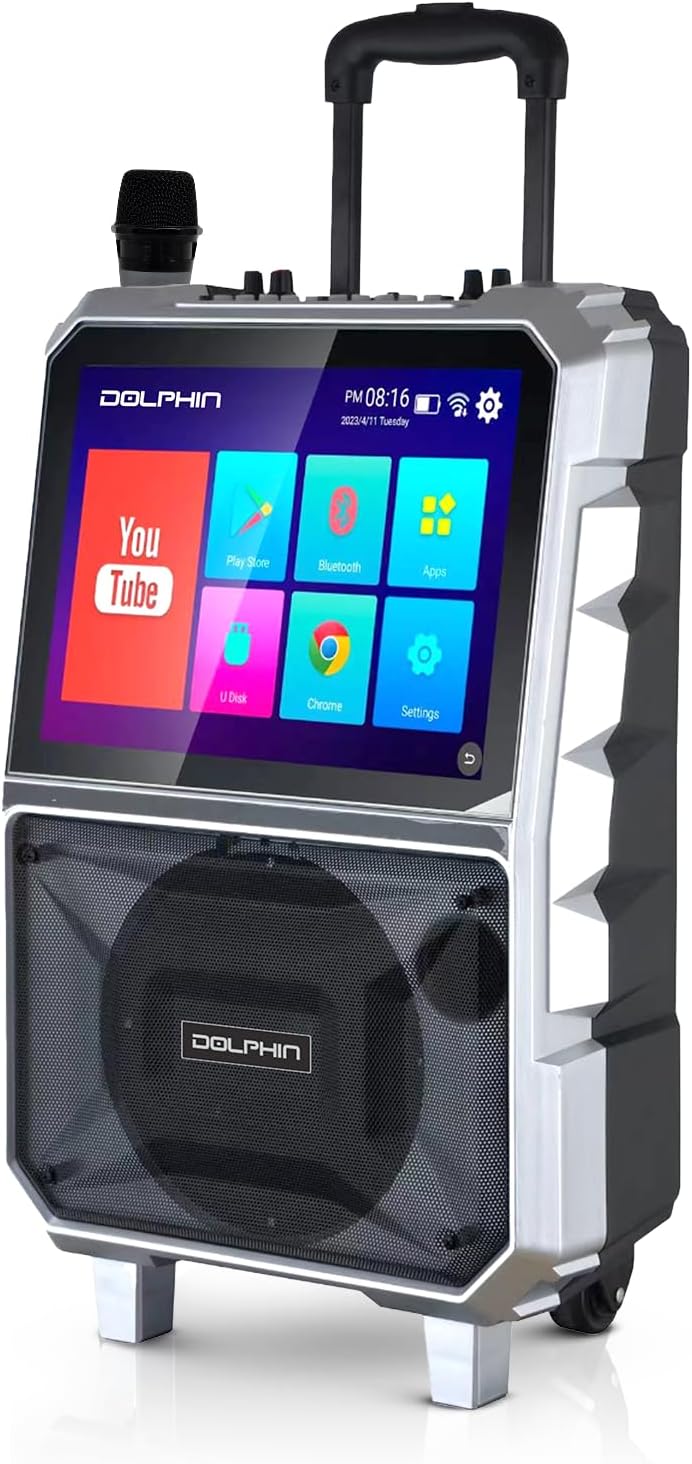
Figure 1: Front view of the Dolphin KaraokeBox 85R, showing the integrated 14-inch tablet display and the main speaker grille. A wireless microphone is visible on top.

Figure 2: Top control panel of the KaraokeBox 85R, featuring various knobs and ports for microphone inputs, volume control, echo, bass, treble, USB, and HDMI output.
Key Components:
- 14-inch Touchscreen Tablet: Integrated display for accessing apps, media, and settings.
- 8-inch Woofer: Delivers powerful 100W RMS audio output.
- Control Panel: Located on top, with knobs for volume, echo, bass, treble, and various input ports.
- Wireless Microphone: For vocal performances.
- Trolley Handle & Wheels: For easy portability.
- HDMI Output: For connecting to external displays.
- USB & SD Card Slots: For media playback.
Setup
1. Initial Charging
Before first use, fully charge the built-in 5400mAh battery. Connect the provided power adapter to the charging port on the unit and plug it into a power outlet. The charging indicator light will show the charging status.
2. Power On/Off
Locate the power switch on the control panel (refer to Figure 2). Flip the switch to the "ON" position to power on the unit. The tablet screen will light up. To power off, flip the switch to the "OFF" position.
3. Wireless Microphone Setup
The included wireless microphone is pre-paired with the unit. Ensure the microphone has fresh batteries. Power on the microphone, and it should automatically connect to the KaraokeBox 85R.
Operating Instructions
1. Tablet Operation and Connectivity
- Wi-Fi Connection: On the 14-inch touchscreen, navigate to "Settings" and select "Wi-Fi" to connect to your wireless network. A stable Wi-Fi connection is recommended for streaming content.
- Google Account Login: For uninterrupted video loading and access to personalized content, log into your Google Account via the YouTube app or system settings.
- Bluetooth Pairing: To connect external devices via Bluetooth, go to "Settings" on the tablet, select "Bluetooth," and pair with your desired device.
- HDMI Output: Connect an HDMI cable from the HDMI output port on the KaraokeBox 85R to an external display (TV, projector) for a larger viewing experience.
- USB/SD Card Playback: Insert a USB drive or SD card into the respective slots on the control panel. Use the built-in media player app on the tablet to browse and play audio or video files.
- Android/iOS Mirroring: The unit supports mirroring functions for both Android and iOS devices. Refer to the tablet's mirroring app for specific instructions on connecting your smartphone or tablet.
2. Audio Controls
- Master Volume: Adjust the main volume knob on the control panel to control the overall sound output.
- Microphone Volume: Use the dedicated microphone volume knob to adjust the level of the wireless microphone.
- Echo: Turn the "Echo" knob to add or reduce reverberation to the microphone sound, enhancing vocal effects.
- Bass & Treble: Adjust the "Bass" and "Treble" knobs to fine-tune the low and high frequencies of the audio output to your preference.
- Voice Modulation: The KB-85R offers various voice modulation functions. Access these effects through the tablet interface or dedicated buttons on the control panel (if available), allowing for personalized vocal styles.
3. Portability Features
- Trolley Handle: Extend the retractable trolley handle from the top of the unit for easy pulling.
- Wheels: Utilize the built-in wheels at the base of the unit for effortless transportation across flat surfaces.

Figure 3: The Dolphin KaraokeBox 85R showcasing its convenient trolley handle and durable wheels for easy transport.
Maintenance
- Cleaning: Use a soft, dry cloth to clean the exterior of the unit. For the touchscreen, use a screen-specific cleaner and a microfiber cloth. Do not use abrasive cleaners or solvents.
- Battery Care: To prolong battery life, avoid fully discharging the battery frequently. Recharge the unit regularly, especially if it will be stored for an extended period. Store in a cool, dry place.
- Storage: When not in use, store the KaraokeBox 85R in a dry, dust-free environment, away from direct sunlight and extreme temperatures.
Troubleshooting
| Problem | Possible Cause | Solution |
|---|---|---|
| Unit does not power on. | Battery is depleted; Power switch is off. | Charge the unit; Ensure power switch is in the "ON" position. |
| No sound output. | Volume is too low; Input source not selected; Cables not connected properly. | Increase master volume; Select correct input source on tablet; Check all cable connections. |
| Microphone not working. | Microphone batteries are low/dead; Microphone not powered on; Microphone volume is low. | Replace microphone batteries; Power on microphone; Increase microphone volume. |
| Tablet screen unresponsive or slow. | Too many apps running in background; System error. | Close unnecessary apps; Restart the unit. |
| Wi-Fi connection issues. | Incorrect password; Out of range; Router issues. | Verify Wi-Fi password; Move closer to router; Restart router and unit. |
Specifications
| Feature | Detail |
|---|---|
| Model | KaraokeBox 85R |
| Product Dimensions | 10 x 20 x 25 inches |
| Item Weight | 22.3 pounds |
| Woofer Size | 8 inches |
| Power Output | 100 Watts RMS |
| Tablet Size | 14 inches |
| Battery | Built-in 5400mAh (12V) Rechargeable Battery |
| Connectivity | Bluetooth, Wi-Fi, HDMI Output, USB, SD, FM Radio |
| Special Features | Voice Modulation, Android/iOS Mirroring, Trolley Handle & Wheels |
| Color | Black |
| Manufacturer | General Sound Co |
Warranty and Support
For warranty information and technical support, please refer to the warranty card included with your product or visit the official Dolphin website. You may also contact customer service at the details provided on the product packaging or the manufacturer's website.
Manufacturer: General Sound Co
Brand: Dolphin



