
1. Introduction
The Ai-M62-13U is an advanced Wi-Fi 6 and BLE 5.3 combo module developed by Ai-Thinker Technology. It integrates the BL616 chip as its core processor, offering robust support for Wi-Fi 802.11b/g/n/ax, BLE, and Thread protocols. Designed for low-power applications, the BL616 system features a 32-bit RISC-V CPU with a floating-point unit (FPU) and DSP unit, capable of operating at a maximum frequency of 320MHz. This module is ideal for a wide range of IoT and embedded applications requiring reliable wireless connectivity.
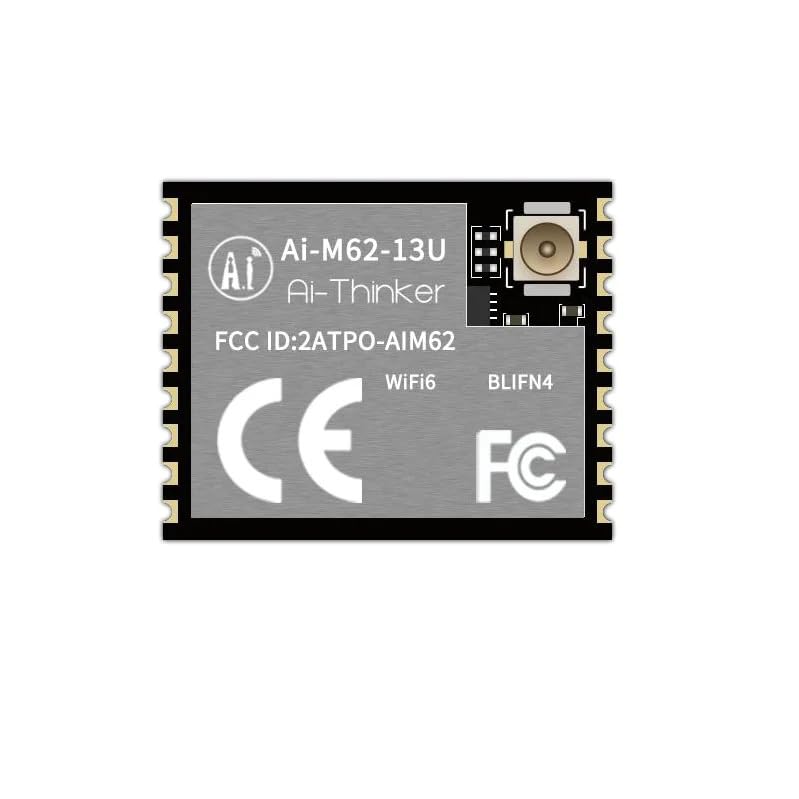
Figure 1: Ai-M62-13U Wi-Fi6 BLE5.3 Combo Module
The module's compact SMD-18 package and comprehensive feature set make it a versatile choice for developers. It supports various Wi-Fi security protocols and operating modes, ensuring secure and flexible network integration. Additionally, its rich peripheral interfaces, including USB2.0, SPI, UART, I2C, and GPIO, provide extensive connectivity options for diverse hardware designs.
2. Key Features
- Integrated BL616 chip with low-power 32-bit RISC-V CPU (max 320MHz).
- Supports Wi-Fi 6 (IEEE 802.11b/g/n/ax) with 20/40MHz bandwidth and 1T1R.
- BLE 5.3 and Thread protocol support.
- Wi-Fi/BLE/Thread coexistence capability.
- Comprehensive Wi-Fi security: WPS/WEP/WPA/WPA2/WPA3.
- Maximum Wi-Fi rate of 229.4Mbps.
- Supports STA, SoftAP, STA + SoftAP, and sniffer modes.
- Memory: 532KB SRAM, 128KB ROM, 4Kb eFuse.
- Extensive peripheral interfaces: Audio Codec, USB2.0, SDU, SD/MMC(SDH), SPI, UART, I2C, I2S, PWM, GPDAC, GPDC, ACOMP, GPIO.
- Integrated RF Balun, PA/LNA.
- Support for safe startup and safe debugging.
- XIP QSPI On-The-Fly AES decryption (OTFAD) and TrustZone support.
- Hardware cryptographic acceleration: AES-CBC/CCM/GCM/XTS, MD5, SHA-1/224/256/384/512, TRNG, PKA (RSA/ECC).
- BLE-enabled Wi-Fi fast connection.
- Universal AT command set for quick integration.
- Supports secondary development with Windows and Linux environments.
3. Specifications
| Attribute | Value |
|---|---|
| Model | Ai-M62-13U |
| Package | SMD-18 |
| Size | 14.0 x 18.0 x 3.2 (±0.2) mm |
| Antenna | IPEX |
| Frequency | 2400 ~ 2483.5 MHz |
| Manufacturer | Ai Thinker |
| Item Weight | 100 g |
| Processor Speed | 2.4 GHz (BL616 max 320MHz) |
| Memory Storage Capacity | 4 KB (eFuse) |
| Connectivity Technology | Wi-Fi, I2C, GPIO |
| Operating System Support | Linux (for development environment) |
4. Pinout and Schematics
Understanding the module's pinout and internal block diagram is crucial for proper integration into your system. The Ai-M62-13U provides a comprehensive set of pins for power, communication, and general-purpose I/O.
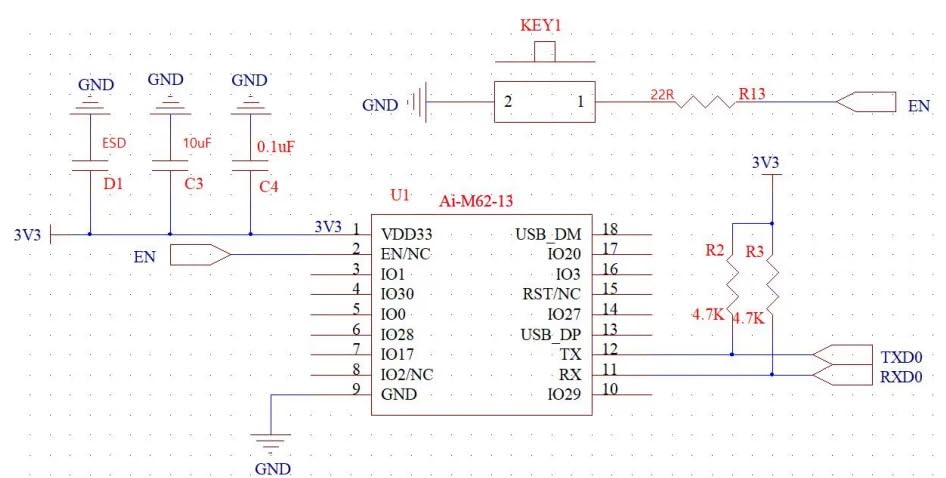
Figure 2: Ai-M62-13U Basic Schematic Diagram
The schematic diagram illustrates typical connections for power supply (3V3), enable (EN), and USB data lines (USB_DM, USB_DP). It also shows the internal structure and connectivity of the BL616 chip, highlighting its various functional blocks.

Figure 3: Ai-M62-13U Internal Block Diagram (BL616 Chip)
The block diagram provides an overview of the BL616's architecture, including the RISC-V CPU, memory blocks (ROM, RAM, Cache), RF section (Wi-Fi, BT/BLE, Zigbee), and various peripheral interfaces like USB, SDIO, SPI, I2C, UART, and GPIO. This visual representation helps in understanding the module's capabilities and how different components interact.
5. Physical Dimensions
Accurate physical dimensions are essential for mechanical design and PCB layout. The Ai-M62-13U module features a compact SMD-18 package.

Figure 4: Ai-M62-13U Physical Dimensions (in mm)
The module measures 14.0mm in width, 18.0mm in length, and 3.2mm in height, with a tolerance of ±0.2mm. The image above provides detailed measurements for the module's footprint and pin spacing, crucial for surface-mount assembly.
6. Setup
This section outlines the general steps for setting up and integrating the Ai-M62-13U module into your application.
- Power Supply: Provide a stable 3.3V DC power supply to the VDD33 pin. Ensure the power source can deliver sufficient current for the module's operation, especially during Wi-Fi transmission peaks.
- Ground Connections: Connect all GND pins to a common ground plane on your PCB. Proper grounding is critical for stable operation and noise reduction.
- Enable Pin (EN): The EN pin controls the module's power state. Pull this pin high (to 3.3V) to enable the module. It can be used for power cycling or low-power modes.
- Antenna Connection: Connect a 2.4GHz IPEX antenna to the module's IPEX connector. Ensure the antenna is correctly matched and placed to avoid interference and maximize signal strength.
- Host Interface: Connect the module's UART (TXD0, RXD0) or USB (USB_DM, USB_DP) pins to your host microcontroller or computer for communication and programming.
- Development Environment: Set up the appropriate development environment (e.g., using Windows or Linux SDKs provided by Ai-Thinker) to compile and flash firmware to the module.
- Initial Firmware Upload: Follow the manufacturer's instructions to upload the initial firmware or AT command set to the module via the chosen interface.
7. Operating Principles
The Ai-M62-13U module operates based on the capabilities of the BL616 chip, providing multi-protocol wireless communication and powerful processing.
- Wi-Fi Operation: The module supports Wi-Fi 6 (802.11ax) for high-efficiency and high-throughput data transfer in the 2.4GHz band. It can operate as a Station (STA) to connect to an access point, an Access Point (SoftAP) to allow other devices to connect to it, or in a combined STA+SoftAP mode.
- Bluetooth Low Energy (BLE): BLE 5.3 enables low-power short-range communication, ideal for sensor networks, wearables, and other battery-powered devices. The module can function as a BLE central or peripheral device.
- Thread Protocol: Support for Thread allows the module to participate in secure, self-healing mesh networks, commonly used in smart home and building automation applications.
- Coexistence: A key feature is the seamless coexistence of Wi-Fi, BLE, and Thread protocols, allowing them to operate concurrently without significant interference, optimizing resource utilization.
- RISC-V CPU: The integrated 32-bit RISC-V CPU handles application logic, network stack processing, and peripheral control. Its FPU and DSP units enhance its capability for complex computations and signal processing.
- AT Commands: For ease of use, the module typically comes with a pre-programmed AT command firmware, allowing users to control Wi-Fi, BLE, and other functions via simple serial commands from a host microcontroller.
8. Maintenance
The Ai-M62-13U module is designed for robust operation, but proper handling and environmental conditions are important for its longevity.
- Handling: Always handle the module by its edges to avoid touching the pins or sensitive components. Use anti-static precautions (e.g., ESD wrist strap) when handling to prevent damage from electrostatic discharge.
- Storage: Store the module in its original anti-static packaging in a dry, temperature-controlled environment when not in use. Avoid exposure to extreme temperatures or humidity.
- Cleaning: If necessary, clean the module's surface with a soft, dry, lint-free cloth. Do not use liquid cleaners or solvents. Ensure no debris or dust accumulates on the pins or antenna connector.
- Environmental Conditions: Operate the module within its specified temperature and humidity ranges. Avoid environments with excessive vibration, dust, or corrosive gases.
- Firmware Updates: Periodically check the manufacturer's website for firmware updates. Keeping the firmware updated can improve performance, add new features, and resolve potential issues.
9. Troubleshooting
This section provides solutions to common issues you might encounter with the Ai-M62-13U module.
- Module Not Powering On:
- Verify the 3.3V power supply is stable and correctly connected to VDD33.
- Ensure the EN pin is pulled high (enabled).
- Check all ground connections for continuity.
- No Wi-Fi Connectivity:
- Confirm the antenna is securely connected to the IPEX port.
- Check Wi-Fi credentials (SSID, password) for accuracy.
- Ensure the module is within range of the access point.
- Verify the Wi-Fi mode (STA, SoftAP) is correctly configured.
- BLE Connection Issues:
- Ensure the BLE device you are trying to connect to is discoverable and within range.
- Check for any interference from other 2.4GHz devices.
- Verify the BLE firmware and application logic are correct.
- Communication Errors (UART/USB):
- Check baud rates and serial port settings on both the module and host.
- Verify TX/RX connections are not swapped.
- Ensure proper USB driver installation if using USB interface.
- Module Overheating:
- Ensure adequate ventilation around the module.
- Verify the power supply voltage is within the specified range.
- Reduce the workload or transmission power if possible.
10. Warranty and Support
For warranty information, technical support, and further assistance with your Ai-M62-13U module, please refer to the official documentation provided by Ai-Thinker or contact your point of purchase (REES52). Keep your purchase receipt as proof of purchase for any warranty claims.
Additional resources, including detailed datasheets, application notes, and development tools, may be available on the manufacturer's official website.