
Taffio LMGQ8913-BO
Taffio 9" Touchscreen Android Car Radio GPS User Manual
Model: LMGQ8913-BO
1. Introduction
This manual provides detailed instructions for the installation, operation, maintenance, and troubleshooting of your Taffio 9-inch Touchscreen Android Car Radio GPS. This device is designed for specific Porsche models, offering advanced navigation, multimedia, and connectivity features.
Product Compatibility: Porsche 911 997 (2003-2010), Porsche BOXSTER (2003-2010), Porsche CAYMAN (2003-2010), Porsche Carrera (2003-2010).
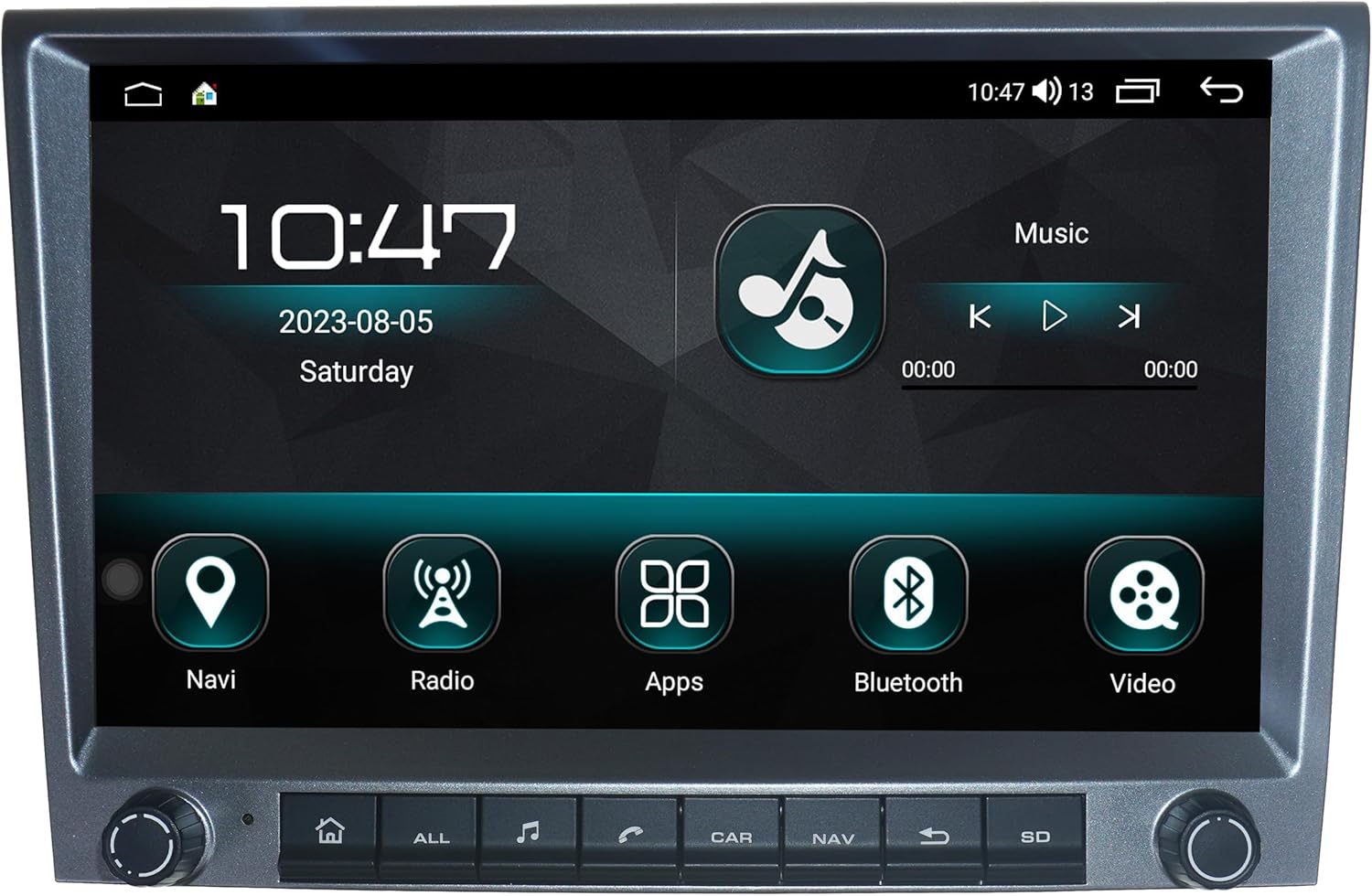
Figure 1: Main display of the Taffio 9-inch Touchscreen Android Car Radio, showing the home screen with navigation, radio, apps, Bluetooth, and video icons.
2. Setup and Installation
The Taffio Android Car Radio is designed for Plug & Play installation, minimizing the need for additional adapters or mounting frames. Ensure your vehicle is compatible before proceeding.
2.1. Unboxing and Components
Carefully unpack all components and verify against the list below:

Figure 2: Overview of included components: Android Multimedia unit, Most-Box for BOSE Soundsystem, GPS Antenna, 4G Antenna, RCA Plugs & SIM Card Slot, 2x USB cables, Backup Camera cable, and Power Cable + CAN-BUS Decoder.
- Taffio Android Multimedia Unit
- 1 GPS Antenna
- 1 Radio Antenna Adapter
- 1 Audio/Video Cable
- 1 Connection Cable with Canbus Decoder
- 1 Most-Box for BOSE Soundsystem (if applicable)
- 2 USB Cables
- 1 Backup Camera Cable
- 1 4G Antenna
- RCA Plugs & SIM Card Slot cable
2.2. Installation Steps
- Prepare the Vehicle: Ensure the vehicle's ignition is off and the battery is disconnected before starting installation.
- Remove Original Radio: Carefully remove the existing car radio from the dashboard. Refer to your vehicle's specific service manual for detailed instructions on removing the original unit.
- Connect Wiring Harness:

Figure 3: Connection diagram showing GPS Antenna (1), 4G Antenna (2), RCA Plugs & SIM-Slot (3), Rear Camera IN RCA (4), USB (5, 6), CAN-BUS-CONNECTOR (7), Power Cable (8), Quadlock Plug (9), ISO Plug (9A), Most Box (10), B+ 12V+ (13), ACC 12V+ (14), GND (-) (15).
- Connect the CAN-BUS-CONNECTOR (7) to the Power Cable (8).
- If your vehicle has a Quadlock Plug, connect Plug 9 to the Original Radio Plug.
- If your vehicle has an ISO Plug, connect Plug 9A to the Original Radio Plug.
- Connect the Power Cable (8) to the Android Radio.
- If your vehicle has a BOSE Soundsystem, remove the fibre optic cable from the Original Radio and plug it into the Most Box (10). Connect the RCA plugs from the Most Box with NR.3 AUDIO OUT L & AUDIO OUT R.
- Connect the GPS Antenna (1) and 4G Antenna (2) to their respective ports on the Android unit. Position the antennas for optimal signal reception.
- Connect the RCA Plugs & SIM-Slot cable (3) and USB cables (5, 6) as needed.
- Connect the Rear Camera IN RCA (4) if installing a backup camera.
- Mount the Unit: Carefully slide the Taffio Android Car Radio into the dashboard opening until it clicks into place. Ensure all cables are tucked away and not pinched.
- Reconnect Battery: Reconnect the vehicle's battery.
- Initial Power On: Turn on the vehicle's ignition and power on the unit. Perform initial setup and testing.

Figure 4: The Taffio Android Car Radio seamlessly integrated into a Porsche vehicle's dashboard after installation, displaying a navigation map and media player.
3. Operating Instructions
Your Taffio Android Car Radio runs on Android 12, offering a wide range of features and applications.
3.1. Basic Navigation
- Touchscreen Interface: Navigate through menus and applications by tapping, swiping, and pinching on the 9-inch touchscreen.
- Home Screen: Access core functions like Navigation, Radio, Apps, Bluetooth, and Video directly from the home screen.
- Steering Wheel Control: The unit supports existing steering wheel controls for safe and convenient operation.
3.2. Key Features
- GPS Navigation: The unit comes with pre-installed GPS maps and offers free lifetime updates. Access navigation via the "Navi" icon or integrated Carplay/Android Auto.
- Carplay & Android Auto: Integrated Carplay and Android Auto functionality allows seamless integration with your smartphone.

Figure 5: The Wireless Carplay interface displaying phone, maps, messages, music, and other compatible applications.

Figure 6: The Android Auto interface showing maps, podcasts, Telegram, phone, settings, and other compatible applications.
- Multimedia Playback: Play audio and video files from various sources including USB, Bluetooth, and streaming apps.

Figure 7: The radio interface displaying frequency tuning and preset stations.
- Connectivity:
- Wi-Fi: Connect to Wi-Fi hotspots or your smartphone's tethering for internet access.
- 4G LTE: Insert a 4G SIM card into the dedicated slot for mobile internet access without Wi-Fi.
- Bluetooth: Pair your smartphone for hands-free calling and audio streaming.
- App Store: Access the Play Store to download and install a wide variety of Android applications.

Figure 8: The applications screen showing icons for App Store, AUX, Bluetooth, Calculator, Car Link 2.0, CarbitLink, Chrome, Equalizer, FileManager, Gallery, Google, iGO Navigation, Maps, and MS9120.
4. Maintenance
- Screen Cleaning: Use a soft, lint-free cloth slightly dampened with water or a screen cleaner specifically designed for electronics. Avoid harsh chemicals or abrasive materials.
- Software Updates: Periodically check for system and application updates through the unit's settings or the Play Store to ensure optimal performance and security.
- Data Backup: Regularly back up important data or settings if available, especially before major software updates.
- Environmental Care: Avoid exposing the unit to extreme temperatures, direct sunlight for prolonged periods, or excessive moisture.
5. Troubleshooting
| Problem | Possible Cause | Solution |
|---|---|---|
| Unit does not power on. | Loose power connection, blown fuse, vehicle battery issue. | Check power cable connections. Inspect vehicle fuses. Ensure vehicle battery is charged. |
| No sound or poor sound quality. | Incorrect wiring, volume too low, speaker issues, BOSE adapter not connected correctly. | Verify speaker wiring. Adjust volume. Check BOSE Most-Box connection if applicable. |
| GPS signal is weak or inaccurate. | GPS antenna improperly placed or obstructed. | Ensure GPS antenna has a clear view of the sky and is securely connected. |
| Carplay/Android Auto not connecting. | USB cable issue, phone settings, software incompatibility. | Try a different USB cable. Check phone settings for Carplay/Android Auto permissions. Ensure phone OS is up to date. |
| Steering wheel controls not working. | CAN-BUS decoder not connected or configured correctly. | Verify CAN-BUS decoder connection. Check unit settings for steering wheel control configuration. |
6. Specifications
| Feature | Detail |
|---|---|
| Brand | Taffio |
| Model Name | LMGQ8913-BO |
| Vehicle Service Type | Car |
| Screen Size | 9 Inches |
| Special Feature | Bluetooth, GPS Navigation, Carplay, Android Auto, Wi-Fi, 4G LTE |
| Connectivity Technology | Bluetooth, USB, Wi-Fi, 4G LTE |
| Map Type | Worldwide (with free lifetime updates) |
| Mounting Type | Dashboard Mount |
| Resolution | 1024 x 600 |
| Operating System | Android 12 |
| Processor | Octa-core 1.6 GHz |
| RAM | 4 GB |
| Flash Memory | 64 GB |
7. Warranty and Support
For warranty information, please refer to the documentation provided with your purchase or contact your retailer. The product typically includes a standard manufacturer's warranty covering defects in materials and workmanship.
For technical support, installation assistance, or further inquiries, please contact Taffio customer service or your authorized dealer. Keep your purchase receipt and product model number (LMGQ8913-BO) handy when seeking support.
Online Resources: You may find additional support resources, FAQs, and software updates on the official Taffio website (if available).
Related documentsLMGQ8913-BO

Ask a question about this manual
Ask about setup, troubleshooting, compatibility, parts, safety, or missing instructions. Manuals+ will review the question and use this page’s manual context to help answer it.