
1. Introduction
Thank you for choosing the Conambo K10C Bluetooth Headset. This manual provides detailed instructions for setting up, operating, and maintaining your headset to ensure optimal performance and longevity. The K10C headset features Bluetooth 5.2 connectivity, CVC8.0 dual-mic noise cancellation, and comes with a 750mAh charging case for extended talk time.
2. Package Contents
Please verify that all items are present in your package:
- Conambo K10C Bluetooth Headset
- 750mAh Charging Case
- Type-C Charging Cable
- 9 Pieces Ear Tips (various sizes)
- User Manual (this document)
3. Product Overview
Familiarize yourself with the components and controls of your Conambo K10C headset and charging case.

Figure 3.1: Conambo K10C Headset with labeled controls. This image displays the headset with callouts indicating the Power On/Off switch, Volume +/- buttons, Mute button, and the area for activating Siri/Google Assistant. It also highlights the Qualcomm QCC3040 Chip and IPX4 Water Resistance.

Figure 3.2: Conambo K10C Headset securely placed within its charging case. The charging case features a digital LED display for battery status.
4. Charging
Ensure your headset and charging case are fully charged before first use.
4.1 Charging the Headset
Place the headset into the charging case. The headset will begin charging automatically. The LED display on the charging case will show the battery level.
4.2 Charging the Charging Case
Connect the provided Type-C cable to the charging port on the case and to a USB power source. The LED digital display will indicate the charging progress. A full charge takes approximately 3 hours.
The 750mAh charging case provides up to 64 additional hours of talk time, extending the headset's 16 hours to a total of 80 hours.
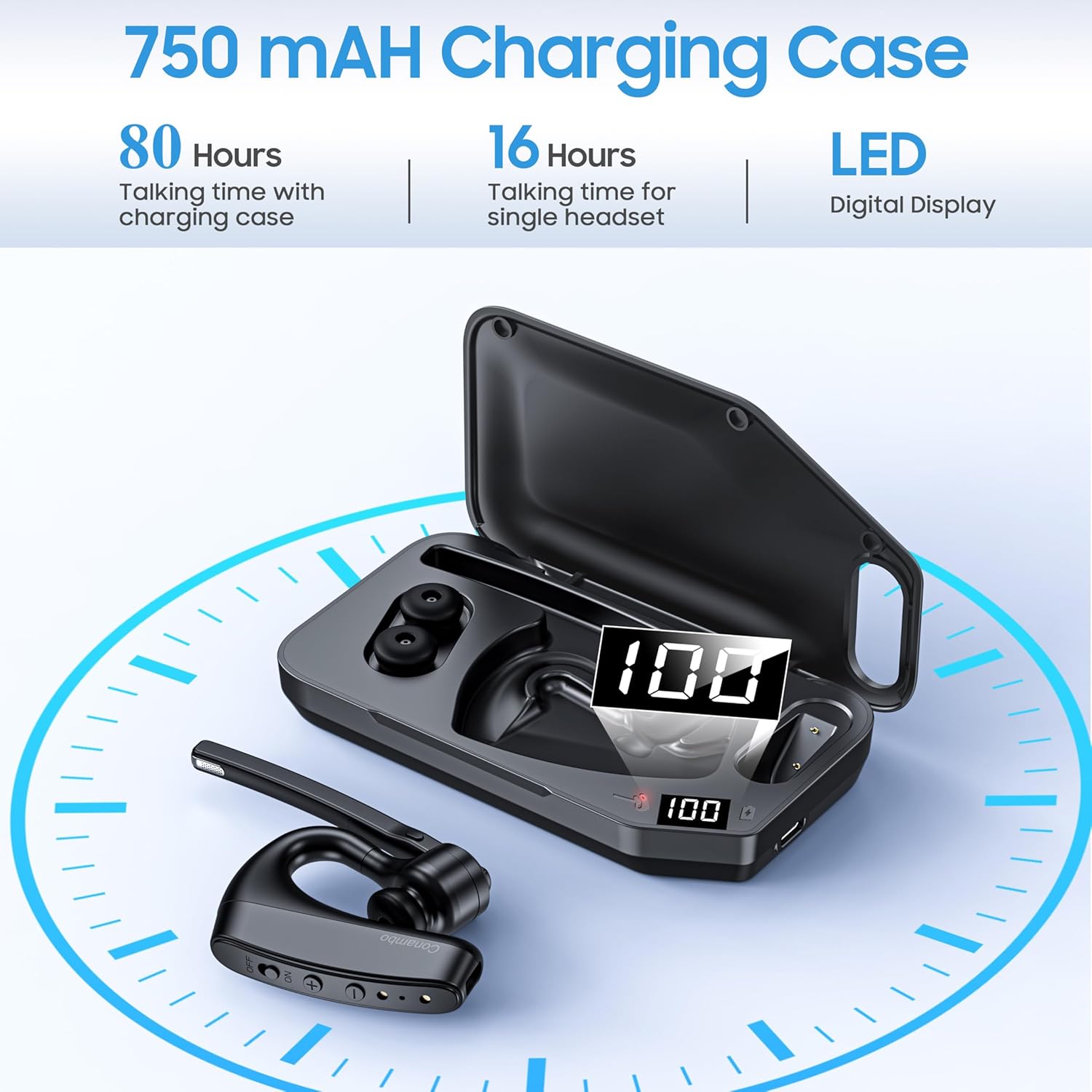
Figure 4.1: Overview of the 750mAh charging case, highlighting its capacity to provide 80 hours of total talk time (16 hours from headset, 64 hours from case) and its LED digital display for battery status.
5. Pairing
Follow these steps to pair your Conambo K10C headset with your device.
5.1 Initial Pairing
- Ensure the headset is charged and powered off.
- Press and hold the Power On/Off button until the indicator light flashes red and blue, indicating pairing mode.
- On your device (smartphone, laptop, tablet), enable Bluetooth and search for available devices.
- Select "K10C-CBOX" from the list of found devices.
- Once connected, the indicator light on the headset will flash blue slowly.
5.2 Multipoint Technology
The K10C headset supports multipoint technology, allowing it to connect to two Bluetooth devices simultaneously. After pairing with the first device, disable Bluetooth on that device, then pair with the second device. Re-enable Bluetooth on the first device, and the headset should connect to both.
The headset utilizes Bluetooth 5.2 for a faster, more efficient, and stable connection, with an operating range of up to 59 feet (18 meters).

Figure 5.1: The Conambo K10C headset demonstrating multipoint technology, connecting to both a smartphone and a laptop simultaneously. This image also highlights fast pairing and a 59ft/18m range.
6. Operation
6.1 Power On/Off
- Power On: Slide the Power On/Off switch to the 'ON' position. The indicator light will flash blue.
- Power Off: Slide the Power On/Off switch to the 'OFF' position. The indicator light will turn off.
6.2 Call Management
- Answer/End Call: Press the Multi-function button once.
- Reject Call: Press and hold the Multi-function button for 2 seconds.
6.3 Mute Function
The headset features an independent mute button on the microphone boom.
- During a call, press the mute button once to activate/deactivate mute.

Figure 6.1: A user demonstrating the one-button mute feature on the Conambo K10C headset, emphasizing easy call management.
6.4 Volume Control
- Press the '+' button to increase volume.
- Press the '-' button to decrease volume.
6.5 Voice Assistant Activation
Hold the mute button for 3 seconds to activate your device's voice assistant (Siri or Google Assistant).
6.6 Noise Cancellation
The Conambo K10C headset incorporates CVC8.0 Dual Mic and ENC (Environmental Noise Cancellation) technology. This system is designed to reduce up to 96% of background noise, ensuring clear voice quality during calls, even in noisy environments.
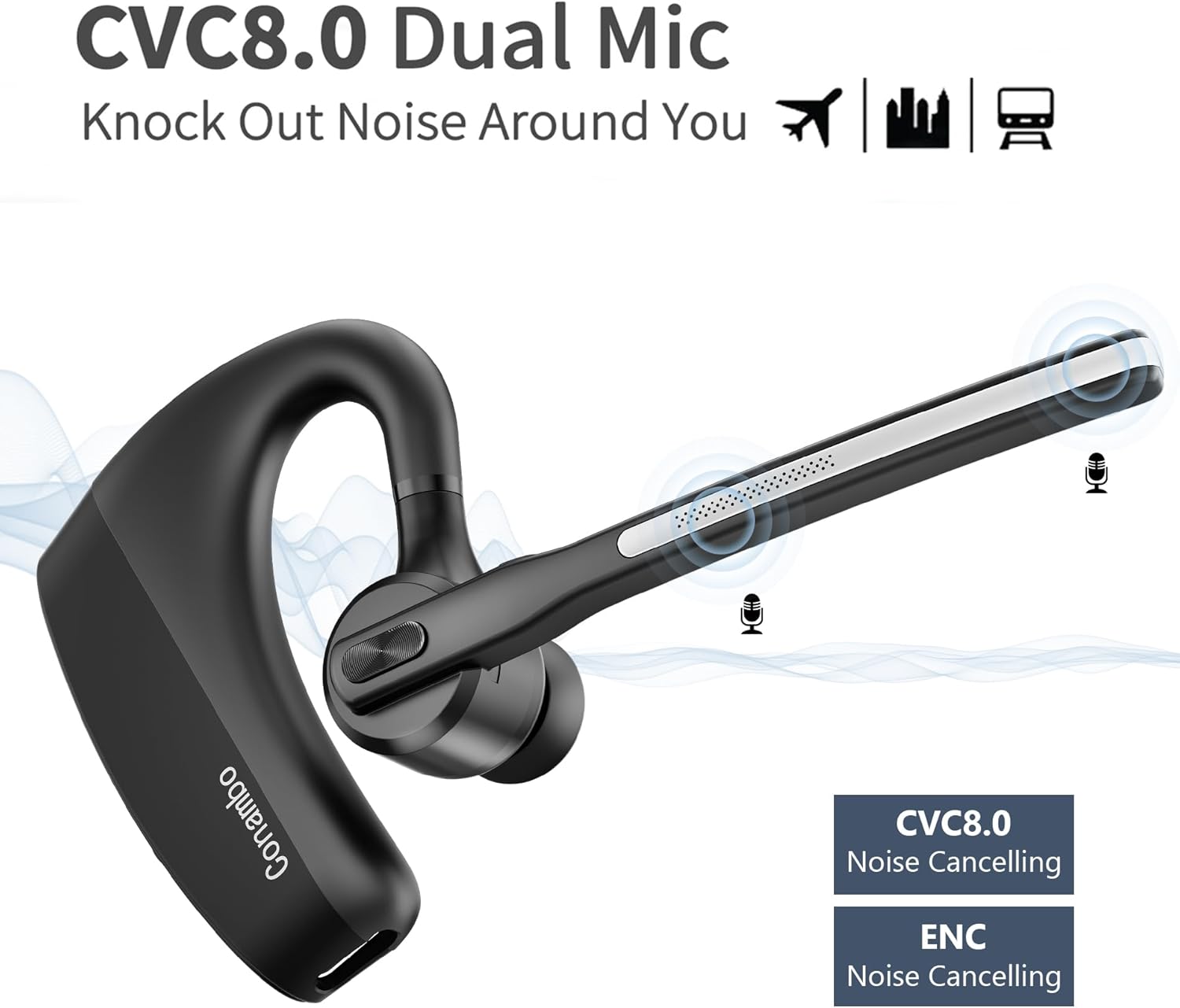
Figure 6.2: Visual representation of the CVC8.0 Dual Mic and ENC Noise Cancelling technology in the Conambo K10C headset, illustrating its ability to block out surrounding noise.
7. Maintenance
Proper maintenance helps extend the life of your headset.
7.1 Cleaning
- Gently wipe the headset and charging case with a soft, dry, lint-free cloth.
- For ear tips, remove them and clean with a mild soap solution if necessary, then rinse thoroughly and dry completely before reattaching.
- Avoid using harsh chemicals, abrasive cleaners, or getting moisture into any openings.
7.2 Storage
- When not in use, store the headset in its charging case to protect it from dust and damage.
- Store in a cool, dry place, away from extreme temperatures and direct sunlight.
8. Troubleshooting
If you encounter issues with your headset, refer to the following common problems and solutions.
| Problem | Solution |
|---|---|
| Headset does not power on. | Ensure the headset is charged. Check the charging case battery level. |
| Cannot pair with device. | Ensure the headset is in pairing mode (flashing red and blue). Turn off and on your device's Bluetooth. Forget previous pairings on your device and try again. |
| No sound or low volume. | Adjust the volume on both the headset and your connected device. Ensure the headset is properly connected. |
| Poor call quality. | Ensure the headset is within range of your device. Avoid physical obstructions. Check for interference from other wireless devices. |
| Mute function not working. | Ensure you are pressing the dedicated mute button on the microphone boom. |
If problems persist, try restarting both the headset and your connected device. For further assistance, please refer to the support information.
9. Specifications
| Feature | Detail |
|---|---|
| Model Name | K10C-CBOX |
| Connectivity Technology | Bluetooth 5.2 |
| Wireless Communication Technology | Bluetooth |
| Noise Control | Active Noise Cancellation (CVC8.0 Dual Mic) |
| Audio Driver Type | Dynamic Driver |
| Bluetooth Range | 18 Meters (59 feet) |
| Headset Battery Life | Up to 16 hours talk time |
| Charging Case Battery Capacity | 750 mAh |
| Charging Case Additional Talk Time | Up to 64 hours |
| Total Talk Time (with case) | Up to 80 hours |
| Charging Time | Approximately 3 hours |
| Water Resistance Level | Water Resistant (IPX4) |
| Compatible Devices | Cellphones, Laptops, Tablets, iPhone |
| Control Type | Button control |
| Material | Plastic |
| Item Weight | 7.2 ounces |
10. Warranty and Support
The Conambo K10C Bluetooth Headset typically comes with a 2-year warranty. Please refer to your purchase documentation for specific warranty terms and conditions.
For technical support or warranty claims, please contact Conambo customer service through the retailer where the product was purchased or visit the official Conambo website for contact information.


