
1. Introduction
This manual provides essential information for the proper assembly, operation, and maintenance of your WENCAI BL-8817 88-Key Digital Piano. Please read it thoroughly before using the instrument to ensure optimal performance and longevity.

2. Safety Instructions
- Power Supply: Use only the provided PES certified power supply. Ensure the voltage matches your local power specifications.
- Placement: Place the piano on a stable, level surface. Avoid direct sunlight, heat sources, and excessive humidity.
- Ventilation: Do not block ventilation openings. Ensure adequate airflow around the instrument.
- Liquid and Objects: Prevent liquids or foreign objects from entering the instrument. If this occurs, disconnect power immediately and contact support.
- Cleaning: Clean the instrument with a soft, dry cloth. Do not use abrasive cleaners or solvents.
- Disassembly: Do not attempt to disassemble or modify the instrument. Refer all servicing to qualified personnel.
3. Package Contents
Verify that all items are present in the package:
- WENCAI BL-8817 Digital Piano Unit
- 3-Pedal Unit
- Power Supply (PES certified)
- Instruction Manual (English)
- Assembly Hardware (screws, plugs)
4. Assembly Instructions
Follow these steps to assemble your digital piano. It is recommended to have assistance during assembly.
- Carefully unpack all components and verify against the package contents list.
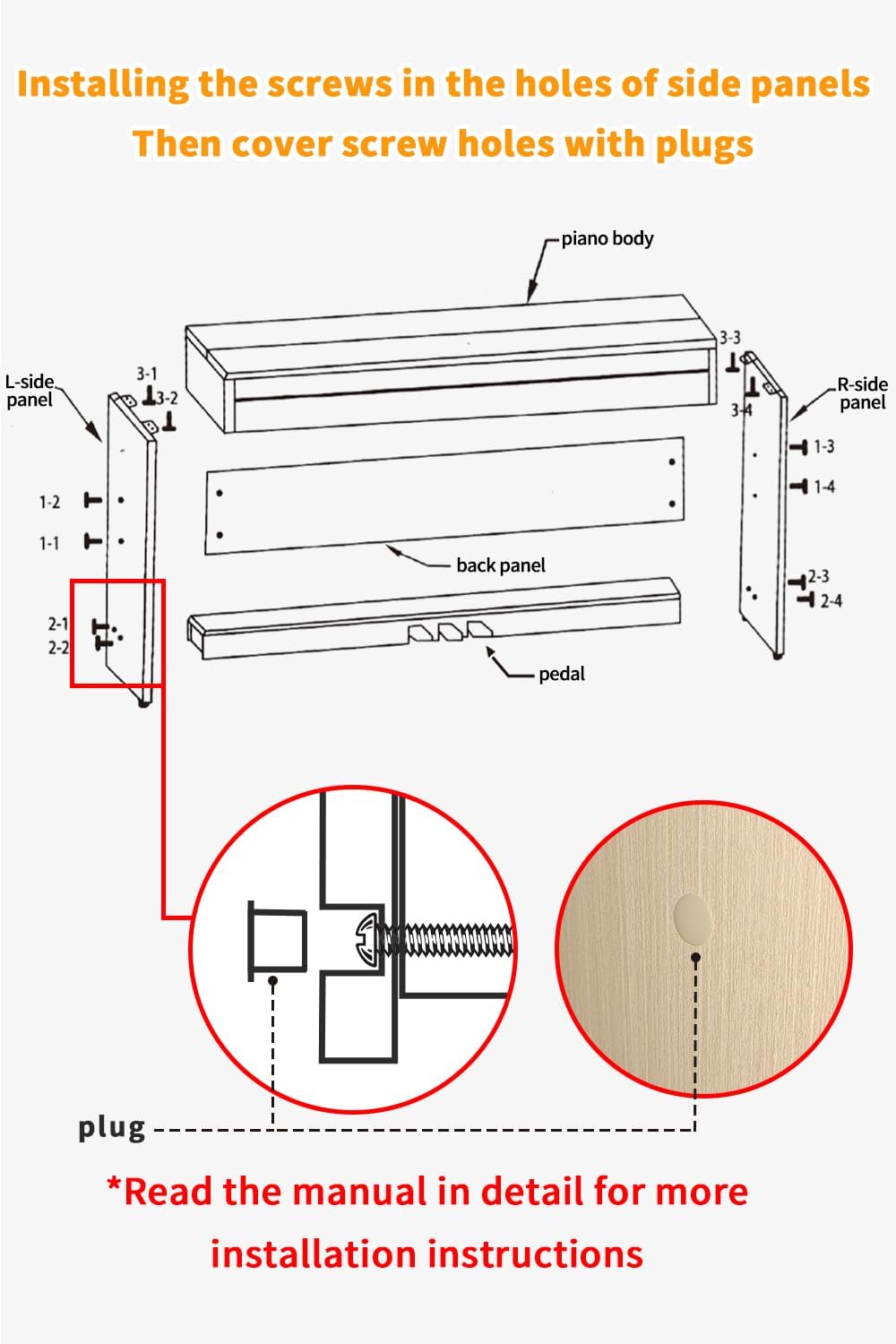
- Attach the side panels to the main piano body using the provided screws. Ensure correct orientation (L-side panel and R-side panel).
- Secure the back panel to the piano body and side panels.
- Connect the pedal unit to the designated attachment points on the side panels.
- Once all screws are tightened, cover the screw holes with the decorative plugs for a finished appearance.
5. Product Features
The WENCAI BL-8817 Digital Piano offers a range of features designed for a comprehensive playing experience:
- 88 Velocity-Sensitive Keys: Full-size keyboard replicating the feel of a grand piano.
- Advanced Sound Source: Utilizes the French DREAM sound source for realistic piano tones.
- Integrated Loudspeaker: Features a 15W electric piano speaker for clear sound output.
- Versatile Functionality: Includes 100 Rhythms, 128 Tones, and 88 Demo songs.
- Practice Modes: Metronome, REC/PLAY function, Finger Force Sensing, Dual Mode, Tempo Change, Transposition, and Chord functions.
- Connectivity: USB-MIDI port for connection to smart devices and music apps, wireless connectivity, and dual headphone jacks for private practice.
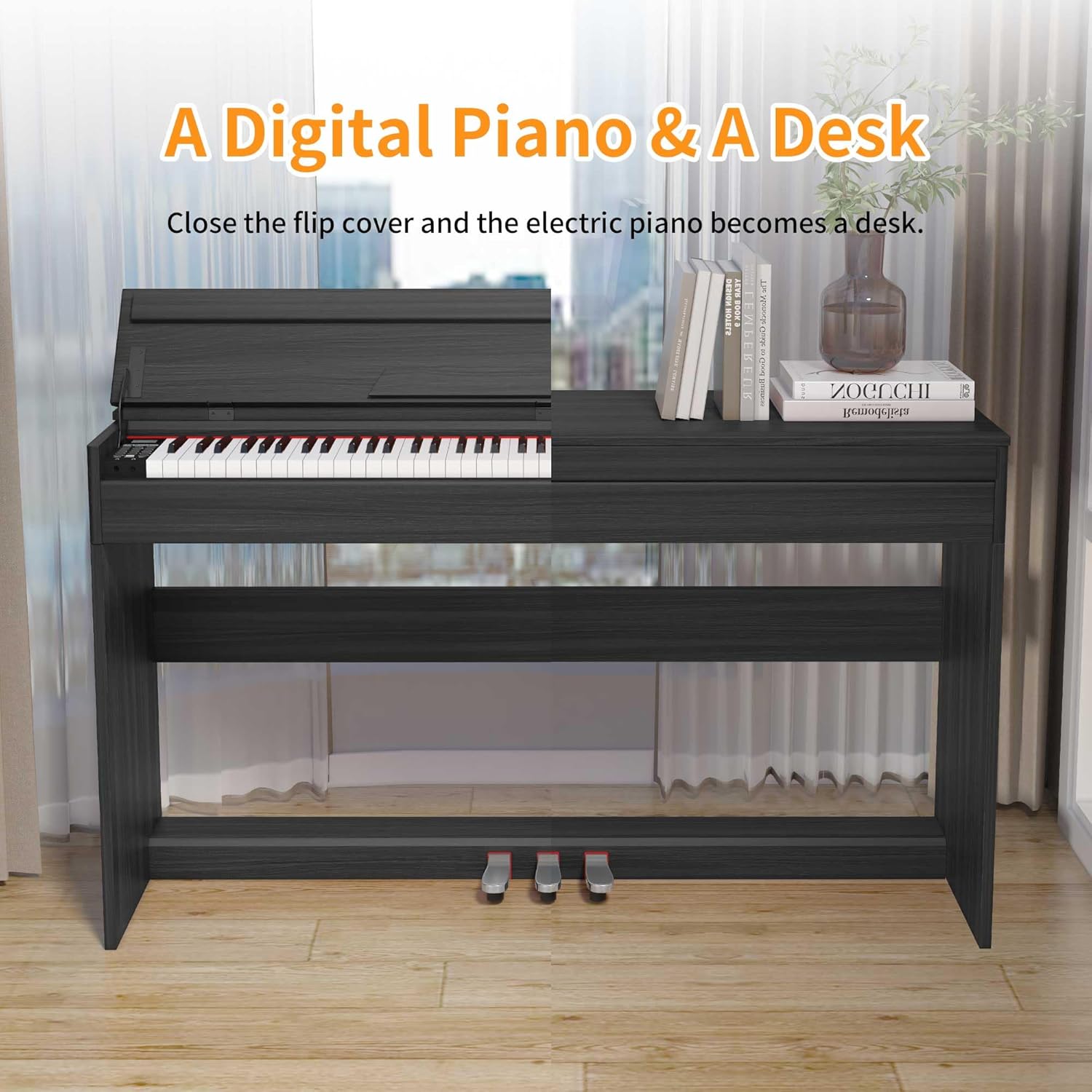
- Dual-Purpose Design: The piano can function as a desk when the dust cover is closed.


6. Setup
- After assembly, ensure all connections are secure.
- Connect the power supply to the DC power socket on the rear of the piano and then to a wall outlet.
- Press and hold the POWER button for 1-1.5 seconds to turn on the instrument.
- Adjust the volume to a comfortable level using the VOL+/- buttons.
7. Operating Instructions
The control panel provides access to various functions. Refer to the diagram below for button layout.

7.1 Basic Functions
- Power On/Off: Press and hold the 'POWER' button for 1-1.5 seconds.
- Volume Adjustment: Use 'VOL+' and 'VOL-' buttons.
- Tone Selection: Press the 'TONE' button, then use 'SELECT+' or 'SELECT-' to choose from 128 available tones.
- Rhythm Selection: Press the 'RHYTHM' button, then use 'SELECT+' or 'SELECT-' to choose from 100 available rhythms.
- Demo Songs: Press the 'DEMO' button to play through the 88 built-in demo songs. Use 'SELECT+' or 'SELECT-' to navigate.
7.2 Advanced Functions
- Metronome: Press the 'METRONOME' button to activate/deactivate the metronome. Adjust tempo using 'TEMPO' button and 'SELECT+'/'SELECT-'.
- Recording (REC/PLAY): Press 'REC' to start recording your performance. Press 'PLAY' to listen to your recorded piece.
- Dual Mode: Allows two different voices to be played simultaneously when a single key is pressed. Press 'DUAL' to activate/deactivate.
- Split Mode: Divides the keyboard into two sections, each with a different voice. Press 'SPLIT' to activate/deactivate.
- Transposition: Adjust the pitch of the entire keyboard up or down. Press 'TRANS' and use 'SELECT+'/'SELECT-'.
- Touch Sensitivity: Adjust the keyboard's response to your playing dynamics. Press 'TOUCH' and use 'SELECT+'/'SELECT-'.
8. Connectivity
The WENCAI BL-8817 offers various connectivity options for enhanced functionality.
- USB-MIDI: Connect the piano to a computer, smartphone, or tablet using a USB-MIDI cable. This allows for MIDI data transfer, enabling use with music production software or learning applications.
- Wireless Connection: The piano supports wireless connectivity for certain functions (e.g., Bluetooth MIDI). Refer to your device's manual for specific pairing instructions.
- Headphone Jacks: Two 3.5mm headphone jacks are provided for private practice, allowing two users to listen simultaneously without disturbing others.
- Audio Input/Output: Use the audio input to connect external audio sources and play along. The audio output can be used to connect to external amplification systems.

9. Maintenance
- Cleaning: Wipe the surface of the piano with a soft, dry, lint-free cloth. For stubborn dirt, slightly dampen the cloth with water and mild soap, then wipe dry immediately. Avoid excessive moisture.
- Key Cleaning: Use a soft cloth to gently wipe the keys. Do not use harsh chemicals.
- Storage: When not in use, close the key cover to protect the keys from dust and debris. If storing for an extended period, disconnect the power supply.
- Environmental Conditions: Maintain a stable room temperature and humidity. Extreme fluctuations can damage the instrument.
10. Troubleshooting
If you encounter issues, refer to the following common problems and solutions:
| Problem | Possible Cause | Solution |
|---|---|---|
| No sound | Power not connected, volume too low, headphones connected. | Check power connection, increase volume, disconnect headphones. |
| Keys not responding | Instrument not powered on, internal malfunction. | Ensure power is on. If problem persists, contact customer support. |
| Distorted sound | Volume too high, faulty connection. | Reduce volume. Check all audio cable connections. |
| MIDI connection issues | Incorrect cable, driver issues, software settings. | Ensure correct USB-MIDI cable is used. Install necessary drivers. Check software MIDI settings. |
If the problem persists after attempting these solutions, please contact WENCAI customer support.
11. Specifications
| Feature | Specification |
|---|---|
| Model Name | BL-8817 |
| Number of Keys | 88 |
| Key Type | Velocity-Sensitive |
| Sound Source | French DREAM |
| Tones | 128 |
| Rhythms | 100 |
| Demo Songs | 88 |
| Connectivity Technology | USB, Wireless |
| Connector Types | 3.5mm Jack (Headphones), MIDI USB, Micro USB B, USB Type C |
| Power Source | Corded Electric |
| Special Feature | Digital Display |
| Item Weight | 72.8 pounds |
| Package Dimensions | 56 x 15 x 13.5 inches |
| Manufacturer | WENCAI |

12. Warranty and Support
Your WENCAI BL-8817 Digital Piano comes with the following:
- Warranty: 1-year warranty from the date of purchase.
- Returns: Unconditional return within 30 days of purchase.
- Customer Support: For any questions or issues, please contact WENCAI customer support through your order history.


