
Introduction
This manual provides detailed instructions for the safe and efficient operation of your MOOKA AP-S0610L H13 True HEPA Air Purifier. Please read this manual thoroughly before use and retain it for future reference.
Product Overview
The MOOKA AP-S0610L air purifier is designed to improve indoor air quality by filtering various airborne pollutants. It features a 360° air intake and a 3-stage filtration system, including a pre-filter, H13 True HEPA filter, and high-efficiency activated carbon filter. The unit is suitable for large rooms up to 1300 sq ft and operates with a low noise level, making it ideal for bedrooms and other quiet spaces. Additional features include an aromatherapy function, customizable fan speeds, timing modes, a night light, and a child lock function.

Image: The MOOKA AP-S0610L H13 True HEPA Air Purifier in black, shown next to a small dog wearing a Santa hat.
Important Safety Precautions
- Read all instructions before using the appliance.
- Do not operate the air purifier if the cord or plug is damaged.
- Keep the appliance away from water or other liquids.
- Ensure the filter is correctly installed before operation.
- Unplug the appliance before cleaning or performing any maintenance.
- Do not block air inlets or outlets.
- This appliance is for indoor use only.
- Keep out of reach of children and pets.
Package Contents
Verify that all items are present in the package:
- MOOKA AP-S0610L Air Purifier Unit
- H13 True HEPA Filter (pre-installed or separate)
- Power Adapter
- User Manual (this document)
Video: Unboxing and initial setup of the MOOKA Air Purifier, showing the included components.
Setup
1. Filter Installation
- Unscrew the base cover of the air purifier by turning it counter-clockwise.
- Remove the new filter from its protective plastic packaging.
- Insert the filter into the air purifier unit. Ensure it is seated correctly.
- Replace the base cover and turn it clockwise to secure.

Image: Diagram illustrating the 3-stage filtration system: Preliminary Filter, HEPA Filter, and Activated Carbon Filter.
2. Power Connection
- Place the air purifier on a flat, stable surface.
- Connect the power adapter to the power input port on the back of the unit.
- Plug the power adapter into a standard electrical outlet.
Video: Demonstrates connecting the power adapter to the air purifier and plugging it into an outlet.
Operating Instructions
Control Panel Overview

Image: A close-up view of the air purifier's top control panel, highlighting various function buttons such as power, speed, timer, sleep, light, and lock.
1. Power On/Off
Press the Power Button () to turn the air purifier on or off.
2. Adjust Fan Speed
Press the Speed Button () to cycle through low, medium, and high fan speeds. The corresponding indicator lights will illuminate.
3. Sleep Mode
Press the Sleep Button () to activate sleep mode. In this mode, the fan operates at its lowest speed, and all indicator lights dim or turn off for quiet operation.
4. Timer Function
Press the Timer Button () to set the operating time for 2, 4, or 8 hours. The unit will automatically turn off after the selected duration.
5. Night Light
Press the Light Button () to turn the night light on or off.
6. Child Lock
To activate or deactivate the child lock, press and hold the Lock Button ( ) for 3 seconds. This prevents accidental changes to settings.
Image: The control panel with icons for H13 HEPA Filter, Aromatherapy, Low Noise, Filter Replacement Reminder, 4 Fan Speed, Timer Setting, Child Lock, and Night Light.
7. Aromatherapy Function
Locate the aromatherapy pad slot on the side of the unit. Add 2-3 drops of your preferred essential oil (not included) to the pad. The air purifier will then diffuse the scent into the room.
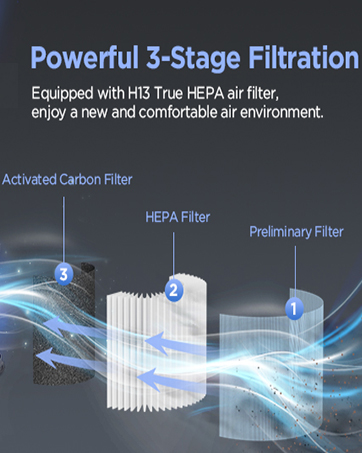
Image: A hand adding essential oil drops to the aromatherapy pad on the side of the air purifier.
Video: Demonstrates the various control panel functions including power, fan speed, timer, sleep mode, night light, and child lock.
Maintenance
1. Filter Replacement
The air purifier is equipped with a filter replacement reminder function. When the filter needs to be replaced, the Filter Reset indicator () will light up. It is recommended to replace the filter every 3-6 months, depending on usage and air quality.
- Turn off and unplug the air purifier.
- Unscrew the base cover and remove the old filter.
- Insert a new genuine MOOKA replacement filter (search B0BR5BJG4J).
- Replace the base cover.
- Plug in the unit and press and hold the Filter Reset Button for 3-5 seconds until the indicator light turns off.

Image: An illustration showing the filter replacement reminder and a shopping cart icon to "Get Filter".
Video: Demonstrates the process of replacing the air filter in the MOOKA Air Purifier.
2. Cleaning
Wipe the exterior of the air purifier with a soft, dry cloth. Do not use abrasive cleaners or solvents. The pre-filter can be gently vacuumed to remove large dust particles, but the HEPA and activated carbon filters are not washable.
Troubleshooting
If you encounter any issues with your MOOKA air purifier, please refer to the following common solutions:
- Unit does not turn on: Ensure the power adapter is securely plugged into both the unit and the electrical outlet. Check if the outlet is functioning.
- Reduced airflow or unusual noise: The filter may be clogged. Replace the filter if the filter reset indicator is on, or clean the pre-filter.
- No scent from aromatherapy: Ensure essential oil has been added to the aromatherapy pad. Check if the pad is correctly inserted.
- Buttons are unresponsive: Check if the child lock function is activated. Deactivate it by pressing and holding the Lock button for 3 seconds.
For further assistance, please contact customer support.
Specifications
| Feature | Detail |
|---|---|
| Model Number | AP-S0610L |
| Product Dimensions | 6.7"D x 6.7"W x 11.1"H |
| Weight | 3.4 Pounds |
| Coverage Area | Up to 1300 Square Feet |
| Filtration Type | H13 True HEPA 3-Stage Filtration |
| Noise Level | As low as 15 dB |
| Special Features | Aromatherapy, Night Light, 3 Fan Speeds, 3 Timing Modes, Child Lock |
| Certification | ETL Certified |
Warranty and Support
Legal Disclaimer
Statements regarding dietary supplements have not been evaluated by the FDA and are not intended to diagnose, treat, cure, or prevent any disease or health condition.
Customer Support
For any questions or concerns regarding your MOOKA AP-S0610L Air Purifier, please contact our customer support team. We are committed to providing assistance and ensuring your satisfaction.
Email: support@mooka.com
Visit the MOOKA Store for more products and information.


