
ACPOTEL PF2L PRO
ACPOTEL Golf Range Finder User Manual
Model: PF2L PRO
Brand: ACPOTEL
Introduction
This manual provides comprehensive instructions for the ACPOTEL Golf Range Finder, Model PF2L PRO. Designed for golf, disc golf, and hunting, this device offers precise distance measurements with advanced features such as slope compensation, an external side display, and flag pole locking vibration. Please read this manual thoroughly to ensure proper use and maintenance of your rangefinder.
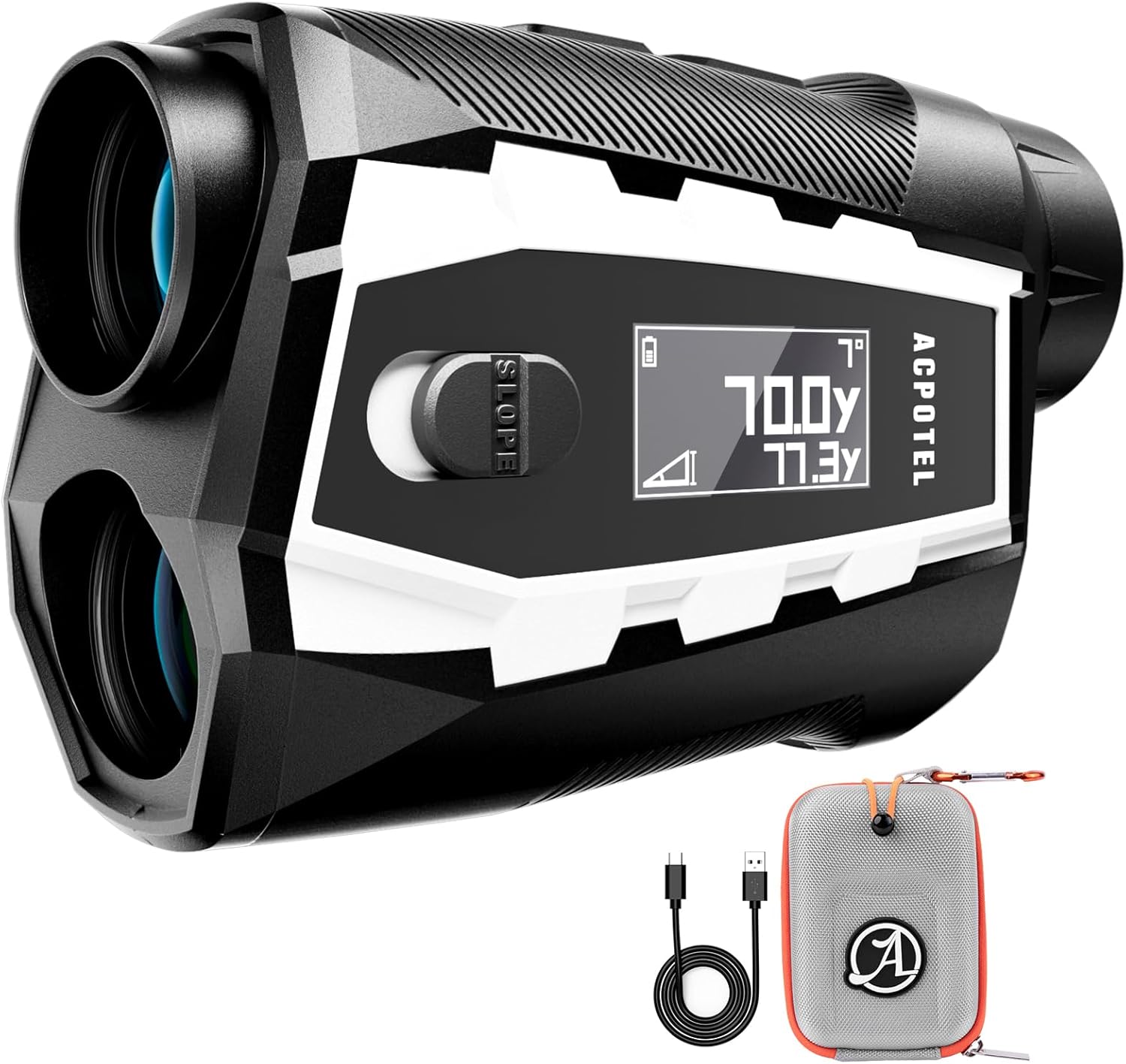
Image: ACPOTEL Golf Range Finder, showing the device, its portable soft case, and USB-C charging cable.
Key Features
- External LCD Display: Provides clear readability of data in various lighting conditions.
- Slope Switching Function: Automatically factors in inclines and declines for precise measurements, with the ability to toggle on/off for tournament compliance.
- Magnetic Strip: Ensures secure attachment to metal surfaces like golf carts.
- Long Measurement Range: Measures distances up to 1000 yards.
- USB-C Charging: Fast charging with a built-in 1000mAh rechargeable battery.
- Versatile Modes: Includes golf flag locking, speed measurement, continuous scan, two-point height, horizontal and vertical distance measurement.
- Unit Switching: Easily switch between feet (ft), yards (yd), and meters (m).

Image: Overview of the rangefinder's key features, including external display, slope switch, accuracy, magnetic strip, unit switching, and battery capacity.
Setup and Charging
Package Contents
Before first use, please verify that all items are present in the package:
- ACPOTEL Golf Range Finder
- Portable soft case & Mountaineering buckle
- USB-C charging cable (Use original cable for optimal charging)
- User Manual (this document)
- Hand Rope
- Lens cloth
Initial Charging
The rangefinder is equipped with a built-in 1000mAh rechargeable lithium battery. For optimal performance, fully charge the device before its first use.
- Locate the USB-C charging port on the device.
- Connect the provided USB-C charging cable to the rangefinder.
- Connect the other end of the cable to a compatible USB power adapter (not included) or a computer's USB port.
- The charging indicator on the device will show the charging status. A full charge can support up to 40,000 uses.

Image: Illustration of the rangefinder's internal battery and USB-C charging connection.
Operating Instructions
Powering On/Off
Press the power button (usually the 'Measure' button) to turn on the device. The device will automatically power off after a period of inactivity to conserve battery.
External Side Display
The rangefinder features an external LCD display for enhanced visibility of measurements. This display allows for easy double-checking of data and is particularly useful in low light conditions or for users with reading difficulties.

Image: The rangefinder's external side display, demonstrating its clarity in various environmental conditions.
Slope Compensation
The slope compensation feature adjusts the measured distance based on the incline or decline of the terrain, providing a more accurate "play as" distance. This function can be toggled on or off using the dedicated switch on the device.
- To Enable/Disable Slope: Locate the physical slope switch on the side of the rangefinder and slide it to the desired position.
- Tournament Legal: Ensure the slope function is turned OFF for official tournament play to comply with rules.

Image: Visual explanation of slope compensation, demonstrating how the device adjusts distances for elevation changes.
Versatile Measurement Modes
The rangefinder offers several modes to suit different measurement needs:
- Golf Flag Locking: Designed to quickly lock onto the flagstick, filtering out background objects. The device will vibrate upon successful flag lock.
- Speed Measurement: Measures the speed of moving objects.
- Continuous Scan Measurement: Allows for rapid measurement of multiple targets in succession by continuously pressing the measure button.
- Two-Point Height Mode: Calculates the height difference between two points.
- Horizontal and Vertical Distance Measurement: Provides horizontal and vertical components of the measured distance.
Unit Switching (Feet, Yards, Meters)
You can easily switch between measurement units (feet, yards, meters) to suit your preference or sport (e.g., disc golf often uses feet).

Image: The rangefinder is suitable for disc golf, highlighting its unit switching capability for precision throws.
Magnetic Attachment
The integrated N95 strong magnet allows the rangefinder to securely attach to metal surfaces, such as a golf cart frame or club, ensuring it remains accessible and stable during play.

Image: The rangefinder's strong magnetic attachment feature, showing it securely mounted to a metal bar.
Care and Maintenance
- Cleaning: Use the provided lens cloth to gently clean the optical lenses. For the body, wipe with a soft, dry cloth. Avoid abrasive materials or harsh chemicals.
- Storage: Store the rangefinder in its portable soft case when not in use to protect it from dust and scratches. Keep it in a cool, dry place away from direct sunlight and extreme temperatures.
- Battery Care: To prolong battery life, avoid fully discharging the battery frequently. Recharge the device when the battery indicator is low. If storing for an extended period, charge the battery to approximately 50% every few months.
- Water Resistance: The device is rated as "Waterproof". While designed to withstand moisture, avoid submerging it in water for prolonged periods.
Troubleshooting
If you encounter issues with your ACPOTEL Golf Range Finder, refer to the following common problems and solutions:
- Why can't I get a reading?
The minimum range for measurement is 5 yards. If you are attempting to use it in small rooms, through glass, or if the distance to the target is outside its operational range, it may not display a reading.
- Why does the reading seem not as accurate as usual sometimes?
Environmental factors such as rain, fog, strong light, or heavy dust can interfere with the laser transmission and affect accuracy. For small objects, ensure you are aiming directly at the target and there is no distracting background.
- How to lock a flag accurately?
In golf mode, the key to accurate flag locking is slow and steady scanning. Hold the measure button and scan from behind the flag to the flag in the front. The device will vibrate when the flag is successfully locked, and the reading will remain stable.

Image: Common troubleshooting questions and answers for the rangefinder.
Product Specifications
| Model Number | PF2L PRO |
| Brand | ACPOTEL |
| Product Dimensions | 11.68 x 7.87 x 4.06 cm |
| Item Weight | 50 g |
| Battery Type | 1000mAh Lithium (rechargeable) |
| Color | Model With Side Display (Premium Edition) |
| Material | Plastic |
| Sport Compatibility | Golf, Hunting |
| Water Resistance Level | Waterproof |
| Magnification Maximum | 6x |
Warranty and Support
ACPOTEL is committed to providing reliable products and excellent customer service.
- Warranty: This product comes with a 2-year assurance from the date of purchase.
- Technical Support: Lifetime technical support is provided for all ACPOTEL golf rangefinders.
- Contact: For any issues or inquiries, please reach out to our after-sales team. You can expect a 24-hour online response.

Image: ACPOTEL's commitment to customer support, including 24-hour online response and a 2-year warranty.
Ask a question about this manual
Ask about setup, troubleshooting, compatibility, parts, safety, or missing instructions. Manuals+ will review the question and use this page’s manual context to help answer it.