
1. Introduction
The FUNMILY Under Desk Elliptical is designed to provide a low-impact, joint-friendly exercise experience for individuals seeking to stay active while seated. Ideal for office workers, seniors, or those undergoing rehabilitation, this portable pedal exerciser helps boost circulation, build muscle, and burn calories without putting strain on knees, hips, or legs. It comes fully assembled for immediate use and features a display monitor and remote control for convenient operation.
2. Safety Information
Please read all safety instructions carefully before using the FUNMILY Under Desk Elliptical. Failure to follow these guidelines may result in injury or damage to the product.
- Consult with a healthcare professional before starting any new exercise program, especially if you have pre-existing medical conditions.
- Always use the elliptical while seated. Do not attempt to stand on the pedals.
- Ensure the elliptical is placed on a stable, level surface to prevent tipping or movement during use.
- Maintain a clear area around the elliptical to avoid obstructions and ensure safe operation.
- Wear appropriate footwear that provides good grip and support.
- Keep hands and feet clear of all moving parts during operation.
- Unplug the elliptical from the power outlet when not in use or before cleaning.
- Keep the device out of reach of children and pets.
3. Product Overview
The FUNMILY Under Desk Elliptical is designed for ease of use and portability. Key components include:
- Main Unit: The core body of the elliptical, housing the motor and internal mechanisms.
- Pedals: Two foot pedals with adjustable safety straps to secure your feet during exercise.
- Display Monitor: An integrated LCD screen that shows exercise data.
- Remote Control: Allows for convenient adjustment of settings without bending down.
- Power Switch: Located on the main unit to turn the device on or off.

Figure 3.1: The main unit of the FUNMILY Under Desk Elliptical, showcasing its compact design, pedals with straps, and integrated display.
4. Setup
The FUNMILY Under Desk Elliptical comes 100% pre-assembled, ready for immediate use right out of the box.
- Unpack: Carefully remove the elliptical from its packaging.
- Placement: Place the elliptical on a flat, stable surface under your desk or in front of your chair. Ensure there is enough space for your legs to move freely without obstruction.
- Power Connection: Plug the power adapter into the elliptical's power port, then into a standard electrical outlet.
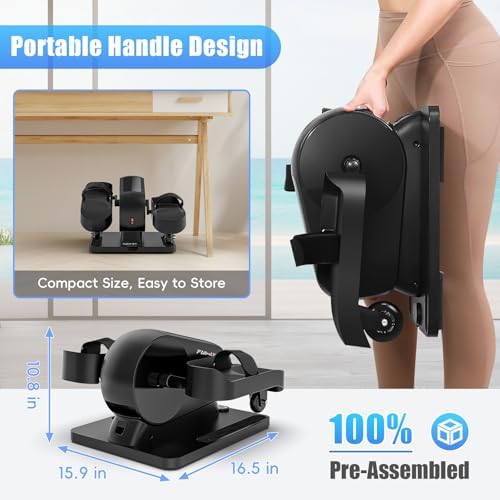
Figure 4.1: The elliptical is pre-assembled and features a portable handle for easy movement and storage.
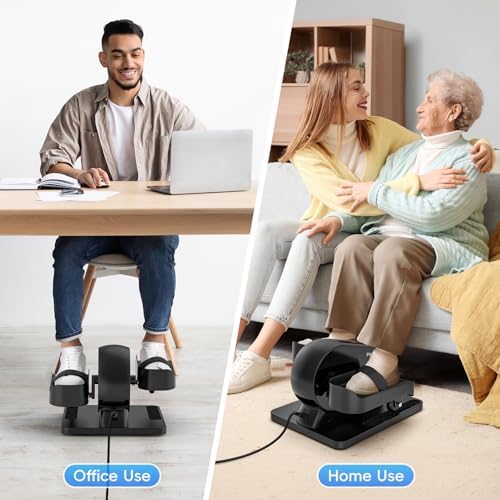
Figure 4.2: The elliptical is suitable for both office and home environments, providing versatile exercise options.
5. Operating Instructions
The elliptical offers both automatic and manual modes, controlled via the integrated display and remote.
5.1 Power On/Off
- Locate the power switch on the main unit.
- Press the switch to turn the elliptical ON. The display will illuminate.
- Press the switch again to turn the elliptical OFF.
5.2 Display Monitor Functions
The large LCD display clearly shows your exercise data in real-time:
- Speed: Current pedaling speed.
- Resistance: Current resistance level.
- Distance: Total distance covered during the session.
- Calorie: Estimated calories burned.
- Time: Duration of your exercise session.

Figure 5.1: The clear LCD display provides essential exercise metrics for easy tracking.
5.3 Modes of Operation (Auto & Manual)
The elliptical offers two primary modes to suit your preference:
- Auto Mode: Provides 12 pre-set speed levels. The pedals will move automatically, allowing for passive exercise. Select the level that suits your desired intensity.
- Manual Mode: Offers 9 levels of exercise resistance. In this mode, you control the pedaling speed and can adjust the resistance manually at any time to increase or decrease the workout intensity.

Figure 5.2: Choose between Auto Mode for passive movement or Manual Mode for active resistance training.
5.4 Remote Control Operation
The included remote control allows for convenient adjustments without needing to bend down.
- Use the remote to switch between Auto and Manual modes.
- Adjust speed levels in Auto Mode.
- Adjust resistance levels in Manual Mode.
- Start and stop the exercise.
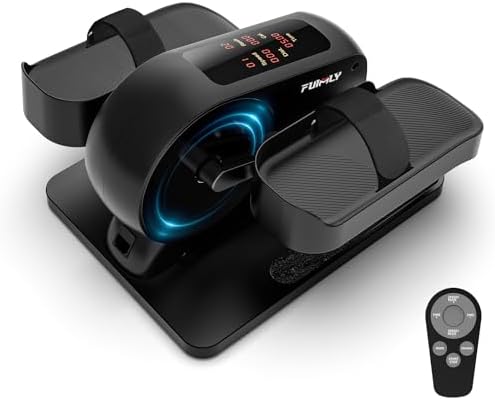
Figure 5.3: The remote control provides easy access to all functions, enhancing user convenience.
5.5 Adjustable Safety Straps
The pedals are equipped with adjustable safety straps to ensure your feet remain securely in place during your workout, preventing slippage and potential injury.

Figure 5.4: Secure your feet with the adjustable straps for a safe and stable exercise experience.
6. Maintenance
Proper maintenance will ensure the longevity and optimal performance of your FUNMILY Under Desk Elliptical.
- Cleaning: Wipe down the unit regularly with a soft, damp cloth. Do not use abrasive cleaners or solvents. Ensure the unit is unplugged before cleaning.
- Storage: When not in use, store the elliptical in a cool, dry place away from direct sunlight and extreme temperatures. Its compact size and portable handle make it easy to store.
- Inspection: Periodically check all parts for wear and tear. If any components appear damaged, discontinue use and contact customer support.
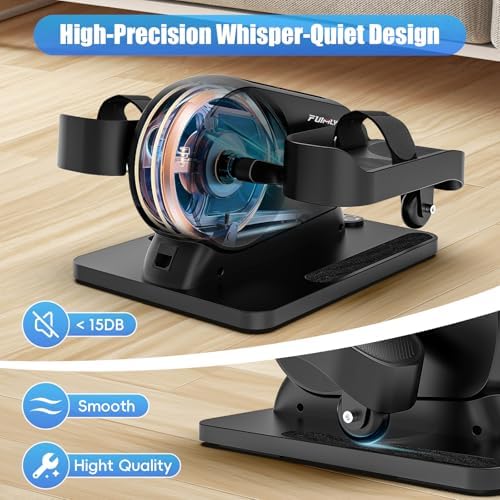
Figure 6.1: The elliptical features a high-precision, whisper-quiet design for discreet use.
7. Troubleshooting
If you encounter any issues with your FUNMILY Under Desk Elliptical, refer to the following common problems and solutions:
| Problem | Possible Cause | Solution |
|---|---|---|
| Unit does not power on. | Not plugged in; Power switch off; Power outlet issue. | Ensure power cord is securely plugged into the unit and a working outlet. Check power switch is ON. Try a different outlet. |
| Pedals are not moving smoothly. | Obstruction; Unit not on level surface; Internal issue. | Check for any objects obstructing pedal movement. Ensure the unit is on a flat, stable surface. If problem persists, contact support. |
| Display is not showing data. | Loose connection; Battery issue (for remote); Sensor issue. | Ensure all connections are secure. If using remote, check/replace batteries. If display remains blank, contact support. |
| Unusual noise during operation. | Loose part; Internal friction. | Stop using the unit immediately. Inspect for any loose parts. Do not attempt to open the unit. Contact customer support. |
If the problem persists after attempting these solutions, please contact FUNMILY customer support for further assistance.
8. Specifications
Detailed specifications for the FUNMILY Under Desk Elliptical (Model MEB001):
| Feature | Detail |
|---|---|
| Brand | FUNMILY |
| Model Name | MEB001 |
| Color | Black |
| Material | Aluminum |
| Item Weight | 8.62 Kilograms |
| Number of Batteries | 1 Lithium Metal batteries required (included) |
| Item Package Dimensions L x W x H | 18 x 18 x 12 inches |
| Item Dimensions L x W x H | 16 x 15 x 11 inches |
| Pre-Assembly | 100% Pre-Assembled |
| Display | Large LCD Monitor |
| Modes | Auto Mode (12 Speed Levels), Manual Mode (9 Resistance Levels) |
| Noise Level | Whisper-Quiet (less than 15dB) |
| Included Components | Leg Exerciser, Remote Control |
| Date First Available | November 30, 2023 |
9. Warranty and Support
FUNMILY stands behind the quality of its products.
- Warranty: This product comes with a 12-Month Warranty from the date of purchase. This warranty covers manufacturing defects and material flaws under normal use. It does not cover damage caused by misuse, accidents, unauthorized modifications, or normal wear and tear.
- Customer Support: For any questions, concerns, or technical assistance, please contact FUNMILY customer support. Have your model number (MEB001) and purchase date ready when contacting support.
Contact Information:
Email: support@funmily.com
Website: www.funmily.com (Please check the official website for the most up-to-date contact information.)