
AHT30
Generic AHT30 Temperature and Humidity Sensor Module User Manual
Model: AHT30
Brand: Generic
1. Introduction
The Generic AHT30 is a high-precision temperature and humidity sensor module designed for various environmental monitoring applications. It utilizes an I²C digital signal interface for communication, offering reliable and stable measurements with low power consumption.
This manual provides essential information for the proper setup, operation, and maintenance of your AHT30 sensor module.
2. Key Features
- Low Power Consumption: Operates efficiently with only 150µA current during normal use, suitable for long-term deployments.
- High Precision: Humidity accuracy of ±2%RH (at 25°C, 60%RH) and temperature accuracy of ±0.4°C.
- Fast Response Time: Responds to environmental changes in approximately 3 seconds.
- Robust Design: Features a dual-row flat pin-free SMD package, providing durability against harsh environments including high/low temperatures and humidity.
- Stable Digital Output: Provides a linear and stable output signal over time, ensuring consistent measurement accuracy.
- I²C Interface: Standard I²C digital communication for easy integration with microcontrollers.
3. Product Overview and Pinout
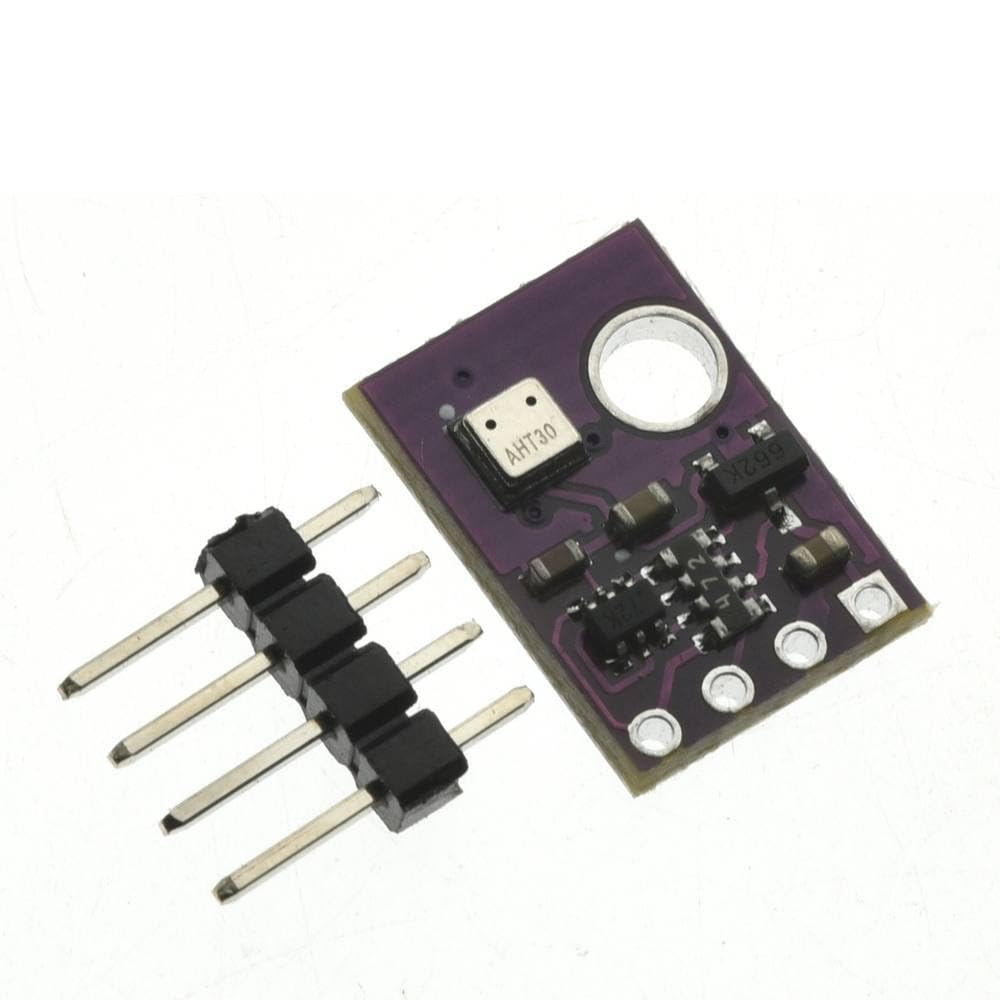
Figure 3.1: Top view of the AHT30 sensor module with a separate 4-pin header. The module is purple with the AHT30 chip visible.

Figure 3.2: Angled view of the AHT30 sensor module, showing the attached 4-pin header for connection.

Figure 3.3: Bottom view of the AHT30 module, clearly showing the pin labels: VIN, GND, SCL, and SDA.

Figure 3.4: Another angled view of the AHT30 module and its pin header, highlighting the compact size.

Figure 3.5: Close-up top view of the AHT30 sensor module, showing the integrated circuit and components.
Pin Description:
| Pin | Description |
|---|---|
| VIN | Voltage Input (Power Supply) |
| GND | Ground |
| SCL | I²C Serial Clock Line |
| SDA | I²C Serial Data Line |
4. Setup Instructions
- Prepare Components: Gather your AHT30 module, a compatible microcontroller (e.g., Arduino, ESP32), breadboard, and jumper wires.
- Connect Power:
- Connect the VIN pin of the AHT30 module to the 3.3V or 5V power supply output of your microcontroller. Refer to your microcontroller's documentation for appropriate voltage levels.
- Connect the GND pin of the AHT30 module to the Ground (GND) pin of your microcontroller.
- Connect I²C Bus:
- Connect the SCL pin of the AHT30 module to the I²C Serial Clock (SCL) pin on your microcontroller.
- Connect the SDA pin of the AHT30 module to the I²C Serial Data (SDA) pin on your microcontroller.
Note: Specific SCL/SDA pins vary by microcontroller. Consult your microcontroller's pinout diagram.
- Software Setup:
- Install necessary libraries for AHT30 or general I²C communication in your development environment (e.g., Arduino IDE).
- Write or load example code to initialize the I²C communication and read data from the AHT30 sensor. The AHT30 typically has an I²C address of 0x38.
5. Operating Instructions
Once the AHT30 module is correctly wired and the software is configured, you can begin reading temperature and humidity data.
- Initialization: In your code, initialize the I²C bus and the AHT30 sensor. This typically involves sending a command to wake up the sensor and perform a calibration.
- Reading Data:
- Send a measurement command to the AHT30 via I²C.
- Wait for the sensor to complete the measurement (approximately 75ms).
- Read the 6-byte data output from the sensor. This data contains raw temperature and humidity values.
- Data Conversion: Convert the raw digital data into meaningful temperature (in °C or °F) and relative humidity (%RH) values using the sensor's datasheet formulas or a dedicated library function.
- Continuous Monitoring: For continuous monitoring, repeat the data reading and conversion process at desired intervals.
Refer to the AHT30 datasheet or specific library documentation for detailed I²C communication protocols and data conversion formulas.
6. Maintenance
The AHT30 sensor module is designed for long-term stability and generally requires minimal maintenance. However, following these guidelines can help ensure optimal performance:
- Keep Clean: Avoid exposing the sensor to dust, dirt, or corrosive substances. If cleaning is necessary, use a soft, dry brush or compressed air. Do not use liquids.
- Avoid Physical Stress: Handle the module carefully to prevent physical damage to the sensor element or solder joints.
- Environmental Conditions: Operate the sensor within its specified environmental limits (temperature and humidity ranges) to prevent damage and ensure accuracy.
- Power Supply: Ensure a stable and clean power supply within the specified voltage range (VIN).
- Recalibration: While the AHT30 offers good long-term stability, for critical applications, periodic calibration checks against a known reference sensor may be considered.
7. Troubleshooting
| Problem | Possible Cause | Solution |
|---|---|---|
| No data or incorrect readings |
|
|
| Sensor not detected on I²C bus |
|
|
| Inaccurate readings |
|
|
8. Specifications
| Parameter | Value |
|---|---|
| Model | AHT30 |
| Interface | I²C Digital Signal |
| Operating Voltage (VIN) | Wide Voltage (typically 2.2V to 5.5V, check datasheet for exact range) |
| Current Consumption | 150µA (normal operation) |
| Humidity Measurement Range | 0% to 100% RH |
| Humidity Accuracy | ±2%RH (at 25°C, 60%RH) |
| Temperature Measurement Range | -40°C to +85°C |
| Temperature Accuracy | ±0.4°C |
| Response Time | 3 seconds |
| Package Type | Dual row flat pin-free SMD package |
| I²C Address | 0x38 (typical) |
9. Warranty and Support
Specific warranty information for this Generic AHT30 module is not provided in the product details. For warranty claims or technical support, please refer to the retailer or seller from whom the product was purchased.
For general technical inquiries regarding the AHT30 sensor, consult the official AHT30 datasheet provided by the chip manufacturer or relevant online communities for I²C sensor integration.
Related documentsAHT30


Ask a question about this manual
Ask about setup, troubleshooting, compatibility, parts, safety, or missing instructions. Manuals+ will review the question and use this page’s manual context to help answer it.