
Mackie ProFX12v3+
Contents
Mackie ProFX12v3+ 12-channel Mixer User Manual
Model: ProFX12v3+
Introduction
The Mackie ProFX12v3+ is a 12-channel professional analog mixer and audio interface designed for recording and streaming. It features high-quality Onyx preamps, versatile EQ controls, switchable USB recording modes, bidirectional Bluetooth with Mix Minus functionality, and upgraded GigFX+ effects that can be adjusted via a color LCD screen. This manual provides comprehensive instructions for setting up, operating, and maintaining your mixer.
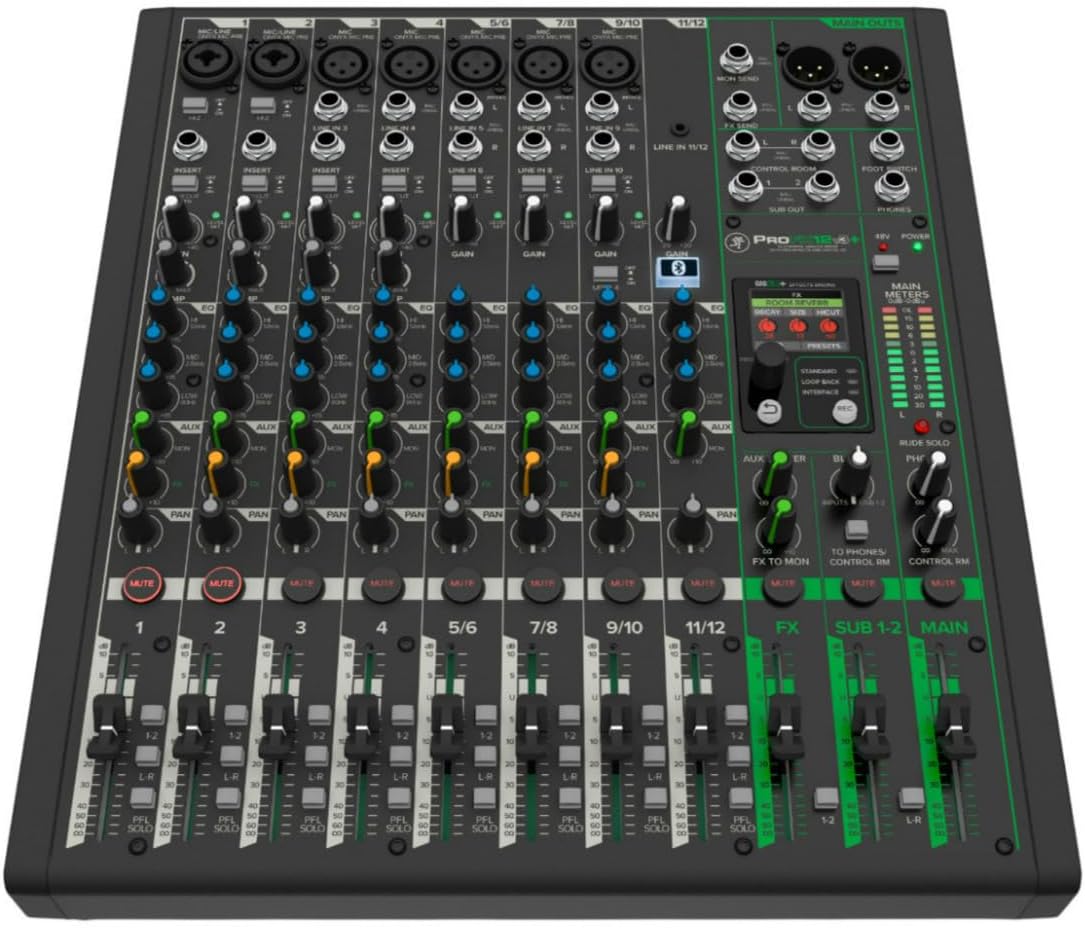
Figure 1: Top-down view of the Mackie ProFX12v3+ mixer, showcasing its various channels, knobs, and faders.
Key Features
- 12-channel Analog Mixer: Provides ample inputs for various audio sources.
- 7 Onyx Mic Preamps: Delivers pristine audio quality with high headroom and low noise.
- 2-in/4-out USB-C Audio Interface: Seamlessly connects to your computer for recording and playback.
- Bidirectional Bluetooth with Mix Minus: Allows for easy integration of phone calls and external audio sources without feedback.
- Upgraded GigFX+ Effects Engine: Features 12 customizable effects with a color LCD screen for precise adjustments.
- Versatile EQ Controls: Shape your sound with detailed equalization options on each channel.
- Multiple USB Recording Modes: Choose between Standard, Loop Back, and Interface modes for flexible recording workflows.
Setup
1. Unpacking and Inspection
Carefully remove the mixer from its packaging. Inspect the unit for any signs of damage during transit. Ensure all accessories listed in the packing list are present.
3. Power Connection
Connect the provided power cable to the mixer's power input on the rear panel and then to a suitable AC power outlet. Ensure the power switch is in the OFF position before connecting.

Figure 2: Rear panel of the mixer, highlighting the power input and USB-C port.
3. USB Connection
Connect the mixer to your computer using a USB-C cable. This connection facilitates audio interface functionality and allows for various recording modes.

Figure 3: Detailed view of the USB-C port for computer connectivity.
4. Initial Power On
Once all connections are secure, switch the power button to the ON position. The mixer's indicators should illuminate, signifying it is ready for operation.
Operating Instructions
1. Input Connections (Mic/Line)
The ProFX12v3+ features 7 Onyx mic preamps with XLR/TRS combo inputs. Connect microphones, instruments, or line-level devices to the appropriate channels. Ensure the HI-Z switch is engaged for instruments like guitars for optimal impedance matching.

Figure 4: Detail of the Mic/Line inputs with Onyx preamps.
2. Gain and EQ Adjustment
Adjust the GAIN knob for each channel to achieve an optimal input level, indicated by the channel's LED meter. Utilize the 3-band EQ (High, Mid, Low) to shape the tone of each input. The MID band is parametric, allowing for precise frequency selection.

Figure 5: Overview of the mixer's control surface, including gain and EQ knobs.
3. GigFX+ Effects Engine
The GigFX+ engine offers 12 built-in effects. Use the color LCD screen to select and customize effects like reverb, delay, chorus, and more. You can edit parameters such as decay, size, and LPF for reverb, or time, feedback, and HICUT for delay. Presets can be saved and recalled.

Figure 6: The GigFX+ Effects Engine display for effect selection and parameter adjustment.

Figure 7: The mixer's screen displaying EQ settings and main output meters.
4. USB Recording Modes
The ProFX12v3+ offers three distinct USB recording modes:
- Standard Mode: Captures a complete recording of your main mix to your computer, including GigFX+ processing and tone shaping EQ. Ideal for live performances and podcasts.
- Loop Back Mode: Includes computer audio in your recording, perfect for video games, streams, or playing music over backing tracks.
- Interface Mode: Sends untouched audio from channels 1 and 2 directly to your computer without any effects for the cleanest recording possible. Suitable for recording instruments or vocals for post-production.

Figure 8: Recording mode selection: Standard, Loop Back, and Interface.
Video 1: An official product overview of the Mackie ProFXV3+ series, detailing its features and recording capabilities.
5. Bluetooth Connectivity
The dedicated Bluetooth channel allows for seamless wireless audio streaming. It supports bidirectional communication, enabling features like Mix Minus for phone calls, where the caller's voice is removed from their own monitor mix to prevent echo.

Figure 9: The Bluetooth indicator on the mixer's control panel.

Figure 10: A user utilizing the mixer for recording, demonstrating its application in a studio setup.
Maintenance
- Cleaning: Use a soft, dry cloth to clean the mixer's surface. Avoid abrasive cleaners or solvents.
- Dust Protection: Keep the mixer covered when not in use to prevent dust accumulation, which can affect faders and knobs.
- Cable Management: Ensure cables are neatly organized and not under strain to prevent damage to ports and connectors.
- Storage: Store the mixer in a cool, dry place away from direct sunlight and extreme temperatures.
Troubleshooting
No Power
- Check if the power cable is securely connected to both the mixer and the power outlet.
- Verify that the power outlet is functional.
- Ensure the power switch on the mixer's rear panel is in the ON position.
No Audio Output
- Check all input and output cable connections.
- Ensure channel faders and the main mix fader are raised.
- Verify that input gain levels are set appropriately.
- Check the main meters for signal presence.
- If using USB, ensure the correct recording mode is selected and your computer's audio settings are configured for the mixer.
Bluetooth Connection Issues
- Ensure Bluetooth is enabled on both the mixer and your device.
- Verify that the mixer is in pairing mode (refer to the Bluetooth section in Operating Instructions).
- Move your device closer to the mixer to ensure a strong signal.
- Try unpairing and re-pairing the device.
Specifications
| Feature | Detail |
|---|---|
| Model Number | ProFX12v3+ |
| Number of Channels | 12 |
| Item Weight | 10.3 pounds |
| Product Dimensions | 13 x 4 x 14.8 inches (13"D x 4"W x 14.8"H) |
| Connectivity Technology | 1/4", USB-C, XLR |
| Power Source | Corded Electric |
| Voltage | 12 Volts |
| Material Type | Steel |
| Color Name | Black |
| Country of Origin | China |
Warranty and Support
For detailed warranty information and technical support, please refer to the official Mackie website or the comprehensive User Guide PDF available for download. The User Guide PDF provides in-depth diagrams and troubleshooting steps.
Documents and downloads
Ask a question about this manual
Ask about setup, troubleshooting, compatibility, parts, safety, or missing instructions. Manuals+ will review the question and use this page’s manual context to help answer it.