
Feonase LEDBED916A2
Feonase Twin Bed Frame User Manual
Model: LEDBED916A2 | Brand: Feonase
1. Introduction
Thank you for choosing the Feonase Twin Bed Frame. This product is designed to provide a comfortable and functional sleeping solution with integrated features such as an ergonomic storage headboard, adjustable LED lighting, and a convenient charging station. This manual provides detailed instructions for assembly, operation, maintenance, and troubleshooting to ensure a safe and enjoyable experience with your new bed frame.

Image 1.1: The Feonase Twin Bed Frame, showcasing its integrated LED lighting and headboard storage with charging capabilities.
2. Important Safety Information
Please read and understand all instructions before assembly and use. Keep this manual for future reference.
- Careful around sharp edges: All corners are rounded to protect against accidental injury. However, always exercise caution during assembly and use.
- Assembly: Always follow assembly instructions precisely to prevent instability or collapse. Ensure all bolts and fasteners are securely tightened.
- Weight Capacity: Do not exceed the maximum weight capacity of 1000 lbs for the Twin size bed frame.
- Electrical Safety: When using the charging station, ensure cables are not pinched or damaged. Do not overload the outlets. Disconnect power during cleaning or if any electrical issue is suspected.
- Fluorescent Strips: Fluorescent strips are integrated into the bed legs to aid visibility in low light conditions, helping to prevent stubbed toes.
3. Package Contents
Before beginning assembly, verify that all components listed below are present and undamaged. If any parts are missing or damaged, please contact Feonase customer support.
- Headboard with integrated storage and charging station
- Side Rails (2)
- Footboard
- Metal Slats
- Center Support Bar(s)
- Support Legs
- LED Light Strip and Controller
- Power Adapter for LED and Charging Station
- Assembly Hardware (bolts, washers, nuts, Allen wrench)
- Installation Manual
4. Product Specifications
| Feature | Detail |
|---|---|
| Size | Twin |
| Product Dimensions (L x W x H) | 83" x 41" x 40" |
| Color | Black |
| Material | Metal & Wood |
| Weight Capacity | 1000 lbs |
| Special Features | Lighted, Squeak Resistant, USB Port, Ergonomic Headboard, Storage Shelf |
| Charging Station | 2 AC Outlets (110V/12A), 1 Type-C Port, 1 USB Port |
| Under-bed Clearance | 12 inches |
| Assembly Required | Yes |
| Box Spring Needed | No |

Image 4.1: Detailed product dimensions and weight capacity for the Feonase Twin Bed Frame.
5. Assembly Instructions
Follow these steps carefully for proper assembly. It is recommended to assemble the bed frame with two people.
- Unpack and Identify Parts: Lay out all components on a clean, soft surface (like a carpet) to prevent scratches. Compare with the package contents list to ensure all parts are present.
- Assemble the Headboard: Attach the headboard support legs to the main headboard panel using the provided bolts and Allen wrench. Ensure the ergonomic tilt is facing the correct direction.
- Attach Side Rails: Connect the side rails to the headboard and footboard using the designated bolts. Do not fully tighten bolts until the entire frame is assembled.
- Install Center Support: Secure the center support bar(s) and any additional support legs to the frame.
- Place Metal Slats: Lay the metal slats across the frame. Ensure they are evenly spaced and securely fastened to the side rails. The embedded design helps keep the mattress in place.
- Install LED Lights and Charging Station: Carefully attach the LED light strip to the designated area, typically under the headboard or along the frame. Connect the power adapter to the charging station and route the power cord safely.
- Final Tightening: Once all components are in place and aligned, fully tighten all bolts and fasteners.

Image 5.1: Detail of the secure slat connection mechanism.

Image 5.2: Example of a rounded corner for safety.
6. Operating Instructions
6.1. LED Lighting System
The integrated LED lights offer customizable ambiance for your room.
- Control: The LED lights can be controlled via a dedicated mobile application or the included remote control.
- Functions: Adjust color (over 60,000 options), brightness, and various dynamic modes.
- Music Sync: Utilize the 'Mic Mode' or 'Music Mode' to synchronize light changes with the rhythm of music.
- Timing Function: Set schedules for the lights to turn on or off automatically.

Image 6.1: Overview of the RGB LED light features, including app and remote control options.
6.2. Charging Station
The headboard features a built-in charging station for your electronic devices.
- Ports: Includes two standard 110V/12A AC outlets, one Type-C port, and one USB port.
- Usage: Plug in your devices directly to charge phones, tablets, or other electronics.
- Safety: The raised edge of the headboard shelf helps prevent items from falling and protects against head injuries.

Image 6.2: Detailed view of the integrated charging station, showing the various power outlets and ports.
6.3. Ergonomic Headboard
The headboard is designed with a 100° tilt angle to provide ergonomic support.
- Comfort: The tilt angle is optimized to fit the natural curve of your back, offering comfortable support for reading, watching, or relaxing in bed.
- Storage: The shelf behind the headboard provides convenient storage for small items, keeping them within easy reach.
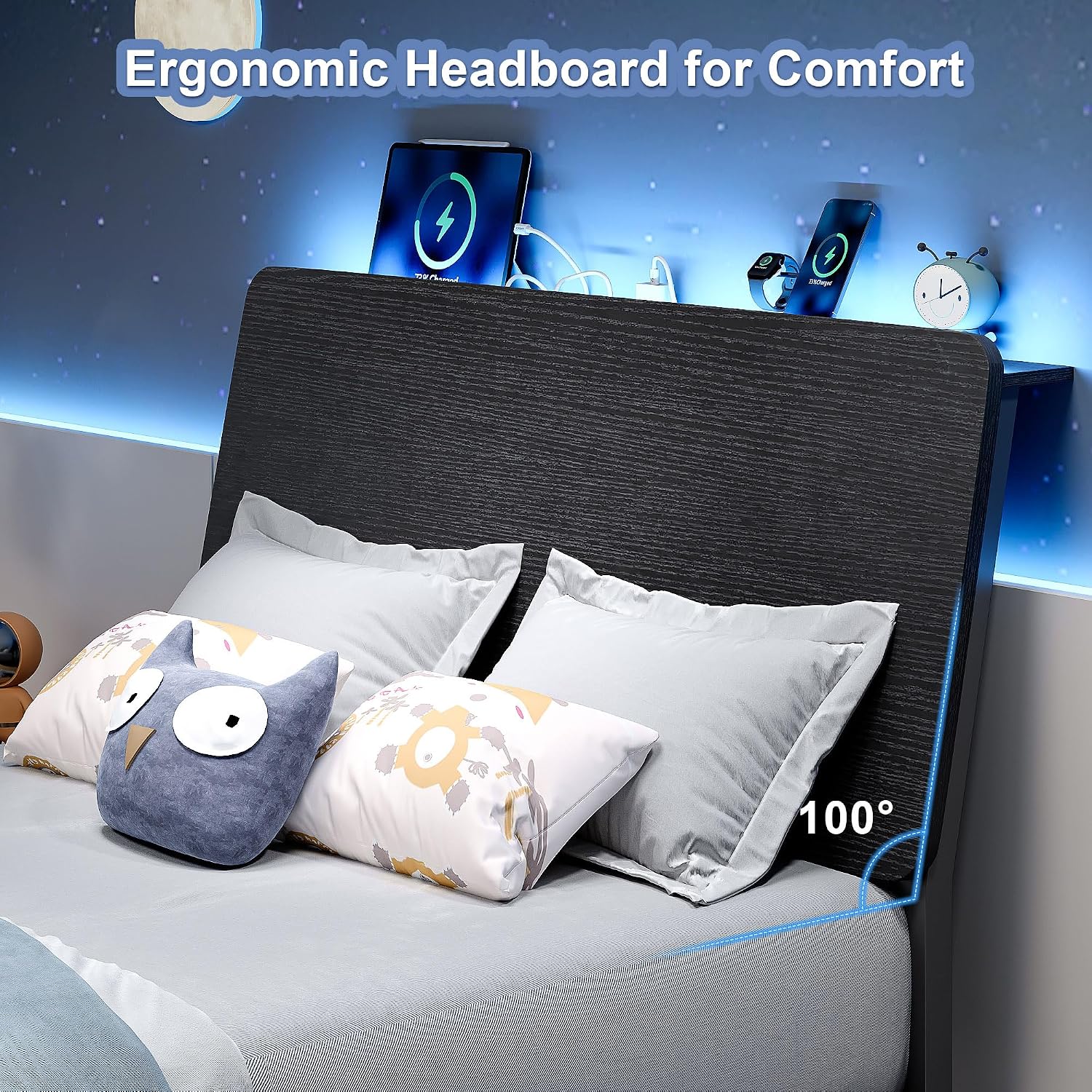
Image 6.3: The ergonomic headboard, illustrating its 100-degree tilt for enhanced comfort.
7. Maintenance
Regular maintenance will help prolong the life and appearance of your bed frame.
- Cleaning: Wipe the metal and wood surfaces with a soft, damp cloth. Avoid harsh chemicals or abrasive cleaners that could damage the finish.
- Dusting: Regularly dust the headboard shelf and frame to prevent buildup.
- Fasteners: Periodically check all bolts and screws to ensure they remain tight. Re-tighten if necessary to maintain stability.
- Electrical Components: Keep the charging station and LED lights free from dust and moisture. Do not attempt to repair electrical components yourself.
8. Troubleshooting
If you encounter any issues with your Feonase Twin Bed Frame, refer to the following common problems and solutions.
| Problem | Possible Cause | Solution |
|---|---|---|
| Bed frame is wobbly or squeaks | Loose bolts or uneven assembly. | Check and tighten all bolts and fasteners. Ensure the bed frame is on a level surface. |
| LED lights are not working | Power connection issue, remote battery dead, or app not connected. | Ensure the power adapter is securely plugged in. Check the remote control battery. Verify the app is correctly paired with the LED controller. |
| Charging station is not providing power | Power cord not connected, device cable faulty, or power surge protection tripped. | Ensure the bed frame's main power cord is plugged into a working wall outlet. Try a different device or charging cable. If applicable, check for a reset button on the charging station. |
| Mattress slides on the frame | Mattress not properly seated or embedded design not fully utilized. | Ensure the mattress is correctly placed within the frame's embedded design. The frame is designed to prevent mattress slippage. |
9. Warranty and Customer Support
Feonase is committed to providing high-quality products. For specific warranty details, please refer to the warranty card included with your purchase or visit the official Feonase website. If you have any questions, require assistance with assembly, or need to report a missing/damaged part, please contact Feonase customer support.
Contact Information: Please refer to your purchase documentation or the Feonase brand store on Amazon for the most current customer service contact details.
Visit the Feonase Store on AmazonAsk a question about this manual
Ask about setup, troubleshooting, compatibility, parts, safety, or missing instructions. Manuals+ will review the question and use this page’s manual context to help answer it.