
FOREVER GSM169761
FOREVER Smartwatch SW-800 User Manual
Model: SW-800 (GSM169761)
Introduction
This manual provides essential information for the proper use and maintenance of your FOREVER Smartwatch SW-800. Please read it thoroughly before operating the device to ensure optimal performance and longevity. The SW-800 features a 1.3-inch AMOLED display, Bluetooth connectivity, and various fitness tracking capabilities.

Image: The FOREVER Smartwatch SW-800, showcasing its versatile design with both metal and silicone strap options, and various digital watch faces.
Setup
1. Charging the Smartwatch
Before first use, fully charge your smartwatch. Connect the charging cable to the charging port on the back of the watch and plug the USB end into a power adapter (not included) or a computer's USB port. The watch display will indicate charging status.

Image: The rear view of the smartwatch, highlighting the magnetic charging pins and the optical heart rate sensors.
2. Powering On/Off
- To power on: Press and hold the side button until the FOREVER logo appears.
- To power off: Press and hold the side button, then select "Power Off" on the screen.
3. Pairing with Your Smartphone
- Download the companion application from the App Store (for iOS) or Google Play Store (for Android). Search for "FOREVER Smartwatch" or refer to the QR code in the watch's settings.
- Ensure Bluetooth is enabled on your smartphone.
- Open the application and follow the on-screen instructions to create an account or log in.
- Select "Add Device" or "Pair Device" within the app.
- Select "SW-800" from the list of available devices.
- Confirm the pairing request on both your smartphone and the smartwatch.

Image: A smartphone displaying the FOREVER companion app interface, with the smartwatch screen prompting the user to "Connect APP" via Bluetooth.
Operating the Smartwatch
1. Basic Navigation
- Touchscreen: Swipe left, right, up, or down to navigate through menus and notifications. Tap to select an item.
- Side Button: Press to return to the home screen or wake the display. Long press for power options.
2. Key Features
- Heart Rate Monitoring: The smartwatch continuously monitors your heart rate. Access the heart rate widget or app on the watch to view real-time data and historical trends.
- Pedometer: Tracks your daily steps, distance, and calories burned.
- Sports Modes: The SW-800 supports 14 different sports modes, including running, cycling, and walking. Select a mode before starting an activity to track specific metrics.
- Sleep Tracking: Monitors your sleep patterns, including deep sleep, light sleep, and wake times.
- Blood Oxygen (SpO2) Monitoring: Measure your blood oxygen saturation levels.
- Temperature Monitoring: Provides body temperature readings.
- Music Control: Control music playback on your connected smartphone directly from the watch.
- Notifications: Receive call, message, and app notifications from your smartphone.

Image: A collage of watch faces illustrating the various health and fitness tracking features, including heart rate, step count, calorie burn, sleep analysis, body temperature, and blood oxygen levels.

Image: The smartwatch displaying a graph of body temperature measurements over time, indicating current and historical readings.

Image: The smartwatch screen showing a blood oxygen saturation (SpO2) reading of 97%, along with a trend graph.

Image: The smartwatch worn by a runner, actively tracking fitness metrics during an outdoor exercise session.
Maintenance
1. Cleaning
Regularly clean your smartwatch and strap to prevent skin irritation and maintain device functionality. Use a soft, lint-free cloth. If necessary, slightly dampen the cloth with water. Avoid using harsh chemicals or abrasive materials.
2. Water Resistance (IP68)
The SW-800 is rated IP68, meaning it is resistant to dust and can withstand immersion in water up to 1.5 meters for up to 30 minutes. It is suitable for daily use, such as hand washing or light rain. However, it is not recommended for swimming, diving, or high-pressure water activities.
3. Battery Care
- Avoid fully discharging the battery frequently.
- Do not expose the device to extreme temperatures.
- Use only the provided charging cable.
Troubleshooting
1. Watch Not Turning On
- Ensure the watch is fully charged. Connect it to the charger for at least 30 minutes.
- Try pressing and holding the side button for 10-15 seconds to force a restart.
2. Connectivity Issues (Bluetooth)
- Ensure Bluetooth is enabled on both your smartwatch and smartphone.
- Make sure the smartwatch is within the Bluetooth range of your phone.
- Restart both your smartwatch and smartphone.
- Unpair the device from your phone's Bluetooth settings and re-pair it through the companion app.
3. Inaccurate Health Readings
- Ensure the watch is worn snugly on your wrist, but not too tight.
- Clean the sensors on the back of the watch.
- Avoid excessive movement during measurements.
- Note that these devices are not medical instruments and readings are for reference only.
4. App Not Syncing Data
- Check your internet connection on your smartphone.
- Ensure the companion app has all necessary permissions enabled in your phone's settings.
- Close and reopen the app, or restart your phone.
Specifications
| Model Name | SW-800 (GSM169761) |
| Display | 1.3-inch AMOLED, 360 x 360 pixels |
| Connectivity | Bluetooth |
| Water Resistance | IP68 |
| Sensors | Heart Rate Monitor, Pedometer, SpO2, Temperature |
| Battery Type | Lithium Ion |
| Compatible Devices | Smartphone |
| Human Interface Input | Buttons, Touchscreen |
| Dimensions (Package) | 11.2 x 9.2 x 7.1 cm |
| Weight (Package) | 240 g |
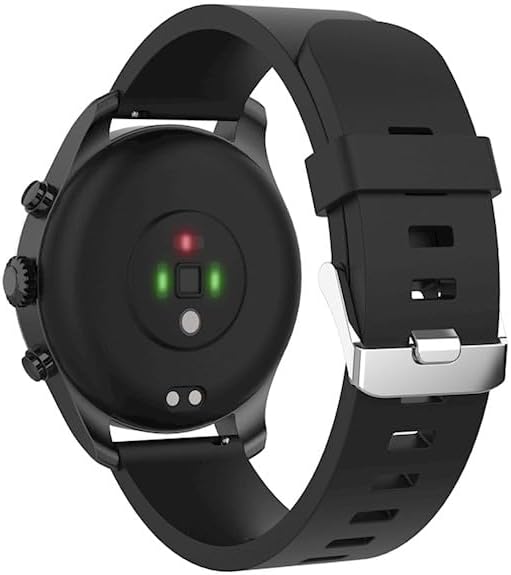
Image: A detailed view of the smartwatch, emphasizing its 1.3-inch display with 360x360 pixel resolution, and the sleek design of the metal band.
Warranty and Support
Your FOREVER Smartwatch SW-800 comes with a standard manufacturer's warranty. Please refer to the warranty card included in your product packaging for specific terms and conditions, including the warranty period and coverage details.
For technical support, troubleshooting assistance, or warranty claims, please contact FOREVER customer service. Contact information can typically be found on the official FOREVER website or on the product packaging.
Related documentsGSM169761


Ask a question about this manual
Ask about setup, troubleshooting, compatibility, parts, safety, or missing instructions. Manuals+ will review the question and use this page’s manual context to help answer it.