
ANRAN C3-EU
ANRAN C3-EU 2K WiFi Surveillance Camera User Manual
Integrated Solar Panel, Unlimited Power, Spotlight & Color Night Vision, Two-Way Audio, Human Detection, Alarm Siren
1. Introduction
Thank you for choosing the ANRAN C3-EU 2K WiFi Surveillance Camera. This camera is designed to provide reliable and efficient outdoor security with its integrated solar panel for continuous power, advanced 2K color night vision, and smart detection features. This manual will guide you through the installation, operation, and maintenance of your new surveillance camera.
Note: This camera is only compatible with the ANRAN and CloudEdge applications. It does not support ONVIF or RTSP protocols. The camera does not have PTZ (pan, tilt, zoom) functionality and cannot be controlled via the app to rotate. Please read this information carefully before purchase.
2. Safety Information
- Ensure the camera is installed in a location where it is not easily accessible to unauthorized individuals.
- Do not expose the camera to extreme temperatures outside its operating range.
- Avoid placing the camera near strong magnetic fields or sources of interference.
- Use only the provided accessories or those recommended by ANRAN.
- Do not attempt to disassemble or repair the camera yourself. Contact customer support for assistance.
- Ensure the solar panel receives adequate direct sunlight for optimal charging.
3. Package Contents
Verify that all items are present in your package:
- ANRAN C3-EU 2K WiFi Surveillance Camera
- Mounting Bracket
- Mounting Screws and Wall Plugs
- USB Charging Cable
- User Manual
- 24 Hour Video Surveillance Sticker

Image: Contents of the ANRAN C3-EU camera package, showing the camera, mounting bracket, screws, USB cable, and user manual.
4. Product Overview
The ANRAN C3-EU camera features a compact design with an integrated solar panel for self-sufficiency. It includes a high-resolution lens, infrared LEDs for night vision, a spotlight, and a microphone/speaker for two-way audio.

Image: The ANRAN C3-EU camera, showcasing its integrated solar panel on top and the camera lens and spotlight on the front.
5. Setup Guide
5.1 Initial Charging
Although the camera has an integrated solar panel, it is recommended to fully charge the camera using the provided USB cable before the first use to ensure optimal battery performance.
5.2 App Installation
Download the "ANRAN" app from the Google Play Store (for Android) or the App Store (for iOS). Ensure you download the correct ANRAN app, not ARCTV or other similar applications.

Image: Visual guide for downloading the correct ANRAN application from app stores.
5.3 Network Connection
The camera connects via 2.4 GHz Wi-Fi. Follow the in-app instructions to pair your camera with your home Wi-Fi network. Ensure your Wi-Fi router is within range and provides a stable 2.4 GHz signal.
5.4 Physical Installation
Choose a location that provides a clear view of the area you wish to monitor and receives ample direct sunlight for the integrated solar panel. Use the provided mounting bracket, screws, and wall plugs to securely attach the camera to a flat surface or wall.

Image: Illustration of the camera's easy, wireless installation and the benefit of its integrated solar panel for continuous power.

Image: Step-by-step guide for camera setup: placing the camera, connecting to 2.4 GHz Wi-Fi via the app, and beginning live viewing.
6. Operating Instructions
6.1 Live View
Once connected, open the ANRAN app to access the live feed from your camera anytime, anywhere. You can monitor your property in real-time from your smartphone or other compatible devices.

Image: The ANRAN app interface showing live view, intercom, and recording options, accessible from various devices.
6.2 Two-Way Audio
The camera features a built-in microphone and speaker, allowing for two-way communication. Use the intercom function in the app to speak with visitors or deter intruders.

Image: Depiction of the two-way audio feature, enabling communication through the ANRAN app even when away from home.
6.3 PIR Humanoid Detection
The camera utilizes a highly sensitive PIR sensor and radar sensor for accurate human detection, minimizing false alarms caused by rain, insects, or other non-human movements. You will receive instant notifications on your device when human motion is detected.

Image: Visual demonstration of PIR Humanoid Detection, capturing a sequence of a person's movement while filtering out irrelevant motion.

Image: Illustration of PIR Motion Detection, focusing on relevant activity within a defined area.
6.4 2K Color Night Vision & Spotlight
The 2K resolution provides clear and detailed images. With its built-in spotlight, the camera offers full-color night vision, capturing vivid details even in low-light conditions. The spotlight can also be activated as a deterrent.

Image: Visual representation of the camera's 2K resolution capabilities, highlighting its ability to capture fine details.

Image: Demonstration of Color Night Vision and Smart Siren features, showing how the camera detects intruders and sends notifications.
6.5 Alarm Siren
In addition to visual alerts, the camera is equipped with an alarm siren that can be triggered manually or automatically upon detection of an intruder, providing an audible deterrent.

Image: Different alarm modes: Light Alarm, Siren Alarm, and combined Light and Siren Alarms for enhanced security.
6.6 Digital Zoom
The app allows for 4X digital zoom, enabling you to zoom in on specific areas of the live view for closer inspection.

Image: Illustration of the 4X Digital Zoom feature, allowing users to zoom into live view with a finger gesture.
6.7 Storage Options
The camera supports local storage via a Micro SD card (up to 128GB, not included) and cloud storage for recorded events. You can choose the storage method that best suits your needs.

Image: Explanation of the two available storage modes: local storage on an SD card (up to 128GB) and cloud storage.
6.8 Smart Home Compatibility
The ANRAN C3-EU camera is compatible with Alexa and Google Home, allowing for voice control and integration into your smart home ecosystem.

Image: The camera's compatibility with Alexa, allowing voice commands to view the camera feed.
6.9 Family Sharing
You can share access to your camera's live feed and recordings with family members or trusted friends through the ANRAN app, allowing multiple users to monitor the property simultaneously.
7. Maintenance
7.1 Cleaning
Periodically clean the camera lens and solar panel with a soft, damp cloth to ensure clear image quality and efficient solar charging. Do not use harsh chemicals or abrasive materials.
7.2 Weather Resistance
The ANRAN C3-EU camera is designed to be waterproof and resistant to various weather conditions, including snow, rain, and direct sunlight. However, extreme weather events may temporarily affect performance.

Image: The camera's durability and resistance to various weather conditions, including snow, rain, and intense sunlight.
7.3 Solar Panel Performance
For optimal performance, ensure the solar panel is positioned to receive at least 2 hours of direct sunlight daily. This will help maintain continuous power to the camera.

Image: The camera's built-in solar panel, designed for uninterrupted power supply and continuous safety.

Image: The solar panel's efficiency, requiring only 2 hours of direct sunlight per day for continuous operation.
8. Troubleshooting
8.1 No Power/Low Battery
- Ensure the solar panel is clean and receiving direct sunlight.
- Charge the camera fully using the USB cable.
- Check the battery level in the ANRAN app.
8.2 Wi-Fi Connection Issues
- Ensure your Wi-Fi network is 2.4 GHz. The camera does not support 5 GHz Wi-Fi.
- Move the camera closer to your Wi-Fi router or consider a Wi-Fi extender.
- Restart your router and the camera.
- Re-pair the camera with the app if necessary.
8.3 Motion Detection Not Working/Too Many False Alarms
- Adjust the detection sensitivity settings in the ANRAN app.
- Ensure the camera lens is clean and unobstructed.
- Verify that the motion detection zone is correctly configured in the app.

Image: Flexible personalization options for motion zones, alarm times, and detection sensitivity.
8.4 No Audio/Poor Audio Quality
- Ensure the microphone and speaker are not blocked.
- Check the audio settings in the app.
- Verify network stability for clear two-way audio.
9. Specifications
| Feature | Specification |
|---|---|
| Model Name | C3 Pro (C3-EU) |
| Brand | ANRAN |
| Video Recording Resolution | 1440p (2K) |
| Effective Video Resolution | 1440 |
| Wireless Communication Technology | Wi-Fi (2.4 GHz) |
| Viewing Angle | 110 degrees |
| Night Vision Range | 15 Meters |
| Power Source | Battery Powered, Solar Powered |
| Battery Type | Lithium-ion (1 AA included) |
| Voltage | 5 Volts |
| Power | 5 Watts |
| Material | Plastic |
| Water Resistance Level | Waterproof |
| Item Dimensions (L x W x H) | 12.7 x 12.7 x 20.3 centimeters |
| Recommended Use | Outdoor Security |
| Special Features | Siren Alarm, Two-Way Audio, Motion Sensor, App Control, Human Detection, Dual Detection Zone, Audio Recording, Video Recording, Smart Playback, Portable, Adjustable, Weather Resistant, Night Vision |
| Compatible Devices | Smartphone |
| Controller Type | Android, iOS, Alexa |
| Mounting Type | Ceiling Mount |
10. Warranty and Support
ANRAN offers a 2-year warranty on this product. For technical support or warranty claims, please contact ANRAN customer service. They provide lifetime technical support and 7x24 hour online service.
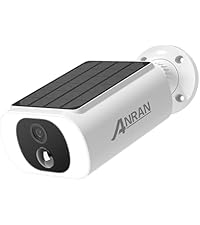


Image: ANRAN's commitment to service, including 2-year warranty, lifetime technical support, and 24/7 online service.
Related documentsC3-EU


Ask a question about this manual
Ask about setup, troubleshooting, compatibility, parts, safety, or missing instructions. Manuals+ will review the question and use this page’s manual context to help answer it.