
FOSSIBOT FOSSiBOT DT2
FOSSIBOT DT2 Rugged Tablet User Manual
Model: FOSSiBOT DT2 | Brand: FOSSIBOT
Introduction
The FOSSIBOT DT2 is a rugged tablet designed for durability and high performance in various environments. It features a large 10.4-inch 2K display, a massive 22000mAh battery with 66W rapid charging, and robust protection against water, dust, and shocks. This manual provides essential information for setting up, operating, and maintaining your FOSSIBOT DT2 tablet.

Figure 1: FOSSIBOT DT2 Rugged Tablet, showcasing its robust design and key specifications like 20GB+256GB memory and 22000mAh battery.
Key Features
- Massive 22000mAh Battery with 66W Rapid Charging: Offers extended usage time and quick recharging capabilities. Supports OTG reverse charging.
- High Capacity Memory: Equipped with 20GB RAM (12GB fixed + 8GB adjustable) and 256GB ROM, expandable up to 2TB with a TF card.
- Powerful Processor: Features the Helio G99 octa-core chip for smooth multitasking and gaming.
- 10.4-inch 2K IPS Display: Provides a clear and vibrant visual experience with a 5:3 wide-screen ratio and 500 nits brightness.
- Advanced Camera System: Includes a 64MP rear camera and a 32MP front camera for high-quality photos and video calls.
- Rugged Durability: IP68, IP69K, and MIL-STD-810H certified for water, dust, and shock resistance.
- Enhanced Connectivity: Dual 4G slots, 5GHz WiFi 6, and Bluetooth 5.0 for stable and fast connections.
Setup
1. Unboxing and Initial Inspection
Upon receiving your FOSSIBOT DT2 tablet, carefully open the packaging and verify that all components are present and undamaged. The standard package includes the tablet, a SIM card pin, a Type-C cable, a leather hand belt, hardware hooks, a quick charger, a user manual/battery warning, a screwdriver, and a set of screws.

Figure 2: Contents of the FOSSIBOT DT2 standard package, including the tablet, charger, cables, and accessories.
2. Charging the Tablet
Before first use, fully charge the tablet. Connect the provided 66W rapid charger to the Type-C port on the tablet. A full charge from empty takes approximately 2.5 hours. The tablet can gain 13% battery power (2860mAh) in just 15 minutes of charging.
Video 1: Demonstrates the 66W rapid charging capability of the FOSSIBOT DT2 tablet, showing significant battery gain in a short period.
Video 2: Overview of the FOSSIBOT DT2, highlighting its 22000mAh battery and 66W fast charging, along with memory and rugged features.
3. Installing SIM/TF Card
The FOSSIBOT DT2 supports dual 4G SIM cards and a TF card for expandable storage up to 2TB. Locate the SIM/TF card slot on the side of the tablet. Use the provided SIM card pin to open the tray. Insert your SIM cards and/or TF card into the designated slots, ensuring correct orientation, then close the tray securely.

Figure 3: Illustration of the dual SIM and TF card slots, demonstrating the tablet's global network compatibility.
Operating Instructions
1. Power On/Off and Basic Navigation
Press and hold the power button located on the side of the tablet to power it on or off. Once powered on, the tablet runs on Android 13. Navigate the interface using touch gestures. Swipe down from the top for quick settings and notifications. Use the on-screen navigation buttons or gestures for home, back, and recent apps.

Figure 4: The Android 13 operating system interface on the FOSSIBOT DT2, emphasizing privacy and device control.
2. Display and Audio Settings
The 10.4-inch 2K IPS display offers a resolution of 1200x2000 pixels and 500 nits brightness for clear viewing even in bright sunlight. Adjust brightness and other display settings in the system settings. The tablet is equipped with four cavity speakers for an immersive audio experience.
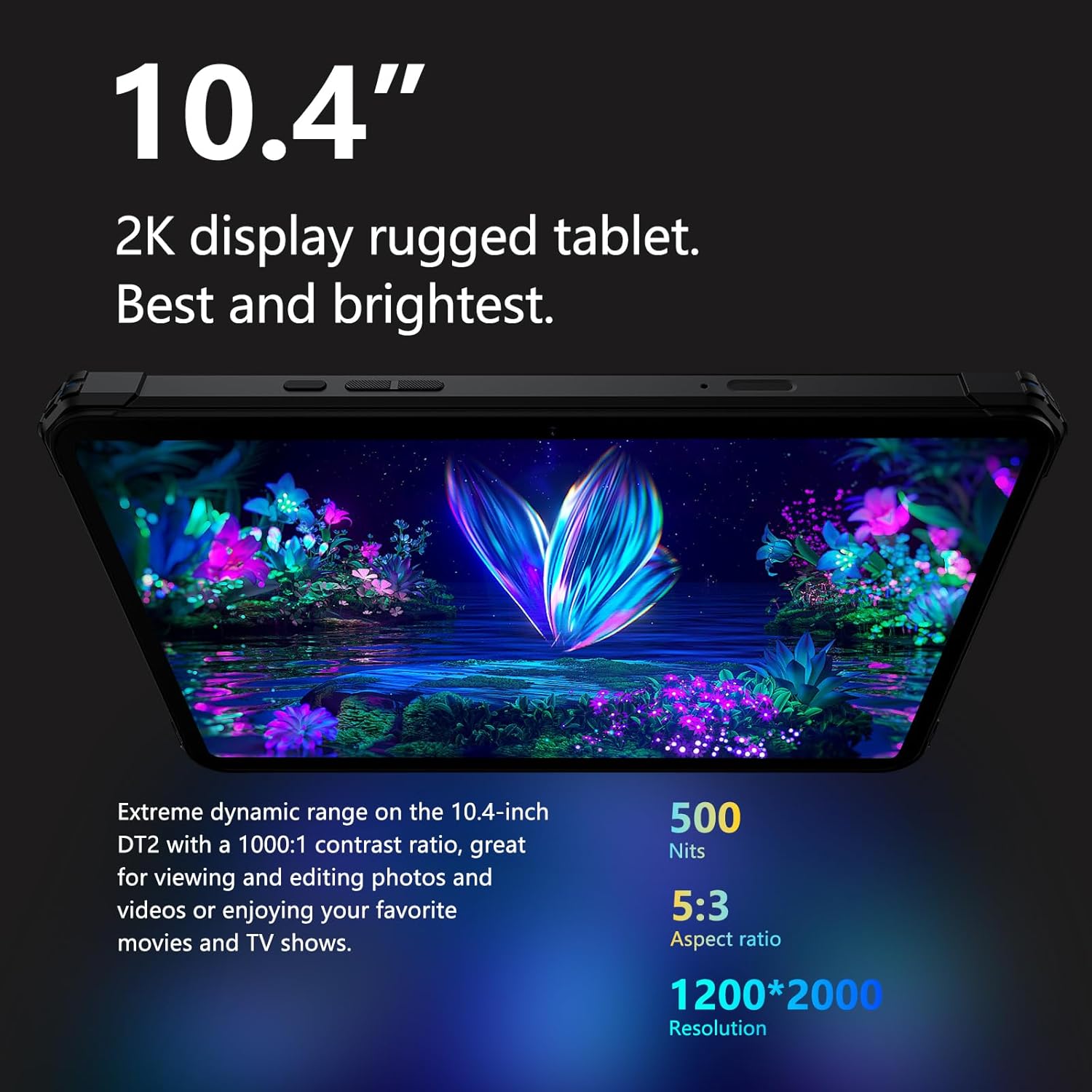
Figure 5: The FOSSIBOT DT2's 10.4-inch 2K display, highlighting its brightness and resolution for optimal viewing.

Figure 6: Diagram illustrating the quad box speakers of the FOSSIBOT DT2, designed for superior surround sound.
3. Camera Usage
Utilize the 64MP rear camera and 32MP front camera for photography and video recording. Open the camera application and select your desired mode (photo, video, portrait, etc.). Tap the screen to focus and press the shutter button to capture images or start/stop recording.

Figure 7: Close-up of the FOSSIBOT DT2's 64MP camera, demonstrating its capability for capturing high-resolution images.

Figure 8: A user operating the 64MP PDAF rear camera to shoot delicate and detailed photos in an industrial setting.

Figure 9: A group of friends taking a selfie with the 32MP front camera of the FOSSIBOT DT2, highlighting its capability for clear and vibrant self-portraits.
4. Flashlight Function
The FOSSIBOT DT2 includes a powerful flashlight function, which can also serve as a camp light. Access the flashlight from the quick settings panel by swiping down from the top of the screen.

Figure 10: The FOSSIBOT DT2 being used as a flashlight and camp light, demonstrating its utility in low-light conditions.

Figure 11: The FOSSIBOT DT2's irregular shape flashlight providing extra light in a dark environment, useful for camping or underwater shooting.
5. Navigation and Connectivity
The tablet supports GPS, GLONASS, Galileo, and BEIDOU for accurate navigation. It also features dual-band 2.4GHz + 5GHz Wi-Fi 6 for stable and fast internet access, and Bluetooth 5.0 for connecting wireless accessories.

Figure 12: The FOSSIBOT DT2 highlighting its dual 4G LTE and Wi-Fi 6 capabilities for fast and reliable connectivity.

Figure 13: The FOSSIBOT DT2 emphasizing its WiFi 6 support for faster, further, and more stable wireless connections.
Durability and Protection
The FOSSIBOT DT2 is built to withstand harsh conditions, complying with IP68, IP69K, and MIL-STD-810H standards. This means it is highly resistant to water, dust, and drops.
- Waterproof (IP68 & IP69K): Can withstand submersion in 1.5m of water for 2 hours and is protected against high-pressure, high-temperature water jets.
- Dustproof (IP68 & IP69K): Offers 360° dustproof capabilities, preventing ingress of dust and fine particles.
- Shockproof (MIL-STD-810H): Designed to endure a 1.5m drop impact, making it suitable for rugged environments.
Video 3: Demonstrates the FOSSIBOT DT2's IP68/IP69K waterproof capabilities, showing it submerged in water and functioning.
Video 4: Shows the FOSSIBOT DT2's resistance to high-pressure and high-temperature water jets, confirming its IP69K rating.

Figure 14: Visual representation of the FOSSIBOT DT2 undergoing various durability tests, including high temperature, low temperature, water submersion, drop resistance, and dust protection.
Video 5: A comprehensive video showcasing the FOSSIBOT DT2's rugged features, including its durability in various harsh environments and its high-definition display.
Specifications
| Feature | Specification |
|---|---|
| Model | FOSSiBOT DT2 |
| Operating System | Android 13 |
| Display Size | 10.4 Inches |
| Screen Resolution | 2000x1200 Pixels (2K IPS) |
| Processor | MediaTek Helio G99 Octa-core (2.2 GHz) |
| RAM | 20GB (12GB fixed + 8GB adjustable) |
| Internal Storage | 256GB ROM |
| Expandable Storage | Up to 2TB with TF card |
| Battery Capacity | 22000mAh |
| Charging Speed | 66W Rapid Charging |
| Rear Camera | 64MP |
| Front Camera | 32MP |
| Waterproof Rating | IP68 & IP69K |
| Shockproof Rating | MIL-STD-810H (1.5m drop) |
| Wireless Connectivity | Wi-Fi 6 (802.11ax), Bluetooth 5.0 |
| Cellular Network | Dual 4G LTE |
| Navigation | GPS, GLONASS, Galileo, BEIDOU |
| Dimensions | 9.96 x 6.41 x 0.78 inches |
| Item Weight | 3.86 pounds |
Troubleshooting
Common Issues and Solutions
- Tablet not powering on: Ensure the tablet is fully charged. Connect it to the charger and wait a few minutes before attempting to power on again. If it still doesn't turn on, try holding the power button for 10-15 seconds for a forced restart.
- Slow performance: Close unnecessary background applications. Clear cache data from apps. Consider performing a factory reset if the issue persists (back up your data first).
- Wi-Fi connectivity issues: Ensure Wi-Fi is enabled. Restart your Wi-Fi router and the tablet. Forget the network and reconnect.
- SIM card not detected: Ensure the SIM card is correctly inserted into the tray. Restart the tablet. Verify that your SIM card is active with your carrier.
- Screen unresponsive: Perform a forced restart by holding the power button. If the issue continues, contact customer support.
Maintenance
- Cleaning: Use a soft, damp cloth to clean the tablet's screen and body. Avoid abrasive materials or harsh chemicals. For the rugged exterior, a gentle rinse with water can be used, ensuring all ports are sealed.
- Storage: Store the tablet in a cool, dry place away from direct sunlight and extreme temperatures.
- Battery Care: To prolong battery life, avoid completely draining the battery frequently. Charge it regularly, and if storing for a long period, ensure it has at least a 50% charge.
- Software Updates: Regularly check for and install system updates to ensure optimal performance and security.
Warranty and Support
The FOSSIBOT DT2 tablet comes with a one-year quality warranty. For any inquiries or technical support, please contact FOSSIBOT-US through Amazon. They aim to provide a prompt and satisfactory solution within 24 hours.
Seller Information: FOSSIBOT-US
For further assistance, please refer to the official FOSSIBOT website or contact their customer service directly.
Related documentsFOSSiBOT DT2


Ask a question about this manual
Ask about setup, troubleshooting, compatibility, parts, safety, or missing instructions. Manuals+ will review the question and use this page’s manual context to help answer it.